# ParaView Parallel pvserver (MPI) - Problems when running on a Cluster
**URL:** https://discourse.paraview.org/t/paraview-parallel-pvserver-mpi-problems-when-running-on-a-cluster/10071
**Category:** ParaView Support
**Created:** [July 29, 2022, 4:09pm UTC](https://discourse.paraview.org/t/paraview-parallel-pvserver-mpi-problems-when-running-on-a-cluster/10071 "2022-07-29T16:09:44Z")
**Posts on this page:** 5
**Page:** 1
### Author:  [@Dosmi](https://discourse.paraview.org/u/Dosmi)
#### Post date: [July 29, 2022, 4:09pm UTC](https://discourse.paraview.org/t/paraview-parallel-pvserver-mpi-problems-when-running-on-a-cluster/10071/1 "2022-07-29T16:09:45Z")
Hello all,
While learning how to use `ParaView` on clusters, I have encountered an issue with making it work in parallel.
There are two issues on two different nodes/hpc-clusters, but I will begin with a more general one in this post.
While in serial, everything was fine (running interactively, with a GUI), however, issues started when connecting to a parallel `MPI` paraview server (pvserver), giving this error:
`Socket error in call to bind. Address already in use, Failed to set up server socket`
… although the port I was using did not seem to be used when I checked with `netstat -ntlp`
`ParaView` Version on my cluster is not new - 4.40, which is from 2015.
The command I used to run this was:
```auto
mpiexec -n 2 pvserver --server-port=11114 &
```
I have since read many forum posts about this, namely:
- [Re: [Paraview] MPI Socket in use](https://marc.info/?l=paraview&m=133468946321439&w=2)
- [BIND FAILS WITH ERROR 98 (OR ERROR 10048)](https://handsonnetworkprogramming.com/articles/bind-error-98-eaddrinuse-10048-wsaeaddrinuse-address-already-in-use/)
- [Paraview parallel](https://discourse.paraview.org/t/paraview-parallel/320)
- [[OpenFOAM] Unable to run pvserver in parallel](https://www.cfd-online.com/Forums/paraview/79234-unable-run-pvserver-parallel.html)
Where in the latter (the `OpenFOAM` Link) a user suggested that:
_“It’s because the `ParaView` was not compiled with `MPI` support. Try compiling `ParaView` by yourself with `MPI` support.”_
However, since I am a new user on a cluster, I really cannot reinstall or recompile `ParaView`. I have no idea if `ParaView` was compiled with `MPI` or not. What I managed to find was the `libvtkparallelcore.so`, which might or might not indicate anything.
Then I saw some posts to check if that is even a problem, namely, check if `PARAVIEW_USE_MPI` is enabled, however, I have no idea where to even look for that `PARAVIEW_USE_MPI` variable! If it is a `CMake` variable, I have not been able to find `CMakeLists.txt` or anything like that on my system.
Also note, that remote connection works on its own (when not using `MPI`, with just a `pvserver`). That is key, as the `ParaView` User Guide states: _“To leverage parallel processing capabilities in `paraview` or `pvpython`, one has to use remote visualization”_ (- from 5.10.0 paraview docs).
Thanks
---
### Author:  [@sharon](https://discourse.paraview.org/u/sharon)
#### Post date: [July 31, 2022, 10:30am UTC](https://discourse.paraview.org/t/paraview-parallel-pvserver-mpi-problems-when-running-on-a-cluster/10071/2 "2022-07-31T10:30:28Z")
Hi Dosmi,
I suggest you to download new version paraview and “install” is very simple, just download and cd to bin directory and launch the executable pvserver, just it.
For you question, you can check from paraview menu: Help–\>about dialog:
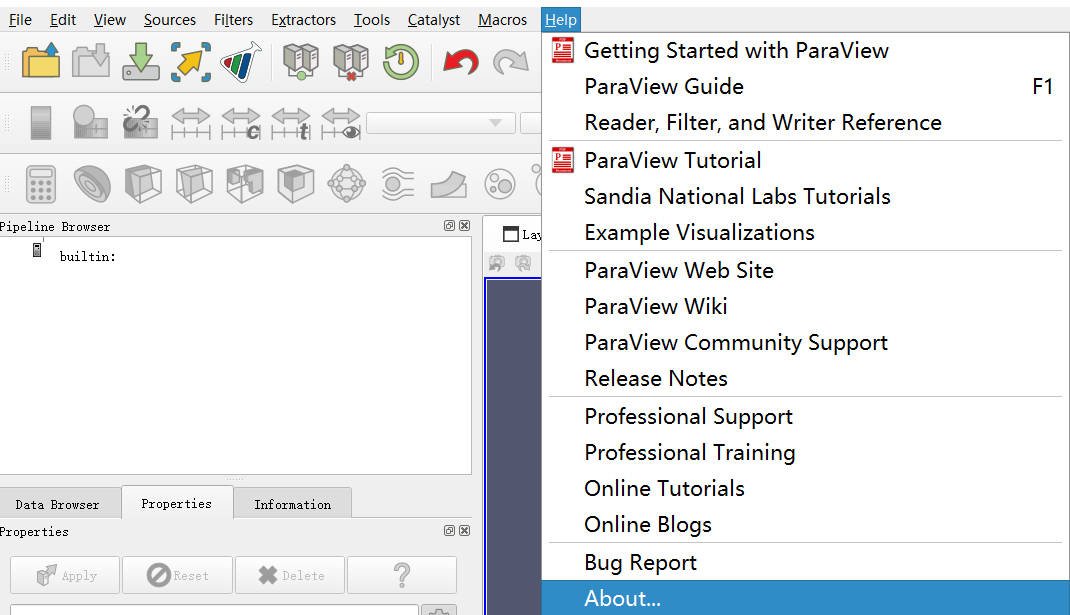
Then from popup dialog, you will find “MPI Enable” tag:

---
### Author:  [@Dosmi](https://discourse.paraview.org/u/Dosmi)
#### Post date: [July 31, 2022, 5:18pm UTC](https://discourse.paraview.org/t/paraview-parallel-pvserver-mpi-problems-when-running-on-a-cluster/10071/3 "2022-07-31T17:18:54Z")
Thank you so much, I can see the problem now Help → About → Client Information - MPI Enabled is OFF, which explains my problems! Unfortunately, I don’t think I can download a new ParaView version and install it on my cluster, as I am not the administrator. Is there a way to turn on MPI Enabled without recompiling/reinstalling?
---
### Author:  [@Dosmi](https://discourse.paraview.org/u/Dosmi)
#### Post date: [August 1, 2022, 12:59pm UTC](https://discourse.paraview.org/t/paraview-parallel-pvserver-mpi-problems-when-running-on-a-cluster/10071/4 "2022-08-01T12:59:52Z")
Related to this, is there a way to see the `VTK_SMP_IMPLEMENTATION_TYPE` on currently installed `ParaView`? (not looking at `ccmake`, as I do not have access to that)
---
### Author:  [@mwestphal](https://discourse.paraview.org/u/mwestphal)
#### Post date: [August 8, 2022, 2:40am UTC](https://discourse.paraview.org/t/paraview-parallel-pvserver-mpi-problems-when-running-on-a-cluster/10071/5 "2022-08-08T02:40:11Z")
> [@Dosmi](#):
>
> Is there a way to turn on MPI Enabled without recompiling/reinstalling?
I’m afraid not. If you cant use our version from [paraview.org/download](http://paraview.org/download) directly, you will have to check with your IT.
> is there a way to see the `VTK_SMP_IMPLEMENTATION_TYPE` on currently installed `ParaView`? (not looking at `ccmake`, as I do not have access to that)
Yes, in the same about dialog, but only since ParaView 5.10.
Anyway, you need to update this old ParaView, check with IT.