# ParaView Server Manager framework
**URL:** https://discourse.paraview.org/t/paraview-server-manager-framework/3576
**Category:** Development
**Created:** [February 16, 2020, 2:44pm UTC](https://discourse.paraview.org/t/paraview-server-manager-framework/3576 "2020-02-16T14:44:05Z")
**Posts on this page:** 8
**Page:** 1
### Author:  [@Yoshino](https://discourse.paraview.org/u/Yoshino)
#### Post date: [February 16, 2020, 2:44pm UTC](https://discourse.paraview.org/t/paraview-server-manager-framework/3576/1 "2020-02-16T14:44:05Z")
Recently I have been investigating ParaView’s infrastructure via its source code, and becoming familiar with the way ParaView builds its menu as well as other GUI components. For customization, I learnt how to add toolbar at [Plugin\_HowTo#Adding a toolbar](https://www.paraview.org/Wiki/ParaView/Plugin_HowTo), which involves **ParaView Server Manager Framework**.
ParaView runs in **client-server** mode and has various **managers** , it seems most part of ParaView revolves around **Server Manager** ( **SM** ), **proxy** , **model** (e.g. an item in source menu is a element in configuration XML file). Even with source code I have no idea what _proxy_ represents through source code, is it a single unit in a session?
I think I need to understand this for high-level customization so I hope for more information about **ServerManager** framework. Thanks.
---
### Author:  [@randomwangran](https://discourse.paraview.org/u/randomwangran)
#### Post date: [February 17, 2020, 2:47am UTC](https://discourse.paraview.org/t/paraview-server-manager-framework/3576/2 "2020-02-17T02:47:51Z")
It’s unclear what you plan to do, please clarify it.
---
### Author:  [@Yoshino](https://discourse.paraview.org/u/Yoshino)
#### Post date: [February 17, 2020, 3:08am UTC](https://discourse.paraview.org/t/paraview-server-manager-framework/3576/3 "2020-02-17T03:08:59Z")
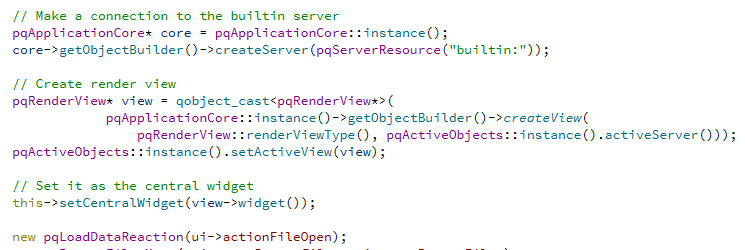
Sorry for that. I’m planning to reproduce what ParaView does with customized GUI components. After binding ParaView **Reactions** to my _File-\>open_ QAction and reading files, I find nothing to be displayed in my render view.
Here is how I created my view(I copy this from an ParaView example):
---
### Author:  [@mwestphal](https://discourse.paraview.org/u/mwestphal)
#### Post date: [February 17, 2020, 3:21am UTC](https://discourse.paraview.org/t/paraview-server-manager-framework/3576/4 "2020-02-17T03:21:38Z")
> [@Yoshino](#):
>
> Even with source code I have no idea what _proxy_ represents through source code, is it a single unit in a session?
Each VTK objects on the server that needs to be controlled by the client have a corresponding Proxy client side.
> I find nothing to be displayed in my render view.
Define “nothing”.
---
### Author:  [@randomwangran](https://discourse.paraview.org/u/randomwangran)
#### Post date: [February 17, 2020, 3:45am UTC](https://discourse.paraview.org/t/paraview-server-manager-framework/3576/5 "2020-02-17T03:45:54Z")
> I’m planning to reproduce what ParaView does with customized GUI components.
Interesting to see.
ParaView is not a customized GUI?
---
### Author:  [@mwestphal](https://discourse.paraview.org/u/mwestphal)
#### Post date: [February 17, 2020, 3:47am UTC](https://discourse.paraview.org/t/paraview-server-manager-framework/3576/6 "2020-02-17T03:47:18Z")
It is, but not in a full extent.
One can instead use ParaView framework to create Custom ParaView applications.
---
### Author:  [@Yoshino](https://discourse.paraview.org/u/Yoshino)
#### Post date: [February 17, 2020, 4:01am UTC](https://discourse.paraview.org/t/paraview-server-manager-framework/3576/7 "2020-02-17T04:01:11Z")
Thanks for reply, my render view remains unchanged after I select file from _Open File_ dialog:

but I am able to **save** the data then.
I guess I omitted something necessary. I’m referring to _MultiServerClient_ example.
---
### Author:  [@mwestphal](https://discourse.paraview.org/u/mwestphal)
#### Post date: [February 17, 2020, 4:02am UTC](https://discourse.paraview.org/t/paraview-server-manager-framework/3576/8 "2020-02-17T04:02:18Z")
You need to execute the pipeline and show you data, the same way as using ParaView.
(maybe you use using the Auto-Apply mode in ParaView, where this would be automatic)