# Paraview software is not responding
**URL:** https://discourse.paraview.org/t/paraview-software-is-not-responding/9229
**Category:** ParaView Support
**Created:** [March 20, 2022, 3:42am UTC](https://discourse.paraview.org/t/paraview-software-is-not-responding/9229 "2022-03-20T03:42:23Z")
**Posts on this page:** 8
**Page:** 1
### Author:  [@MR\_VISHAL\_SANTOSH\_VI](https://discourse.paraview.org/u/MR_VISHAL_SANTOSH_VI)
#### Post date: [March 20, 2022, 3:42am UTC](https://discourse.paraview.org/t/paraview-software-is-not-responding/9229/1 "2022-03-20T03:42:23Z")
Hello sir/mam,
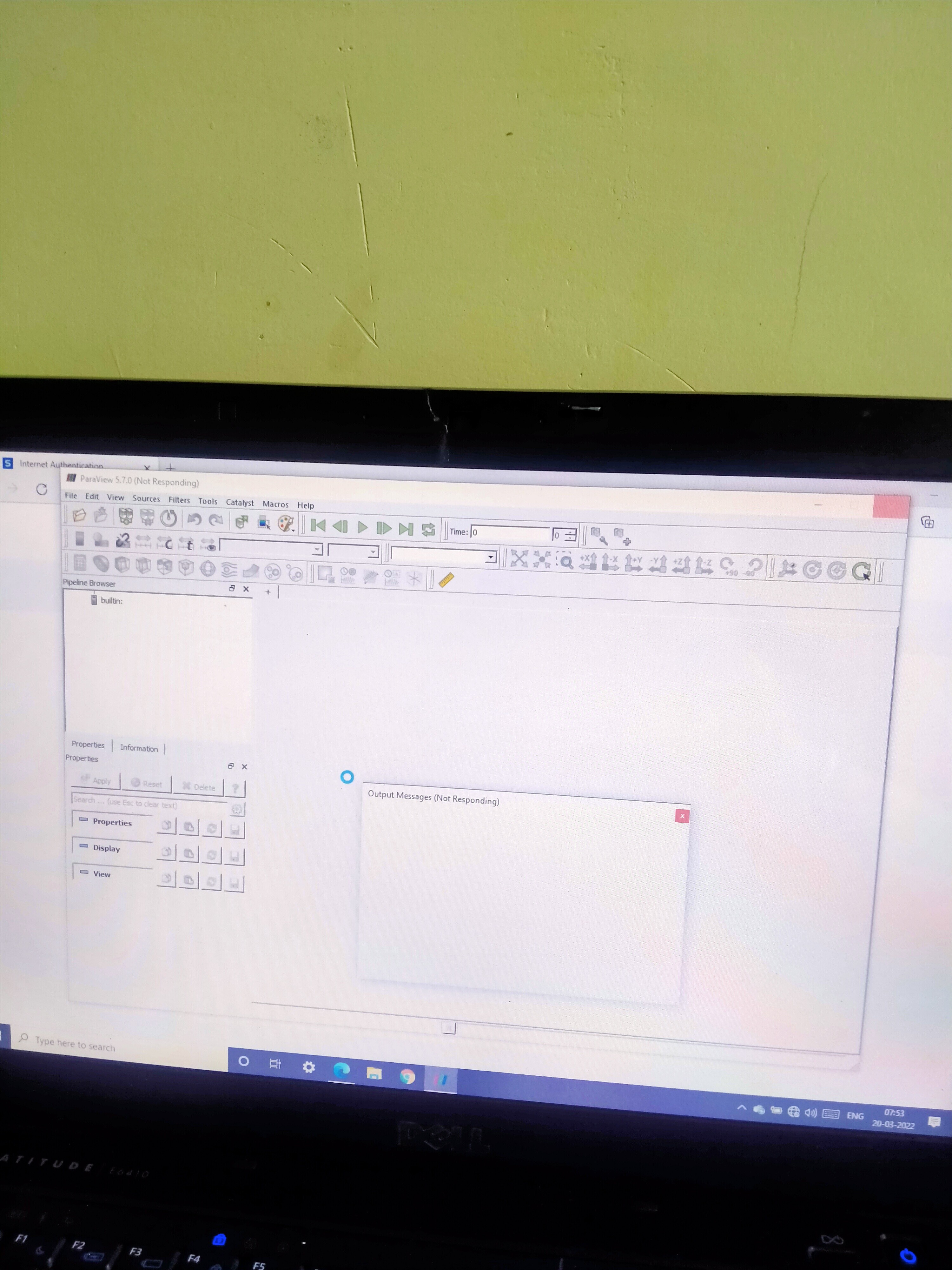
I downloaded and install ParaView successfully, but while opening one output message is coming and after that, it suddenly closed on its own.
For more clarification, I downloaded different versions and installed them five times with the same easy procedure but the same response by software is showing.
Kindly help me in this case and give some procedures so that I can run this smoothly.
Best regards,
Vishal S. Vishwakarma
IIT BBS
---
### Author:  [@utkarsh.ayachit](https://discourse.paraview.org/u/utkarsh.ayachit)
#### Post date: [March 20, 2022, 12:58pm UTC](https://discourse.paraview.org/t/paraview-software-is-not-responding/9229/2 "2022-03-20T12:58:12Z")
Which version of ParaView is this? You should be able to run paraview with `-l=...path.log,TRACE` from a command line. Then the generate log file will perhaps let us know what was the error message and why the application quit.
---
### Author:  [@MR\_VISHAL\_SANTOSH\_VI](https://discourse.paraview.org/u/MR_VISHAL_SANTOSH_VI)
#### Post date: [March 20, 2022, 1:05pm UTC](https://discourse.paraview.org/t/paraview-software-is-not-responding/9229/3 "2022-03-20T13:05:56Z")
Sir, can you elaborate ?
I didn’t get your sentence.
---
### Author:  [@utkarsh.ayachit](https://discourse.paraview.org/u/utkarsh.ayachit)
#### Post date: [March 20, 2022, 1:07pm UTC](https://discourse.paraview.org/t/paraview-software-is-not-responding/9229/4 "2022-03-20T13:07:48Z")
Let’s start with which version of ParaView you are using. Specifying the version number and the platform on which you’re running are essential in diagnosing issues, without which it’s really hard to know where to begin.
---
### Author:  [@MR\_VISHAL\_SANTOSH\_VI](https://discourse.paraview.org/u/MR_VISHAL_SANTOSH_VI)
#### Post date: [March 20, 2022, 1:23pm UTC](https://discourse.paraview.org/t/paraview-software-is-not-responding/9229/5 "2022-03-20T13:23:09Z")
Sir, i am using paraview-5.7.0 -windows-python2.7- msvc-64bit
Also, I downloaded a different version too.
I tried 5 times with 5 different versions.
Firstly start with the latest version.
I am attaching pictures that are shown while opening.
Kindly address me some solution now, it will be very grateful to me.
---
### Author:  [@utkarsh.ayachit](https://discourse.paraview.org/u/utkarsh.ayachit)
#### Post date: [March 20, 2022, 1:43pm UTC](https://discourse.paraview.org/t/paraview-software-is-not-responding/9229/6 "2022-03-20T13:43:56Z")
Open the Windows terminal. Then navigate to the directory containing paraview.exe. You should be able find that by right clicking on the paraview icon and then clicking on Open File Location – I don’t have Windows here, so can’t help you there precisely. Once you’re in the directory with paraview.exe
```auto
> paraview.exe -l=c:/...../paraview.log,TRACE
```
Make sure the `C:/...` is replaced by a directory path that you can write into. Once the application quits, the log will have details on what exactly failed – hopefully.
---
### Author:  [@AllenW94](https://discourse.paraview.org/u/AllenW94)
#### Post date: [July 26, 2022, 12:06am UTC](https://discourse.paraview.org/t/paraview-software-is-not-responding/9229/7 "2022-07-26T00:06:21Z")
Sorry but do you mean that we should run a certain command in the command prompt? Or can you elaborate on how to execute that command line? thank you!
---
### Author:  [@jourdain](https://discourse.paraview.org/u/jourdain)
#### Post date: [August 9, 2022, 2:35pm UTC](https://discourse.paraview.org/t/paraview-software-is-not-responding/9229/8 "2022-08-09T14:35:33Z")
Yes command prompt