# Paraview stops responding when loading large csv file
**URL:** https://discourse.paraview.org/t/paraview-stops-responding-when-loading-large-csv-file/10218
**Category:** ParaView Support
**Created:** [August 29, 2022, 9:41pm UTC](https://discourse.paraview.org/t/paraview-stops-responding-when-loading-large-csv-file/10218 "2022-08-29T21:41:56Z")
**Posts on this page:** 9
**Page:** 1
### Author:  [@maddylucas](https://discourse.paraview.org/u/maddylucas)
#### Post date: [August 29, 2022, 9:41pm UTC](https://discourse.paraview.org/t/paraview-stops-responding-when-loading-large-csv-file/10218/1 "2022-08-29T21:41:56Z")
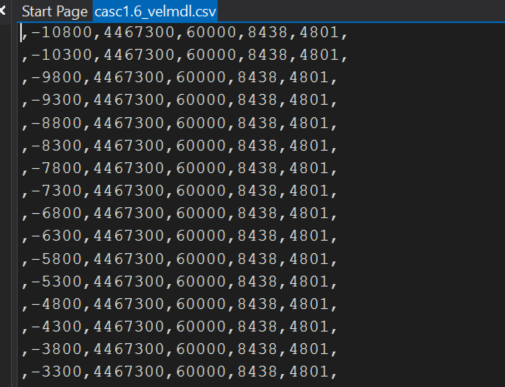
I am trying to load a large 16GB .csv in Paraview (version 5.10.1). When I click “apply”, Paraview immediately stops responding and I have to restart the program. When I try to just load the first few lines of my file it works fine, but when I try the whole file, it stops working. I have read similar support pages and tried to reset to the default settings and that did not work. I am wondering if I should try downloading an older version of Paraview? I have attached a photo of what my file looks like. I am aware of the extra commas at the beginning and end so I clicked the “merge consecutive deliminters” option before hitting “apply”. Any help would be greatly appreciated.
---
### Author:  [@todoooo](https://discourse.paraview.org/u/todoooo)
#### Post date: [August 29, 2022, 10:14pm UTC](https://discourse.paraview.org/t/paraview-stops-responding-when-loading-large-csv-file/10218/2 "2022-08-29T22:14:38Z")
On Windows? Try Mac or Linux.
---
### Author:  [@maddylucas](https://discourse.paraview.org/u/maddylucas)
#### Post date: [August 29, 2022, 10:18pm UTC](https://discourse.paraview.org/t/paraview-stops-responding-when-loading-large-csv-file/10218/3 "2022-08-29T22:18:42Z")
Yes on windows.
---
### Author:  [@todoooo](https://discourse.paraview.org/u/todoooo)
#### Post date: [August 29, 2022, 10:24pm UTC](https://discourse.paraview.org/t/paraview-stops-responding-when-loading-large-csv-file/10218/4 "2022-08-29T22:24:58Z")
It may be that you’re running into this issue. [Error reading large VTK files in the Windows version](https://discourse.paraview.org/t/error-reading-large-vtk-files-in-the-windows-version/8199)
Because of the way streams are loaded, Windows can only traverse up to 2Gb of data.
---
### Author:  [@maddylucas](https://discourse.paraview.org/u/maddylucas)
#### Post date: [August 29, 2022, 10:25pm UTC](https://discourse.paraview.org/t/paraview-stops-responding-when-loading-large-csv-file/10218/5 "2022-08-29T22:25:29Z")
I just tried it on Mac and got the same issue as on windows.
---
### Author:  [@todoooo](https://discourse.paraview.org/u/todoooo)
#### Post date: [August 29, 2022, 10:26pm UTC](https://discourse.paraview.org/t/paraview-stops-responding-when-loading-large-csv-file/10218/6 "2022-08-29T22:26:29Z")
I suggest you cut the file size down to 2Gb and try again.
---
### Author:  [@maddylucas](https://discourse.paraview.org/u/maddylucas)
#### Post date: [August 29, 2022, 10:27pm UTC](https://discourse.paraview.org/t/paraview-stops-responding-when-loading-large-csv-file/10218/7 "2022-08-29T22:27:25Z")
I will try that now. Isn’t paraview supposed to work with large files though?
---
### Author:  [@maddylucas](https://discourse.paraview.org/u/maddylucas)
#### Post date: [August 29, 2022, 10:45pm UTC](https://discourse.paraview.org/t/paraview-stops-responding-when-loading-large-csv-file/10218/8 "2022-08-29T22:45:03Z")
It works when I make the file smaller. Is there a way to load a bunch of smaller files and merge them together in Paraview? Although this is not ideal since the file is very large…
---
### Author:  [@todoooo](https://discourse.paraview.org/u/todoooo)
#### Post date: [August 29, 2022, 11:05pm UTC](https://discourse.paraview.org/t/paraview-stops-responding-when-loading-large-csv-file/10218/9 "2022-08-29T23:05:43Z")
Are you building Paraview locally or just downloading the binary? If you’re building it you can increase the file size limit to 4Gb on Windows using the code change outlined here [Error reading large VTK files in the Windows version - #22 by todoooo](https://discourse.paraview.org/t/error-reading-large-vtk-files-in-the-windows-version/8199/22)
**Edit:** Sorry that will only work for the XML reader.
You should be able to combine the tabular data inside Paraview.