# Paraview Time Formatting
**URL:** https://discourse.paraview.org/t/paraview-time-formatting/3348
**Category:** ParaView Support
**Created:** [January 16, 2020, 11:23am UTC](https://discourse.paraview.org/t/paraview-time-formatting/3348 "2020-01-16T11:23:55Z")
**Posts on this page:** 6
**Page:** 1
### Author:  [@vbuck](https://discourse.paraview.org/u/vbuck)
#### Post date: [January 16, 2020, 11:23am UTC](https://discourse.paraview.org/t/paraview-time-formatting/3348/1 "2020-01-16T11:23:55Z")
Hi!
I’m currently trying to visualize time-series data in paraview. This data is collected over a period of several days.
I know it’s possible to create an python-annotation in the view that displays the time, but is there a way to have the time displayed in a different format, say ISO 8601 in the GUI?
This is how it currently looks (timestamp is in Unix time, not very readable).
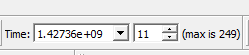
Not all of my data starts at the same time, so it would be valuable if the timestamps would not reference a relative time to some start time, but an absolute time.
Thanks in advance!
---
### Author:  [@mwestphal](https://discourse.paraview.org/u/mwestphal)
#### Post date: [January 16, 2020, 12:09pm UTC](https://discourse.paraview.org/t/paraview-time-formatting/3348/2 "2020-01-16T12:09:37Z")
@nicolas.vuaille
---
### Author:  [@nicolas.vuaille](https://discourse.paraview.org/u/nicolas.vuaille)
#### Post date: [January 16, 2020, 12:47pm UTC](https://discourse.paraview.org/t/paraview-time-formatting/3348/3 "2020-01-16T12:47:45Z")
There is no native option in ParaView to transform a timestamp into a date.
You should use a `Programmable Filter` and create a FieldData containg the formatted date.
---
### Author:  [@vbuck](https://discourse.paraview.org/u/vbuck)
#### Post date: [January 16, 2020, 12:54pm UTC](https://discourse.paraview.org/t/paraview-time-formatting/3348/4 "2020-01-16T12:54:02Z")
Yes, that is how I would add an annotation.
It’s not really about transforming the timestamp, but about showing a more readable value in the GUI (not only in the time controls, but also in the animation view and for the x-axis of graphs).
Is there an option available like returning an array of string instead of an array of float in the RequestInformation step or do the timestamps need to be float values?
---
### Author:  [@nicolas.vuaille](https://discourse.paraview.org/u/nicolas.vuaille)
#### Post date: [January 16, 2020, 1:09pm UTC](https://discourse.paraview.org/t/paraview-time-formatting/3348/5 "2020-01-16T13:09:50Z")
No, there is no such options. In the GUI, time is always considered as a floating point value, and no option exists to make it more human-friendly.
---
### Author:  [@mwestphal](https://discourse.paraview.org/u/mwestphal)
#### Post date: [January 17, 2020, 9:26am UTC](https://discourse.paraview.org/t/paraview-time-formatting/3348/6 "2020-01-17T09:26:12Z")
You can change the notation from scientific to fixed though.
Edit -\> Settings -\> Animation Time Notation