# paraview transparent effect, there are always uneven color blocks, how to eliminate
**URL:** https://discourse.paraview.org/t/paraview-transparent-effect-there-are-always-uneven-color-blocks-how-to-eliminate/15269
**Category:** ParaView Support
**Tags:** opengl
**Created:** [August 22, 2024, 1:24am UTC](https://discourse.paraview.org/t/paraview-transparent-effect-there-are-always-uneven-color-blocks-how-to-eliminate/15269 "2024-08-22T01:24:43Z")
**Posts on this page:** 3
**Page:** 1
### Author:  [@henrybolt](https://discourse.paraview.org/u/henrybolt)
#### Post date: [August 22, 2024, 1:24am UTC](https://discourse.paraview.org/t/paraview-transparent-effect-there-are-always-uneven-color-blocks-how-to-eliminate/15269/1 "2024-08-22T01:24:43Z")
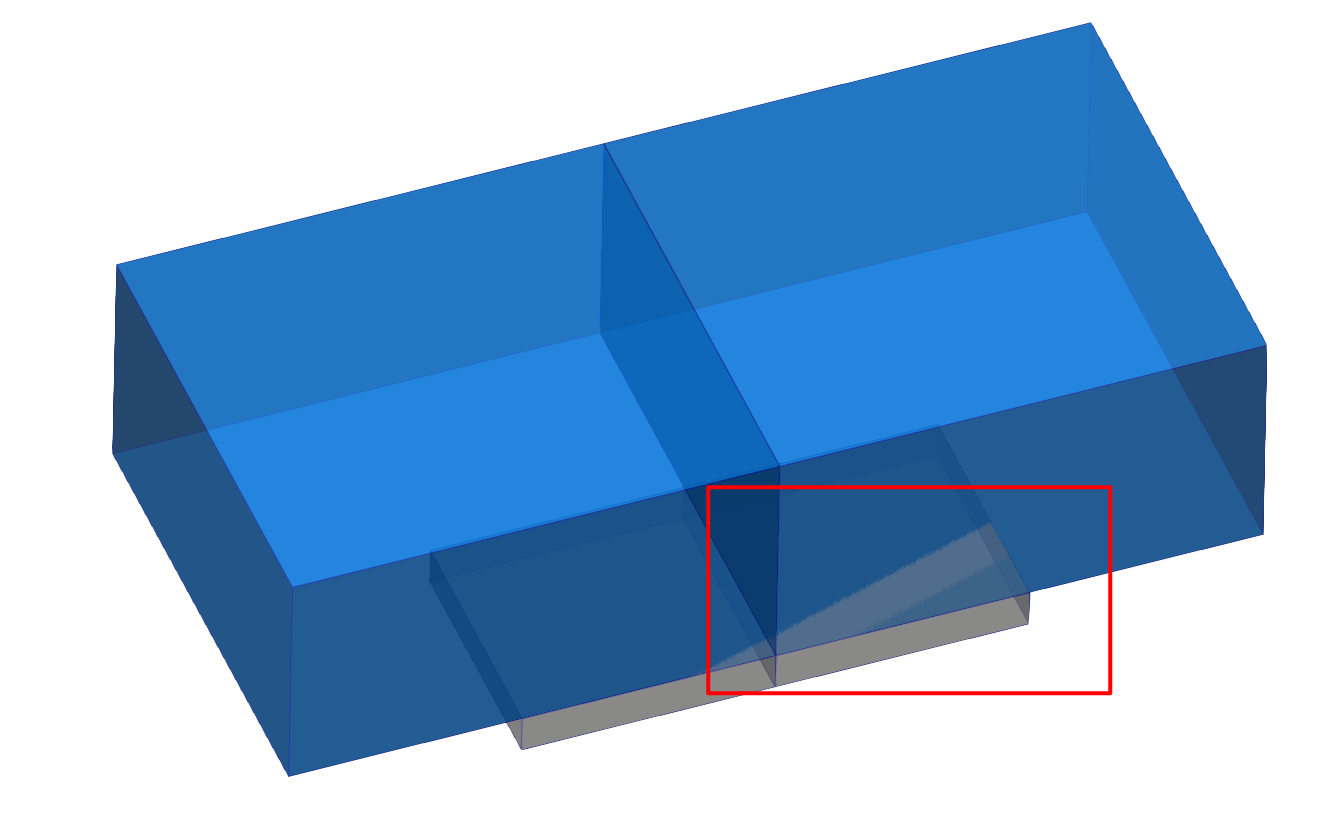
When open the opacity effect, the surface with edges type always show uneven color blocks, how to eliminate them?
---
### Author:  [@mwestphal](https://discourse.paraview.org/u/mwestphal)
#### Post date: [August 22, 2024, 8:12am UTC](https://discourse.paraview.org/t/paraview-transparent-effect-there-are-always-uneven-color-blocks-how-to-eliminate/15269/2 "2024-08-22T08:12:41Z")
Hi @henrybolt
Please share your data,
Best,
---
### Author:  [@Kenneth\_Moreland](https://discourse.paraview.org/u/Kenneth_Moreland)
#### Post date: [August 22, 2024, 11:35am UTC](https://discourse.paraview.org/t/paraview-transparent-effect-there-are-always-uneven-color-blocks-how-to-eliminate/15269/3 "2024-08-22T11:35:55Z")
It’s always helpful to share your data, but based on your image that looks like z-buffer fighting ([Z-fighting - Wikipedia](https://en.wikipedia.org/wiki/Z-fighting)). That happens when two things are drawn at the exact same space.
Probably the top of your gray box is on the same plane as the bottom of your blue box. You know from context that the gray box is behind, but the render doesn’t know that, so the “front” surface can flip from pixel to pixel based on floating point imprecision.
There is no really good solution when you have two polygonal surfaces. You could add a gap between the two objects so one surface is truly in front of the other.