# pivot arrow to the midpoint
**URL:** https://discourse.paraview.org/t/pivot-arrow-to-the-midpoint/15116
**Category:** ParaView Support
**Created:** [July 24, 2024, 3:09pm UTC](https://discourse.paraview.org/t/pivot-arrow-to-the-midpoint/15116 "2024-07-24T15:09:45Z")
**Posts on this page:** 5
**Page:** 1
### Author:  [@sumeshpt](https://discourse.paraview.org/u/sumeshpt)
#### Post date: [July 24, 2024, 3:09pm UTC](https://discourse.paraview.org/t/pivot-arrow-to-the-midpoint/15116/1 "2024-07-24T15:09:46Z")
Hi,
I am wondering whether anybody knows how to pivot the mid point of the glyph vector to the grid point? I am plotting a nematic director (no head/tail, and thus a line) whose mid point should coincide with the grid point. A demonstration in 2D done in matlab is available here. [Can the arrows of a quiver plot rotate around their mid point? - MATLAB Answers - MATLAB Central](https://uk.mathworks.com/matlabcentral/answers/377735-can-the-arrows-of-a-quiver-plot-rotate-around-their-mid-point)
I could make a vtk file with corresponding coordinates, but I would have thought that paraview should already have options to do this manipulation. Any ideas will be helpful.
Thanks,
sumesh
---
### Author:  [@Kenichiro-Yoshimi](https://discourse.paraview.org/u/Kenichiro-Yoshimi)
#### Post date: [July 25, 2024, 7:08am UTC](https://discourse.paraview.org/t/pivot-arrow-to-the-midpoint/15116/2 "2024-07-25T07:08:59Z")
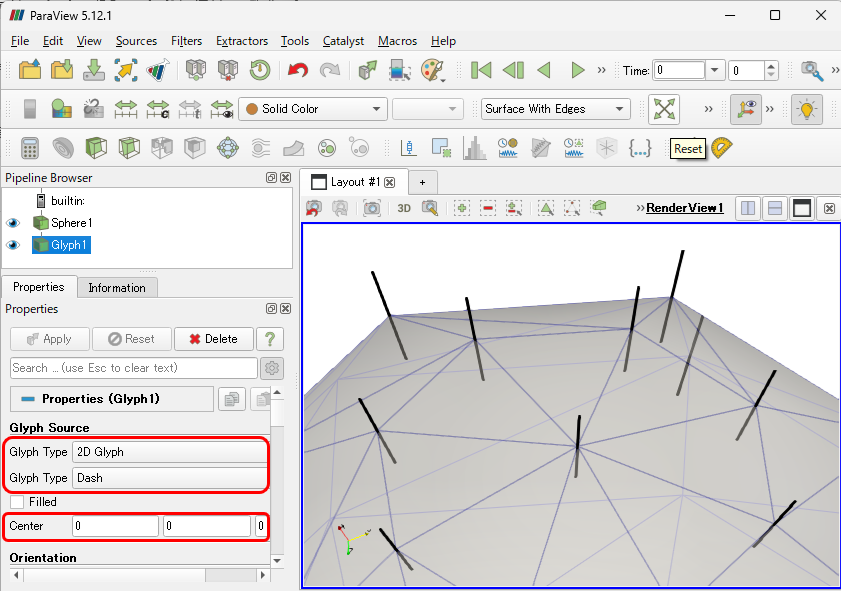
In the `Glyph` filter:
- Glyph Type: 2D Glyph
- Glyph Type: Dash
the middle point of the glyph will be the nodal point of the mesh, which is the desired outcome. If the first component of the `Center` option is set to 0.5, the starting point of the glyph will align with the nodal point of the mesh.
---
### Author:  [@sumeshpt](https://discourse.paraview.org/u/sumeshpt)
#### Post date: [July 25, 2024, 7:45am UTC](https://discourse.paraview.org/t/pivot-arrow-to-the-midpoint/15116/3 "2024-07-25T07:45:08Z")
Dear Kyoshimi,
Perfect!. This is what exactly I was looking for. Thanks very much.
sumesh
---
### Author:  [@mcjbo](https://discourse.paraview.org/u/mcjbo)
#### Post date: [July 26, 2024, 1:02pm UTC](https://discourse.paraview.org/t/pivot-arrow-to-the-midpoint/15116/4 "2024-07-26T13:02:24Z")
I’m facing a similar problem, trying to put the arrows with their heads on the nodes. However, I cannot find the options for “Glyph Source” that you proposed in my Properties window. There’s only one Glyph Type selectable and no `Center` option.
I’m using Paraview 5.12.1 for Ubuntu 22.04.4 LTS.

What system and Paraview version are you using?
Or any other idea how I can realize this?
---
### Author:  [@Kenichiro-Yoshimi](https://discourse.paraview.org/u/Kenichiro-Yoshimi)
#### Post date: [July 26, 2024, 2:10pm UTC](https://discourse.paraview.org/t/pivot-arrow-to-the-midpoint/15116/5 "2024-07-26T14:10:33Z")
That may be in the advanced settings.
> [@I can't find an option/parameter/control in a dialog, or tab (such as the Properties tab)](https://discourse.paraview.org/t/i-cant-find-an-option-parameter-control-in-a-dialog-or-tab-such-as-the-properties-tab/4512):
>
> Make sure to enable the advanced option by clicking on the gear icon: [2020-05-24-111301\_31x30\_scrot]