# Plot over line clipping bug
**URL:** https://discourse.paraview.org/t/plot-over-line-clipping-bug/3098
**Category:** ParaView Support
**Created:** [December 2, 2019, 2:13pm UTC](https://discourse.paraview.org/t/plot-over-line-clipping-bug/3098 "2019-12-02T14:13:34Z")
**Posts on this page:** 15
**Page:** 1
### Author:  [@Rem](https://discourse.paraview.org/u/Rem)
#### Post date: [December 2, 2019, 2:13pm UTC](https://discourse.paraview.org/t/plot-over-line-clipping-bug/3098/1 "2019-12-02T14:13:34Z")
Hi all,
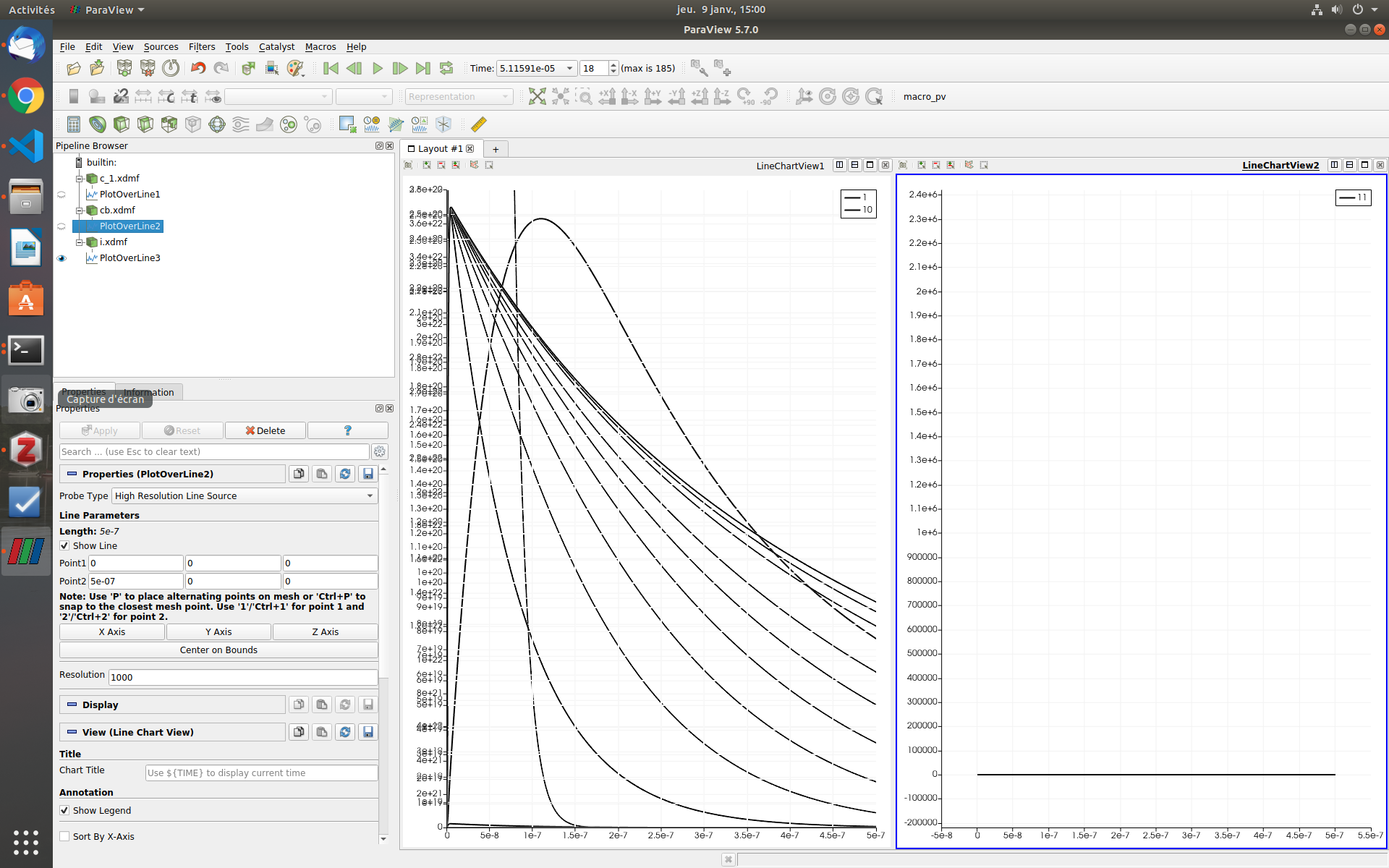
For some time I’ve been experiencing an issue when plotting over line of xdmf files.

As you can see above, the line overlap one another in a funny way, which makes the visualisation really difficult. I had the issue on three different computer and I’m currently using 5.7.
Thanks for the help !
---
### Author:  [@mwestphal](https://discourse.paraview.org/u/mwestphal)
#### Post date: [December 2, 2019, 2:25pm UTC](https://discourse.paraview.org/t/plot-over-line-clipping-bug/3098/2 "2019-12-02T14:25:00Z")
please share a way to reproduce the issue.
---
### Author:  [@Rem](https://discourse.paraview.org/u/Rem)
#### Post date: [December 2, 2019, 2:28pm UTC](https://discourse.paraview.org/t/plot-over-line-clipping-bug/3098/3 "2019-12-02T14:28:18Z")
Here are the XDMF files I’m using.
To reproduce the bug, simply load the xdmf file, then PlotOverLine (any direction) and click Play.
[files.zip](https://discourse.paraview.org/uploads/short-url/nrAPupK4PBA2rG6khO7uQWJQMTq.zip) (2.8 MB)
---
### Author:  [@mwestphal](https://discourse.paraview.org/u/mwestphal)
#### Post date: [December 2, 2019, 2:31pm UTC](https://discourse.paraview.org/t/plot-over-line-clipping-bug/3098/4 "2019-12-02T14:31:05Z")
Looks fine to me using ParaView 5.7. I always see a single line, moving slightly over time.
---
### Author:  [@Rem](https://discourse.paraview.org/u/Rem)
#### Post date: [December 2, 2019, 2:37pm UTC](https://discourse.paraview.org/t/plot-over-line-clipping-bug/3098/5 "2019-12-02T14:37:34Z")
I had the issue on three different machines so I reckon it’s either a bug or something I do wrong (more likely). Here’s a video of what I see: [capture\_.zip](https://discourse.paraview.org/uploads/short-url/l3AbqcvDkd5jApXspdSzRxohcIM.zip) (2.6 MB)
---
### Author:  [@mwestphal](https://discourse.paraview.org/u/mwestphal)
#### Post date: [December 2, 2019, 2:42pm UTC](https://discourse.paraview.org/t/plot-over-line-clipping-bug/3098/6 "2019-12-02T14:42:31Z")
I do the same without any issue, using 5.7.0 . can you specify the specs of the computers you tried with ?
---
### Author:  [@Rem](https://discourse.paraview.org/u/Rem)
#### Post date: [December 2, 2019, 2:49pm UTC](https://discourse.paraview.org/t/plot-over-line-clipping-bug/3098/7 "2019-12-02T14:49:25Z")
Sure :
- GPU : Nvidia Quadro P2000
- CPU : Intel® Xeon® E-2186G CPU @ 3.80GHz
---
### Author:  [@mwestphal](https://discourse.paraview.org/u/mwestphal)
#### Post date: [December 2, 2019, 2:59pm UTC](https://discourse.paraview.org/t/plot-over-line-clipping-bug/3098/8 "2019-12-02T14:59:56Z")
What is your OS ?
---
### Author:  [@Rem](https://discourse.paraview.org/u/Rem)
#### Post date: [December 2, 2019, 3:00pm UTC](https://discourse.paraview.org/t/plot-over-line-clipping-bug/3098/9 "2019-12-02T15:00:19Z")
Sorry: I use both Windows 10 Pro and Ubuntu 18.04
---
### Author:  [@Kenneth\_Moreland](https://discourse.paraview.org/u/Kenneth_Moreland)
#### Post date: [December 2, 2019, 3:06pm UTC](https://discourse.paraview.org/t/plot-over-line-clipping-bug/3098/10 "2019-12-02T15:06:17Z")
@mwestphal, I also tried and nor do I get the errant behavior (Windows 10 with an old Quadro K4200). Sounds like a graphics driver issue. Weird that you would same the same behavior on two different OS’s though.
@Rem, What happens if in the properties for the line chart view you set `Left Axis Use Custom Range`? It might also be helpful to update the graphics driver.
---
### Author:  [@Rem](https://discourse.paraview.org/u/Rem)
#### Post date: [December 2, 2019, 3:09pm UTC](https://discourse.paraview.org/t/plot-over-line-clipping-bug/3098/11 "2019-12-02T15:09:56Z")
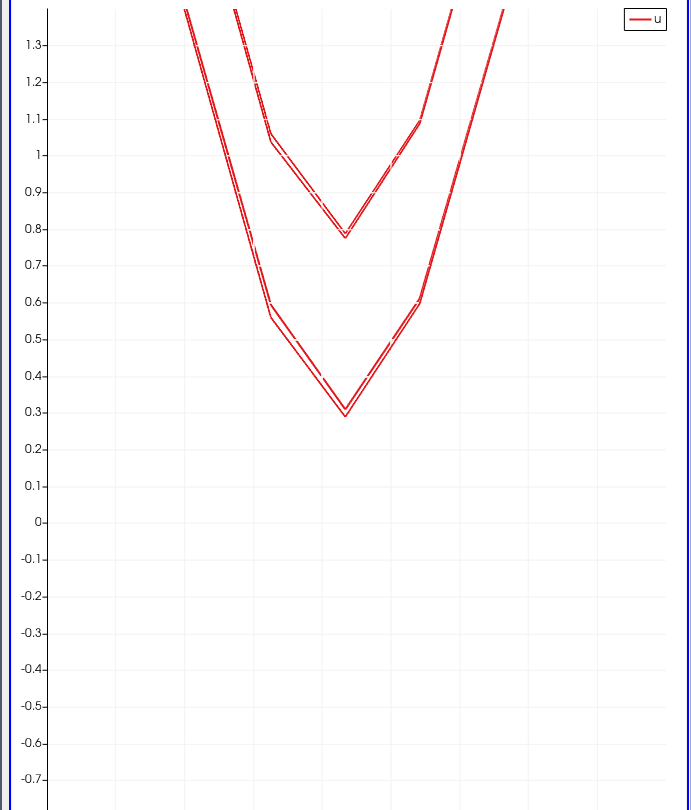
@Kenneth_Moreland in fact it was on 3 different computers. One had RX 480 + Intel i5 the other GeForce GTX 150 Ti + Intel i7 (both Windows 10)
The problem is still here when setting Custom Range :
---
### Author:  [@Rem](https://discourse.paraview.org/u/Rem)
#### Post date: [December 19, 2019, 10:52am UTC](https://discourse.paraview.org/t/plot-over-line-clipping-bug/3098/13 "2019-12-19T10:52:10Z")
Hi all,
After a while a went back to this issue, updated all my drivers on all my machines using paraview, and I am still exeperiencing this issue.
---
### Author:  [@wascott](https://discourse.paraview.org/u/wascott)
#### Post date: [December 19, 2019, 7:10pm UTC](https://discourse.paraview.org/t/plot-over-line-clipping-bug/3098/14 "2019-12-19T19:10:09Z")
This is a total wild, bad guess, but try getting rid of your configuration files.
Edit/ Reset to Default Settings. Yes. Restart Paraview. Now try.
---
### Author:  [@Rem](https://discourse.paraview.org/u/Rem)
#### Post date: [December 20, 2019, 8:57am UTC](https://discourse.paraview.org/t/plot-over-line-clipping-bug/3098/15 "2019-12-20T08:57:08Z")
Nope didn’t do the trick.
It seems that the window is zooming in and immediately zooming out at each time step which makes this clipping effect (see attached video).[2019-12-20 09-55-34.rar](https://discourse.paraview.org/uploads/short-url/h5IIDU3SVe5xb9vtQaEO9C8aTEB.rar) (1.3 MB)
---
### Author:  [@Rem](https://discourse.paraview.org/u/Rem)
#### Post date: [January 9, 2020, 2:03pm UTC](https://discourse.paraview.org/t/plot-over-line-clipping-bug/3098/16 "2020-01-09T14:03:13Z")
hi all, don’t know if this bug (if it is indeed one) has been further investigated or not… I updated all my drviers and all but still no improvement. I forgot to mention that while playing the animation, I can encounter this kind of issue (see picture). The window goes back to normal if the cursor to it. Does that give any hint ?