# Points Gaussian succeeded but Contour iso surface failed.
**URL:** https://discourse.paraview.org/t/points-gaussian-succeeded-but-contour-iso-surface-failed/6032
**Category:** ParaView Support
**Created:** [December 10, 2020, 11:38pm UTC](https://discourse.paraview.org/t/points-gaussian-succeeded-but-contour-iso-surface-failed/6032 "2020-12-10T23:38:01Z")
**Posts on this page:** 3
**Page:** 1
### Author:  [@Giovanni](https://discourse.paraview.org/u/Giovanni)
#### Post date: [December 10, 2020, 11:38pm UTC](https://discourse.paraview.org/t/points-gaussian-succeeded-but-contour-iso-surface-failed/6032/1 "2020-12-10T23:38:01Z")
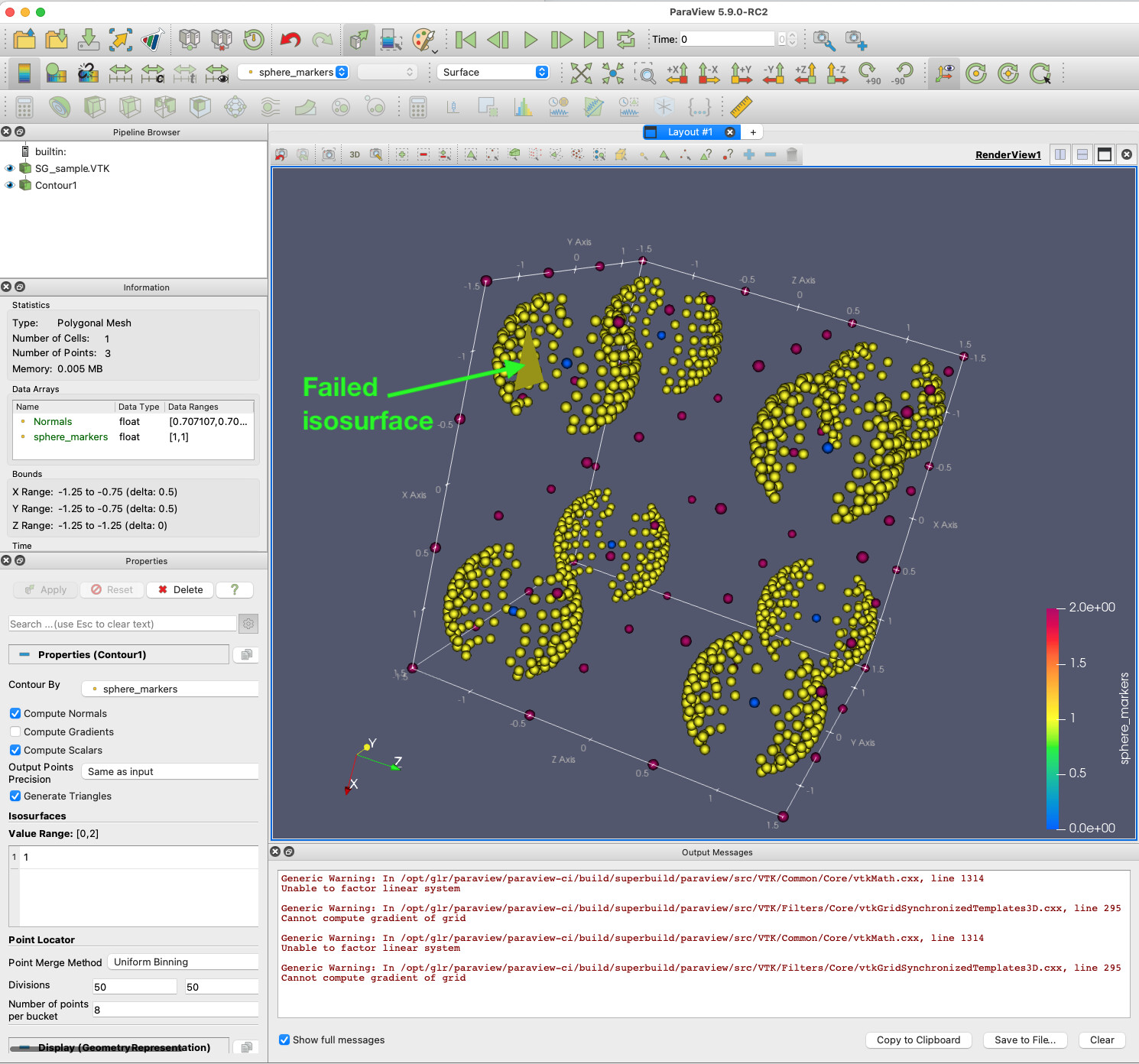
Can ParaView draw an isosurface = 1 from the .VTK file attached? “Contour” filter fails. But “Legacy Reader” reads it correctly, and “Points Gaussian” represents it correctly (screen shot). So, I wonder if there is a workaround: a pre filter? a file reader? some other method?
Many thanks for your help.
**STEPS TO REPRODUCE ISSUE** :
1. Download [SG\_sample.VTK](https://discourse.paraview.org/uploads/short-url/92WnNRZVv0e7yjXnM85TvZmAZ6J.VTK) (36.9 KB)
2. Open SG\_sample.VTK using “Legacy VTK Reader”.
3. Select:
-
```
Representation = Point Gaussian,
```
-
```
Coloring = sphere_markers,
```
-
```
Gaussian Radius = 0.04.
```
**Result** : Correctly renders data points for 8 spheres (screen shot).
Scalar values:
-
```
0 = Blue = center of 8 spheres.
```
-
```
1 = Yellow = points on surface of such spheres.
```
-
```
2 = Red = points in the space between spheres.
```
1. Add filter: “Contour”.
> ```
> Generic Warning: In /opt/glr/paraview/paraview-ci/build/superbuild/paraview/src/VTK/Common/Core/vtkMath.cxx, line 1314
> Unable to factor linear system
>
> Generic Warning: In /opt/glr/paraview/paraview-ci/build/superbuild/paraview/src/VTK/Filters/Core/vtkGridSynchronizedTemplates3D.cxx, line 295
> Cannot compute gradient of grid
>
> ```
**MY SETUP** :
-
```
ParaView Version 5.9.0-RC2 (The latest, Dec 10 2020, from https://www.paraview.org/download/ )
```
-
```
Macbook Pro Big Sur 11.0.1 (20B29)
```
-
```
Graphics: Radeon Pro 560 4 GB
```
---
### Author:  [@wascott](https://discourse.paraview.org/u/wascott)
#### Post date: [December 11, 2020, 2:17am UTC](https://discourse.paraview.org/t/points-gaussian-succeeded-but-contour-iso-surface-failed/6032/2 "2020-12-11T02:17:34Z")
I think there are a few issues here. Lets start from the top.
- File formats in many OS’s are case sensitive. If you go File/ Open/ then look at the possible extensions, you will see that .VTK is wrong, and it should be .vtk.
- Next, you asked for a STRUCTURED\_GRID. The dimensions X, Y and Z tell you the number of points you get in the X, Y and Z direction. For a 2,2,2, you only get 8 points, and these will be in the corners of your cube. Note that ParaView used the first 8 points you gave it for the dimentions of your weird, warped cube. (Use representation Surface). Below, I will give you an example that does work of a dimension 3,3,3.
- You can’t arbitrarily read in points in STRUCTURED\_GRID. That isn’t the definition of “Structured”. You probably want some type of unstructured grid.
- With the mesh you have, you can then run a contour. Note, again, that you may NOT add points as you have done above.
Attached is a small, toy STRUCTURED\_GRID that works, 3 3 3.
[sg\_sample-alan.vtk](https://discourse.paraview.org/uploads/short-url/z50lixOrybYIpccaR8t1OUdhrTA.vtk) (1.0 KB)
---
### Author:  [@Giovanni](https://discourse.paraview.org/u/Giovanni)
#### Post date: [December 11, 2020, 4:27am UTC](https://discourse.paraview.org/t/points-gaussian-succeeded-but-contour-iso-surface-failed/6032/3 "2020-12-11T04:27:47Z")
Thanks for your answer, Walter.
I changed my files from .VTK to .vtk to comply. Thanks for the tip.
Because Gaussian Points can read and render the file (including its extra points), I was wondering if there could be some tool (filter etc.) to convert it into an unstructured grid. If not (as it seem to be the case), I would have to bite the bullet and learn/create an unstructured grid myself as you suggest. In that case, are there any toy examples of an unstructured grid that might work?
Many thanks again for your answer.