# Positioning and orientation of the orientation widget
**URL:** https://discourse.paraview.org/t/positioning-and-orientation-of-the-orientation-widget/11048
**Category:** ParaView Support
**Created:** [December 21, 2022, 2:51am UTC](https://discourse.paraview.org/t/positioning-and-orientation-of-the-orientation-widget/11048 "2022-12-21T02:51:56Z")
**Posts on this page:** 5
**Page:** 1
### Author:  [@ssss](https://discourse.paraview.org/u/ssss)
#### Post date: [December 21, 2022, 2:51am UTC](https://discourse.paraview.org/t/positioning-and-orientation-of-the-orientation-widget/11048/1 "2022-12-21T02:51:56Z")
Hi all,
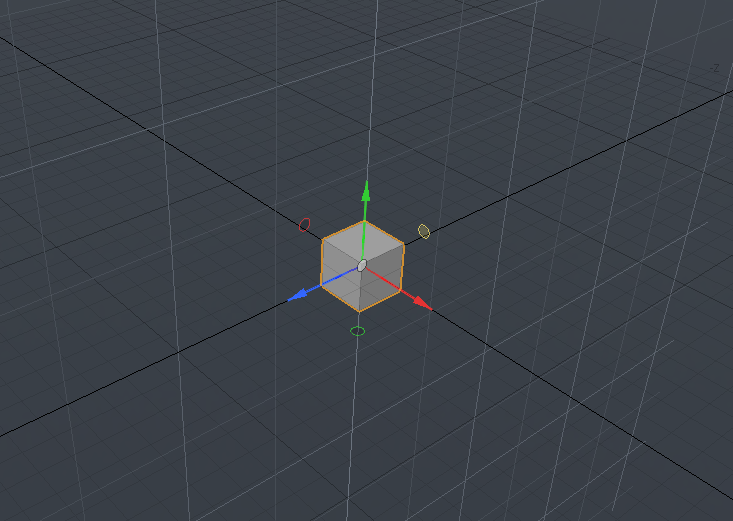
Is it possible to create orientation axes positioned and oriented arbitrarily in ParaView? Something similar to the following image taken from blender.
Thank you
---
### Author:  [@Kenneth\_Moreland](https://discourse.paraview.org/u/Kenneth_Moreland)
#### Post date: [December 27, 2022, 8:54pm UTC](https://discourse.paraview.org/t/positioning-and-orientation-of-the-orientation-widget/11048/2 "2022-12-27T20:54:37Z")
Does the `Axes` source (`Sources` → `Measurement Tools` → `Axes`) get close to what you want?
---
### Author:  [@ssss](https://discourse.paraview.org/u/ssss)
#### Post date: [December 27, 2022, 10:37pm UTC](https://discourse.paraview.org/t/positioning-and-orientation-of-the-orientation-widget/11048/3 "2022-12-27T22:37:52Z")
Thanks @Kenneth_Moreland , the issue with the `Axes` source is that it’s not drawn on top of the viewport and hence it is not visible if it lays behind the object from the camera point of view. ParaView’s orientation axes are drawn on top of the viewport and hence are always visible on screen.
---
### Author:  [@Kenneth\_Moreland](https://discourse.paraview.org/u/Kenneth_Moreland)
#### Post date: [December 28, 2022, 4:40pm UTC](https://discourse.paraview.org/t/positioning-and-orientation-of-the-orientation-widget/11048/4 "2022-12-28T16:40:33Z")
I see. I’m not familiar with blender or how its widgets interact.
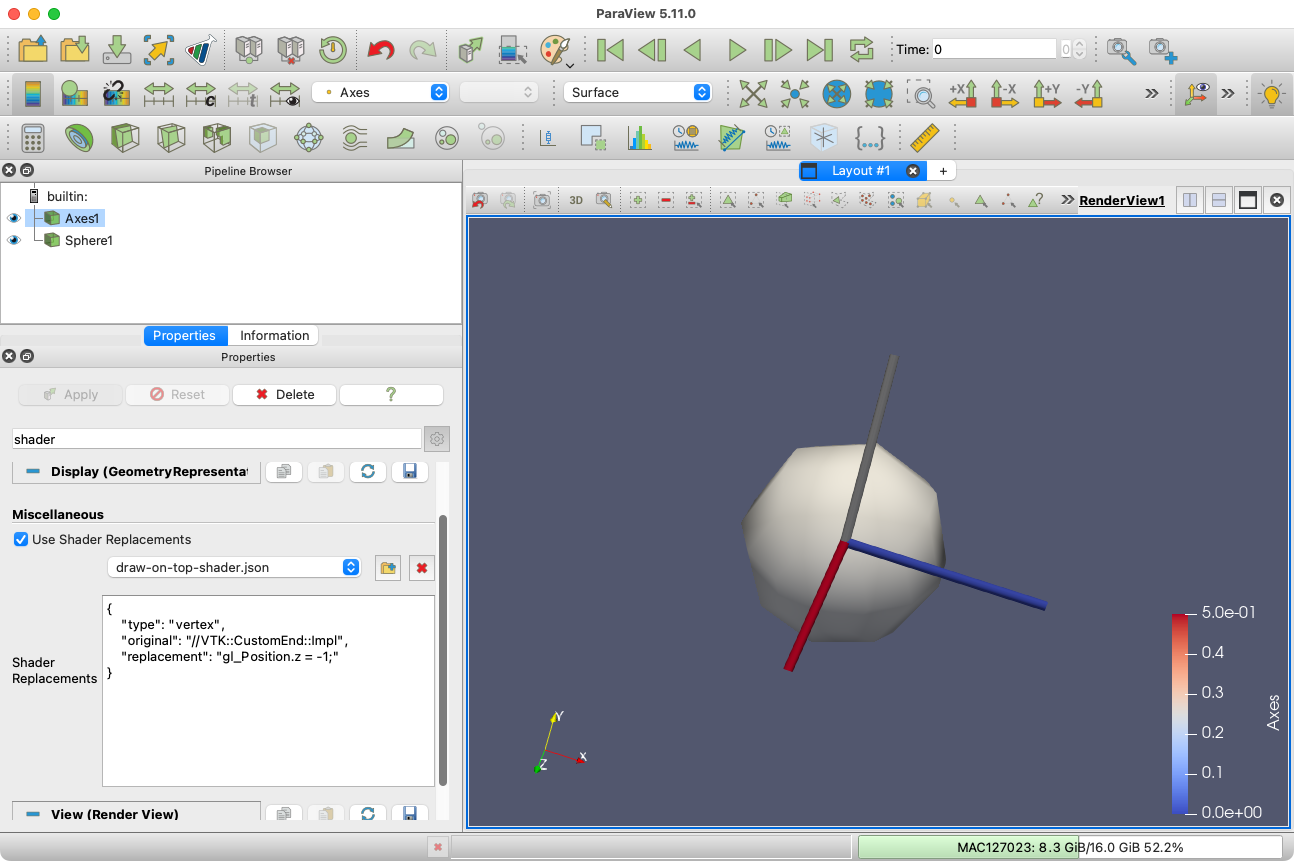
It took me a while to figure out how to draw something on-top. Typically, ParaView just doesn’t render like this. But ParaView does allow you to provide custom rendering shader. You can use that to pop the position of the object to the front of the clipping coordinates by adjusting the z coordinate after transformation. I’m not sure I got this completely right, but applying this shader to the axes object seems to work: [draw-on-top-shader.json](https://discourse.paraview.org/uploads/short-url/8Gmal3Cu3OAk7UnmmRTUbTVgfFg.json)
To apply this, turn on the advanced option `Use Shader Replacements` and then load [the attached json file](https://discourse.paraview.org/uploads/short-url/8Gmal3Cu3OAk7UnmmRTUbTVgfFg.json) using the  button.
---
### Author:  [@ssss](https://discourse.paraview.org/u/ssss)
#### Post date: [January 8, 2023, 9:01am UTC](https://discourse.paraview.org/t/positioning-and-orientation-of-the-orientation-widget/11048/5 "2023-01-08T09:01:33Z")
Thanks @Kenneth_Moreland that looks great. Do you know by any change if there’s a way to scale the size of the Axes so that it always occupies a fraction of the viewport? Something similar to what the orientation axes achieve in ParaView’s render view. Thank you!