# Problem about Visualizer build
**URL:** https://discourse.paraview.org/t/problem-about-visualizer-build/607
**Category:** Web Support
**Created:** [September 20, 2018, 7:59am UTC](https://discourse.paraview.org/t/problem-about-visualizer-build/607 "2018-09-20T07:59:28Z")
**Posts on this page:** 20
**Page:** 1
### Author:  [@yancheng](https://discourse.paraview.org/u/yancheng)
#### Post date: [September 20, 2018, 7:59am UTC](https://discourse.paraview.org/t/problem-about-visualizer-build/607/1 "2018-09-20T07:59:29Z")
Hi, I’m trying to build the latest github code of Visualizer on Ubuntu 18.04, following the guidline at: [https://github.com/Kitware/visualizer](https://github.com/Kitware/visualizer).
1. After I git clone the code to local path, I copy it to the directory of /data/visualizer
2. I give the read/write/modify rights of /data to all account using “sudo chmod -R 777 /data”
3. I go into visualizer directory
4. sudo npm install
But I come across the problem as follows:
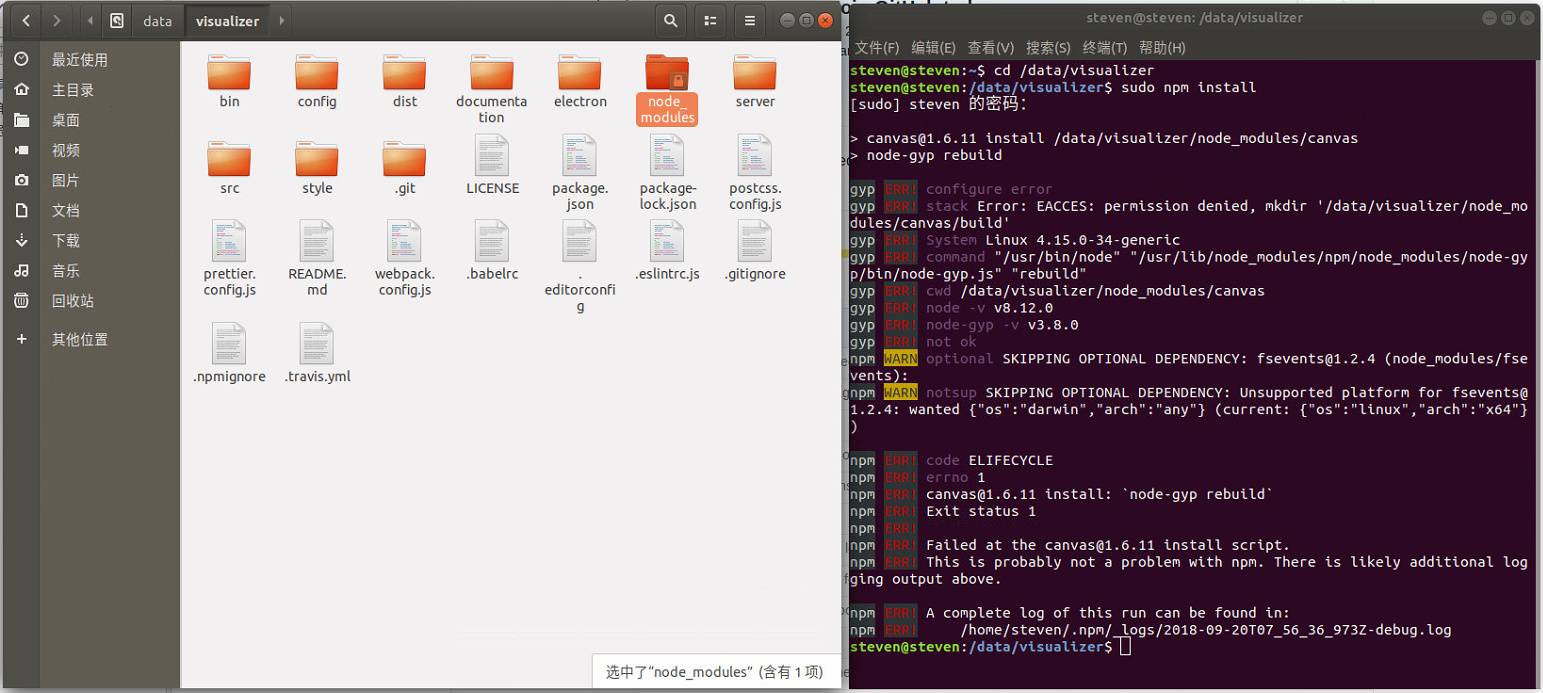
I have try to google, and try some solution, such as:
5. install node-gyp, python, make, gcc
6. modify the default path of npm
7. modify the rights of ~/.npm path
But all failed.
Can anyone help me? Thank you~
---
### Author:  [@jourdain](https://discourse.paraview.org/u/jourdain)
#### Post date: [September 20, 2018, 1:08pm UTC](https://discourse.paraview.org/t/problem-about-visualizer-build/607/2 "2018-09-20T13:08:47Z")
Are you trying to build it because you want to expand the code or just use it?
If it is just to use it, you just need the ./dist/ directory and the ./server/ ones. It is already built.
Regarding your issue, it is specific to node and some of our dependency for testing. Depending on your usage, you can remove those dependencies.
Let me know what’s your goal behind that.
Thanks,
Seb
---
### Author:  [@yancheng](https://discourse.paraview.org/u/yancheng)
#### Post date: [September 21, 2018, 11:30am UTC](https://discourse.paraview.org/t/problem-about-visualizer-build/607/3 "2018-09-21T11:30:44Z")
Thank you. We want to expand it and develop our specific app of web visualization
—Original—
---
### Author:  [@jourdain](https://discourse.paraview.org/u/jourdain)
#### Post date: [September 21, 2018, 12:27pm UTC](https://discourse.paraview.org/t/problem-about-visualizer-build/607/4 "2018-09-21T12:27:52Z")
I’ve just noticed that you are doing `sudo npm install`. You should never do `sudo` when you do a `npm install` in a project. I can’t tell if that’s your issue, but you don’t want to mixup permission inside your repo/project.
---
### Author:  [@yancheng](https://discourse.paraview.org/u/yancheng)
#### Post date: [September 25, 2018, 7:35am UTC](https://discourse.paraview.org/t/problem-about-visualizer-build/607/5 "2018-09-25T07:35:14Z")
I still have problem.
I user Ubuntu 18.04 LTS and login with administrative account steven.
My node version and npm version is as following snapshot
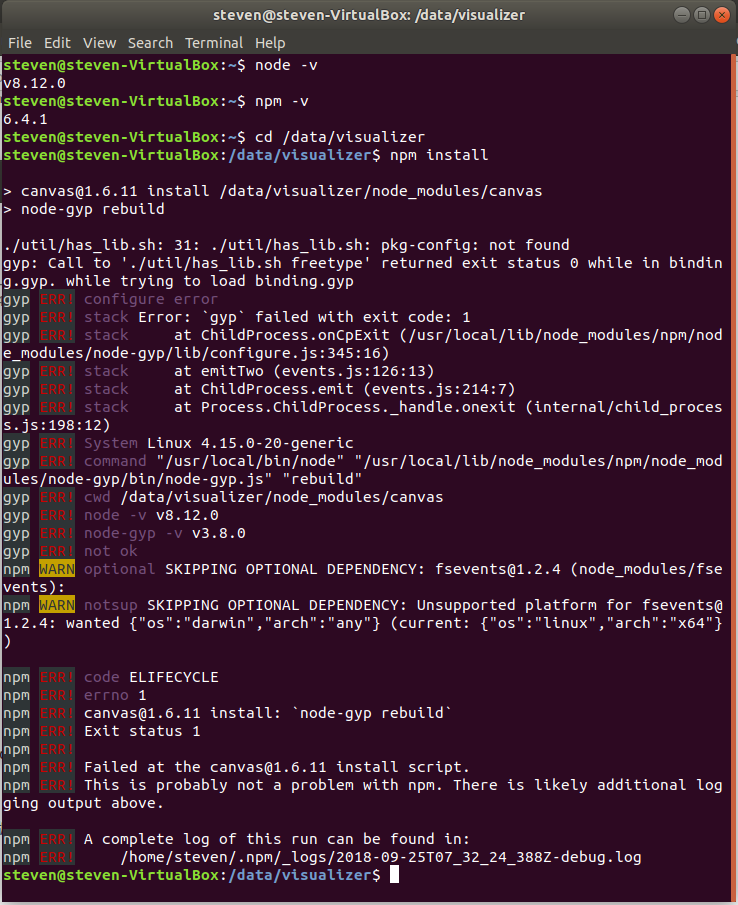
I want to know whether this problem is related with the user account or the dir path?
---
### Author:  [@jourdain](https://discourse.paraview.org/u/jourdain)
#### Post date: [September 25, 2018, 2:21pm UTC](https://discourse.paraview.org/t/problem-about-visualizer-build/607/6 "2018-09-25T14:21:33Z")
`pkg-config: not found`
Try to install it? Did you install `build-essential` so you could build and compile applications on your system?
---
### Author:  [@yancheng](https://discourse.paraview.org/u/yancheng)
#### Post date: [September 25, 2018, 3:06pm UTC](https://discourse.paraview.org/t/problem-about-visualizer-build/607/7 "2018-09-25T15:06:53Z")
I just follow the website: [https://github.com/kitware/visualizer](https://github.com/kitware/visualizer)
So I did not find the build-essential section in the user guid. Where is it ?
---
### Author:  [@yancheng](https://discourse.paraview.org/u/yancheng)
#### Post date: [September 25, 2018, 3:55pm UTC](https://discourse.paraview.org/t/problem-about-visualizer-build/607/8 "2018-09-25T15:55:13Z")
I almost come to success. Summery as follows:
install node and npm:
sudo apt-get install nodejs-legacy
sudo apt-get install npm
sudo npm install npm@latest -g
sudo npm install -g n
sudo n stable
install other essential package:
sudo apt-get install build-essential pkg-config libcairo2-dev libjpeg-dev libgif-dev
So my problem is the lack of the other essential package in my Ubuntu system, which is not shown in the guidline.
---
### Author:  [@jourdain](https://discourse.paraview.org/u/jourdain)
#### Post date: [September 25, 2018, 4:02pm UTC](https://discourse.paraview.org/t/problem-about-visualizer-build/607/9 "2018-09-25T16:02:35Z")
The document assume you have a machine setup for development. We don’t go into details on how to install a computer.
What is happening is that one of the dependency needs to compile some code (C++) and on linux to do so you need a bunch of tools such as a compiler, build tools and so on.
The Linux distribution simplify the process by providing a meta package with that set of tools. To install on your system those build tools, you should be able to run the following command line:
`sudo apt-get install build-essential`
---
### Author:  [@jourdain](https://discourse.paraview.org/u/jourdain)
#### Post date: [September 25, 2018, 4:05pm UTC](https://discourse.paraview.org/t/problem-about-visualizer-build/607/10 "2018-09-25T16:05:43Z")
What is the error now?
Because so far the issue were:
1. permission issue as you ran the install command as sudo
2. you were missing `pkg-config`
So now, if you have pkg-config, there is no reason to get the same error?
---
### Author:  [@yancheng](https://discourse.paraview.org/u/yancheng)
#### Post date: [September 26, 2018, 12:38am UTC](https://discourse.paraview.org/t/problem-about-visualizer-build/607/11 "2018-09-26T00:38:20Z")
After I install those package, no errors prompt.
But only one issue is that the “npm link” command should add sudo.
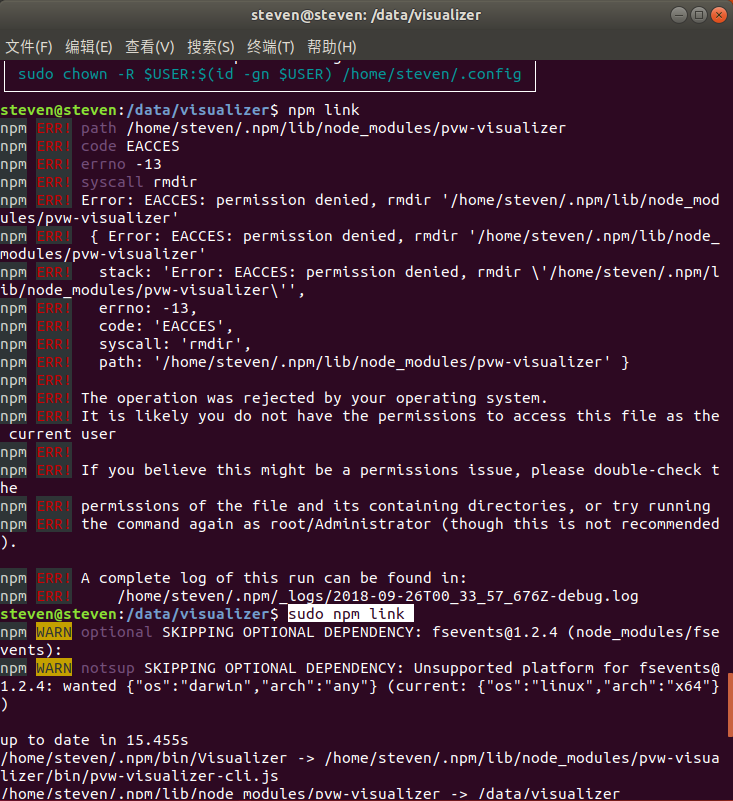
---
### Author:  [@jourdain](https://discourse.paraview.org/u/jourdain)
#### Post date: [September 26, 2018, 12:43am UTC](https://discourse.paraview.org/t/problem-about-visualizer-build/607/12 "2018-09-26T00:43:16Z")
`npm link` is not required for development. It is only needed if you use the `Visualizer` executable which helps to generate the appropriate command line.
All the npm issue you are facing are computer specific and are dependent on the way you’ve installed node.
---
### Author:  [@yancheng](https://discourse.paraview.org/u/yancheng)
#### Post date: [September 26, 2018, 12:48am UTC](https://discourse.paraview.org/t/problem-about-visualizer-build/607/13 "2018-09-26T00:48:15Z")
So could you tell me the best way of installing node and npm for Visualizer development ?
---
### Author:  [@jourdain](https://discourse.paraview.org/u/jourdain)
#### Post date: [September 26, 2018, 2:05am UTC](https://discourse.paraview.org/t/problem-about-visualizer-build/607/14 "2018-09-26T02:05:11Z")
A google search lead me to this blog which seems to do the trick.
> **[Installing Node.js Tutorial: Using nvm](https://nodesource.com/blog/installing-node-js-tutorial-using-nvm-on-mac-os-x-and-ubuntu/)**
>
> In this quick tutorial, we'll take a look at how to install nvm, and then how to start using it as a dependable version manager for Node.js.
---
### Author:  [@yancheng](https://discourse.paraview.org/u/yancheng)
#### Post date: [September 27, 2018, 6:06am UTC](https://discourse.paraview.org/t/problem-about-visualizer-build/607/15 "2018-09-27T06:06:01Z")
Excuse me, how do you edit and code the .mcss style file?
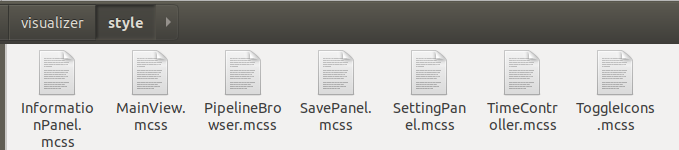
I guess you code it in some visualization IDE?
---
### Author:  [@jourdain](https://discourse.paraview.org/u/jourdain)
#### Post date: [September 27, 2018, 3:02pm UTC](https://discourse.paraview.org/t/problem-about-visualizer-build/607/16 "2018-09-27T15:02:44Z")
It is css (module), so a plain text editor should do fine.
---
### Author:  [@yancheng](https://discourse.paraview.org/u/yancheng)
#### Post date: [September 29, 2018, 3:36am UTC](https://discourse.paraview.org/t/problem-about-visualizer-build/607/17 "2018-09-29T03:36:03Z")
I am trying to compile the source code in webpack enviroment.
For automated compile and see the webpage, I install the webpack-dev-server first.
Then go to the visualizer directory, I run “npm run dev”, but the webpage is empty, just the title come out.
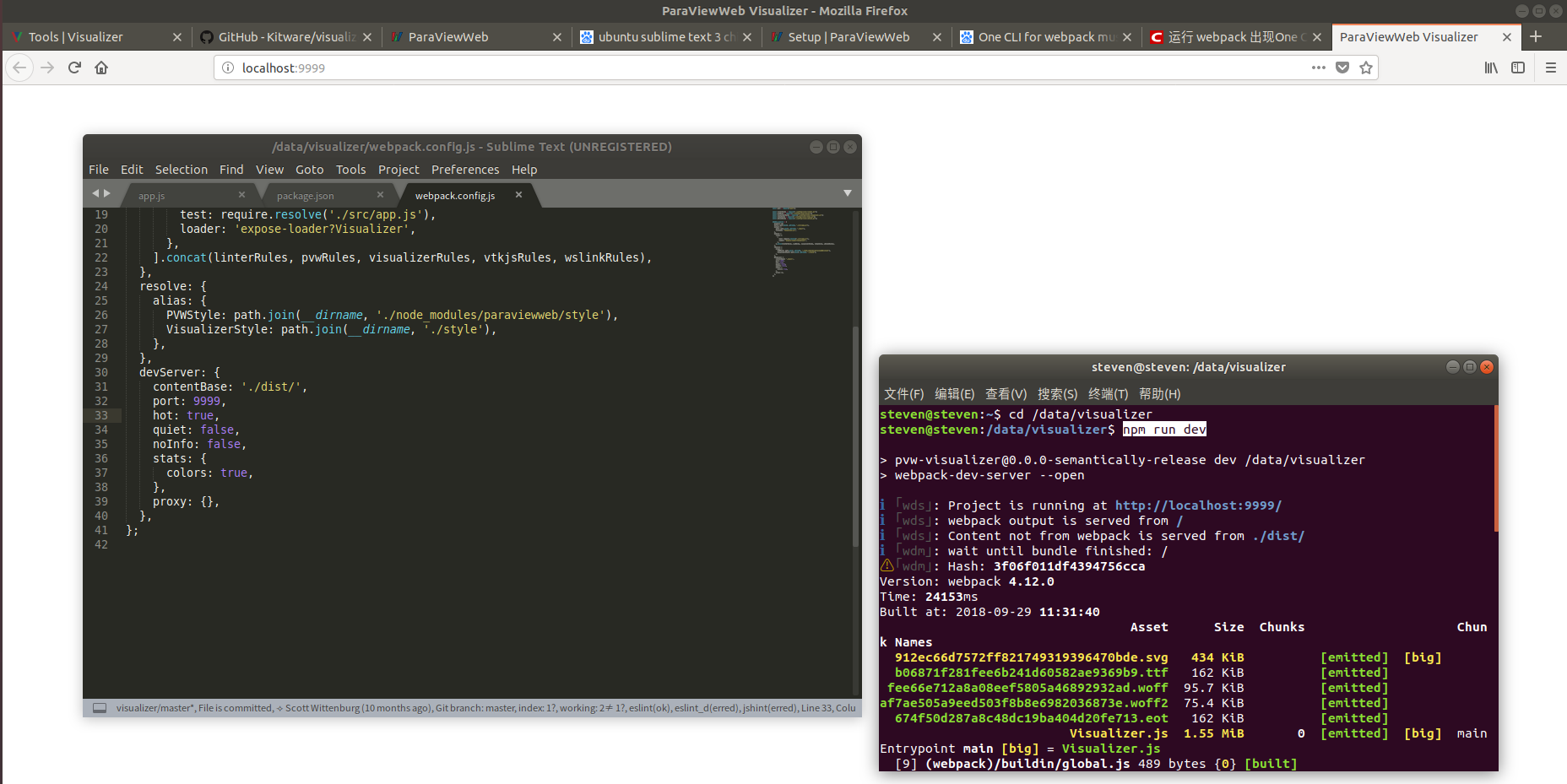
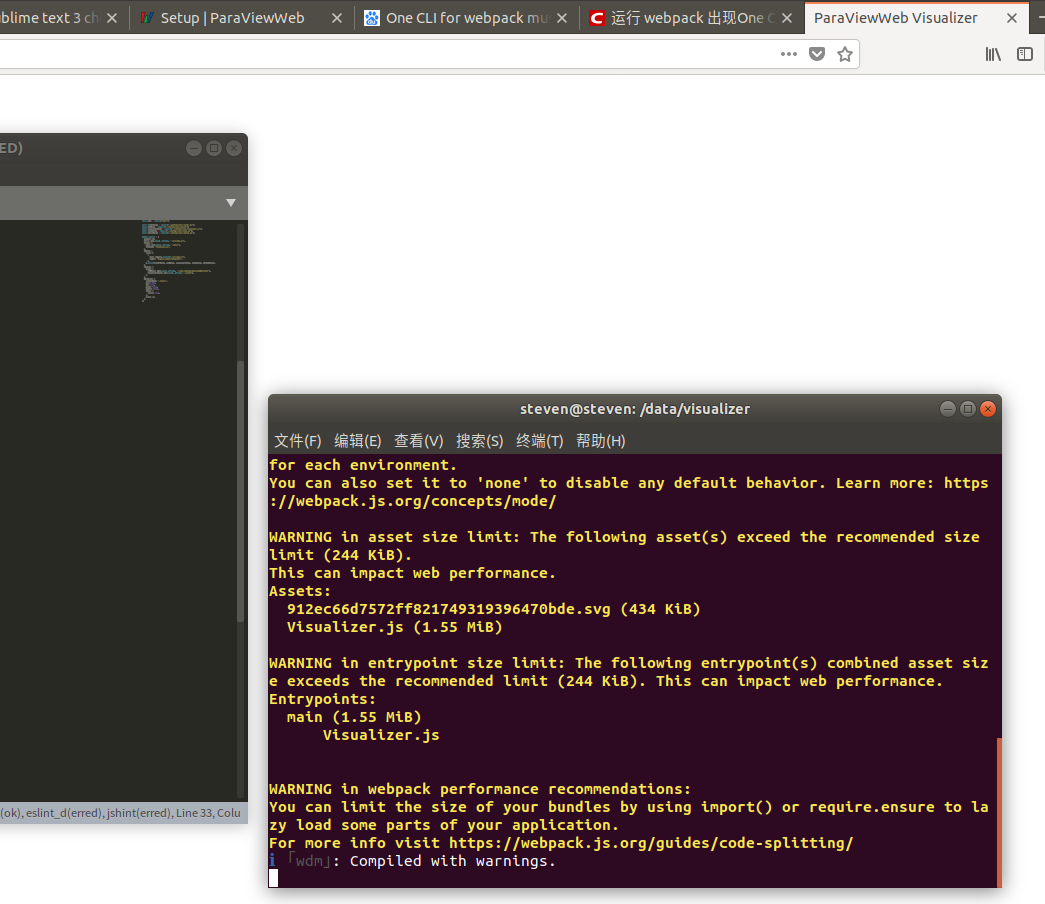
So where is the problem? thanks!
---
### Author:  [@jourdain](https://discourse.paraview.org/u/jourdain)
#### Post date: [September 30, 2018, 12:10am UTC](https://discourse.paraview.org/t/problem-about-visualizer-build/607/18 "2018-09-30T00:10:12Z")
Where is the ParaView server? You need to run the server
```auto
$ pvpython ./server/pvw-visualizer.py --content ./dist --data ~/ --port 8080
```
Then you can incrementally build the web app with the following command line
```auto
$ npm run build -- --watch
```
---
### Author:  [@yancheng](https://discourse.paraview.org/u/yancheng)
#### Post date: [September 30, 2018, 2:02am UTC](https://discourse.paraview.org/t/problem-about-visualizer-build/607/19 "2018-09-30T02:02:22Z")
I have try your way, and it works. Thank you~
BTY, I find that this way is just used for coding and debug at the same time.
Is there anyway that I can see the realtime change of webpage when coding?
---
### Author:  [@jourdain](https://discourse.paraview.org/u/jourdain)
#### Post date: [September 30, 2018, 10:52pm UTC](https://discourse.paraview.org/t/problem-about-visualizer-build/607/20 "2018-09-30T22:52:02Z")
I’m pretty sure you can, but keep in mind that you have a stateful server side connected via websocket.
You can probably use the webpack-dev-server as long your properly configure the proxy for the websocket.