# Problem running ParaView-5.5.2-Qt5 on Ubuntu 16.04
**URL:** https://discourse.paraview.org/t/problem-running-paraview-5-5-2-qt5-on-ubuntu-16-04/330
**Category:** ParaView Support
**Created:** [July 17, 2018, 8:25am UTC](https://discourse.paraview.org/t/problem-running-paraview-5-5-2-qt5-on-ubuntu-16-04/330 "2018-07-17T08:25:37Z")
**Posts on this page:** 20
**Page:** 1
### Author:  [@HarryvL](https://discourse.paraview.org/u/HarryvL)
#### Post date: [July 17, 2018, 8:25am UTC](https://discourse.paraview.org/t/problem-running-paraview-5-5-2-qt5-on-ubuntu-16-04/330/1 "2018-07-17T08:25:37Z")
Hi,
I recently bought a new laptop and am facing problems running Paraview 5.5.2 On the old machine Paraview 5.5.1 worked perfectly well. Here some of the facts:
Old machine: Dell Precision M3800 with Intel i7-4702HQ CPU
OS: Ubuntu 16.04 LTS via Oracle VM
Paraview version: 5.5.1.Qt5-MPI-Linux-64bit
New Machine: Alienware 15 R4 with Intel Core i9-8950HK CPU
Graphics Adapter: NVIDIA GeForce GTX 1080 (Laptop)
OS: Ubuntu 16.04 LTS via Oracle VM
Paraview version: 5.5.2.Qt5-MPI-Linux-64bit
When trying to run Paraview 5.5.2 on the new machine the usual startup screen pops-up in the foreground, but the actual Paraview 5.5.2 64-bit window in the background is empty and can only be closed.
I then tried to install Paraview through PPA. This version works OK, but is version 5.01.
Any suggestions or help to resolve this issue would be appreciated.
Thanks, Harry
---
### Author:  [@cory.quammen](https://discourse.paraview.org/u/cory.quammen)
#### Post date: [July 17, 2018, 2:44pm UTC](https://discourse.paraview.org/t/problem-running-paraview-5-5-2-qt5-on-ubuntu-16-04/330/2 "2018-07-17T14:44:35Z")
Is this ParaView 5.5.2 downloaded from [www.paraview.org/download](http://www.paraview.org/download) ?
---
### Author:  [@HarryvL](https://discourse.paraview.org/u/HarryvL)
#### Post date: [July 18, 2018, 3:40am UTC](https://discourse.paraview.org/t/problem-running-paraview-5-5-2-qt5-on-ubuntu-16-04/330/3 "2018-07-18T03:40:13Z")
Yes it is Cory
---
### Author:  [@mwestphal](https://discourse.paraview.org/u/mwestphal)
#### Post date: [July 18, 2018, 9:47am UTC](https://discourse.paraview.org/t/problem-running-paraview-5-5-2-qt5-on-ubuntu-16-04/330/4 "2018-07-18T09:47:17Z")
Can you run paraview from a terminal and report any output ?
Which nvidia driver are you using ?
---
### Author:  [@HarryvL](https://discourse.paraview.org/u/HarryvL)
#### Post date: [July 18, 2018, 10:05am UTC](https://discourse.paraview.org/t/problem-running-paraview-5-5-2-qt5-on-ubuntu-16-04/330/5 "2018-07-18T10:05:29Z")
Thanks Matthieu, I am traveling but will check and report back when I have access again (which is next Monday). Harry
---
### Author:  [@HarryvL](https://discourse.paraview.org/u/HarryvL)
#### Post date: [August 4, 2018, 9:02am UTC](https://discourse.paraview.org/t/problem-running-paraview-5-5-2-qt5-on-ubuntu-16-04/330/6 "2018-08-04T09:02:09Z")
Hello Mathieu. Sorry for the delay. The Nvidia driver on Windows is GeForce 398.82. However, Paraview 5.5.2 runs without problem on Windows. On my Ubuntu box (Oracle VM VB Manager) I have problems checking what driver is installed. I am also unable to run Paraview from the terminal. I get the usual “program currently not installed” and when I run “sudo apt install Paraview” the old PPA version (5.0.1) gets activated. Harry
---
### Author:  [@mwestphal](https://discourse.paraview.org/u/mwestphal)
#### Post date: [August 6, 2018, 7:15am UTC](https://discourse.paraview.org/t/problem-running-paraview-5-5-2-qt5-on-ubuntu-16-04/330/7 "2018-08-06T07:15:41Z")
What do you mean by :
> On my Ubuntu box (Oracle VM VB Manager)
?
To run from terminal, you need to navigate to the folder where you extracted ParaView.
eg, let’s say you extracted ParaView.\*\*\*.tar.gz in `~/Download`
```
Open Terminal
cd ~/Download
cd ParaView.***./bin/paraview
```
---
### Author:  [@HarryvL](https://discourse.paraview.org/u/HarryvL)
#### Post date: [August 6, 2018, 7:21am UTC](https://discourse.paraview.org/t/problem-running-paraview-5-5-2-qt5-on-ubuntu-16-04/330/8 "2018-08-06T07:21:57Z")
Thanks Mathieu. I did, but no luck. I decided to switch my development effort to Windows 10, which is the default OS on my computer. Thanks again for your support. Regards. Harry
---
### Author:  [@Someone\_fromjapan](https://discourse.paraview.org/u/Someone_fromjapan)
#### Post date: [August 6, 2018, 8:11am UTC](https://discourse.paraview.org/t/problem-running-paraview-5-5-2-qt5-on-ubuntu-16-04/330/9 "2018-08-06T08:11:20Z")
I would not recommend using 5.x branch in Windows. I experienced so many problems on various windows machines, and poor performance. While it works more reliably in VM Debian environment, for example, (in software rendering mode). Well, it depends on the data source, but you should know. There are some incompatibilities with windows drivers model, probably. Not sure, but release builds are crashing too often.
---
### Author:  [@mwestphal](https://discourse.paraview.org/u/mwestphal)
#### Post date: [August 6, 2018, 8:30am UTC](https://discourse.paraview.org/t/problem-running-paraview-5-5-2-qt5-on-ubuntu-16-04/330/10 "2018-08-06T08:30:01Z")
Windows Release are thoroughly checked and pass the same tests as the linux build.
As long as the software and the hardware are not too old, everything should be fine.
---
### Author:  [@HarryvL](https://discourse.paraview.org/u/HarryvL)
#### Post date: [August 6, 2018, 9:27am UTC](https://discourse.paraview.org/t/problem-running-paraview-5-5-2-qt5-on-ubuntu-16-04/330/11 "2018-08-06T09:27:25Z")
So far it’s working fine for me on Windows 10. The bigger challenge I had was to find and install proper drivers for my GPU on Ubuntu, so decided to switch to Windows. So far so good.
---
### Author:  [@Someone\_fromjapan](https://discourse.paraview.org/u/Someone_fromjapan)
#### Post date: [August 21, 2018, 1:48am UTC](https://discourse.paraview.org/t/problem-running-paraview-5-5-2-qt5-on-ubuntu-16-04/330/12 "2018-08-21T01:48:48Z")
And it is not fine, using quite normal hardware, as I said before.
It seems to me, your beta-testing is weak, and based on formal automatic test-pass methods. While Paraview in Windows can render scenes well in “load-and-render” mode, trying biulding some new stack of filters with hand-and-mouse can become impossible. So I do: prepare the stack in linux virtual machine in software mode, then load it up in native windows host, and render. As I said, Paraview betas made with alternative compilers/tool-sets generally work better than releases.
---
### Author:  [@Dinushika1992](https://discourse.paraview.org/u/Dinushika1992)
#### Post date: [August 23, 2018, 3:02am UTC](https://discourse.paraview.org/t/problem-running-paraview-5-5-2-qt5-on-ubuntu-16-04/330/13 "2018-08-23T03:02:49Z")
Hi,
I also tried to install ParaView -5.5.2-Qt5 on Ubuntu 16.04 after reading this discussion. But I couldn’t. After extracting the folder I entered " ./bin/ParaView" command. But it says “No such file or directory”. Could you please help me also?
---
### Author:  [@cory.quammen](https://discourse.paraview.org/u/cory.quammen)
#### Post date: [August 23, 2018, 3:17am UTC](https://discourse.paraview.org/t/problem-running-paraview-5-5-2-qt5-on-ubuntu-16-04/330/14 "2018-08-23T03:17:42Z")
The executable name is lower case, so run `./bin/paraview`.
---
### Author:  [@Dinushika1992](https://discourse.paraview.org/u/Dinushika1992)
#### Post date: [August 23, 2018, 3:32am UTC](https://discourse.paraview.org/t/problem-running-paraview-5-5-2-qt5-on-ubuntu-16-04/330/15 "2018-08-23T03:32:35Z")
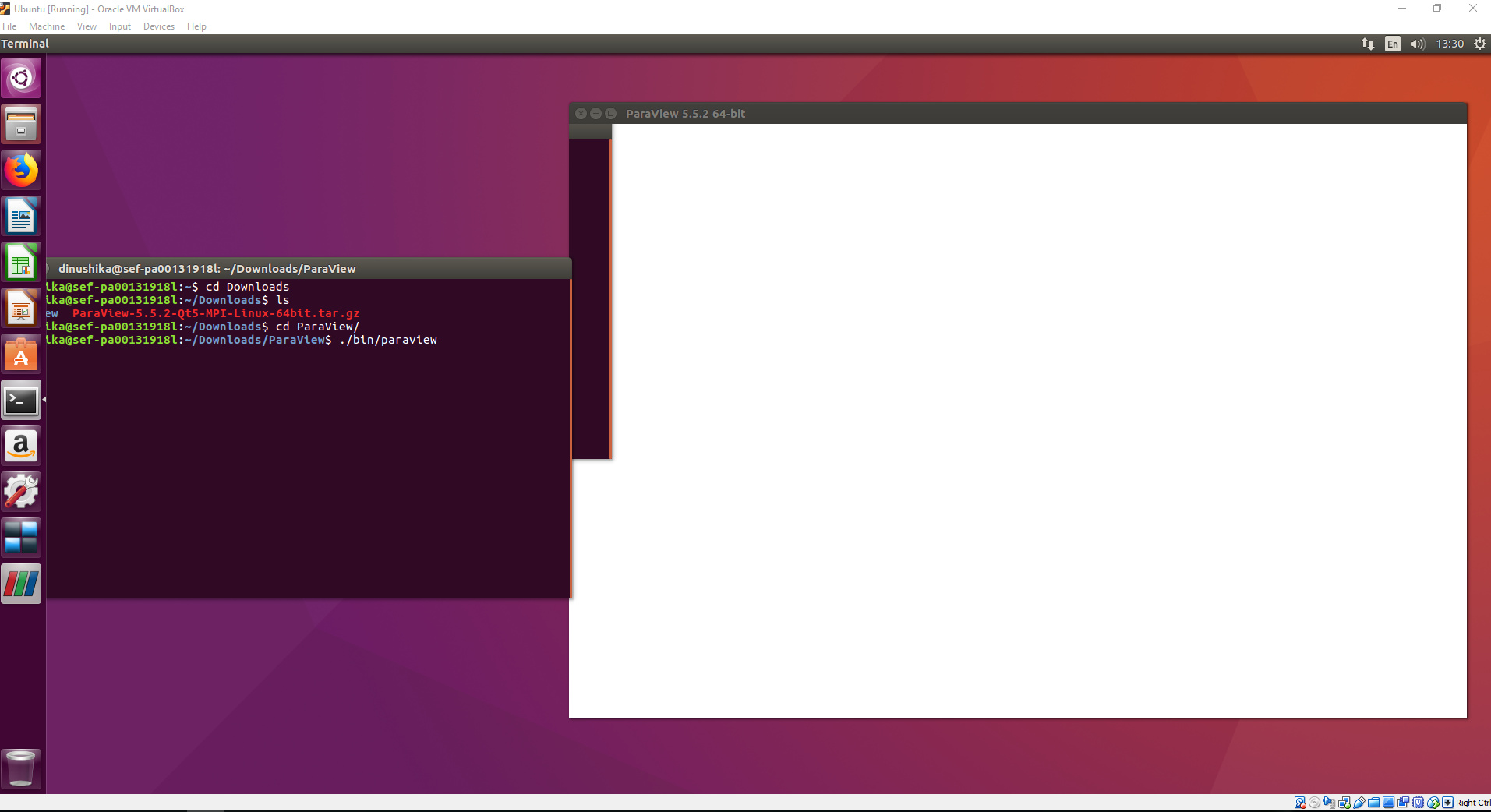
Thank You. I did so. Then this appeared. I can not do anything with it. What is the reason for it?
---
### Author:  [@Dinushika1992](https://discourse.paraview.org/u/Dinushika1992)
#### Post date: [August 23, 2018, 3:40am UTC](https://discourse.paraview.org/t/problem-running-paraview-5-5-2-qt5-on-ubuntu-16-04/330/16 "2018-08-23T03:40:59Z")
I have installed Ubuntu in Virtual Box on windows. some time it says me disk has less space in Ubuntu. I feel like it is the reason for not to work paraview properly in my computer.
---
### Author:  [@Antech](https://discourse.paraview.org/u/Antech)
#### Post date: [August 23, 2018, 6:39am UTC](https://discourse.paraview.org/t/problem-running-paraview-5-5-2-qt5-on-ubuntu-16-04/330/17 "2018-08-23T06:39:56Z")
Hello. Things like this may happen due to graphics drivers compatibility problems. I used/use ParaView with Ubuntu 12, Ubuntu 14, Centos 6.5, Windows 7 and even with CentOS 6.2 + VNC Viewer a little. ParaView versions are 4.3…5.x (don’t remember exactly, actual version for beginning of 2018). Graphics are some old AMD card (Ubuntu 12), nVidia 1060 (Kubuntu 14 + ParaView 4.3…5.x), some nVidia Quadro (Windows 7 + FreeRDP + ParaView 4.3…5.2), software rendering (CentOS 6.2 + VNC Viewer). I never used special options for software rendering on these systems and never encounter graphics compatibility issues until now, but, generally, these issues happen to many users. So you may try another Ubuntu distribution or flavour (Ubuntu/Kubuntu), another ParaView version (if it’s not crucial for you, give a try to ParaView 5.2) or another graphics driver/card if possible.
---
### Author:  [@Dinushika1992](https://discourse.paraview.org/u/Dinushika1992)
#### Post date: [August 23, 2018, 6:46am UTC](https://discourse.paraview.org/t/problem-running-paraview-5-5-2-qt5-on-ubuntu-16-04/330/18 "2018-08-23T06:46:26Z")
Thank you very much Andrew. I’ll try as you suggested. Thanks again.
---
### Author:  [@shawn.waldon](https://discourse.paraview.org/u/shawn.waldon)
#### Post date: [August 23, 2018, 1:30pm UTC](https://discourse.paraview.org/t/problem-running-paraview-5-5-2-qt5-on-ubuntu-16-04/330/19 "2018-08-23T13:30:32Z")
You should try `./bin/paraview --mesa`. Unless VirtualBox has made significant improvements I haven’t heard about, your VirtualBox graphics drivers don’t support the OpenGL version that ParaView needs. This option will force ParaView to use the bundled version of the Mesa software graphics stack instead.
---
### Author:  [@Dinushika1992](https://discourse.paraview.org/u/Dinushika1992)
#### Post date: [August 24, 2018, 1:03am UTC](https://discourse.paraview.org/t/problem-running-paraview-5-5-2-qt5-on-ubuntu-16-04/330/20 "2018-08-24T01:03:25Z")
Thank you very much Shawn. It worked. 😀 Thanks everyone for the help.
[Next page](https://discourse.paraview.org/t/problem-running-paraview-5-5-2-qt5-on-ubuntu-16-04/330.md?page=2)