# Problem with clip in Paraview 5.8.0
**URL:** https://discourse.paraview.org/t/problem-with-clip-in-paraview-5-8-0/5371
**Category:** ParaView Support
**Tags:** python
**Created:** [September 17, 2020, 9:51am UTC](https://discourse.paraview.org/t/problem-with-clip-in-paraview-5-8-0/5371 "2020-09-17T09:51:50Z")
**Posts on this page:** 12
**Page:** 1
### Author:  [@Naeeme.dmo](https://discourse.paraview.org/u/Naeeme.dmo)
#### Post date: [September 17, 2020, 9:51am UTC](https://discourse.paraview.org/t/problem-with-clip-in-paraview-5-8-0/5371/1 "2020-09-17T09:51:50Z")
Hi,
I have a script with a simple clip “Box” definition in pvpython which works fine on paraview 5.5. I have written compatibility commands on top of my script as defined below:
paraview.compatibility.major = 5
paraview.compatibility.minor = 5
The scripts works fine for paraview 5.6, too. When I use paraview 5.8.0, it runs with no error but produces no results.
The reason for it is that I have defined “.Bounds” attribute for my clip, which somehow does not work on this version of paraview. If for any reason I change the size of my bounding box array, I would get an error that it needs to have 6 entries, which makes me think paraview reads the bounds array correctly. But after reading, it does not apply it. When I checked the file in interactive mode on Paraview, I see that the clip definition is completely wrong. I changed the bounds to .Position+.Length definitions, and the script works perfectly.
I thought by defining compatibility commands on top of my python scripts, It would be possible to use them for newer versions of paraview. Am I missing out on something or is this a bug in this version (5.8) ?
Cheers,
Naeeme
---
### Author:  [@mwestphal](https://discourse.paraview.org/u/mwestphal)
#### Post date: [September 17, 2020, 11:48am UTC](https://discourse.paraview.org/t/problem-with-clip-in-paraview-5-8-0/5371/2 "2020-09-17T11:48:11Z")
It may be possible the retro compatibility got broken.
Did you try doing this manually in ParaView and using the trace ?
---
### Author:  [@Naeeme.dmo](https://discourse.paraview.org/u/Naeeme.dmo)
#### Post date: [September 17, 2020, 5:23pm UTC](https://discourse.paraview.org/t/problem-with-clip-in-paraview-5-8-0/5371/3 "2020-09-17T17:23:17Z")
Yes, indeed. But the clip box is somehow broken. It does not have any attribute in the trace and when I click on it the Position is [1e299 1e299 1e299] and the length is [1 1 1].
---
### Author:  [@mwestphal](https://discourse.paraview.org/u/mwestphal)
#### Post date: [September 18, 2020, 7:37am UTC](https://discourse.paraview.org/t/problem-with-clip-in-paraview-5-8-0/5371/4 "2020-09-18T07:37:25Z")
I just tried with 5.8.1 and it works great, I see this in the trace after applying :
```
# Properties modified on clip1.ClipType
clip1.ClipType.Length = [12.523610213744012, 20.0, 20.0]
# update the view to ensure updated data information
renderView1.Update()
```
---
### Author:  [@Naeeme.dmo](https://discourse.paraview.org/u/Naeeme.dmo)
#### Post date: [September 22, 2020, 3:15pm UTC](https://discourse.paraview.org/t/problem-with-clip-in-paraview-5-8-0/5371/5 "2020-09-22T15:15:55Z")
So I tried everything out and I still don’t get the same answer. Unfortunately I cannot share my codes, because they are confidential. As a simple test I wrote this script and ran it with Paraview5.5.0-RC3 and Paraview5.8.1. The result of the later are not correct.
```
#! /usr/bin/env python
import sys, math, time, os
paraview.compatibility.major = 5
paraview.compatibility.minor = 5
paraview.simple._DisableFirstRenderCameraReset()
case = Box()
RenderView = GetActiveViewOrCreate('RenderView')
ClipDef = Clip(Input=case, ClipType = 'Box')
ClipDef.ClipType.Position= [0.0, 0.0, 0.0]
ClipDef.ClipType.Bounds = [-100.,0.,-100.,100.,-100.,100.]
clippedcase = ClipDef
caseDisplay = GetDisplayProperties(clippedcase, view=RenderView) #Show Data in View
```
In my other codes, I also wrote out the trace for both paraview versions. And I see that the one for Paraview 5.8.1 is not correct. However, I can not explain why the definitions end up being interpreted so differently. I share with you the part of the trace related to the clipping. Please note that the input for both runs are identical. The only different is in python scripts: the later has python version 3.7 instead of 2.7 and has compatibility commands defined on top of all the files.
**Paraview.5.5.0-RC3 (correct results):**
```
clip1 = Clip(Input=groupDatasets1)
clip1.ClipType = 'Box'
clip1.Scalars = [None, '']
clip2 = Clip(Input=groupDatasets2)
clip2.ClipType = 'Box'
clip2.Scalars = [None, '']
clip2Display = Show(clip2, renderView1)
clip2Display.Representation = 'Surface'
clip2Display.ColorArrayName = [None, '']
clip2Display.DiffuseColor = [0.0, 0.0, 0.0]
clip2Display.BackfaceDiffuseColor = [0.0, 0.0, 0.0]
clip2Display.OSPRayScaleArray = 'VelocityP'
clip2Display.OSPRayScaleFunction = 'PiecewiseFunction'
clip2Display.SelectOrientationVectors = 'None'
clip2Display.ScaleFactor = 4.352999877929688
clip2Display.SelectScaleArray = 'None'
clip2Display.GlyphType = 'Arrow'
clip2Display.GlyphTableIndexArray = 'None'
clip2Display.GaussianRadius = 0.21764999389648437
clip2Display.SetScaleArray = ['POINTS', 'VelocityP']
clip2Display.ScaleTransferFunction = 'PiecewiseFunction'
clip2Display.OpacityArray = ['POINTS', 'VelocityP']
clip2Display.OpacityTransferFunction = 'PiecewiseFunction'
clip2Display.DataAxesGrid = 'GridAxesRepresentation'
clip2Display.SelectionCellLabelFontFile = ''
clip2Display.SelectionPointLabelFontFile = ''
clip2Display.PolarAxes = 'PolarAxesRepresentation'
clip2Display.ScalarOpacityUnitDistance = 0.23948920075608798
clip2Display.ScaleTransferFunction.Points = [-38.81049346923828, 0.0, 0.5, 0.0, 47.40387725830078, 1.0, 0.5, 0.0]
clip2Display.OpacityTransferFunction.Points = [-38.81049346923828, 0.0, 0.5, 0.0, 47.40387725830078, 1.0, 0.5, 0.0]
clip2Display.DataAxesGrid.XTitleFontFile = ''
clip2Display.DataAxesGrid.YTitleFontFile = ''
clip2Display.DataAxesGrid.ZTitleFontFile = ''
clip2Display.DataAxesGrid.XLabelFontFile = ''
clip2Display.DataAxesGrid.YLabelFontFile = ''
clip2Display.DataAxesGrid.ZLabelFontFile = ''
clip2Display.PolarAxes.PolarAxisTitleFontFile = ''
clip2Display.PolarAxes.PolarAxisLabelFontFile = ''
clip2Display.PolarAxes.LastRadialAxisTextFontFile = ''
clip2Display.PolarAxes.SecondaryRadialAxesTextFontFile = ''
```
**Paraview-5.8.1 (wrong results):**
```
clip1 = Clip(Input=groupDatasets1)
clip1.ClipType = 'Box'
clip1.HyperTreeGridClipper = 'Plane'
clip1.Scalars = [None, '']
clip1.ClipType.Position = [1e+299, 1e+299, 1e+299]
clip2 = Clip(Input=groupDatasets2)
clip2.ClipType = 'Box'
clip2.HyperTreeGridClipper = 'Plane'
clip2.Scalars = [None, '']
clip2.ClipType.Position = [1e+299, 1e+299, 1e+299]
clip2Display = Show(clip2, renderView1, 'UnstructuredGridRepresentation')
clip2Display.Representation = 'Surface'
clip2Display.ColorArrayName = [None, '']
clip2Display.OSPRayScaleFunction = 'PiecewiseFunction'
clip2Display.SelectOrientationVectors = 'None'
clip2Display.ScaleFactor = -2.0000000000000002e+298
clip2Display.SelectScaleArray = 'None'
clip2Display.GlyphType = 'Arrow'
clip2Display.GlyphTableIndexArray = 'None'
clip2Display.GaussianRadius = -1e+297
clip2Display.SetScaleArray = [None, '']
clip2Display.ScaleTransferFunction = 'PiecewiseFunction'
clip2Display.OpacityArray = [None, '']
clip2Display.OpacityTransferFunction = 'PiecewiseFunction'
clip2Display.DataAxesGrid = 'GridAxesRepresentation'
clip2Display.PolarAxes = 'PolarAxesRepresentation'
clip2Display.ExtractedBlockIndex = 2
clip2Display.OSPRayScaleFunction.Points = [0.0, 0.0, 0.5, 0.0, 21.0, 1.0, 0.5, 0.0]
```
Could you elaborate what the reason for these differences are?
Thank you very much for your support
---
### Author:  [@Naeeme.dmo](https://discourse.paraview.org/u/Naeeme.dmo)
#### Post date: [September 22, 2020, 3:23pm UTC](https://discourse.paraview.org/t/problem-with-clip-in-paraview-5-8-0/5371/6 "2020-09-22T15:23:25Z")
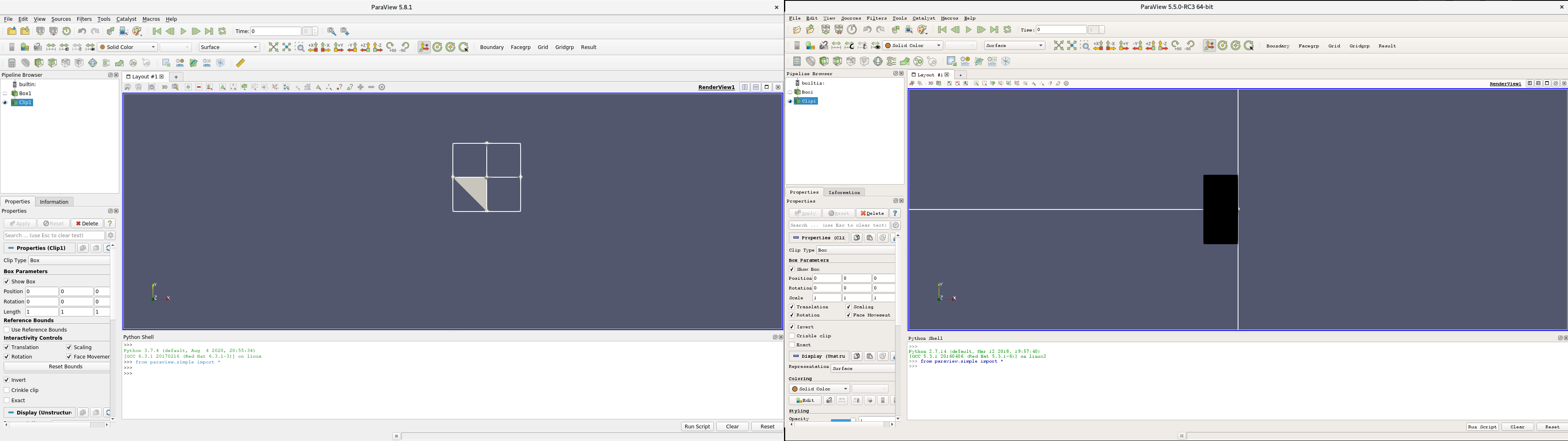
sorry, I forgot to post the result of the simple clip on the box.
Left: Paraview5.8.1 right: 5.5.0-RC3
---
### Author:  [@mwestphal](https://discourse.paraview.org/u/mwestphal)
#### Post date: [September 23, 2020, 11:16am UTC](https://discourse.paraview.org/t/problem-with-clip-in-paraview-5-8-0/5371/7 "2020-09-23T11:16:18Z")
I’m confused, can you try to reproduce your issue with a simple test, as I tried to do ?
---
### Author:  [@Naeeme.dmo](https://discourse.paraview.org/u/Naeeme.dmo)
#### Post date: [September 23, 2020, 3:24pm UTC](https://discourse.paraview.org/t/problem-with-clip-in-paraview-5-8-0/5371/8 "2020-09-23T15:24:37Z")
Sorry for the confusion.
So I ran this code on both versions of paraview (5.5.0 and 5.8.1):
```auto
paraview.compatibility.major = 5
paraview.compatibility.minor = 5
box = Box()
clip = Clip(Input=box, ClipType = 'Box')
clip.ClipType.Position= [0.0, 0.0, 0.0]
clip.ClipType.Bounds = [-1.,0.,-1.,1.,-1.,1.]
RenderView = GetActiveViewOrCreate('RenderView')
boxdisplay = GetDisplayProperties(clip, view=RenderView)
```
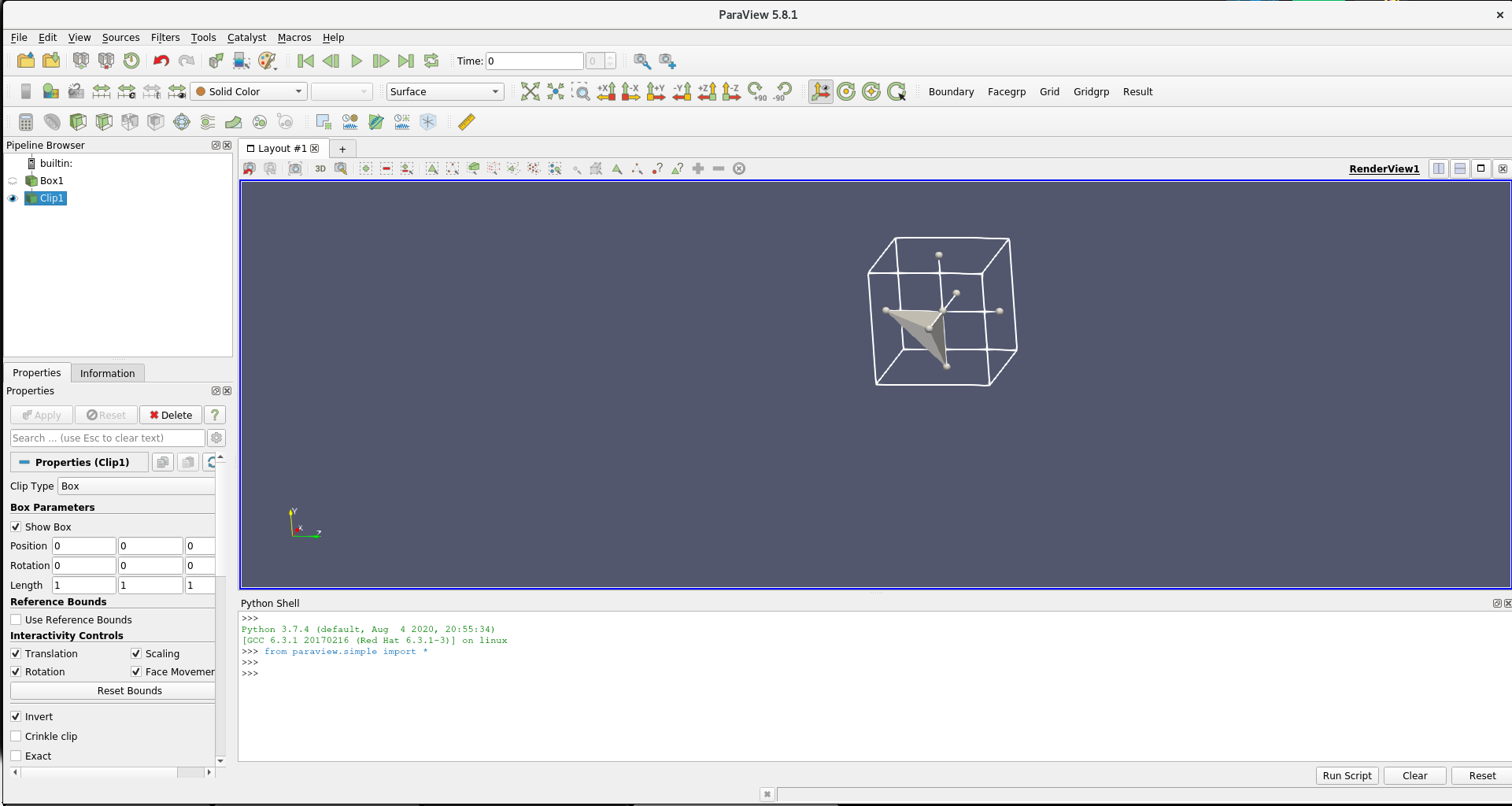
The code is supposed to make a zero centered unit cube and clip it on the yz axis.
The code works fine with paraview 5.5.0, I get the expected result, i.e half a box.
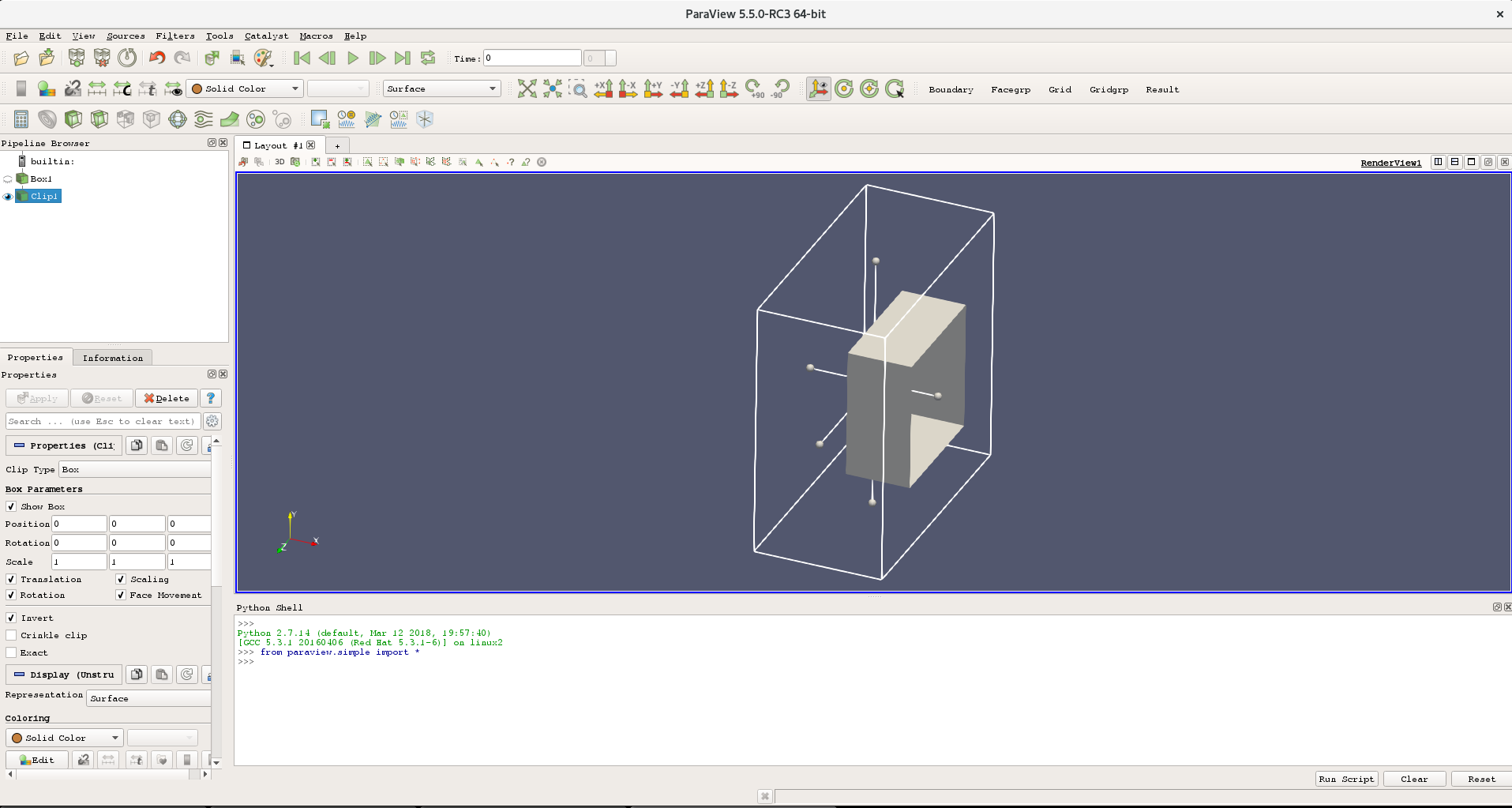
Whereas for paraview 5.8.1, the clip somehow cuts of a corner of the cube, which makes no sense to me, see the following screenshot
**steps to reproduce**
- open paraview gui
- click View \> Python shell
- paste the code in the Python shell
- Press Enter
I am working on centos 8. I have paraview 5.5.0 (binaries) and paraview 5.8.1 (binaries). I load the different versions through a module management system.
Thanks for your help.
---
### Author:  [@Naeeme.dmo](https://discourse.paraview.org/u/Naeeme.dmo)
#### Post date: [September 23, 2020, 5:47pm UTC](https://discourse.paraview.org/t/problem-with-clip-in-paraview-5-8-0/5371/9 "2020-09-23T17:47:05Z")
I think there is a bug in backwards compatibility.
when I add the following line in the code, it works fine for paraview version 5.8.1:
```auto
clip.ClipType.UseReferenceBounds = 1
```
So it seems like it has to be manually enabled. Unfortunately, this attribute does not exist in paraview-5.5.0. So I was not able to write a backward compatible script.
**Observed behavior (Paraview 5.8.1)**
Setting attribute ClipType.Bounds results in unexpected clip.
**Expected behavior**
Setting the attribute ClipType.Bounds automatically sets .UseReferenceBounds to true, which would result in a correct clip.
---
### Author:  [@mwestphal](https://discourse.paraview.org/u/mwestphal)
#### Post date: [September 24, 2020, 12:44pm UTC](https://discourse.paraview.org/t/problem-with-clip-in-paraview-5-8-0/5371/10 "2020-09-24T12:44:04Z")
FYI : @cory.quammen
---
### Author:  [@mwestphal](https://discourse.paraview.org/u/mwestphal)
#### Post date: [September 28, 2020, 1:31pm UTC](https://discourse.paraview.org/t/problem-with-clip-in-paraview-5-8-0/5371/11 "2020-09-28T13:31:37Z")
@Naeeme.dmo: You may want to open an issue : [https://gitlab.kitware.com/paraview/paraview/-/issues](https://gitlab.kitware.com/paraview/paraview/-/issues)
---
### Author:  [@Naeeme.dmo](https://discourse.paraview.org/u/Naeeme.dmo)
#### Post date: [September 29, 2020, 11:37am UTC](https://discourse.paraview.org/t/problem-with-clip-in-paraview-5-8-0/5371/12 "2020-09-29T11:37:11Z")
Ok, i did it:
[https://gitlab.kitware.com/paraview/paraview/-/issues/20237](https://gitlab.kitware.com/paraview/paraview/-/issues/20237)