# Problem with Surface LIC and UseLight = 0 =\> wrong image
**URL:** https://discourse.paraview.org/t/problem-with-surface-lic-and-uselight-0-wrong-image/14255
**Category:** ParaView Support
**Created:** [March 25, 2024, 9:22am UTC](https://discourse.paraview.org/t/problem-with-surface-lic-and-uselight-0-wrong-image/14255 "2024-03-25T09:22:22Z")
**Posts on this page:** 3
**Page:** 1
### Author:  [@Frank](https://discourse.paraview.org/u/Frank)
#### Post date: [March 25, 2024, 9:22am UTC](https://discourse.paraview.org/t/problem-with-surface-lic-and-uselight-0-wrong-image/14255/1 "2024-03-25T09:22:22Z")
I’m trying to generate an image with Surface LIC on a slice. When I use
**renderView1.UseLight = 0** the **Surface LIC** is **incorrect**.
with
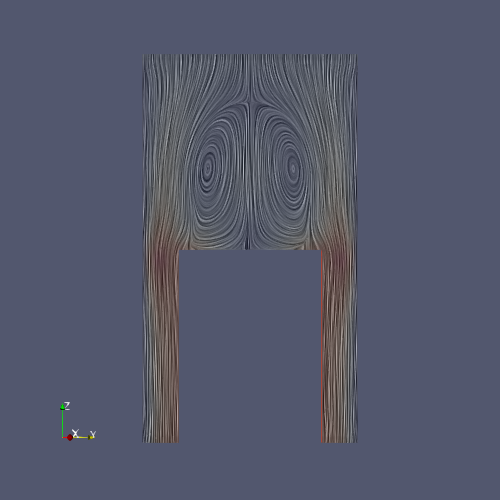
**renderView1.UseLight = 1** everything is **fine**.
Correct Image using UseLight = 1
Wrong Image using UseLight = 0
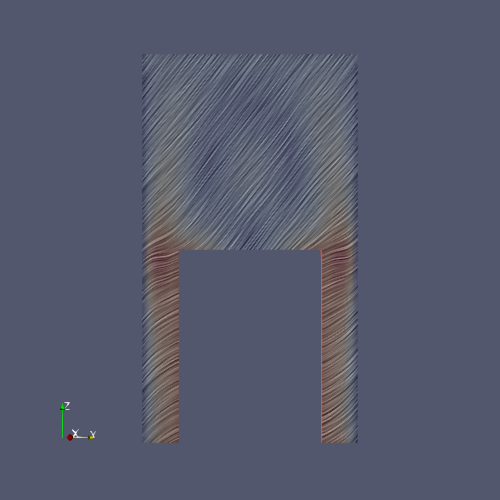
What am I doing wrong?
Here the code with disk\_out\_ref.ex2 out of the tutorial data…
I run the python code with pvbatch…
```auto
# state file generated using paraview version 5.12.0
import paraview
paraview.compatibility.major = 5
paraview.compatibility.minor = 12
from paraview.simple import *
paraview.simple._DisableFirstRenderCameraReset()
materialLibrary1 = GetMaterialLibrary()
renderView1 = CreateView('RenderView')
renderView1.ViewSize = [500, 500]
renderView1.AxesGrid = 'GridAxes3DActor'
renderView1.CenterOfRotation = [0.0, 0.0, 0.0]
renderView1.StereoType = 'Crystal Eyes'
renderView1.CameraPosition = [40., -10., 0.0]
renderView1.CameraFocalPoint = [0.0, 0.0, 0.0]
renderView1.CameraViewUp = [0.0, 0.0, 1.]
renderView1.CameraFocalDisk = 1.0
renderView1.CameraParallelScale = 12.951115722667065
renderView1.CameraParallelProjection = 1
renderView1.Background = [0.32, 0.34, 0.43]
renderView1.BackEnd = 'OSPRay raycaster'
renderView1.OSPRayMaterialLibrary = materialLibrary1
SetActiveView(None)
layout1 = CreateLayout(name='Layout #1')
layout1.AssignView(0, renderView1)
layout1.SetSize(500, 500)
SetActiveView(renderView1)
# Load Data out of
# https://www.paraview.org/Wiki/images/5/5d/ParaViewTutorialData.tar.gz
disk_out_refex2 = IOSSReader(registrationName='disk_out_ref.ex2', FileName=['disk_out_ref.ex2'])
disk_out_refex2.ElementBlocks = ['block_1']
disk_out_refex2.NodeBlockFields = ['V']
vTF2D = GetTransferFunction2D('V')
vLUT = GetColorTransferFunction('V')
vLUT.TransferFunction2D = vTF2D
vLUT.RGBPoints = [0.0, 0.231373, 0.298039, 0.752941, 11.209410083552676, 0.865003, 0.865003, 0.865003, 22.418820167105352, 0.705882, 0.0156863, 0.14902]
vLUT.ScalarRangeInitialized = 1.0
vPWF = GetOpacityTransferFunction('V')
vPWF.Points = [0.0, 0.0, 0.5, 0.0, 20.0, 1.0, 0.5, 0.0]
vPWF.ScalarRangeInitialized = 1
# create a new 'Slice'
slice1 = Slice(registrationName='Slice1', Input=disk_out_refex2)
slice1.SliceType = 'Plane'
slice1.HyperTreeGridSlicer = 'Plane'
slice1.SliceOffsetValues = [0.0]
slice1.SliceType.Origin = [0.0, 0.0, 0.0]
slice1.HyperTreeGridSlicer.Origin = [0.0, 0.0, 0.0]
# show data from slice1
slice1Display = Show(slice1, renderView1, 'GeometryRepresentation')
slice1Display.Representation = 'Surface LIC' # without Surface LIC everything is ok
slice1Display.ColorArrayName = ['POINTS', 'V']
slice1Display.LookupTable = vLUT
SetActiveSource(slice1)
# save screenshot
renderView1.UseLight = 1 #"Surface LIC" is ok
SaveScreenshot('test_UseLight1.png', renderView1, ImageResolution=[500, 500])
renderView1.UseLight = 0 #produces wrong image for "Surface LIC"
SaveScreenshot('test_UseLight0.png', renderView1, ImageResolution=[500, 500])
if __name__ == ' __main__':
# generate extracts
SaveExtracts(ExtractsOutputDirectory='extracts')
```
I tried it with Paraview 5.9, 5.11 and 5.12 which I download from [https://www.paraview.org/download/](https://www.paraview.org/download/) for example ParaView-5.12.0-MPI-Linux-Python3.10-x86\_64.tar.gz
I run it on different Linux machines (Rocky Linux).
The Image with UseLight = 0 differs on the machines, but is always wrong. The UseLight = 0 version is correct all the time…
I would appreciate if you could help me
Thanks,
Frank
---
### Author:  [@mwestphal](https://discourse.paraview.org/u/mwestphal)
#### Post date: [March 25, 2024, 11:32am UTC](https://discourse.paraview.org/t/problem-with-surface-lic-and-uselight-0-wrong-image/14255/2 "2024-03-25T11:32:34Z")
I confirm the behavior, please open an issue: [https://gitlab.kitware.com/paraview/paraview/-/issues](https://gitlab.kitware.com/paraview/paraview/-/issues)
---
### Author:  [@Frank](https://discourse.paraview.org/u/Frank)
#### Post date: [March 25, 2024, 12:02pm UTC](https://discourse.paraview.org/t/problem-with-surface-lic-and-uselight-0-wrong-image/14255/3 "2024-03-25T12:02:31Z")
Thanks a lot. I opened an issue:
[https://gitlab.kitware.com/paraview/paraview/-/issues/22541](https://gitlab.kitware.com/paraview/paraview/-/issues/22541)