# PV5.9.1: Rendering Artefacts, Win10, GTX1650
**URL:** https://discourse.paraview.org/t/pv5-9-1-rendering-artefacts-win10-gtx1650/8567
**Category:** ParaView Support
**Created:** [December 6, 2021, 5:06am UTC](https://discourse.paraview.org/t/pv5-9-1-rendering-artefacts-win10-gtx1650/8567 "2021-12-06T05:06:36Z")
**Posts on this page:** 8
**Page:** 1
### Author:  [@cfd\_payne](https://discourse.paraview.org/u/cfd_payne)
#### Post date: [December 6, 2021, 5:06am UTC](https://discourse.paraview.org/t/pv5-9-1-rendering-artefacts-win10-gtx1650/8567/1 "2021-12-06T05:06:36Z")
While trying to interact [rotate,pan ,zoom]with dormant \*.paraview state files opened after a while [few days,hrs] leads to the below :-
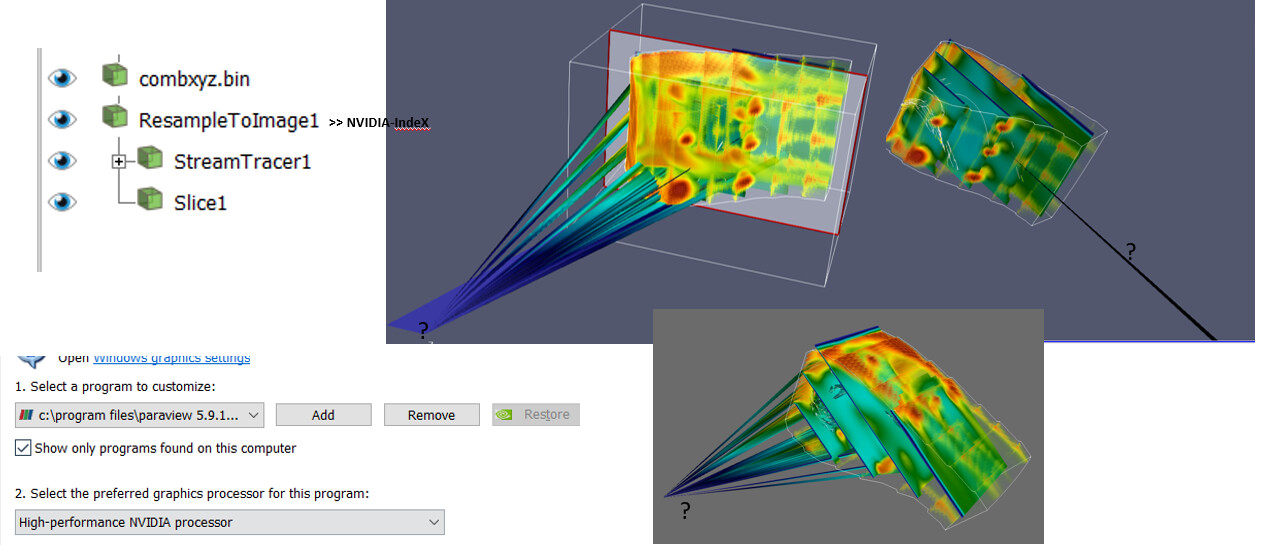
- Test Set : Comb.xyz, Comb.q [combxyz\_artefacts1.pvsm](https://discourse.paraview.org/uploads/short-url/z1LIkoXmpPCvhTTR8viphnmQ12B.pvsm) (840.1 KB)
point the file to appropriate \*.xyz,bin::[say] %userprofile%vtk/VTKData/Data/combq.bin
- PVersion: 5.9.1
- PS : certain filter uses NVIDIAIndeX, Paraview has been set to the HighPerf Nvidia Proc. Mode
Client Information:
Version: 5.9.1
VTK Version:
Qt Version: 5.15.1
vtkIdType size: 64bits
Embedded Python: On
Python Library Path: C:\Program Files\ParaView 5.9.1-MPI-Windows-Python3.8-msvc2017-64bit\bin\lib
Python Library Version: 3.8.6 (tags/v3.8.6:db45529, Sep 23 2020, 15:52:53) [MSC v.1927 64 bit (AMD64)]
Python Numpy Support: On
Python Numpy Path: C:\Program Files\ParaView 5.9.1-MPI-Windows-Python3.8-msvc2017-64bit\bin\Lib\site-packages\numpy
Python Numpy Version: 1.19.2
Python Matplotlib Support: On
Python Matplotlib Path: C:\Program Files\ParaView 5.9.1-MPI-Windows-Python3.8-msvc2017-64bit\bin\Lib\site-packages\matplotlib
Python Matplotlib Version: 3.2.1
Python Testing: Off
MPI Enabled: On
Disable Registry: Off
Test Directory:
Data Directory:
OpenGL Vendor: NVIDIA Corporation
OpenGL Version: 3.2.0 NVIDIA 471.41
OpenGL Renderer: NVIDIA GeForce GTX 1650/PCIe/SSE2
Connection Information:
Remote Connection: No
---
### Author:  [@mwestphal](https://discourse.paraview.org/u/mwestphal)
#### Post date: [December 7, 2021, 12:29pm UTC](https://discourse.paraview.org/t/pv5-9-1-rendering-artefacts-win10-gtx1650/8567/2 "2021-12-07T12:29:22Z")
Make sure you do not have any exotic drivers installed on your machine.
---
### Author:  [@cfd\_payne](https://discourse.paraview.org/u/cfd_payne)
#### Post date: [December 7, 2021, 1:18pm UTC](https://discourse.paraview.org/t/pv5-9-1-rendering-artefacts-win10-gtx1650/8567/3 "2021-12-07T13:18:42Z")
@mwestphal , it’s happening only if the ribbon filter of the stream tracer is activated.
Is there a way the conflicting drivers can be nailed ? How do we check !
---
### Author:  [@mwestphal](https://discourse.paraview.org/u/mwestphal)
#### Post date: [December 7, 2021, 1:23pm UTC](https://discourse.paraview.org/t/pv5-9-1-rendering-artefacts-win10-gtx1650/8567/4 "2021-12-07T13:23:59Z")
Can you reproduce on another computer or only on one computer ?
---
### Author:  [@cfd\_payne](https://discourse.paraview.org/u/cfd_payne)
#### Post date: [December 8, 2021, 8:41am UTC](https://discourse.paraview.org/t/pv5-9-1-rendering-artefacts-win10-gtx1650/8567/5 "2021-12-08T08:41:35Z")
Tried on a machine, with bare metal OS installed, with no exotic drivers.
There was some **nvindex** warning for non matching CUDA version due to old graphics driver update it to 10.2 as per warning.
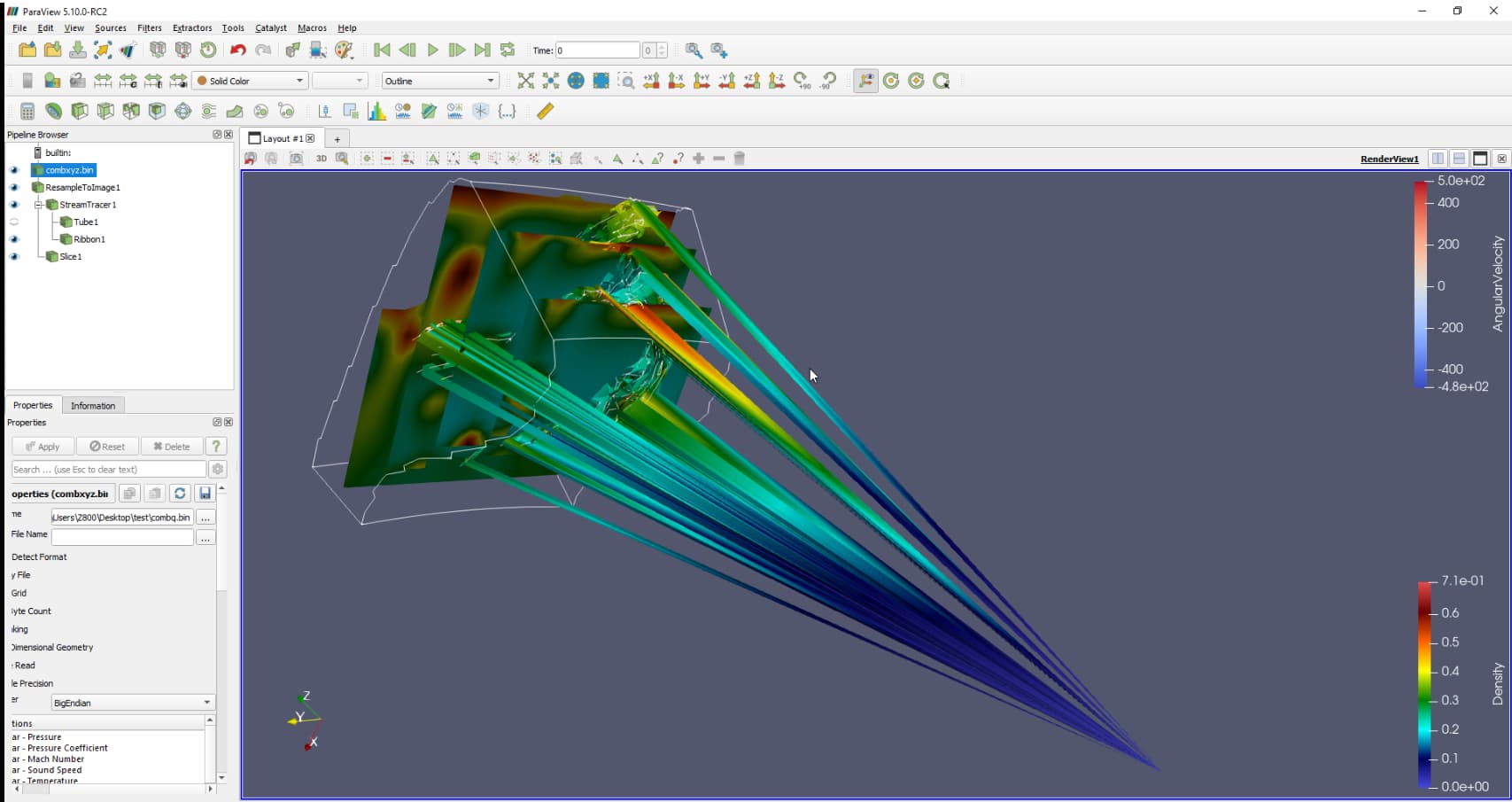
is this issue replicated at your end ?
---
### Author:  [@mwestphal](https://discourse.paraview.org/u/mwestphal)
#### Post date: [December 8, 2021, 8:57am UTC](https://discourse.paraview.org/t/pv5-9-1-rendering-artefacts-win10-gtx1650/8567/6 "2021-12-08T08:57:27Z")
> is this issue replicated at your end ?
Not yet, please share precise steps to reproduce the issue.
---
### Author:  [@cfd\_payne](https://discourse.paraview.org/u/cfd_payne)
#### Post date: [December 8, 2021, 9:14am UTC](https://discourse.paraview.org/t/pv5-9-1-rendering-artefacts-win10-gtx1650/8567/7 "2021-12-08T09:14:22Z")
**Steps** :
- Load PVSM, point to comb\*.xyz,\*.q
- Switch on the Ribbon within Stream\_Tracer
Interact with the model [rotate, zoom, pan].
---
### Author:  [@cfd\_payne](https://discourse.paraview.org/u/cfd_payne)
#### Post date: [December 8, 2021, 9:45am UTC](https://discourse.paraview.org/t/pv5-9-1-rendering-artefacts-win10-gtx1650/8567/8 "2021-12-08T09:45:03Z")
Tried on a machine that has WSL with Ubuntu20.04, that has openfoam + pv 5.6
similar trends.
