# Python how to generate ghost cells?
**URL:** https://discourse.paraview.org/t/python-how-to-generate-ghost-cells/15383
**Category:** ParaView Support
**Created:** [September 13, 2024, 5:22am UTC](https://discourse.paraview.org/t/python-how-to-generate-ghost-cells/15383 "2024-09-13T05:22:06Z")
**Posts on this page:** 8
**Page:** 1
### Author:  [@CathyX](https://discourse.paraview.org/u/CathyX)
#### Post date: [September 13, 2024, 5:22am UTC](https://discourse.paraview.org/t/python-how-to-generate-ghost-cells/15383/1 "2024-09-13T05:22:06Z")
[https://gitlab.kitware.com/vtk/vtk/-/blob/v9.3.0/Filters/ParallelDIY2/Testing/Cxx/TestGhostCellsGenerator.cxx](https://gitlab.kitware.com/vtk/vtk/-/blob/v9.3.0/Filters/ParallelDIY2/Testing/Cxx/TestGhostCellsGenerator.cxx)
I noticed there is a C++ test code for vtkGhostCellsGenerator.h but it is in C++
wondering is there a matching Python SPI?
BTW, I am creating an overlappingAMR vth with all vti (ImageData). But there are gaps between each block. That’s why thinking is there a convenient Python way to generate Ghost cells to fill in those gaps?
Attached screenshot along with vth and vti files.
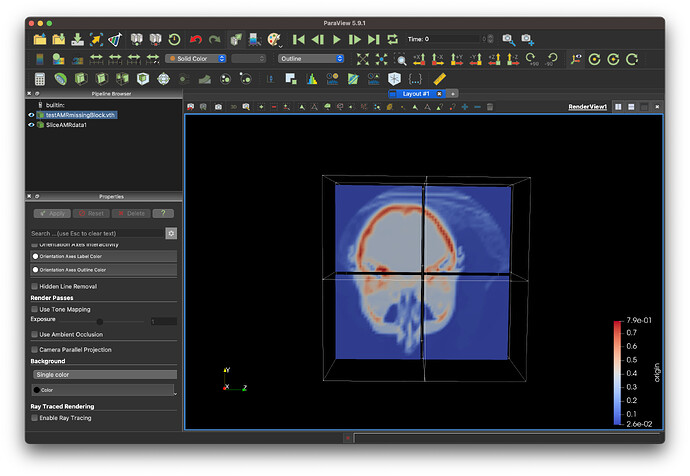
[TestAMR.zip](https://discourse.paraview.org/uploads/short-url/dyxP68o0g5mDWZmfG12Q8vJTjfT.zip) (463.0 KB)
---
### Author:  [@spyridon97](https://discourse.paraview.org/u/spyridon97)
#### Post date: [September 13, 2024, 5:24pm UTC](https://discourse.paraview.org/t/python-how-to-generate-ghost-cells/15383/2 "2024-09-13T17:24:24Z")
```auto
# trace generated using paraview version 5.13.0
#import paraview
#paraview.compatibility.major = 5
#paraview.compatibility.minor = 13
#### import the simple module from the paraview
from paraview.simple import *
#### disable automatic camera reset on 'Show'
paraview.simple._DisableFirstRenderCameraReset()
# create a new 'Sphere'
sphere1 = Sphere(registrationName='Sphere1')
# get active view
renderView1 = GetActiveViewOrCreate('RenderView')
# show data in view
sphere1Display = Show(sphere1, renderView1, 'GeometryRepresentation')
# trace defaults for the display properties.
sphere1Display.Representation = 'Surface'
# reset view to fit data
renderView1.ResetCamera(False, 0.9)
# get the material library
materialLibrary1 = GetMaterialLibrary()
# update the view to ensure updated data information
renderView1.Update()
# create a new 'Ghost Cells Generator'
ghostCells1 = GhostCells(registrationName='GhostCells1', Input=sphere1)
# show data in view
ghostCells1Display = Show(ghostCells1, renderView1, 'GeometryRepresentation')
# trace defaults for the display properties.
ghostCells1Display.Representation = 'Surface'
# hide data in view
Hide(sphere1, renderView1)
# update the view to ensure updated data information
renderView1.Update()
#================================================================
# addendum: following script captures some of the application
# state to faithfully reproduce the visualization during playback
#================================================================
# get layout
layout1 = GetLayout()
#--------------------------------
# saving layout sizes for layouts
# layout/tab size in pixels
layout1.SetSize(3132, 888)
#-----------------------------------
# saving camera placements for views
# current camera placement for renderView1
renderView1.CameraPosition = [0.0, 0.0, 3.2903743041222895]
renderView1.CameraParallelScale = 0.8516115354228021
##--------------------------------------------
## You may need to add some code at the end of this python script depending on your usage, eg:
#
## Render all views to see them appears
# RenderAllViews()
#
## Interact with the view, usefull when running from pvpython
# Interact()
#
## Save a screenshot of the active view
# SaveScreenshot("path/to/screenshot.png")
#
## Save a screenshot of a layout (multiple splitted view)
# SaveScreenshot("path/to/screenshot.png", GetLayout())
#
## Save all "Extractors" from the pipeline browser
# SaveExtracts()
#
## Save a animation of the current active view
# SaveAnimation()
#
## Please refer to the documentation of paraview.simple
## https://kitware.github.io/paraview-docs/latest/python/paraview.simple.html
##--------------------------------------------
```
---
### Author:  [@cory.quammen](https://discourse.paraview.org/u/cory.quammen)
#### Post date: [September 13, 2024, 9:30pm UTC](https://discourse.paraview.org/t/python-how-to-generate-ghost-cells/15383/3 "2024-09-13T21:30:10Z")
Spiros’ example here shows that you can create a **GhostCells** filter in ParaView’s Python scripting layer. ParaView’s Python scripting ultimately lets you use the code in `vtkGhostCellsGenerator.h/.cxx`.
---
### Author:  [@CathyX](https://discourse.paraview.org/u/CathyX)
#### Post date: [September 15, 2024, 3:45am UTC](https://discourse.paraview.org/t/python-how-to-generate-ghost-cells/15383/4 "2024-09-15T03:45:37Z")
Thank you both!!!
I see there is paraview filter can do the work.
But I hit many problems of Python ParaView package install.
Is there any specific guidance for MacOS to install ParaView Python package?
---
### Author:  [@CathyX](https://discourse.paraview.org/u/CathyX)
#### Post date: [September 15, 2024, 7:02am UTC](https://discourse.paraview.org/t/python-how-to-generate-ghost-cells/15383/5 "2024-09-15T07:02:09Z")
Am I able to write both data and ghost cells to vti(imageData) file?
(only noticed _CreateWriter(“/…/vti”, reader)_ write from a reader.)
Another question, is this right? read a vti file as the Sphere, then generate ghost cells,
reader = OpenDataFile(‘…/xxx.vti’)
ghostCells = GhostCells(registrationName=‘GhostCells’, Input=reader)
Then it comes to the same problem above, I want both data and ghost to be saved to another file.
---
### Author:  [@cory.quammen](https://discourse.paraview.org/u/cory.quammen)
#### Post date: [September 16, 2024, 1:47am UTC](https://discourse.paraview.org/t/python-how-to-generate-ghost-cells/15383/6 "2024-09-16T01:47:53Z")
> [@CathyX](#):
>
> Is there any specific guidance for MacOS to install ParaView Python package?
Are you trying to use the Python installation that comes with ParaView? That should just work from pvpython or in the Python Console within ParaView. Or are you trying to use a system Python and set it up to provide access to the ParaView Python modules?
---
### Author:  [@cory.quammen](https://discourse.paraview.org/u/cory.quammen)
#### Post date: [September 16, 2024, 1:50am UTC](https://discourse.paraview.org/t/python-how-to-generate-ghost-cells/15383/7 "2024-09-16T01:50:45Z")
> [@CathyX](#):
>
> Another question, is this right? read a vti file as the Sphere, then generate ghost cells,
> reader = OpenDataFile(‘…/xxx.vti’)
> ghostCells = GhostCells(registrationName=‘GhostCells’, Input=reader)
Yes, that looks fine.
> [@CathyX](#):
>
> Then it comes to the same problem above, I want both data and ghost to be saved to another file.
Use the following Python to save to another file
```python
SaveData('/path/to/data/filename.vti', proxy=ghostCells)
```
---
### Author:  [@CathyX](https://discourse.paraview.org/u/CathyX)
#### Post date: [September 16, 2024, 5:35am UTC](https://discourse.paraview.org/t/python-how-to-generate-ghost-cells/15383/8 "2024-09-16T05:35:52Z")
Yes, system wise, I want to directly import paraview.simple module to my code.
Run pvpython with my code from terminal, it is slow and I cannot really why SPIs are available directly from editor.