# python script with for loop
**URL:** https://discourse.paraview.org/t/python-script-with-for-loop/15072
**Category:** ParaView Support
**Tags:** python
**Created:** [July 17, 2024, 10:02am UTC](https://discourse.paraview.org/t/python-script-with-for-loop/15072 "2024-07-17T10:02:36Z")
**Posts on this page:** 10
**Page:** 1
### Author:  [@dim14](https://discourse.paraview.org/u/dim14)
#### Post date: [July 17, 2024, 10:02am UTC](https://discourse.paraview.org/t/python-script-with-for-loop/15072/1 "2024-07-17T10:02:36Z")
Hi,
I’m trying to write a short script in order to automate configuration and opening med file in paravis
This script works :
```auto
import pvsimple
pvsimple.ShowParaviewView()
# trace generated using paraview version 5.9.0
#### import the simple module from the paraview
from pvsimple import *
#### disable automatic camera reset on 'Show'
pvsimple._DisableFirstRenderCameraReset()
b = [None]
d = [None]
i = 0
# create a new 'MED Reader'
b.append("bassin/%s" % i)
d.append("bassin/%s" % i + "Display" )
b = MEDReader(registrationName='bassin' + str(i) + '.med', FileName='/media/vesvard211/Crucial X8/resultat_FSI/0.6S/maillage (1)/bassin' + str(i) + '.med')
# get animation scene
animationScene1 = GetAnimationScene()
# update animation scene based on data timesteps
animationScene1.UpdateAnimationUsingDataTimeSteps()
# Properties modified on bassin0med
b.AllArrays = ['TS0/bassin/ComSup0/Velocity@@][@@P0']
# get active view
renderView1 = GetActiveViewOrCreate('RenderView')
# show data in view
d = Show(b, renderView1, 'UnstructuredGridRepresentation')
# trace defaults for the display properties.
d.Representation = 'Surface'
# reset view to fit data
renderView1.ResetCamera()
# get the material library
materialLibrary1 = GetMaterialLibrary()
# update the view to ensure updated data information
renderView1.Update()
# set scalar coloring
ColorBy(d, ('CELLS', 'Velocity', 'Magnitude'))
# rescale color and/or opacity maps used to include current data range
d.RescaleTransferFunctionToDataRange(True, False)
# show color bar/color legend
d.SetScalarBarVisibility(renderView1, True)
# get color transfer function/color map for 'Velocity'
velocityLUT = GetColorTransferFunction('Velocity')
# get opacity transfer function/opacity map for 'Velocity'
velocityPWF = GetOpacityTransferFunction('Velocity')
#### saving camera placements for all active views
# current camera placement for renderView1
renderView1.CameraPosition = [0.12, 0.0, 1.7787239526758387]
renderView1.CameraFocalPoint = [0.12, 0.0, 0.1500000000000064]
renderView1.CameraParallelScale = 0.4215447781671621
```
but when i want to create a loop with this simple change
```auto
for i in range(0 , 2, 30):
```
new script :
```auto
pvsimple.ShowParaviewView()
# trace generated using paraview version 5.9.0
#### import the simple module from the paraview
from pvsimple import *
#### disable automatic camera reset on 'Show'
pvsimple._DisableFirstRenderCameraReset()
b = [None]
d = [None]
for i in range(0 , 2, 30):
# create a new 'MED Reader'
b.append("bassin/%s" % i)
d.append("bassin/%s" % i + "Display" )
b = MEDReader(registrationName='bassin' + str(i) + '.med', FileName='/media/vesvard211/Crucial X8/resultat_FSI/0.6S/maillage (1)/bassin' + str(i) + '.med')
# get animation scene
animationScene1 = GetAnimationScene()
# update animation scene based on data timesteps
animationScene1.UpdateAnimationUsingDataTimeSteps()
# Properties modified on bassin0med
b.AllArrays = ['TS0/bassin/ComSup0/Velocity@@][@@P0']
# get active view
renderView1 = GetActiveViewOrCreate('RenderView')
# show data in view
d = Show(b, renderView1, 'UnstructuredGridRepresentation')
# trace defaults for the display properties.
d.Representation = 'Surface'
# reset view to fit data
renderView1.ResetCamera()
# get the material library
materialLibrary1 = GetMaterialLibrary()
# update the view to ensure updated data information
renderView1.Update()
# set scalar coloring
ColorBy(d, ('CELLS', 'Velocity', 'Magnitude'))
# rescale color and/or opacity maps used to include current data range
d.RescaleTransferFunctionToDataRange(True, False)
# show color bar/color legend
d.SetScalarBarVisibility(renderView1, True)
# get color transfer function/color map for 'Velocity'
velocityLUT = GetColorTransferFunction('Velocity')
# get opacity transfer function/opacity map for 'Velocity'
velocityPWF = GetOpacityTransferFunction('Velocity')
#### saving camera placements for all active views
# current camera placement for renderView1
renderView1.CameraPosition = [0.12, 0.0, 1.7787239526758387]
renderView1.CameraFocalPoint = [0.12, 0.0, 0.1500000000000064]
renderView1.CameraParallelScale = 0.4215447781671621
```
it doesn’t work anymore, i have try with while instruction and it doesn’t work too
If someone can help me it will be great
---
### Author:  [@dim14](https://discourse.paraview.org/u/dim14)
#### Post date: [July 17, 2024, 11:31am UTC](https://discourse.paraview.org/t/python-script-with-for-loop/15072/2 "2024-07-17T11:31:47Z")
oups the script that is not working is this one:
```auto
import pvsimple
pvsimple.ShowParaviewView()
# trace generated using paraview version 5.9.0
#### import the simple module from the paraview
from pvsimple import *
#### disable automatic camera reset on 'Show'
pvsimple._DisableFirstRenderCameraReset()
b = [None]
d = [None]
for i = 0
# create a new 'MED Reader'
b.append("bassin/%s" % i)
d.append("bassin/%s" % i + "Display" )
b[i] = MEDReader(registrationName='bassin' + str(i) + '.med', FileName='/media/vesvard211/Crucial X8/resultat_FSI/0.6S/maillage (1)/bassin' + str(i) + '.med')
# get animation scene
animationScene1 = GetAnimationScene()
# update animation scene based on data timesteps
animationScene1.UpdateAnimationUsingDataTimeSteps()
# Properties modified on bassin0med
b[i].AllArrays = ['TS0/bassin/ComSup0/Velocity@@][@@P0']
# get active view
renderView1 = GetActiveViewOrCreate('RenderView')
# show data in view
d[i] = Show(b[i], renderView1, 'UnstructuredGridRepresentation')
# trace defaults for the display properties.
d[i].Representation = 'Surface'
# reset view to fit data
renderView1.ResetCamera()
# get the material library
materialLibrary1 = GetMaterialLibrary()
# update the view to ensure updated data information
renderView1.Update()
# set scalar coloring
ColorBy(d[i], ('CELLS', 'Velocity', 'Magnitude'))
# rescale color and/or opacity maps used to include current data range
d[i].RescaleTransferFunctionToDataRange(True, False)
# show color bar/color legend
d[i].SetScalarBarVisibility(renderView1, True)
# get color transfer function/color map for 'Velocity'
velocityLUT = GetColorTransferFunction('Velocity')
# get opacity transfer function/opacity map for 'Velocity'
velocityPWF = GetOpacityTransferFunction('Velocity')
#### saving camera placements for all active views
# current camera placement for renderView1
renderView1.CameraPosition = [0.12, 0.0, 1.7787239526758387]
renderView1.CameraFocalPoint = [0.12, 0.0, 0.1500000000000064]
renderView1.CameraParallelScale = 0.4215447781671621
```
---
### Author:  [@Tox](https://discourse.paraview.org/u/Tox)
#### Post date: [July 18, 2024, 2:03pm UTC](https://discourse.paraview.org/t/python-script-with-for-loop/15072/3 "2024-07-18T14:03:10Z")
Hi dim14, welcome to Paraview! Neither of the modified scripts should work, I guess. When you do a for loop in python, all subsequent statements that should be performed within the loop should be indented. In your scripts, there does not seem to be any indent at all. Furthermore, in the second post, there should also be a colon ( : ) at the end of the line with the for loop…
To get better help, it is also good to state what does not work exactly, ie what message do you see in the python window.
---
### Author:  [@Tox](https://discourse.paraview.org/u/Tox)
#### Post date: [July 18, 2024, 2:05pm UTC](https://discourse.paraview.org/t/python-script-with-for-loop/15072/4 "2024-07-18T14:05:11Z")
And by the way: I have very good experience with upgrading to the latest versions of Paraview. You seem to be using version 5.9, while 5.12 is already out there?
---
### Author:  [@dim14](https://discourse.paraview.org/u/dim14)
#### Post date: [July 18, 2024, 4:28pm UTC](https://discourse.paraview.org/t/python-script-with-for-loop/15072/5 "2024-07-18T16:28:58Z")
Thanks for your help
My purpose consists in opening several med file (about 30), selecting velocity parameter, and make an animation based on them by enable and disable successively each of them in the animation view in order to build an animation of velocity parameter
i have modified the last script and now it can open the different med file :
```auto
import pvsimple
pvsimple.ShowParaviewView()
# trace generated using paraview version 5.9.0
#### import the simple module from the paraview
from pvsimple import *
#### disable automatic camera reset on 'Show'
pvsimple._DisableFirstRenderCameraReset()
b = [None]
d = [None]
for i in range(30):
# create a new 'MED Reader'
b.append("bassin/%d" % i)
d.append("bassin/%d" % i + "Display" )
b[i] = MEDReader(registrationName='bassin' + str(i) + '.med', FileName='/media/vesvard211/Crucial X8/resultat_FSI/0.6S/maillage (1)/bassin' + str(i) + '.med')
# get animation scene
animationScene1 = GetAnimationScene()
# update animation scene based on data timesteps
animationScene1.UpdateAnimationUsingDataTimeSteps()
# Properties modified on bassin0med
b[i].AllArrays = ['TS0/bassin/ComSup0/Velocity@@][@@P0']
# get active view
renderView1 = GetActiveViewOrCreate('RenderView')
# show data in view
d[i] = Show(b[i], renderView1, 'UnstructuredGridRepresentation')
# trace defaults for the display properties.
d[i].Representation = 'Surface'
# reset view to fit data
renderView1.ResetCamera()
# get the material library
materialLibrary1 = GetMaterialLibrary()
# update the view to ensure updated data information
renderView1.Update()
# set scalar coloring
ColorBy(d[i], ('CELLS', 'Velocity', 'Magnitude'))
# rescale color and/or opacity maps used to include current data range
d[i].RescaleTransferFunctionToDataRange(True, False)
# show color bar/color legend
d[i].SetScalarBarVisibility(renderView1, True)
# get color transfer function/color map for 'Velocity'
velocityLUT = GetColorTransferFunction('Velocity')
# get opacity transfer function/opacity map for 'Velocity'
velocityPWF = GetOpacityTransferFunction('Velocity')
#### saving camera placements for all active views
# current camera placement for renderView1
renderView1.CameraPosition = [0.12, 0.0, 1.7787239526758387]
renderView1.CameraFocalPoint = [0.12, 0.0, 0.1500000000000064]
renderView1.CameraParallelScale = 0.4215447781671621
```
Now i would like to continue the script in order to set keyframe and visibility of each med file (for example bassin0 visibility=1 during [0-0.1s], bassin1 visibility=1 during [0.1s-0.02s], and so on)
---
### Author:  [@Tox](https://discourse.paraview.org/u/Tox)
#### Post date: [July 19, 2024, 2:14pm UTC](https://discourse.paraview.org/t/python-script-with-for-loop/15072/6 "2024-07-19T14:14:53Z")
I regularly make animations of time accurate simulations, but do not use the AnimationScene for that. I just use a script which takes the time iteration number as input (i.e. the i you use in the loop) and produces a single png (or multiple if I have several viewpoints or view settings per time step) as output using SaveScreenshot. Then I use pvbatch on our HPC system to generate all plots in parallel and then use ffmpeg to convert all images into a movie. I find that much faster and more convenient than using the AnimationScene.
---
### Author:  [@dim14](https://discourse.paraview.org/u/dim14)
#### Post date: [July 21, 2024, 7:06pm UTC](https://discourse.paraview.org/t/python-script-with-for-loop/15072/7 "2024-07-21T19:06:23Z")
thank you for your advice
I’ll try your process
Regards
---
### Author:  [@dim14](https://discourse.paraview.org/u/dim14)
#### Post date: [July 21, 2024, 7:58pm UTC](https://discourse.paraview.org/t/python-script-with-for-loop/15072/8 "2024-07-21T19:58:21Z")
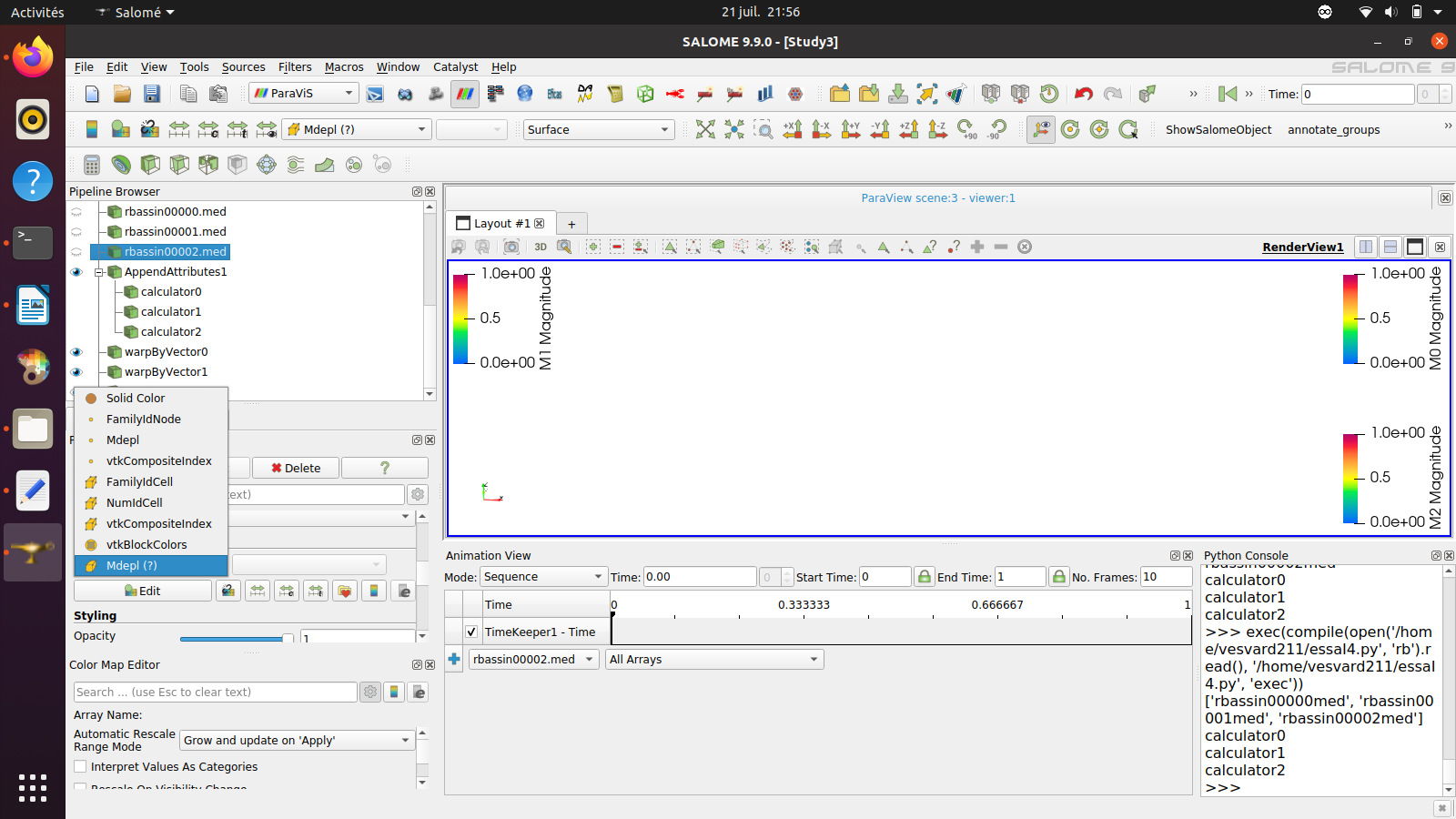
but i have an other problem paraview don’t recognize the Medlp of the med file :
```auto
import pvsimple
pvsimple.ShowParaviewView()
# trace generated using paraview version 5.9.0
#### import the simple module from the paraview
from pvsimple import *
#### disable automatic camera reset on 'Show'
pvsimple._DisableFirstRenderCameraReset()
a = []
b = [None]
d = [None]
e = [None]
f = [None]
g = [None]
h = [None]
p = [None]
for i in range(3):
# create a new 'MED Reader'
if i < 10:
b.append('rbassin0000%d' % i + 'med')
a.append('rbassin0000%d' % i + 'med')
d.append('rbassin0000%d' % i + 'med' + 'Display')
b[i] = MEDReader(registrationName='rbassin0000' + str(i) + '.med', FileName='/home/vesvard211/maillage/rbassin0000' + str(i) + '.med')
else:
b.append('rbassin0000%d' % i + 'med')
a.append('rbassin0000%d' % i + 'med')
d.append('rbassin000%d' % i + 'med' + 'Display')
b[i] = MEDReader(registrationName='rbassin000' + str(i) + '.med', FileName='/home/vesvard211/maillage/rbassin000' + str(i) + '.med')
# get animation scene
animationScene1 = GetAnimationScene()
# update animation scene based on data timesteps
animationScene1.UpdateAnimationUsingDataTimeSteps()
SetActiveSource(b[i])
# Properties modified on bassin0med
b[i].AllArrays = ['TS0/bassin/ComSup1/Mdepl@@][@@P1']
# get active view
renderView1 = GetActiveViewOrCreate('RenderView')
# show data in view
d[i] = Show(b[i], renderView1, 'UnstructuredGridRepresentation')
# trace defaults for the display properties.
d[i].Representation = 'Surface'
# reset view to fit data
renderView1.ResetCamera()
# get the material library
materialLibrary1 = GetMaterialLibrary()
# update the view to ensure updated data information
renderView1.Update()
# set scalar coloring
ColorBy(d[i], ('CELLS', 'Mdepl', 'Magnitude'))
# rescale color and/or opacity maps used to include current data range
d[i].RescaleTransferFunctionToDataRange(True, False)
# show color bar/color legend
d[i].SetScalarBarVisibility(renderView1, True)
# get color transfer function/color map for 'Mdepl'
mdeplLUT = GetColorTransferFunction('Mdepl')
# get opacity transfer function/opacity map for 'Mdepl'
mdeplPWF = GetOpacityTransferFunction('Mdepl')
# update the view to ensure updated data information
renderView1.Update()
# create a new 'Append Attributes'
# create a new 'Append Attributes'
appendAttributes1 = AppendAttributes(registrationName='AppendAttributes1', Input=[print(a)])
# show data in view
appendAttributes1Display = Show(appendAttributes1, renderView1, 'UnstructuredGridRepresentation')
# trace defaults for the display properties.
appendAttributes1Display.Representation = 'Surface'
for j in range(3):
# create a new 'Calculator'
k = j - 1
e.append("calculator%d" % j)
e[j] = Calculator(registrationName='calculator%d' % j, Input=appendAttributes1)
# Properties modified on calculator1
if j == 0:
e[j].ResultArrayName = 'M%d' % j
e[j].Function = 'Mdepl'
else:
e[j].ResultArrayName = 'M%d' % j
e[j].Function = 'M%d' % k + '+' + 'Mdepl_input_%d' % j
# create a new 'Warp By Vector'
f.append("warpByVector%d" % j)
g.append("warpByVector%d" % j + "Display" )
f[j] = WarpByVector(registrationName="warpByVector%d" % j, Input=[print('calculator%d' % j)])
# Properties modified on warpByVector1
f[j].ScaleFactor = 5000
# show data in view
g[j] = Show(f[j], renderView1, 'UnstructuredGridRepresentation')
# trace defaults for the display properties.
g[j].Representation = 'Surface'
# hide data in view
Hide(b[j], renderView1)
# update the view to ensure updated data information
renderView1.Update()
# set scalar coloring
ColorBy(g[j], ('POINTS', 'M%d' % j, 'Magnitude'))
# rescale color and/or opacity maps used to include current data range
g[j].RescaleTransferFunctionToDataRange(True, False)
# show color bar/color legend
g[j].SetScalarBarVisibility(renderView1, True)
# get color transfer function/color map for 'Mdepl'
mdeplLUT = GetColorTransferFunction('M%d' % j)
# get opacity transfer function/opacity map for 'Mdepl'
mdeplPWF = GetOpacityTransferFunction('M%d' % j)
# Apply a preset using its name. Note this may not work as expected when presets have duplicate names.
mdeplLUT.ApplyPreset('Rainbow Uniform', True)
#### saving camera placements for all active views
# current camera placement for renderView1
renderView1.CameraPosition = [0.007254707374675282, -0.49900709211761174, 0.46427352241737563]
renderView1.CameraFocalPoint = [1.2015019498213393e-06, -6.744833810744443e-08, 0.15000010536583305]
renderView1.CameraViewUp = [0.011771325523215763, 0.5330006202259059, 0.8460329631487336]
renderView1.CameraParallelScale = 0.15264365376518474
```
---
### Author:  [@Tox](https://discourse.paraview.org/u/Tox)
#### Post date: [July 22, 2024, 7:21am UTC](https://discourse.paraview.org/t/python-script-with-for-loop/15072/9 "2024-07-22T07:21:33Z")
As you can see in the list of variables, Mdepl is a Point array (small point icon in front of the variable), not a Cell array (cell icon in front), so:
> [@dim14](#):
>
> `ColorBy(d[i], ('CELLS', 'Mdepl', 'Magnitude'))`
must be
> [@](#):
>
> `ColorBy(d[i], ('POINTS', 'Mdepl', 'Magnitude'))`
---
### Author:  [@dim14](https://discourse.paraview.org/u/dim14)
#### Post date: [July 22, 2024, 9:25am UTC](https://discourse.paraview.org/t/python-script-with-for-loop/15072/10 "2024-07-22T09:25:35Z")
Thank you Serge for your answer
Mdepl information is ok now
but i still have an other problem with the AppendAttibute which don’t allow to share Mdelp Mdelp\_input1 Mdelp\_input\_2 with the calculator
Regards