# Python shell won't work
**URL:** https://discourse.paraview.org/t/python-shell-wont-work/10801
**Category:** ParaView Support
**Tags:** python
**Created:** [November 18, 2022, 2:30am UTC](https://discourse.paraview.org/t/python-shell-wont-work/10801 "2022-11-18T02:30:39Z")
**Posts on this page:** 5
**Page:** 1
### Author:  [@Miraboreasau](https://discourse.paraview.org/u/Miraboreasau)
#### Post date: [November 18, 2022, 2:30am UTC](https://discourse.paraview.org/t/python-shell-wont-work/10801/1 "2022-11-18T02:30:39Z")
Hi, I have a python script that was working. But this afternoon, when I copy it into the shell, nothing happened.

Can anyone help me copy this into your python shell of ParaView, and see if you can have an error in opening the file since we have different location
```auto
# trace generated using paraview version 5.10.0
#import paraview
#paraview.compatibility.major = 5
#paraview.compatibility.minor = 10
#### import the simple module from the paraview
from paraview.simple import *
#### disable automatic camera reset on 'Show'
paraview.simple._DisableFirstRenderCameraReset()
import os
num_files = 5
for j in range(31,num_files+1):
jstr = str(j)
FileName_temp = []
for i in range(51):
istr = str(i*300)
str1 = 'E:\\checkt1vol\\{}_output\\Run_1_1\\{}_Run_1_femdem.r3m_basic_{}.vtu'.format(jstr, jstr, istr)
FileName_temp.append(str1)
registrationName_temp = '{}_Run_1_femdem.r3m_basic_*'.format(jstr)
# create a new 'XML Unstructured Grid Reader'
a1_Run_1_femdemr3m_basic_ = XMLUnstructuredGridReader(registrationName=registrationName_temp, FileName = FileName_temp)
a1_Run_1_femdemr3m_basic_.CellArrayStatus = ['principal deviatoric stresses', 'principal strains', 'principal stresses', 'strains', 'stresses', 'alive', 'mass', 'material property ID', 'mean stress', 'volumetric strain']
a1_Run_1_femdemr3m_basic_.PointArrayStatus = ['displacement', 'force', 'velocity', 'boundary condition ID', 'fluid pressure']
a1_Run_1_femdemr3m_basic_.TimeArray = 'TimeValue'
# get animation scene
animationScene1 = GetAnimationScene()
# update animation scene based on data timesteps
animationScene1.UpdateAnimationUsingDataTimeSteps()
# get active view
renderView1 = GetActiveViewOrCreate('RenderView')
# get layout
layout1 = GetLayout()
# split cell
layout1.SplitHorizontal(0, 0.5)
# set active view
SetActiveView(None)
# Create a new 'SpreadSheet View'
spreadSheetView1 = CreateView('SpreadSheetView')
spreadSheetView1.UseCache = 0
spreadSheetView1.ViewSize = [400, 400]
spreadSheetView1.CellFontSize = 9
spreadSheetView1.HeaderFontSize = 9
spreadSheetView1.SelectionOnly = 0
spreadSheetView1.GenerateCellConnectivity = 0
spreadSheetView1.ColumnToSort = ''
spreadSheetView1.InvertOrder = 0
spreadSheetView1.BlockSize = 1024
spreadSheetView1.HiddenColumnLabels = ['Block Number']
spreadSheetView1.FieldAssociation = 'Point Data'
# assign view to a particular cell in the layout
AssignViewToLayout(view=spreadSheetView1, layout=layout1, hint=2)
# show data in view
a1_Run_1_femdemr3m_basic_Display = Show(a1_Run_1_femdemr3m_basic_, spreadSheetView1, 'SpreadSheetRepresentation')
# update the view to ensure updated data information
spreadSheetView1.Update()
# Properties modified on a1_Run_1_femdemr3m_broken_joint_Display
a1_Run_1_femdemr3m_basic_Display.Assembly = ''
#animationScene1.GoToLast()
# export view
saving_path1 = 'E:/Overalldataset/sphere/velo/t1/points/' + jstr + '/'
if not os.path.exists(saving_path1):
os.makedirs(saving_path1)
for i in range(0, 51):
view_name_temp1 = saving_path1 + '{}.csv'.format(str(i))
#ExportView(view_name_temp1, view=spreadSheetView1, RealNumberNotation='Mixed',
# RealNumberPrecision=6)
ExportView(view_name_temp1, view=spreadSheetView1)
animationScene1.GoToNext()
animationScene1.GoToFirst()
# Properties modified on spreadSheetView1
spreadSheetView1.FieldAssociation = 'Cell Data'
# Properties modified on spreadSheetView1
spreadSheetView1.GenerateCellConnectivity = 1
# export view
'''
saving_path2 = 'E:/Overalldataset/sphere/velo/t2/' + jstr + '/'
if not os.path.exists(saving_path2):
os.makedirs(saving_path2)
for i in range(0, 51):
view_name_temp2 = saving_path2 + '{}.csv'.format(str(i))
#ExportView(view_name_temp2, view=spreadSheetView1, RealNumberNotation='Mixed',
# RealNumberPrecision=6)
ExportView(view_name_temp2, view=spreadSheetView1)
animationScene1.GoToNext()
animationScene1.GoToFirst()
'''
#view_name_temp2 = saving_path2 + '{}.csv'.format(jstr)
#ExportView(view_name_temp2, view=spreadSheetView1, RealNumberNotation='Mixed',
# RealNumberPrecision=6)
#================================================================
# addendum: following script captures some of the application
# state to faithfully reproduce the visualization during playback
#================================================================
#--------------------------------
# saving layout sizes for layouts
# layout/tab size in pixels
layout1.SetSize(947, 552)
Delete(spreadSheetView1)
del spreadSheetView1
layout1.Collapse(2)
#set active view
SetActiveView(renderView1)
#--------------------------------------------
# uncomment the following to render all views
# RenderAllViews()
# alternatively, if you want to write images, you can use SaveScreenshot(...).
```
---
### Author:  [@Miraboreasau](https://discourse.paraview.org/u/Miraboreasau)
#### Post date: [November 18, 2022, 6:34pm UTC](https://discourse.paraview.org/t/python-shell-wont-work/10801/2 "2022-11-18T18:34:20Z")
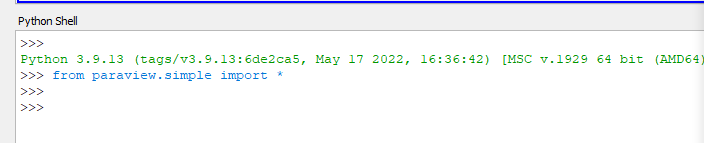
it only shows this when I run a script file, but another script works, can someone tell me what direction I should go?
---
### Author:  [@Miraboreasau](https://discourse.paraview.org/u/Miraboreasau)
#### Post date: [November 26, 2022, 3:24pm UTC](https://discourse.paraview.org/t/python-shell-wont-work/10801/3 "2022-11-26T15:24:38Z")
Anyone has the same problem?
---
### Author:  [@mwestphal](https://discourse.paraview.org/u/mwestphal)
#### Post date: [November 28, 2022, 8:38am UTC](https://discourse.paraview.org/t/python-shell-wont-work/10801/4 "2022-11-28T08:38:10Z")
Hi @Miraboreasau
It is really unclear what is working or not.
Please share clear steps to reproduce your issue.
Best,
---
### Author:  [@aron.helser](https://discourse.paraview.org/u/aron.helser)
#### Post date: [November 28, 2022, 2:06pm UTC](https://discourse.paraview.org/t/python-shell-wont-work/10801/5 "2022-11-28T14:06:58Z")
Indeed, your sample may not represent what you actually want to do, but it looks like you have a typo:
```auto
num_files = 5
for j in range(31,num_files+1):
```
`range(31, 6)` is empty, so the loop doesn’t run.
HTH, Aron