# Question about settings on rescale
**URL:** https://discourse.paraview.org/t/question-about-settings-on-rescale/10570
**Category:** ParaView Support
**Created:** [October 21, 2022, 3:54pm UTC](https://discourse.paraview.org/t/question-about-settings-on-rescale/10570 "2022-10-21T15:54:44Z")
**Posts on this page:** 8
**Page:** 1
### Author:  [@Eloise](https://discourse.paraview.org/u/Eloise)
#### Post date: [October 21, 2022, 3:54pm UTC](https://discourse.paraview.org/t/question-about-settings-on-rescale/10570/1 "2022-10-21T15:54:44Z")
Hello,
I am trying to create de default settings Paraview-UserSetting.json with some options I need but it does not seem to take it into account.
I add the following line in my setting files:
```auto
"settings" :
{
"GeneralSettings" :
{
"AutomaticRescaleRangeMode" : 4,
"BlockColorsDistinctValues" : 15,
"DefaultTimeStep" : 2,
"SelectOnClickInMultiBlockInspector" : 0
}
}
```
I closed paraview and relaunched it, load the example database can.ex2 and I have this window:
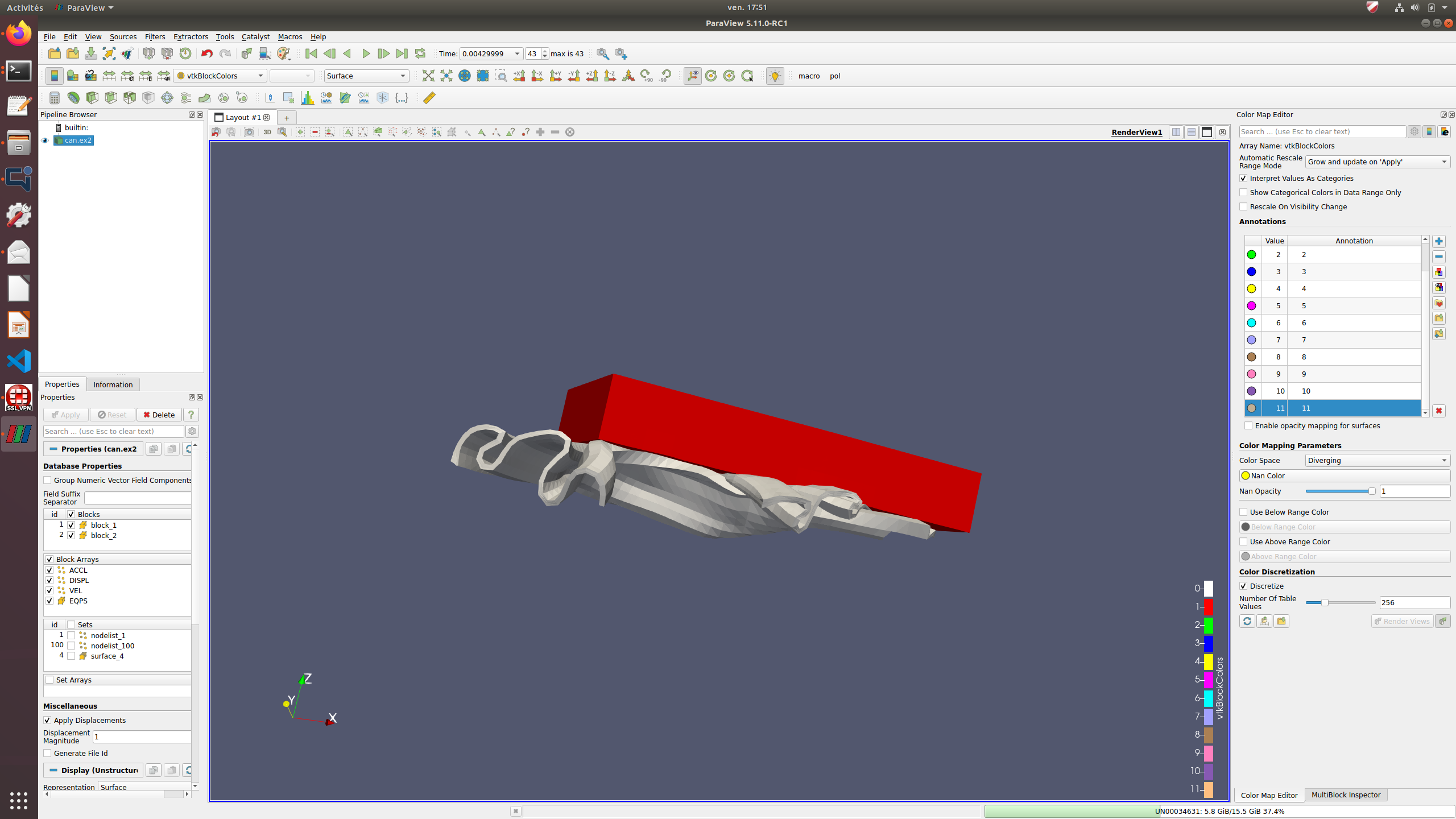
We can see that there is only 12 colors in my categorical colors (I thought I tell paraview I wanted 15) and the default rescale mode is again “Grow and Update on Apply”.
However, the select on click in the multiblock inspector and the default timestep are well applied.
Why some parameters are ignored from my config file ?
Thanks for your help,
Eloïse
---
### Author:  [@Eloise](https://discourse.paraview.org/u/Eloise)
#### Post date: [November 23, 2022, 10:38am UTC](https://discourse.paraview.org/t/question-about-settings-on-rescale/10570/2 "2022-11-23T10:38:45Z")
Up: Anyone could help me to have a valid configuration file ? ☹
---
### Author:  [@mwestphal](https://discourse.paraview.org/u/mwestphal)
#### Post date: [November 23, 2022, 10:44am UTC](https://discourse.paraview.org/t/question-about-settings-on-rescale/10570/3 "2022-11-23T10:44:45Z")
Hi @Eloise
I’m a bit confused by the question, could you provide clear steps to reproduce the issue ?
Best,
---
### Author:  [@Eloise](https://discourse.paraview.org/u/Eloise)
#### Post date: [November 23, 2022, 10:53am UTC](https://discourse.paraview.org/t/question-about-settings-on-rescale/10570/4 "2022-11-23T10:53:36Z")
I want a Paraview-UserSetting.json which set the automatic rescale to “Clamp and Update everytimestep” by default.
I wrote the config file above (with `"AutomaticRescaleRangeMode" : 4`)
However, when I open paraview, the default mode is always “Grow and update on ‘Apply’”.
Others settings in this file is applied (last time by default), but not the rescale mode.
---
### Author:  [@mwestphal](https://discourse.paraview.org/u/mwestphal)
#### Post date: [November 23, 2022, 11:01am UTC](https://discourse.paraview.org/t/question-about-settings-on-rescale/10570/5 "2022-11-23T11:01:06Z")
There is no such settings, here is how to do it:
```auto
{
"lookup_tables" :
{
"PVLookupTable" :
{
"AutomaticRescaleRangeMode" : 3
}
}
}
```
---
### Author:  [@Eloise](https://discourse.paraview.org/u/Eloise)
#### Post date: [November 23, 2022, 11:18am UTC](https://discourse.paraview.org/t/question-about-settings-on-rescale/10570/6 "2022-11-23T11:18:42Z")
Ok, so this wasn’t an general setting as I thought but something more hidden =)
Thank you, it works =)
---
### Author:  [@wascott](https://discourse.paraview.org/u/wascott)
#### Post date: [November 23, 2022, 5:30pm UTC](https://discourse.paraview.org/t/question-about-settings-on-rescale/10570/7 "2022-11-23T17:30:38Z")
Hi Eloise,
We have been debating the Automatic Rescale setting for years, and keep believing that although it gives pretty movies, it is actually confusing to have the min and max updated every timestep. What is the usecase you have, and why do you need to update the min and max every timestep?
Thanks for the insite,
Alan
---
### Author:  [@Eloise](https://discourse.paraview.org/u/Eloise)
#### Post date: [November 25, 2022, 8:48am UTC](https://discourse.paraview.org/t/question-about-settings-on-rescale/10570/8 "2022-11-25T08:48:55Z")
Hello, It’s quite simple: some of my field begin to the max value at initial time andd the become smaller. “Grow and update” keeps me the biggest scale and I could not see changes in time: In the can.ex2 example, use the “grow and update” rescale with the ACCL field results in a all red figure during all timestep