# Questions recording test case
**URL:** https://discourse.paraview.org/t/questions-recording-test-case/9941
**Category:** ParaView Support
**Created:** [June 29, 2022, 3:29pm UTC](https://discourse.paraview.org/t/questions-recording-test-case/9941 "2022-06-29T15:29:57Z")
**Posts on this page:** 13
**Page:** 1
### Author:  [@Fabian](https://discourse.paraview.org/u/Fabian)
#### Post date: [June 29, 2022, 3:29pm UTC](https://discourse.paraview.org/t/questions-recording-test-case/9941/1 "2022-06-29T15:29:57Z")
I ask the question here, as the topic might be of interest also for others and it is easier to find here than in merge request commentary.
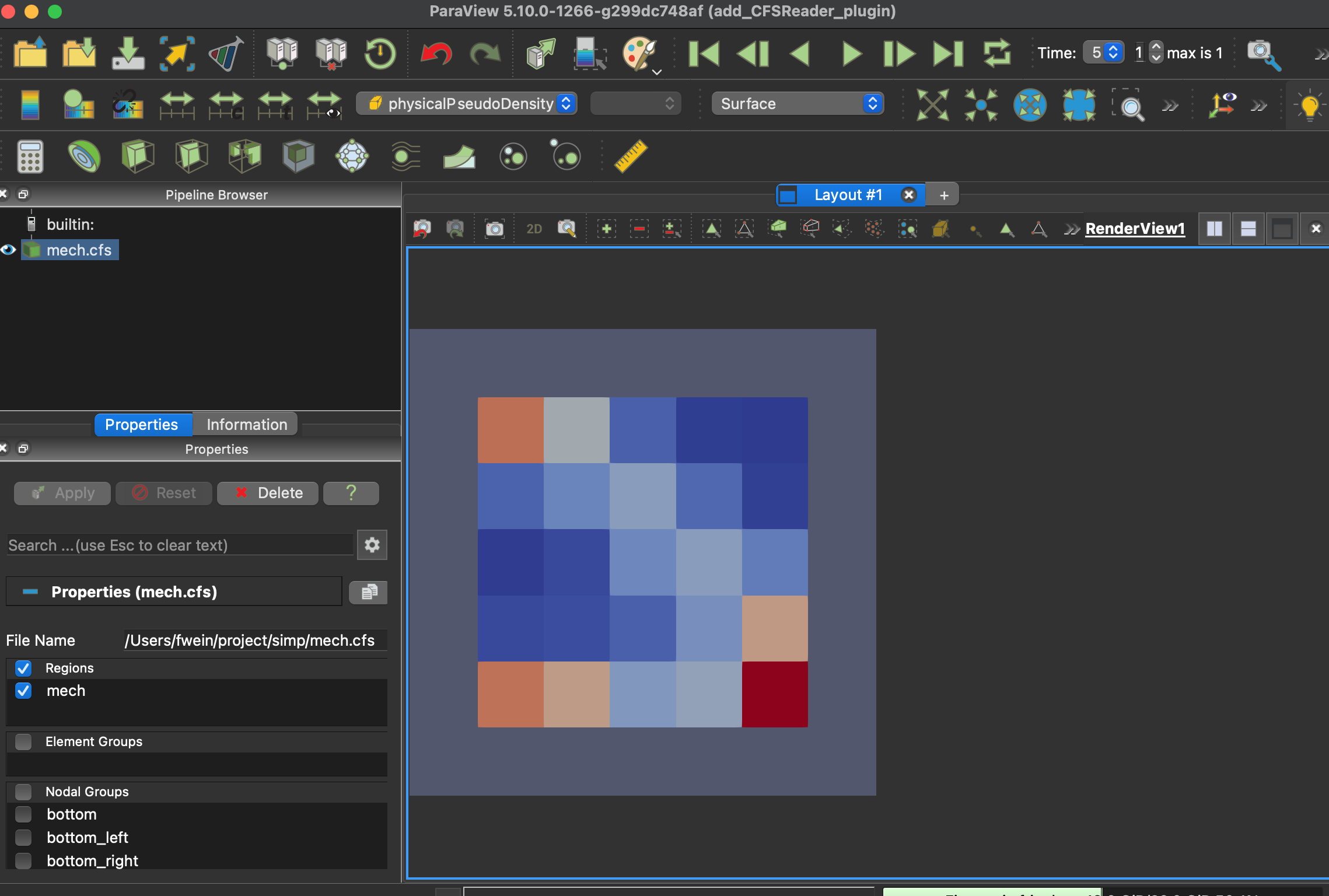
I try to create a test case for a reader plugin. I orientate myself with the GmshIO reader which has a test. From that example it is also clear how a file is loaded. I recorded loading and visualizing data and come to a point, where my screen shows the following content.
How do I continue? Thanks!
BTW: This is stuff, where a youtube-video would be really cool 🙂
---
### Author:  [@mwestphal](https://discourse.paraview.org/u/mwestphal)
#### Post date: [June 30, 2022, 8:17am UTC](https://discourse.paraview.org/t/questions-recording-test-case/9941/2 "2022-06-30T08:17:02Z")
> [@Fabian](#):
>
> How do I continue? Thanks!
What is the question here ?
> BTW: This is stuff, where a youtube-video would be really cool
We do have a few webinars ! Please take a look: [https://www.paraview.org/webinars/](https://www.paraview.org/webinars/)
---
### Author:  [@Fabian](https://discourse.paraview.org/u/Fabian)
#### Post date: [July 8, 2022, 3:31pm UTC](https://discourse.paraview.org/t/questions-recording-test-case/9941/3 "2022-07-08T15:31:02Z")
I found no test case recording and playing in the webinars, did I miss it?
I guess I need to first record loading the plugin, as this is what I need to do when I start paraview.
What I do is:
- start paraview with --dr
- start recording a test
- load the plugin
- load my file
- stop recording.
The recording is
```auto
```
But when I run the test, I get
```auto
Process started
17:23:06 : 0: Test (0): Event: /localPlugins: setCurrent : vtkPVInitializerPlugin
critical: In unknown, line 0
critical: In event 'object=pqClientMainWindow/PluginManagerDialog/splitter/localGroup/localPlugins' 'command=setCurrent' 'arguments=vtkPVInitializerPlugin':
Couldn't find object `pqClientMainWindow/PluginManagerDialog/splitter/localGroup/localPlugins`
Found up to `pqClientMainWindow`
Available widget: `pqClientMainWindow/_layout`
Available widget: `pqClientMainWindow/menubar`
Available widget: `pqClientMainWindow/menubar/qt_menubar_ext_button`
Available widget: `pqClientMainWindow/menubar/menu_File`
Available widget: `pqClientMainWindow/menubar/menu_File/QAction0`
Available widget: `pqClientMainWindow/menubar/menu_File/actionServerConnect`
Available widget: `pqClientMainWindow/menubar/menu_File/actionServerConnect/pqServerConnectReaction0`
Available widget: `pqClientMainWindow/menubar/menu_File/actionServerDisconnect`
Available widget: `pqClientMainWindow/menubar/menu_File/actionServerDisconnect/pqServerDisconnectReaction0`
Available widget: `pqClientMainWindow/menubar/menu_File/actionFileSaveScreenshot`
Available widget: `pqClientMainWindow/menubar/menu_File/actionFileSaveScreenshot/pqSaveScreenshotReaction0`
Available widget: `pqClientMainWindow/menubar/menu_File/actionFileSaveAnimation`
Available widget: `pqClientMainWindow/menubar/menu_File/actionFileSaveAnimation/pqSaveAnimationReaction0`
Available widget: `pqClientMainWindow/menubar/menu_File/actionFileSaveData`
Available widget: `pqClientMainWindow/menubar/menu_File/actionFileSaveData/pqSaveDataReaction0`
Available widget: `pqClientMainWindow/menubar/menu_File/actionFileLoadServerState`
Available widget: `pqClientMainWindow/menubar/menu_File/actionFileLoadServerState/pqLoadStateReaction0`
Available widget: `pqClientMainWindow/menubar/menu_File/actionFileSaveServerState`
Available widget: `pqClientMainWindow/menubar/menu_File/actionFileSaveServerState/pqSaveStateReaction0`
Available widget: `pqClientMainWindow/menubar/menu_File/actionFileSaveCatalystState`
Available widget: .... (and 3869 more!)
Set PQOBJECTNAMING_MATCH_LIMIT environment var to a +'ve number to limit entries (or 0 for unlimited).
17:23:06 : 0: Done
```
---
### Author:  [@aron.helser](https://discourse.paraview.org/u/aron.helser)
#### Post date: [July 8, 2022, 4:39pm UTC](https://discourse.paraview.org/t/questions-recording-test-case/9941/4 "2022-07-08T16:39:47Z")
Oh, on Mac, because the menu is separated from the main window, menu events are not recorded. I recorded opening the plugin-manager on Linux and got:
```auto
```
If you add that to the top of your test, it should work.
---
### Author:  [@Fabian](https://discourse.paraview.org/u/Fabian)
#### Post date: [July 8, 2022, 5:21pm UTC](https://discourse.paraview.org/t/questions-recording-test-case/9941/5 "2022-07-08T17:21:13Z")
Thank you, that brought me further!
With hard coded filenames it works!
When I look into GmshIOTest I see for opening the file
_“$PARAVIEW\_DATA\_ROOT/Plugins/GmshIO/Testing/Data/Gmsh/hemisphere.msh”_
and for the comparison
_$PARAVIEW\_DATA\_ROOT/Plugins/GmshIO/Testing/Data/Baseline/GmshIOTestA.png_
Both variables seem not to to work for me. Shall I define them in my system environment?
---
### Author:  [@Fabian](https://discourse.paraview.org/u/Fabian)
#### Post date: [July 8, 2022, 5:46pm UTC](https://discourse.paraview.org/t/questions-recording-test-case/9941/6 "2022-07-08T17:46:07Z")
Well, I simply tried and it worked!
Even when I set the viewport to 400x400 (by the test) the screenshot was 800x800 - this is probably due to my Retina MacBook? I got an error about different image size. When I scale my screenshot offline to 400x400 I get
```auto
Using View API for capture
0Standard0.00630999
0.006321
debug: In unknown, line 0
debug: Test "CFSReaderTest.xml" is finished. Success = true
```
I assume `0` just means no error?!
If this is true I just need to find out, how to handle my test data (200KB, cannot easily be smaller) and the reference image (7 KB).
---
### Author:  [@aron.helser](https://discourse.paraview.org/u/aron.helser)
#### Post date: [July 8, 2022, 5:58pm UTC](https://discourse.paraview.org/t/questions-recording-test-case/9941/7 "2022-07-08T17:58:14Z")
Yes, `$PARAVIEW_DATA_ROOT` is define by ctest, you can see what it’s doing by running with `ctest -V`
ParaView handled testing data and baseline images using VTK’s external-data mechanism. You can see the [develop docs](https://github.com/Kitware/ParaView/blob/master/Documentation/dev/git/develop.md) and the [vtk data docs](https://gitlab.kitware.com/vtk/vtk/-/blob/master/Documentation/dev/git/data.md). Are you intending your plugin to be part of the ParaView repo?
---
### Author:  [@Fabian](https://discourse.paraview.org/u/Fabian)
#### Post date: [July 8, 2022, 6:06pm UTC](https://discourse.paraview.org/t/questions-recording-test-case/9941/8 "2022-07-08T18:06:15Z")
Yes, merging it is my great hope 🙂
---
### Author:  [@mwestphal](https://discourse.paraview.org/u/mwestphal)
#### Post date: [July 10, 2022, 4:55pm UTC](https://discourse.paraview.org/t/questions-recording-test-case/9941/9 "2022-07-10T16:55:01Z")
> [@Fabian](#):
>
> load the plugin
Not how to test a plugin, there is many test example in the existing plugins, you may want to take a look
---
### Author:  [@mwestphal](https://discourse.paraview.org/u/mwestphal)
#### Post date: [July 11, 2022, 6:55am UTC](https://discourse.paraview.org/t/questions-recording-test-case/9941/10 "2022-07-11T06:55:00Z")
eg: [https://gitlab.kitware.com/paraview/paraview/-/tree/master/Plugins/GmshIO/Testing](https://gitlab.kitware.com/paraview/paraview/-/tree/master/Plugins/GmshIO/Testing)
---
### Author:  [@Fabian](https://discourse.paraview.org/u/Fabian)
#### Post date: [July 15, 2022, 10:12am UTC](https://discourse.paraview.org/t/questions-recording-test-case/9941/11 "2022-07-15T10:12:47Z")
With the hint of the to be added command on macOS the topic “recording a test case” is solved in this context. Thanks.
With respect to the MR of the CFSReader plugin, I guess it is better to go back to the MR-discussion?!
[https://gitlab.kitware.com/paraview/paraview/-/merge\_requests/5635](https://gitlab.kitware.com/paraview/paraview/-/merge_requests/5635)
---
### Author:  [@Fabian](https://discourse.paraview.org/u/Fabian)
#### Post date: [July 18, 2022, 3:48pm UTC](https://discourse.paraview.org/t/questions-recording-test-case/9941/12 "2022-07-18T15:48:39Z")
As a comment when creating a plugin test case:
In addition to [https://gitlab.kitware.com/vtk/vtk/-/blob/master/Documentation/dev/git/data.md](https://gitlab.kitware.com/vtk/vtk/-/blob/master/Documentation/dev/git/data.md) on shall not forget in the plugin’s CMakeLists.txt a
```auto
if (BUILD_TESTING)
add_subdirectory(Testing)
endif ()
```
I could not make the GmshIO example run, as both make GmshIO and ctest -R GmshIO fail. However, it works for GMVReader.
My test was running, when I run the recording manually. As a test case with external data I have an issue.
I have
```auto
ExternalData_Expand_Arguments(ParaViewData _
"DATA{${CMAKE_CURRENT_SOURCE_DIR}/Data/openCFS/Single_Region_Opt.cfs}"
"DATA{${CMAKE_CURRENT_SOURCE_DIR}/Data/Baseline/Single_Region_Opt_last_PSD.png}"
)
```
But that gave me the following error on make
```auto
SHA512/106137f13bae250b692fb8f6f221de6821fb66ac01ae6b27b371dde0431d6a3953cea8f09f606e4fd01053dd47a7873f82f070f28444b5613e1ed6700b34f182
-- Linked Plugins/CFSReader/Testing/Data/Baseline/Single_Region_Opt_last_PSD.png.sha512 to ExternalData SHA512/09b9b43589921733ac06af33f71b1230c4118e99f4ba641c3d49accf27af37bf7684b5f247157e03395f0e762f39f78330c9bf083e9bd110e384186a116e29a6
CMake Warning (dev) at /opt/homebrew/Cellar/cmake/3.22.2/share/cmake/Modules/ExternalData.cmake:738 (message):
Data file referenced by argument
DATA{/Users/fwein/code/pv_10/paraview_cfsreader/Plugins/CFSReader/Testing/Data/Baseline/CFSReaderTest.png}
corresponds to source tree path
Plugins/CFSReader/Testing/Data/Baseline/CFSReaderTest.png
that does not exist as a file (with or without an extension)!
Call Stack (most recent call first):
/opt/homebrew/Cellar/cmake/3.22.2/share/cmake/Modules/ExternalData.cmake:542 (_ExternalData_arg)
/opt/homebrew/Cellar/cmake/3.22.2/share/cmake/Modules/ExternalData.cmake:355 (ExternalData_expand_arguments)
CMake/ParaViewTesting.cmake:232 (ExternalData_add_test)
CMake/ParaViewTesting.cmake:289 (_paraview_add_tests)
Plugins/CFSReader/Testing/CMakeLists.txt:13 (paraview_add_client_tests)
```
An this `Plugins/CFSReader/Testing/Data/Baseline/CFSReaderTest.png` instead of `Data/Baseline/Single_Region_Opt_last_PSD.png` seems to be problem.
When I run the test, I see, that everything works, but I get the error
```auto
80: debug: Test "CFSReaderTest.xml" is finished. Success = true
80: 0Standard0.00658298
80: 0.006587
80: /Users/fwein/code/pv_10/paraview_cfsreader/Plugins/CFSReader/Testing/Data/Baseline/CFSReaderTest.png
```
So it is again `CFSReaderTest.png` instead of `Single_Region_Opt_last_PSD.png`.
This is my CMakeLists.txt in my plugins’s Testing
```auto
set(module_tests
CFSReaderTest.xml)
if (BUILD_SHARED_LIBS)
set(_paraview_add_tests_default_test_data_target ParaViewData)
ExternalData_Expand_Arguments(ParaViewData _
"DATA{${CMAKE_CURRENT_SOURCE_DIR}/Data/openCFS/Single_Region_Opt.cfs}"
"DATA{${CMAKE_CURRENT_SOURCE_DIR}/Data/Baseline/Single_Region_Opt_last_PSD.png}"
)
paraview_add_client_tests(
LOAD_PLUGIN "CFSReader"
BASELINE_DIR "${CMAKE_CURRENT_SOURCE_DIR}/Data/Baseline"
TEST_DATA_TARGET ParaViewData
TEST_SCRIPTS ${module_tests})
paraview_add_client_server_tests(
LOAD_PLUGIN "CFSReader"
BASELINE_DIR "${CMAKE_CURRENT_SOURCE_DIR}/Data/Baseline"
TEST_DATA_TARGET ParaViewData
TEST_SCRIPTS ${module_tests})
paraview_add_client_server_render_tests(
LOAD_PLUGIN "CFSReader"
BASELINE_DIR "${CMAKE_CURRENT_SOURCE_DIR}/Data/Baseline"
TEST_DATA_TARGET ParaViewData
TEST_SCRIPTS ${module_tests})
endif ()
```
---
### Author:  [@mwestphal](https://discourse.paraview.org/u/mwestphal)
#### Post date: [July 19, 2022, 9:40am UTC](https://discourse.paraview.org/t/questions-recording-test-case/9941/13 "2022-07-19T09:40:05Z")
Thanks for sharing @Fabian, you may want to reader data.md :
[https://gitlab.kitware.com/vtk/vtk/blob/master/Documentation/dev/git/data.md](https://gitlab.kitware.com/vtk/vtk/blob/master/Documentation/dev/git/data.md)