# Quiver (Matlab) in ParaView
**URL:** https://discourse.paraview.org/t/quiver-matlab-in-paraview/2238
**Category:** ParaView Support
**Created:** [July 17, 2019, 11:06am UTC](https://discourse.paraview.org/t/quiver-matlab-in-paraview/2238 "2019-07-17T11:06:20Z")
**Posts on this page:** 14
**Page:** 1
### Author:  [@Misha](https://discourse.paraview.org/u/Misha)
#### Post date: [July 17, 2019, 11:06am UTC](https://discourse.paraview.org/t/quiver-matlab-in-paraview/2238/1 "2019-07-17T11:06:20Z")
Hi,
I am trying to plot a velocity vector around a sphere, similar to Quiver in Matlab.
Is there a way to do that?
I have the U and V components.
I tried to use the calculator filter and wrote : U_iHat+V_jHat. After that, I used the Gliph filter,
but the gliphs were incorrect.
Thanks,
Misha
---
### Author:  [@mwestphal](https://discourse.paraview.org/u/mwestphal)
#### Post date: [July 17, 2019, 11:14am UTC](https://discourse.paraview.org/t/quiver-matlab-in-paraview/2238/2 "2019-07-17T11:14:25Z")
Could you include a screenshot of what you are trying to achieve ?
---
### Author:  [@Misha](https://discourse.paraview.org/u/Misha)
#### Post date: [July 17, 2019, 11:44am UTC](https://discourse.paraview.org/t/quiver-matlab-in-paraview/2238/3 "2019-07-17T11:44:27Z")
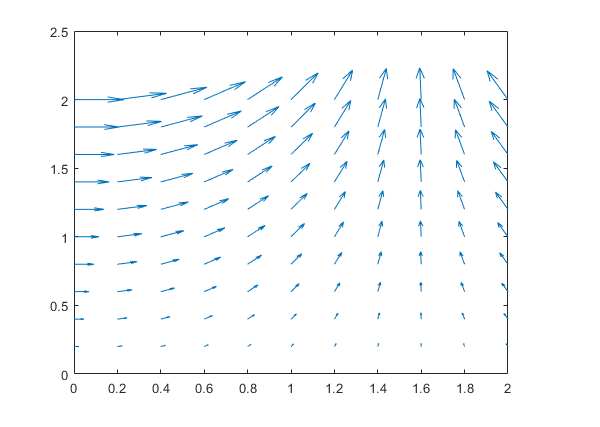
and later:
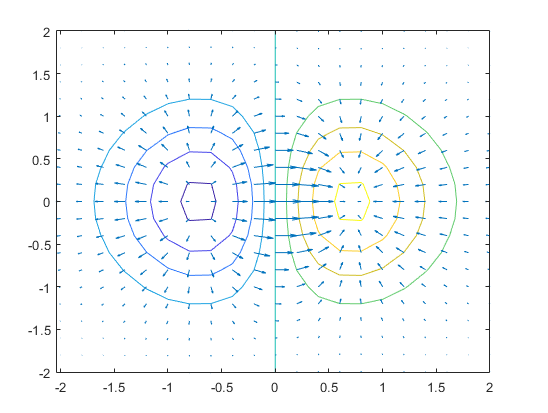
If ParaView also have contour lines - I couldn’t find a way to do that.
The problem is that if I use the calculator and write for example:
U\*iHat
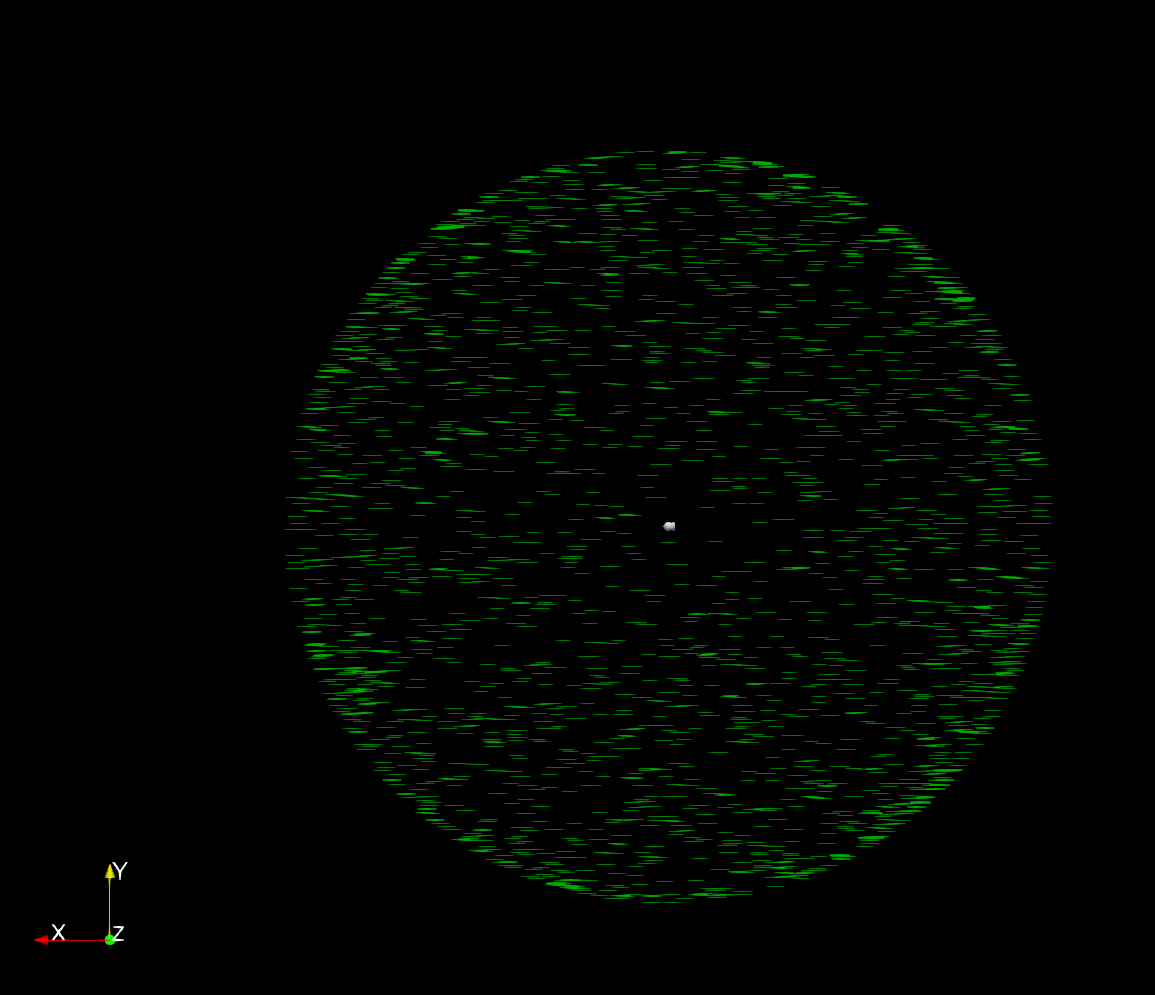
The gliph lines are not being drawn on the sphere using the spherical coordinate system. They are supposed to be longitude lines, similar to earth’s longitude lines.
This is an example of the gliph lines:
Thank you,
Misha
---
### Author:  [@mwestphal](https://discourse.paraview.org/u/mwestphal)
#### Post date: [July 18, 2019, 8:01am UTC](https://discourse.paraview.org/t/quiver-matlab-in-paraview/2238/4 "2019-07-18T08:01:48Z")
Did you try enabling the “Surface Streamlines” option in the stream tracer ?
---
### Author:  [@Misha](https://discourse.paraview.org/u/Misha)
#### Post date: [July 18, 2019, 8:36am UTC](https://discourse.paraview.org/t/quiver-matlab-in-paraview/2238/5 "2019-07-18T08:36:48Z")
I am trying to, but it takes forever. That’s why I tried using the Gliph arrow filter (also because that is what I actually want).
Do I need a GPU to render streamlines?
---
### Author:  [@mwestphal](https://discourse.paraview.org/u/mwestphal)
#### Post date: [July 18, 2019, 8:39am UTC](https://discourse.paraview.org/t/quiver-matlab-in-paraview/2238/6 "2019-07-18T08:39:52Z")
No, you do not need a GPU.
Could you share a dataset ? That would be more easy to help you.
---
### Author:  [@Misha](https://discourse.paraview.org/u/Misha)
#### Post date: [July 18, 2019, 9:02am UTC](https://discourse.paraview.org/t/quiver-matlab-in-paraview/2238/7 "2019-07-18T09:02:43Z")
> **[first\_step\_0.vts](https://www.dropbox.com/s/k1oolmv1ig3ufee/first_step_0.vts?dl=0)**
>
> Shared with Dropbox
---
### Author:  [@mwestphal](https://discourse.paraview.org/u/mwestphal)
#### Post date: [July 18, 2019, 12:16pm UTC](https://discourse.paraview.org/t/quiver-matlab-in-paraview/2238/8 "2019-07-18T12:16:42Z")
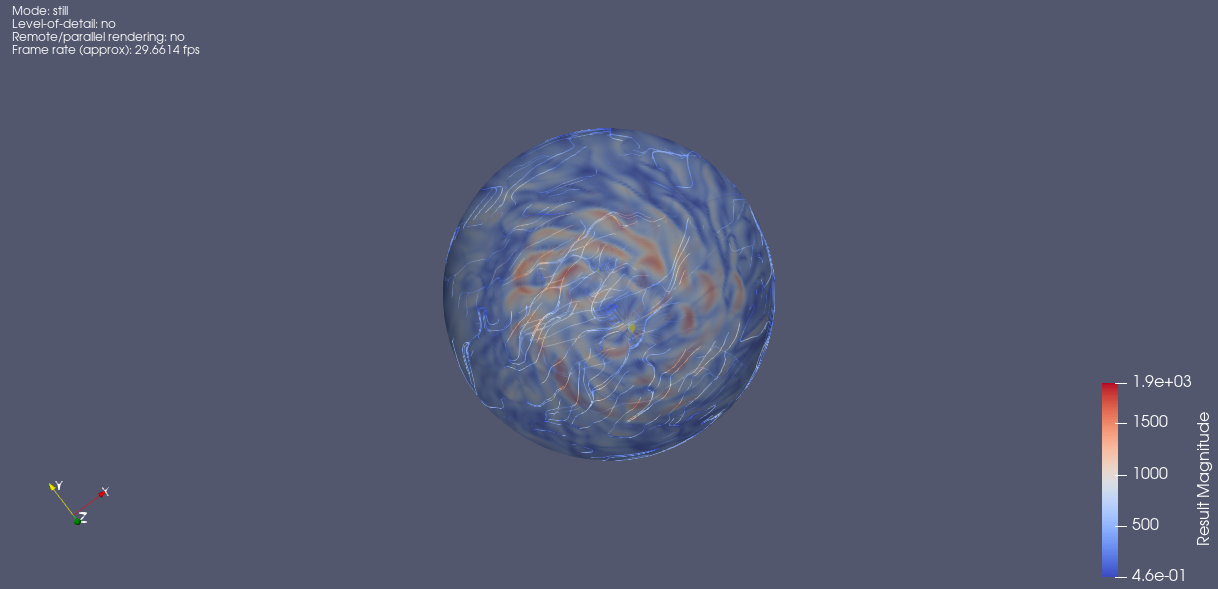
I was able to generate something, but your vector (U_iHat + V_jHat + W\*KHat) are not at all colinear with the surface of the spere, so not really usable imo.
[streamSurf.pvsm](https://discourse.paraview.org/uploads/default/original/2X/8/80d645e19893159e5d319fc87c3c3d85c0d06eb8.pvsm) (769.1 KB)
---
### Author:  [@Misha](https://discourse.paraview.org/u/Misha)
#### Post date: [July 18, 2019, 12:23pm UTC](https://discourse.paraview.org/t/quiver-matlab-in-paraview/2238/9 "2019-07-18T12:23:11Z")
First of all, thank you very much Mathieu for your time and effort. I really appreciate it.
I will check the pvsm file.
I do still have a couple of questions:
Did you use a GPU and if not, how much time did it took to create the streamlines?
How can I animate such complicated streamlines if I have multiple time frames?
And third, is there a way to do the same with arrow gliphs, and if not, why?
Thank you,
Misha
---
### Author:  [@mwestphal](https://discourse.paraview.org/u/mwestphal)
#### Post date: [July 18, 2019, 12:25pm UTC](https://discourse.paraview.org/t/quiver-matlab-in-paraview/2238/10 "2019-07-18T12:25:16Z")
I use the GPU only to display, not to compute, nothing critical at all.
It took around 20 seconds to compute the streamlines because I generate them only on the surface.
I can’t add arrowglyphs because the vectors are not oriented correctly. The glyphs would not go in the right direction.
---
### Author:  [@Misha](https://discourse.paraview.org/u/Misha)
#### Post date: [July 18, 2019, 12:41pm UTC](https://discourse.paraview.org/t/quiver-matlab-in-paraview/2238/11 "2019-07-18T12:41:31Z")
Can you please tell me how did you get to this conclusion? Can you please show me an example of U and V velocity components (scalars) , turned to velocity vector using the Calculator filter and using the arrow gliphs are correctly drawn around a sphere?
---
### Author:  [@mwestphal](https://discourse.paraview.org/u/mwestphal)
#### Post date: [July 18, 2019, 12:42pm UTC](https://discourse.paraview.org/t/quiver-matlab-in-paraview/2238/12 "2019-07-18T12:42:44Z")
> Can you please tell me how did you get to this conclusion?
There is a statefile in my post. You can load it in ParaView using File-\>LoadState.
Just set the path to your file.
---
### Author:  [@Misha](https://discourse.paraview.org/u/Misha)
#### Post date: [July 21, 2019, 7:01am UTC](https://discourse.paraview.org/t/quiver-matlab-in-paraview/2238/13 "2019-07-21T07:01:12Z")
Thank you very much Mathieu. I will check that.
---
### Author:  [@Misha](https://discourse.paraview.org/u/Misha)
#### Post date: [July 22, 2019, 8:23am UTC](https://discourse.paraview.org/t/quiver-matlab-in-paraview/2238/14 "2019-07-22T08:23:01Z")
Hi,
I checked it but I still don’t have the answer. I tried to add the attribute : “positive:up”
to the netCDF file but that didn’t change anything. Do I need to use a different netCDF reader? There is only one that is working
Is this by any chance related to the following issue:
> [@CGNS support - velocity as a vector](https://discourse.paraview.org/t/cgns-support-velocity-as-a-vector/1364):
>
> I have started generating CGNS files from my CFD code, which is 2D and has a structured mesh. I have found that Paraview does not automatically convert VelocityX and VelocityY into a native vector format that can be plotted with glyph arrows. To get this functionality, I have to use the calculator to form the vectors from the components. Or, I can use the cgns-to-vtk converter to create a vtk file that Paraview recognizes velocity as native vectors. Shouldn’t this functionality be built-in t…
Another thing : the colors of the U component should be the same after I write in the calculator : “U\*iHat”, don’t they? but they seem like the inverse colors.