# reading ascii file into Paraview
**URL:** https://discourse.paraview.org/t/reading-ascii-file-into-paraview/1435
**Category:** ParaView Support
**Created:** [March 10, 2019, 1:41pm UTC](https://discourse.paraview.org/t/reading-ascii-file-into-paraview/1435 "2019-03-10T13:41:19Z")
**Posts on this page:** 4
**Page:** 1
### Author:  [@Dec](https://discourse.paraview.org/u/Dec)
#### Post date: [March 10, 2019, 1:41pm UTC](https://discourse.paraview.org/t/reading-ascii-file-into-paraview/1435/1 "2019-03-10T13:41:20Z")
Hi,
Looking to understand how to best import an ascii file, like the one attached, into ParaView. Its one of many output file from CONVERGE CFD program. I am looking to utilize ParaView for my line plotting (XP plots) post processing.
I think its probably related to the # symbols and lines leading up to the main column headers. Basically want to have all the parameters in separate columns so I can plot them all against Crank speed (column 1).
Note: I edited the file in notepad to reduce its size but it automatically changed from the software normal .out to .txt.
Software manual describes the .out files as “ASCII-formatted output files that contain
average values (or sums) for the entire domain as well as for individual regions”
Any input much appreciated.
Dec.
[asciiReading.txt](https://discourse.paraview.org/uploads/default/original/2X/d/df6f6ba0f2f36bd1c058c1496681825d31694a0f.txt) (5.2 KB)
---
### Author:  [@banesullivan](https://discourse.paraview.org/u/banesullivan)
#### Post date: [March 11, 2019, 2:06am UTC](https://discourse.paraview.org/t/reading-ascii-file-into-paraview/1435/2 "2019-03-11T02:06:21Z")
[`PVGeo`](http://pvgeo.org) has a great ASCII reader that allows you to specify comments, skipping lines, etc. Unfortunately, your ASCII file format is poorly defined… The column names are jumbled in the header as comments and it would be quite difficult to build a file reader that could understand the difference between column names and all the other information in the file header.
Perhaps your CFD program has other file types it can export to?
---
### Author:  [@mwestphal](https://discourse.paraview.org/u/mwestphal)
#### Post date: [March 11, 2019, 9:22am UTC](https://discourse.paraview.org/t/reading-ascii-file-into-paraview/1435/3 "2019-03-11T09:22:52Z")
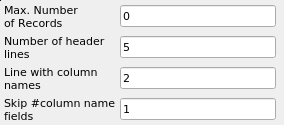
@Dec : This is supported by paraview with the Tecplot Table Reader.
- Rename your file as a **.dat** file
- Open it with paraview
- Select “Tecplot Table Reader”
- Use the following configuration :
---
### Author:  [@Dec](https://discourse.paraview.org/u/Dec)
#### Post date: [March 11, 2019, 11:38am UTC](https://discourse.paraview.org/t/reading-ascii-file-into-paraview/1435/4 "2019-03-11T11:38:06Z")
@mwestphal Thank you so much! This will help me alot!
Best Regards,
Dec