# Remove additional edges to export correctly the mesh
**URL:** https://discourse.paraview.org/t/remove-additional-edges-to-export-correctly-the-mesh/8730
**Category:** ParaView Support
**Created:** [January 5, 2022, 2:50pm UTC](https://discourse.paraview.org/t/remove-additional-edges-to-export-correctly-the-mesh/8730 "2022-01-05T14:50:03Z")
**Posts on this page:** 9
**Page:** 1
### Author:  [@Chris90](https://discourse.paraview.org/u/Chris90)
#### Post date: [January 5, 2022, 2:50pm UTC](https://discourse.paraview.org/t/remove-additional-edges-to-export-correctly-the-mesh/8730/1 "2022-01-05T14:50:03Z")
Dear all,
I have this problem. The following mesh in cgns format, has the following structure and it is plotted with “Surface With Edges”

If I plot the mesh with “Feature Edges”, the mesh is different, triangular instead with hexaedron:
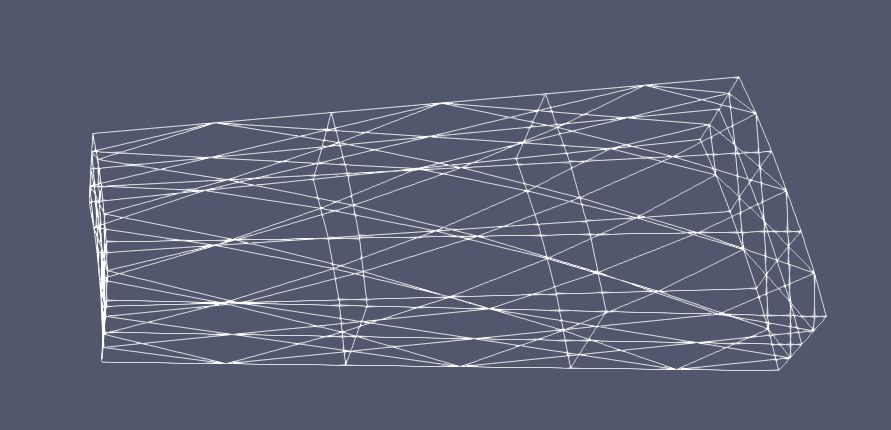
Unfortunately, when I export the mesh in other formats that I need (.vtm, .vtk, .stl) from the pyvista library in Python, the mesh is ever represented like in Feature Edges, but I want it like the first figure, with hexaedrons.
I generated, at the beginning, this mesh in ansys. Unfortunately, I didn’t find a way to export it without this problem. If I export the mesh directly in stl from ansys, paraview show me the mesh in “Surface with Edges” incorrectly:
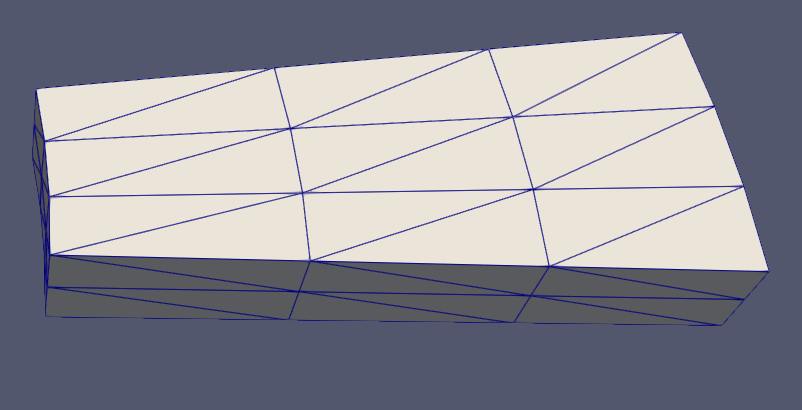
Anyone that has some suggestions to fix this problem with Ansys, Paraview or Python?
Thanks in advance for your time.
Best regards,
Christian
---
### Author:  [@Kenichiro-Yoshimi](https://discourse.paraview.org/u/Kenichiro-Yoshimi)
#### Post date: [January 6, 2022, 3:34am UTC](https://discourse.paraview.org/t/remove-additional-edges-to-export-correctly-the-mesh/8730/2 "2022-01-06T03:34:04Z")
Hi,
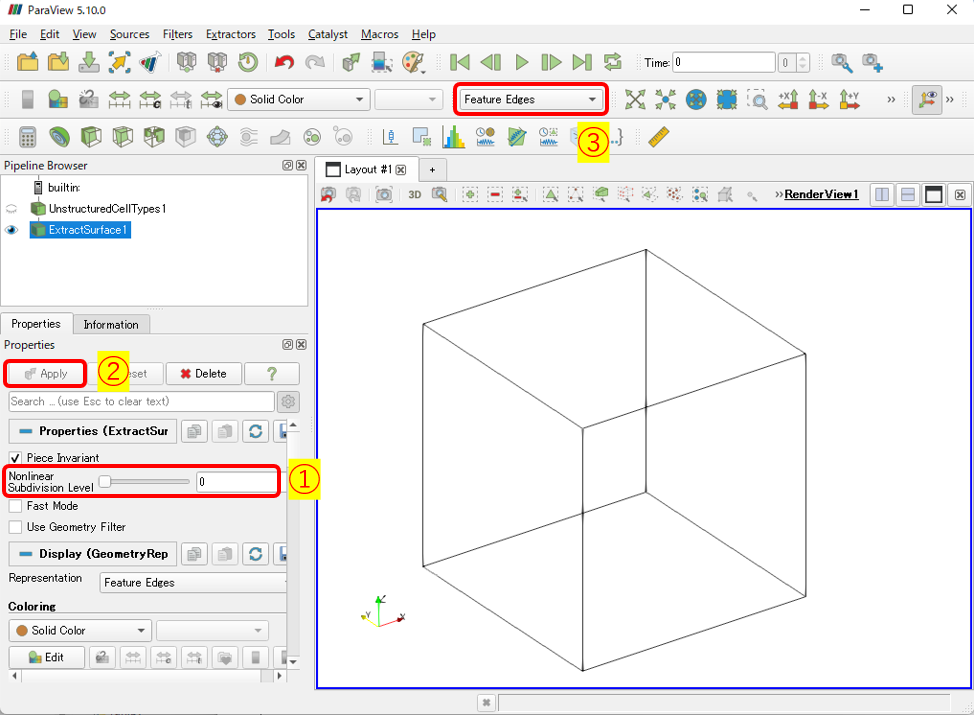
The “ **Feature Edges** ” representation is equivalent to doing the **Extract Surface** filter, then doing the **Feature Edges** filter, and then displaying it. However, the **Extract Surface** filter will, as a default operation, subdivide the surface shape of the quadratic element. As a result, the “ **Feature Edges** ” representation of a quadratic hexahedral element will be split into triangles and displayed.
Therefore, a simple solution to correctly display quadratic element features is to first apply the **Extract Surface** filter to the loaded CGNS with the option **Nonlinear Subdivision Level set** to **0** , and then use " **Feature Edges**" representation.
---
### Author:  [@Chris90](https://discourse.paraview.org/u/Chris90)
#### Post date: [January 6, 2022, 11:14am UTC](https://discourse.paraview.org/t/remove-additional-edges-to-export-correctly-the-mesh/8730/3 "2022-01-06T11:14:25Z")
Thank you very much! It works. I could export the geometry with this discretization, thanks for your suggestion. I have only another problem: the geometry is visualized and exported only with the edges, without the possibility to visualize the surfaces. Here below the plot:
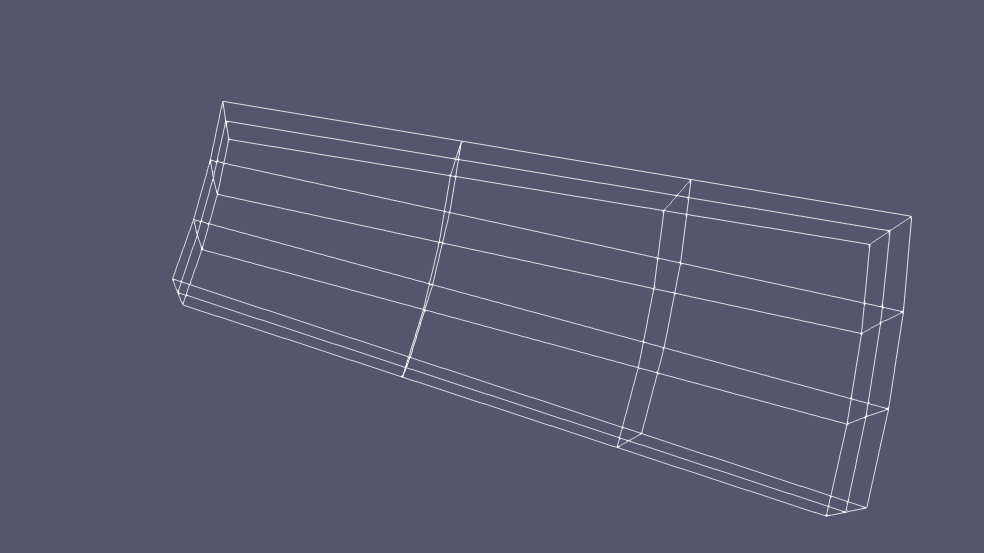
Is it possible to have this mesh, with the surfaces of the cell, like the previous plots?
Thanks again for your time.
Best regards,
Christian
---
### Author:  [@Kenichiro-Yoshimi](https://discourse.paraview.org/u/Kenichiro-Yoshimi)
#### Post date: [January 6, 2022, 12:18pm UTC](https://discourse.paraview.org/t/remove-additional-edges-to-export-correctly-the-mesh/8730/4 "2022-01-06T12:18:30Z")
I am sorry. I’m not really sure what you want to do.
If you want to output only the surface shape of quadratic hexahedral meshes in some format without subdividing them into triangles, you can output the result of the **Extract Surface** filter as \*.obj or \*.vtp from " **File \> Save Data"**.
---
### Author:  [@Chris90](https://discourse.paraview.org/u/Chris90)
#### Post date: [January 12, 2022, 12:35pm UTC](https://discourse.paraview.org/t/remove-additional-edges-to-export-correctly-the-mesh/8730/5 "2022-01-12T12:35:36Z")
Dear Kyoshimi,
I tried without success. I used your suggestion, but when I save the “Extract Surface” in vtp (or other formats), the mesh is not quadratic anymore.
Here below what I did, “Extract Surface wirh Nonlinear Subdivision Level to 0”

After, I exported the “ExtractSurface1” to .vtp format in the “prova.vtp” file:
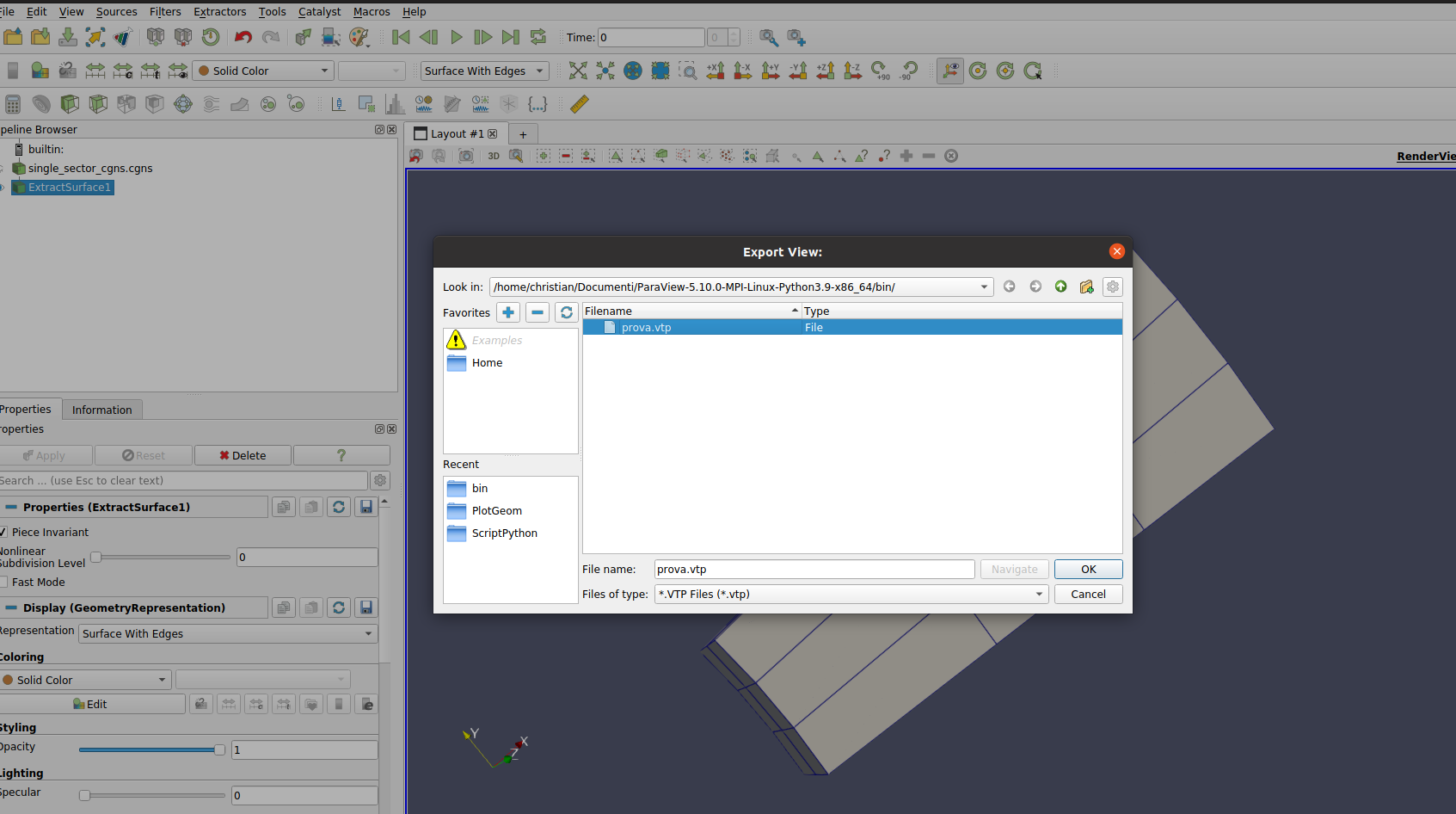
Than, I loaded “prova.vtp” file, getting again the mesh with the subdivisions in triangles:

Do you have suggestions to export the “ExtractSurface1” correctly, please?
Thank you very much for your time.
Best regards,
Christian
---
### Author:  [@Kenichiro-Yoshimi](https://discourse.paraview.org/u/Kenichiro-Yoshimi)
#### Post date: [January 12, 2022, 1:25pm UTC](https://discourse.paraview.org/t/remove-additional-edges-to-export-correctly-the-mesh/8730/6 "2022-01-12T13:25:48Z")
Hi,
Would it be possible to share your cgns file?
---
### Author:  [@Chris90](https://discourse.paraview.org/u/Chris90)
#### Post date: [January 13, 2022, 3:47pm UTC](https://discourse.paraview.org/t/remove-additional-edges-to-export-correctly-the-mesh/8730/7 "2022-01-13T15:47:35Z")
Yes, sure. Here attached the cgns file.
Thank you very much for your time.
Regards,
Christian
[single\_sector\_cgns.cgns](https://discourse.paraview.org/uploads/short-url/pI24g3cOlhRiP0BddtGQ2ZHwMvL.cgns) (20 KB)
---
### Author:  [@Kenichiro-Yoshimi](https://discourse.paraview.org/u/Kenichiro-Yoshimi)
#### Post date: [January 13, 2022, 11:48pm UTC](https://discourse.paraview.org/t/remove-additional-edges-to-export-correctly-the-mesh/8730/8 "2022-01-13T23:48:41Z")
Thank you very much for the data.
I was not able to reproduce the issue when I tried ParaView 5.10.0 for Windows. Maybe the behavior is different depending on the version or OS.
Note: I had to add the MerbeBlocks filtering process as shown below.
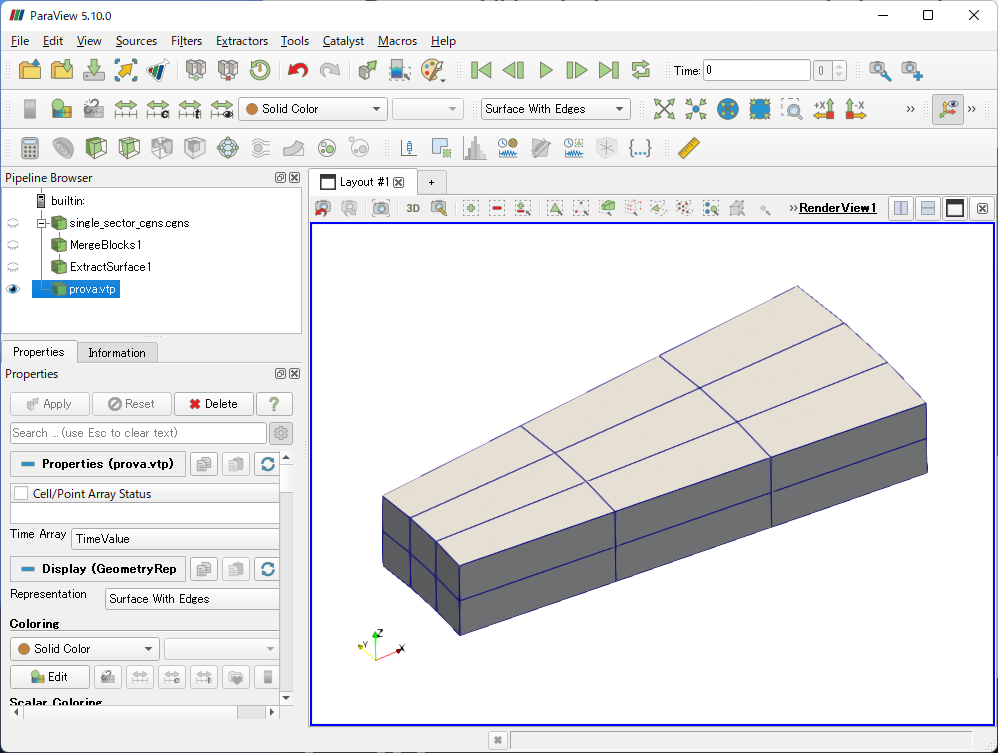
---
### Author:  [@Chris90](https://discourse.paraview.org/u/Chris90)
#### Post date: [January 14, 2022, 2:34pm UTC](https://discourse.paraview.org/t/remove-additional-edges-to-export-correctly-the-mesh/8730/9 "2022-01-14T14:34:50Z")
Thank you very much, you’ve been very helpful!
I ever used Paraview 5.10.0 for Linux. I just did this procedure with MergeBlocks with Paraview for Linux and Windows. Once again, Paraview for Linux didn’t provide the expected result (at this point, it is a bug). Differently, Paraview for Windows worked correctly.
Thank you very much!
Christian