# Remove feature edges on reflection axis
**URL:** https://discourse.paraview.org/t/remove-feature-edges-on-reflection-axis/5125
**Category:** ParaView Support
**Created:** [August 18, 2020, 7:43am UTC](https://discourse.paraview.org/t/remove-feature-edges-on-reflection-axis/5125 "2020-08-18T07:43:59Z")
**Posts on this page:** 5
**Page:** 1
### Author:  [@thabuis](https://discourse.paraview.org/u/thabuis)
#### Post date: [August 18, 2020, 7:43am UTC](https://discourse.paraview.org/t/remove-feature-edges-on-reflection-axis/5125/1 "2020-08-18T07:43:59Z")
Hello,
I would like to render the stress distribution inside a deformed structure and keep showing the contour/boundaries of the undeformed one.
As my structure is symmetric, my input results correspond to one half (_1_ on the first figure). I then use the Reflect filter to have the full structure (_2_ on the first figure). To have only the borders of the undeformed structure appearing, I use `Feature Edges` representation instead of `Surface` (_3_ on the first figure).
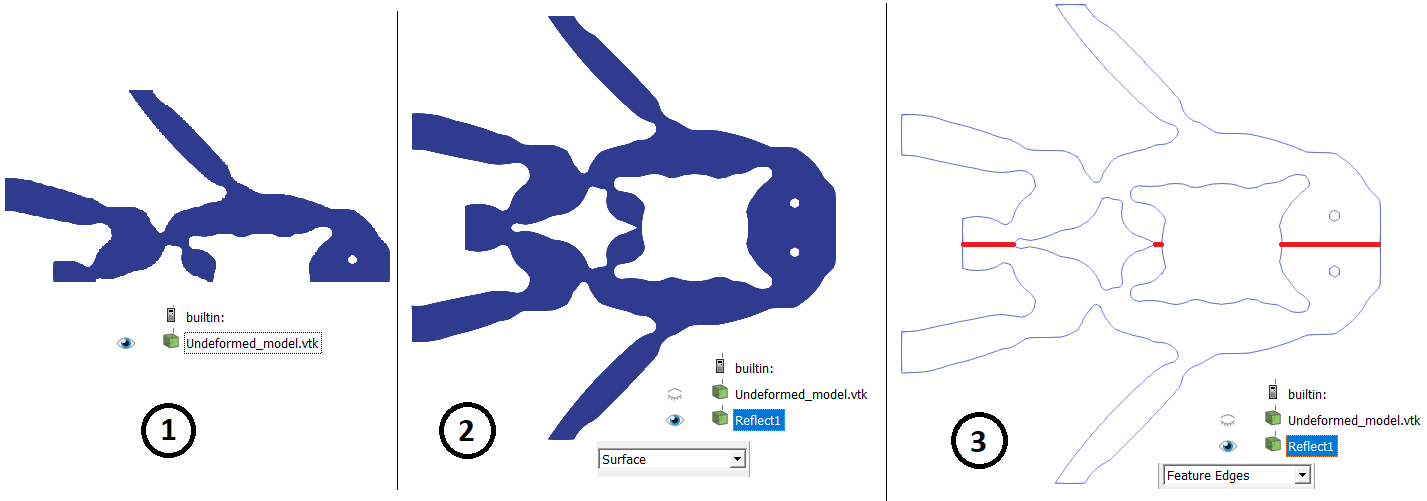
However, the edges common to both halves (symmetry axis) are still appearing (highlighted in red for clarity) … I would like to get rid of it. Do you have suggestions?
Here is the final rendering that I obtain, with the undesired edges on the symmetry axis:
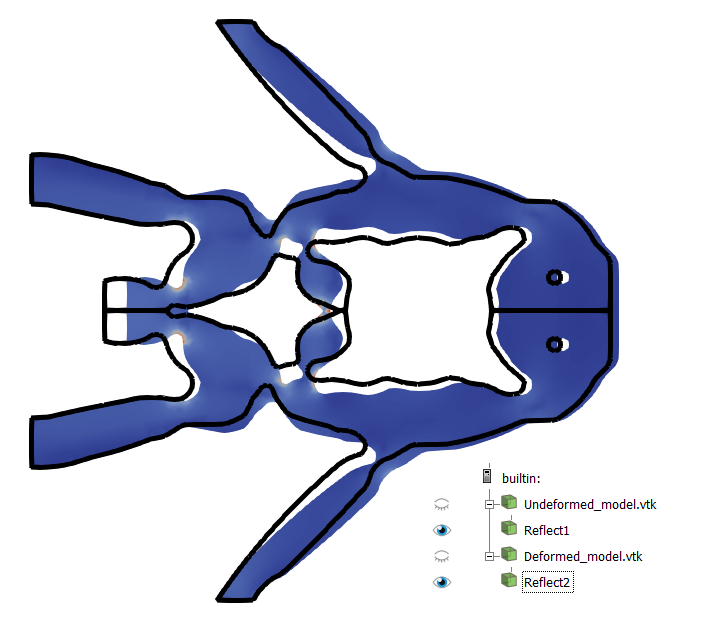
Thank you for your time.
---
### Author:  [@cory.quammen](https://discourse.paraview.org/u/cory.quammen)
#### Post date: [August 18, 2020, 12:47pm UTC](https://discourse.paraview.org/t/remove-feature-edges-on-reflection-axis/5125/2 "2020-08-18T12:47:54Z")
I don’t think you’ll be able to remove the shared line in the middle using the `Feature Edges` representation. Instead, you can try the following pipeline:
- Reader
- **Feature Edges**
- **Clip** - change the clip plane to be oriented parallel to the symmetry axes and orthogonal to the plane of the geometry, and move it just to the inside of the symmetry axes
- **Reflect**
There might be a slight discontinuity where the reflected halves meet, but hopefully you won’t be able to see it.
---
### Author:  [@thabuis](https://discourse.paraview.org/u/thabuis)
#### Post date: [August 18, 2020, 1:40pm UTC](https://discourse.paraview.org/t/remove-feature-edges-on-reflection-axis/5125/3 "2020-08-18T13:40:46Z")
When I perform a Clip, with the clip plane parallel and slightly shifted compared to the symmetry axis, the problem persists if I apply the reflection afterwards.
Maybe I didn’t understand your suggestion.
What do you mean in your first two points (Reader, and Feature Edges)? How is it different from what I was doing? It still relies on the `Feature Edges` representation. Or is your “Feature Edges” something different?
What is “Reader” referring to?
---
### Author:  [@cory.quammen](https://discourse.paraview.org/u/cory.quammen)
#### Post date: [August 18, 2020, 2:45pm UTC](https://discourse.paraview.org/t/remove-feature-edges-on-reflection-axis/5125/4 "2020-08-18T14:45:04Z")
By “Reader” I mean the file reader, the element in the Pipeline browser labeled “Undeformed\_model.vtk”.
I understand the confusion about the two different uses of “Feature Edges” in ParaView. The “Feature Edges” you are using is a representation of the data. Representations often hide some filtering behind the scenes. In the case of the “Feature Edges” _representation_, a **Feature Edges** filter is run to extract the feature edges and display them. The tradeoff to having this done behind the scenes is that you can’t modify those feature edges with subsequent filters in the Pipeline.
Fortunately, you can apply the **Feature Edges** _filter_ to your dataset in the Pipeline Browser. That is what I am suggesting. You can find it under the Filters -\> Alphabetical menu. Apply this filter to your data set, then Clip the resulting symmetry axis lines away. Then when you apply the **Reflect** filter, those lines will not appear on the symmetry axis and you should get your desired result.
---
### Author:  [@thabuis](https://discourse.paraview.org/u/thabuis)
#### Post date: [August 19, 2020, 7:24am UTC](https://discourse.paraview.org/t/remove-feature-edges-on-reflection-axis/5125/5 "2020-08-19T07:24:16Z")
Thank you for the clarification.
It is working!