# Remove transparency from .vtk
**URL:** https://discourse.paraview.org/t/remove-transparency-from-vtk/7022
**Category:** ParaView Support
**Tags:** vtk
**Created:** [April 21, 2021, 1:10pm UTC](https://discourse.paraview.org/t/remove-transparency-from-vtk/7022 "2021-04-21T13:10:06Z")
**Posts on this page:** 6
**Page:** 1
### Author:  [@bkb005](https://discourse.paraview.org/u/bkb005)
#### Post date: [April 21, 2021, 1:10pm UTC](https://discourse.paraview.org/t/remove-transparency-from-vtk/7022/1 "2021-04-21T13:10:06Z")
I work in a biology lab, so Paraview is very new to me. We’ve created .vtk files that represent cells and the blood vessels that surround them in the liver. I’d like to visualize them together, but there seems to be a transparency that I cannot remove. I’ve attached two files as an example. I open each in the same pipeline, and change the display representation to ‘Volume’. Each time it seems as though the vessels between the cell and the camera tend to disappear.
I admit, I’m likely missing a step in loading these into Paraview. A second question I’d like to address is whether these .vtk files with no time data can be used to create a short video by spinning them 360 degrees? I’m sorry if this is a very basic question that has been asked before. I’m struggling to find forum examples with the same file types.
[Cell\_2064.vtk](https://discourse.paraview.org/uploads/short-url/x9aOU5wNmjt3zA0ZRriSwj3i6Lg.vtk) (1.2 MB) [Bile\_2064.vtk](https://discourse.paraview.org/uploads/short-url/boVXIpwhkjQqlhUwYJJIcJXJweq.vtk) (1.2 MB)
---
### Author:  [@nicolas.vuaille](https://discourse.paraview.org/u/nicolas.vuaille)
#### Post date: [April 21, 2021, 1:17pm UTC](https://discourse.paraview.org/t/remove-transparency-from-vtk/7022/2 "2021-04-21T13:17:10Z")
The volume rendering needs to use opacity, otherwise it would be only an external surface rendering. That said, you can control the opacity in the [color map editor](https://docs.paraview.org/en/latest/ReferenceManual/colorMapping.html#mapping-data)
You can [animate the camera](https://docs.paraview.org/en/latest/UsersGuide/animation.html#animating-the-camera) (I think Orbit mode is what you need), and export this as a video.
---
### Author:  [@cory.quammen](https://discourse.paraview.org/u/cory.quammen)
#### Post date: [April 21, 2021, 1:24pm UTC](https://discourse.paraview.org/t/remove-transparency-from-vtk/7022/3 "2021-04-21T13:24:10Z")
Welcome to ParaView, Ben!
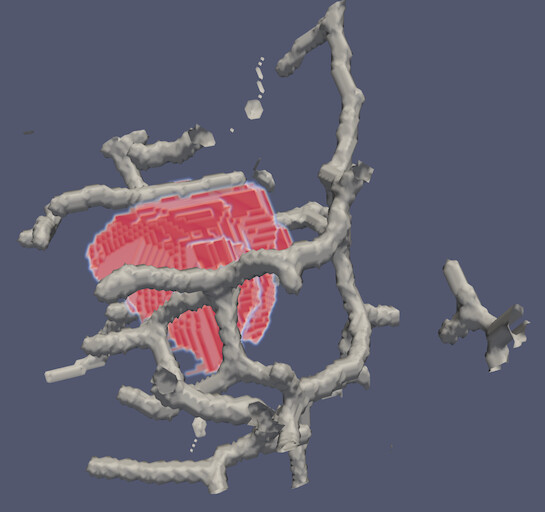
The problem is that you are using the ‘Volume’ representation on two overlapping volumes, and that is not supported in ParaView. You won’t get a warning, but it will just look weird, as you have noticed.
My recommendation is to extract a contour of the vessels and volume render the cells. Use the **Contour** filter to extract the vessels. Intermixed surface and volume rendering is supported, and should give you the effect you are looking for, e.g.,
---
### Author:  [@bkb005](https://discourse.paraview.org/u/bkb005)
#### Post date: [April 21, 2021, 1:37pm UTC](https://discourse.paraview.org/t/remove-transparency-from-vtk/7022/4 "2021-04-21T13:37:00Z")
Thanks Cory!
This is very helpful to know! Is there anything to do after opening the file in my pipeline that enables the Contour filter? All the filter options are grey-ed out when I load any of our .vtk files.
---
### Author:  [@cory.quammen](https://discourse.paraview.org/u/cory.quammen)
#### Post date: [April 21, 2021, 1:55pm UTC](https://discourse.paraview.org/t/remove-transparency-from-vtk/7022/5 "2021-04-21T13:55:47Z")
Clock on the **Bile\_2064.vtk** file in the _Pipeline Browser_, and the **Contour** filter should be available.
---
### Author:  [@mwestphal](https://discourse.paraview.org/u/mwestphal)
#### Post date: [April 22, 2021, 10:44am UTC](https://discourse.paraview.org/t/remove-transparency-from-vtk/7022/6 "2021-04-22T10:44:10Z")
Also make sure that you clicked the “Apply” button.
> [@I've just opened my dataset. I can't add filters, and everything is greyed out](https://discourse.paraview.org/t/ive-just-opened-my-dataset-i-cant-add-filters-and-everything-is-greyed-out/4511):
>
> Make sure your dataset is selected in the Pipeline Browser Click apply (in the Properties tab) if the apply button is green