# Render of 3D surface in 2D Interaction Mode
**URL:** https://discourse.paraview.org/t/render-of-3d-surface-in-2d-interaction-mode/10442
**Category:** ParaView Support
**Tags:** python
**Created:** [October 3, 2022, 2:48pm UTC](https://discourse.paraview.org/t/render-of-3d-surface-in-2d-interaction-mode/10442 "2022-10-03T14:48:24Z")
**Posts on this page:** 3
**Page:** 1
### Author:  [@thibaultDrt](https://discourse.paraview.org/u/thibaultDrt)
#### Post date: [October 3, 2022, 2:48pm UTC](https://discourse.paraview.org/t/render-of-3d-surface-in-2d-interaction-mode/10442/1 "2022-10-03T14:48:25Z")
Hi,
I couldn’t find information about that so I take my chance here.
I am using pvpython 3.8 with on Paraview/5.9.1.
I attempt to generate a screenshot of a 3D surface in a 2D Interaction Mode.
The 3D surface is a cylinder made of triangles. The source is read from a .xmf file based of an HDF5 mesh file.
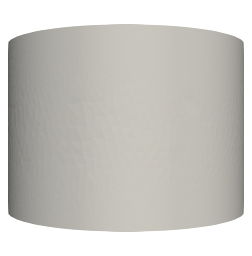
By setting the `renderView.InteractionMode = '3D'`, the source is well represented.
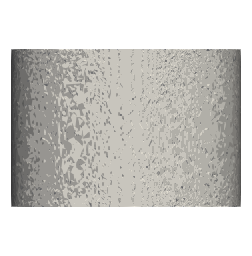
However, I would rather use a 2D Interaction Mode for a question of perspective. But by setting `renderView.InteractionMode = '2D'`, the PNG file obtained by `SaveScreenshot()` has a bad rendering:
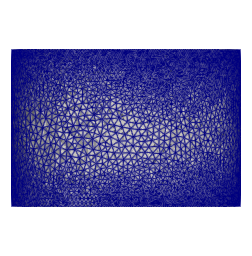
Here is the triangle mesh of the source:
Here is a simple example of my code :
```auto
renderView = GetActiveView()
renderView.InteractionMode = '2D' # Or '3D'
xmf = XDMFReader(FileNames=['file.xmf'])
display = Show(xmf, renderView)
display.SetRepresentationType('Surface')
display.SetScalarColoring(None, 0)
SaveScreenshot('output.png', renderView, ImageResolution=(252, 256), TransparentBackgound=1)
```
Do you have an idea on how to have the same rendering in ‘2D’ perspective than in ‘3D’ ?
Have a nice day,
Thibault
---
### Author:  [@mwestphal](https://discourse.paraview.org/u/mwestphal)
#### Post date: [October 4, 2022, 1:48am UTC](https://discourse.paraview.org/t/render-of-3d-surface-in-2d-interaction-mode/10442/2 "2022-10-04T01:48:50Z")
Hi @thibaultDrt ,
Please share your data.
Best,
---
### Author:  [@thibaultDrt](https://discourse.paraview.org/u/thibaultDrt)
#### Post date: [October 4, 2022, 4:13pm UTC](https://discourse.paraview.org/t/render-of-3d-surface-in-2d-interaction-mode/10442/3 "2022-10-04T16:13:11Z")
Hi @mwestphal ,
Thanks for your quick answer.
Trying to isolate my cylinder to share it here, I finally found the answer myself.
I was setting the `renderView.CameraPosition` to something far away from the `renderView.CameraFocalPoint`, thinking it didn’t really matter in 2D:
`renderView.CameraPosition = [0.042, -0.006, 1000]`
Apparently it mattered. Setting it to something closer (without being the real distance from the CameraFocalPoint) fix the problem. And if I get further (`[0.042, -0.006, 2000]`), the quality of the rendering goes even lower.
Sorry for bothering, and hoping it could help someone else,
Best,