# Render Z Order for Image Data
**URL:** https://discourse.paraview.org/t/render-z-order-for-image-data/10432
**Category:** ParaView Support
**Created:** [September 29, 2022, 6:40pm UTC](https://discourse.paraview.org/t/render-z-order-for-image-data/10432 "2022-09-29T18:40:24Z")
**Posts on this page:** 3
**Page:** 1
### Author:  [@mersoj](https://discourse.paraview.org/u/mersoj)
#### Post date: [September 29, 2022, 6:40pm UTC](https://discourse.paraview.org/t/render-z-order-for-image-data/10432/1 "2022-09-29T18:40:24Z")
I have two fields that are computed from the same 2D image dataset (constructed by resample to image from a slice).
Is it possible to change the order of which one is rendered on top? It doesn’t seem like there is a setting for “Zorder” and which one is displayed on top seems to randomly change.
---
### Author:  [@Kenneth\_Moreland](https://discourse.paraview.org/u/Kenneth_Moreland)
#### Post date: [September 30, 2022, 8:42pm UTC](https://discourse.paraview.org/t/render-z-order-for-image-data/10432/2 "2022-09-30T20:42:24Z")
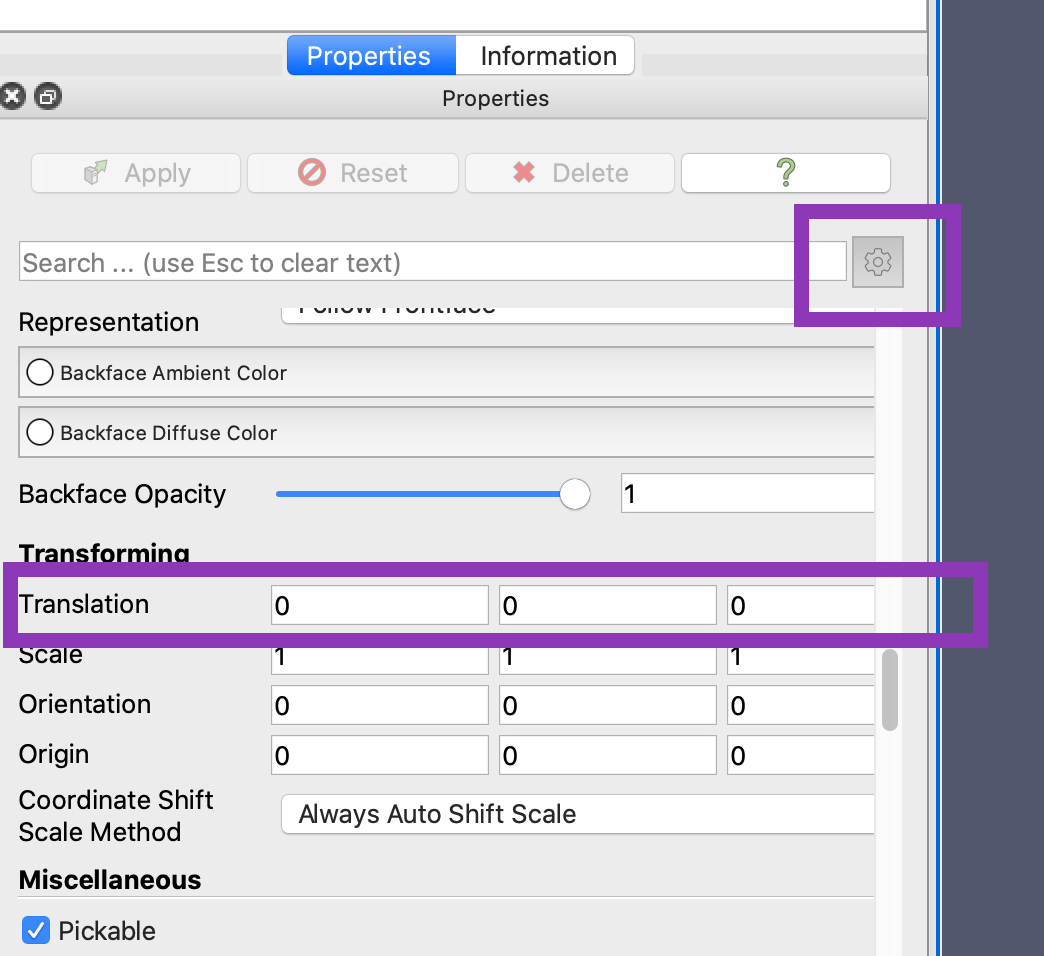
I can think of several ways to solve the problem, but the one that most directly answers the question as posed is to translate one of the planes a bit (probably in the z direction) so they are not rendered directly on top of each other. (Note this is an “advanced” property in the properties panel.)
---
### Author:  [@mersoj](https://discourse.paraview.org/u/mersoj)
#### Post date: [September 30, 2022, 8:46pm UTC](https://discourse.paraview.org/t/render-z-order-for-image-data/10432/3 "2022-09-30T20:46:50Z")
This is exactly what I was looking for thanks! I tried using the calculator to shift the coordinate, but it had issues due to the data being image data. I didn’t realize that there is a translate option built into the pipeline properties 🤦♂️.
Thanks again this is a huge help!