# Restore some filter icons on the toolbar
**URL:** https://discourse.paraview.org/t/restore-some-filter-icons-on-the-toolbar/17237
**Category:** ParaView Support
**Created:** [October 9, 2025, 7:57pm UTC](https://discourse.paraview.org/t/restore-some-filter-icons-on-the-toolbar/17237 "2025-10-09T19:57:10Z")
**Posts on this page:** 3
**Page:** 1
### Author:  [@s1291](https://discourse.paraview.org/u/s1291)
#### Post date: [October 9, 2025, 7:57pm UTC](https://discourse.paraview.org/t/restore-some-filter-icons-on-the-toolbar/17237/1 "2025-10-09T19:57:10Z")
In ParaView 5.x version, I frequently used the “Extract a subgrid or subsample” filter from the toolbar as shown below:
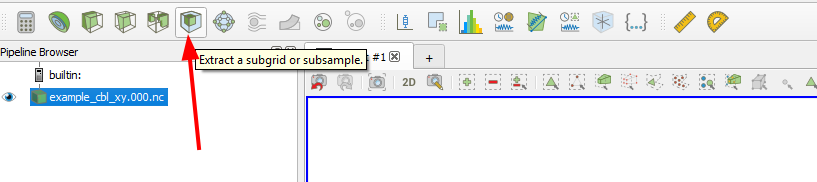
However, in ParaView 6.x, that icon has been removed.
How can I restore it?
Thank you
---
### Author:  [@cory.quammen](https://discourse.paraview.org/u/cory.quammen)
#### Post date: [October 9, 2025, 8:35pm UTC](https://discourse.paraview.org/t/restore-some-filter-icons-on-the-toolbar/17237/2 "2025-10-09T20:35:10Z")
I’m sorry to hear that the removal of that button has interrupted your workflow. We removed it to make room for some other icons that were added, thinking there weren’t many users of this filter.
Unfortunately you cannot customize toolbars with your choice of buttons for commonly used filters, but that is an interesting idea.
As a workaround, you could add a Macro containing the script
```auto
from paraview.simple import *
ExtractSubset()
```
This will add a button to the Macros toolbar that will create an **Extract Subset** filter attached to the filter you’ve created. It will not highlight the Apply button, but if you modify any properties of the filter, the Apply button will be enabled.
---
### Author:  [@mwestphal](https://discourse.paraview.org/u/mwestphal)
#### Post date: [October 10, 2025, 8:34am UTC](https://discourse.paraview.org/t/restore-some-filter-icons-on-the-toolbar/17237/3 "2025-10-10T08:34:21Z")
> [@cory.quammen](#):
>
> you cannot customize toolbars with your choice of buttons for commonly used filters, but that is an interesting idea.
Well, you can, it’s a 6.0 feature 🙂
- Tools → Configure Categories
- Search for “Extract Subset”, add it to “Favorites” (or any other categories)
- Click on the category and check “Toolbar”
