# run paraview on ubuntu 24.04
**URL:** https://discourse.paraview.org/t/run-paraview-on-ubuntu-24-04/15964
**Category:** ParaView Support
**Created:** [January 10, 2025, 4:11pm UTC](https://discourse.paraview.org/t/run-paraview-on-ubuntu-24-04/15964 "2025-01-10T16:11:58Z")
**Posts on this page:** 9
**Page:** 1
### Author:  [@lumasci](https://discourse.paraview.org/u/lumasci)
#### Post date: [January 10, 2025, 4:11pm UTC](https://discourse.paraview.org/t/run-paraview-on-ubuntu-24-04/15964/1 "2025-01-10T16:11:58Z")
Hi,
I try to run paraview on Ubuntu 24.04. I get the following error typing `paraview` in the terminal
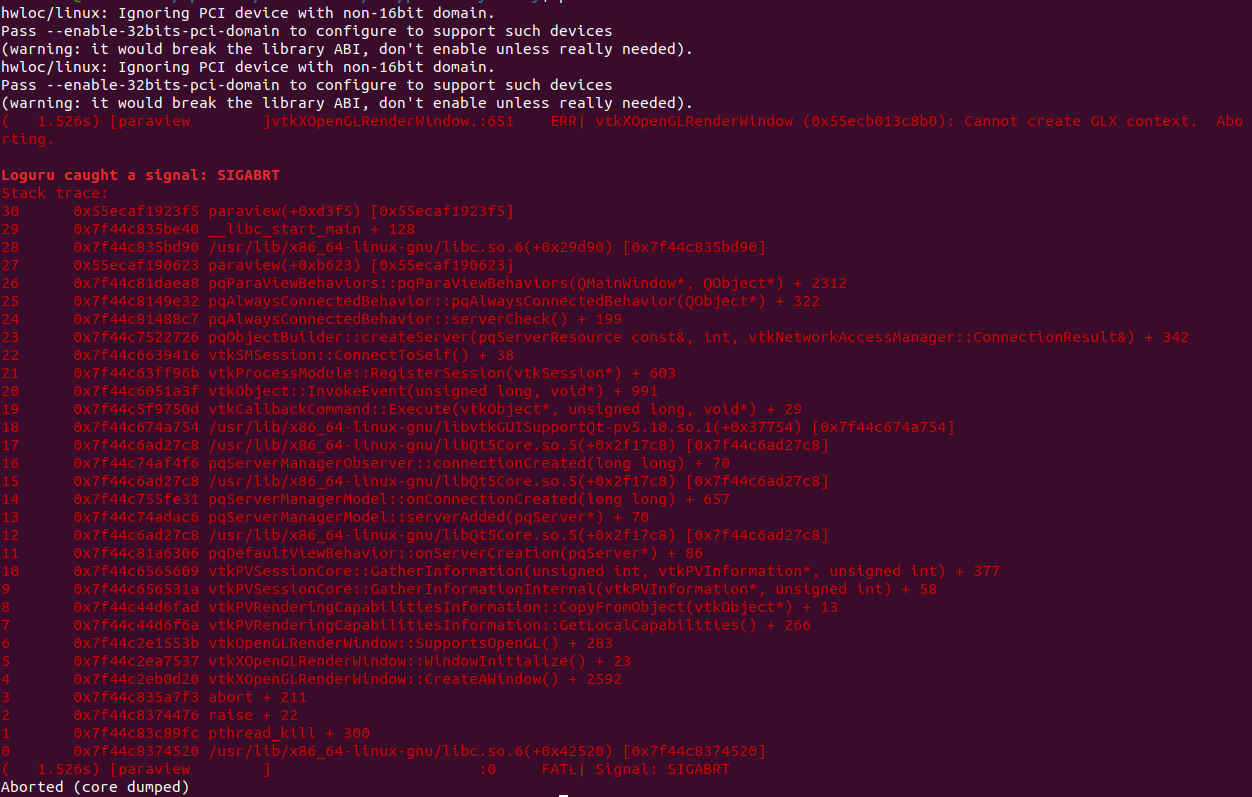
Note: Paraview was before coupled with Openfoam (12 and 2312)
```auto
hwloc/linux: Ignoring PCI device with non-16bit domain.
Pass --enable-32bits-pci-domain to configure to support such devices
(warning: it would break the library ABI, don't enable unless really needed).
hwloc/linux: Ignoring PCI device with non-16bit domain.
Pass --enable-32bits-pci-domain to configure to support such devices
(warning: it would break the library ABI, don't enable unless really needed).
( 1.064s) [paraview]vtkXOpenGLRenderWindow.:651 ERR| vtkXOpenGLRenderWindow (0x56286f1cd2c0): Cannot create GLX context. Aborting.
Loguru caught a signal: SIGABRT
Stack trace:
30 0x56286da0e3f5 paraview(+0xd3f5) [0x56286da0e3f5]
29 0x7f1fb29e0e40 __libc_start_main + 128
28 0x7f1fb29e0d90 /usr/bin/../lib/x86_64-linux-gnu/libc.so.6(+0x29d90) [0x7f1fb29e0d90]
27 0x56286da0c623 paraview(+0xb623) [0x56286da0c623]
26 0x7f1fb285fea8 pqParaViewBehaviors::pqParaViewBehaviors(QMainWindow*, QObject*) + 2312
25 0x7f1fb27cee32 pqAlwaysConnectedBehavior::pqAlwaysConnectedBehavior(QObject*) + 322
24 0x7f1fb27cd8c7 pqAlwaysConnectedBehavior::serverCheck() + 199
23 0x7f1fb1ba7726 pqObjectBuilder::createServer(pqServerResource const&, int, vtkNetworkAccessManager::ConnectionResult&) + 342
22 0x7f1fb0cbe416 vtkSMSession::ConnectToSelf() + 38
21 0x7f1fb0a8496b vtkProcessModule::RegisterSession(vtkSession*) + 603
20 0x7f1fb06d8a3f vtkObject::InvokeEvent(unsigned long, void*) + 991
19 0x7f1fb061e50d vtkCallbackCommand::Execute(vtkObject*, unsigned long, void*) + 29
18 0x7f1fb0dcf754 /usr/bin/../lib/x86_64-linux-gnu/libvtkGUISupportQt-pv5.10.so.1(+0x37754) [0x7f1fb0dcf754]
17 0x7f1fb11577c8 /usr/bin/../lib/x86_64-linux-gnu/libQt5Core.so.5(+0x2f17c8) [0x7f1fb11577c8]
16 0x7f1fb1b344f6 pqServerManagerObserver::connectionCreated(long long) + 70
15 0x7f1fb11577c8 /usr/bin/../lib/x86_64-linux-gnu/libQt5Core.so.5(+0x2f17c8) [0x7f1fb11577c8]
14 0x7f1fb1be4e31 pqServerManagerModel::onConnectionCreated(long long) + 657
13 0x7f1fb1b32ac6 pqServerManagerModel::serverAdded(pqServer*) + 70
12 0x7f1fb11577c8 /usr/bin/../lib/x86_64-linux-gnu/libQt5Core.so.5(+0x2f17c8) [0x7f1fb11577c8]
11 0x7f1fb282b306 pqDefaultViewBehavior::onServerCreation(pqServer*) + 86
10 0x7f1fb0bea609 vtkPVSessionCore::GatherInformation(unsigned int, vtkPVInformation*, unsigned int) + 377
9 0x7f1fb0bea31a vtkPVSessionCore::GatherInformationInternal(vtkPVInformation*, unsigned int) + 58
8 0x7f1faeb5bfad vtkPVRenderingCapabilitiesInformation::CopyFromObject(vtkObject*) + 13
7 0x7f1faeb5bf6a vtkPVRenderingCapabilitiesInformation::GetLocalCapabilities() + 266
6 0x7f1fad49a53b vtkOpenGLRenderWindow::SupportsOpenGL() + 283
5 0x7f1fad52c537 vtkXOpenGLRenderWindow::WindowInitialize() + 23
4 0x7f1fad535d20 vtkXOpenGLRenderWindow::CreateAWindow() + 2592
3 0x7f1fb29df7f3 abort + 211
2 0x7f1fb29f9476 raise + 22
1 0x7f1fb2a4d9fc pthread_kill + 300
0 0x7f1fb29f9520 /usr/bin/../lib/x86_64-linux-gnu/libc.so.6(+0x42520) [0x7f1fb29f9520]
( 1.064s) [paraview] :0 FATL| Signal: SIGABRT
Aborted (core dumped)
```
Does anyone know where the issue come from?
```auto
sudo apt install paraview
```
tells me that the latest version of paraview is installed.
Cheerio,
LM
---
### Author:  [@mwestphal](https://discourse.paraview.org/u/mwestphal)
#### Post date: [January 10, 2025, 4:13pm UTC](https://discourse.paraview.org/t/run-paraview-on-ubuntu-24-04/15964/2 "2025-01-10T16:13:52Z")
Do you have a Xorg server running ?
---
### Author:  [@lumasci](https://discourse.paraview.org/u/lumasci)
#### Post date: [January 10, 2025, 4:16pm UTC](https://discourse.paraview.org/t/run-paraview-on-ubuntu-24-04/15964/3 "2025-01-10T16:16:32Z")
no
---
### Author:  [@mwestphal](https://discourse.paraview.org/u/mwestphal)
#### Post date: [January 10, 2025, 4:17pm UTC](https://discourse.paraview.org/t/run-paraview-on-ubuntu-24-04/15964/4 "2025-01-10T16:17:21Z")
ParaView needs Xorg to run. ParaView is a GUI application.
---
### Author:  [@lumasci](https://discourse.paraview.org/u/lumasci)
#### Post date: [January 10, 2025, 4:22pm UTC](https://discourse.paraview.org/t/run-paraview-on-ubuntu-24-04/15964/5 "2025-01-10T16:22:10Z")
in fact I do have it installed. Sorry:
```auto
X.Org X Server 1.21.1.4
X Protocol Version 11, Revision 0
Current Operating System: Linux wia48559 5.15.0-122-generic #132-Ubuntu SMP Thu Aug 29 13:45:52 UTC 2024 x86_64
Kernel command line: BOOT_IMAGE=/boot/vmlinuz-5.15.0-122-generic root=UUID=8141c4f9-75ce-4279-8904-e9abea896d78 ro quiet splash vt.handoff=7
xorg-server 2:21.1.4-2ubuntu1.7~22.04.12 (For technical support please see http://www.ubuntu.com/support)
Current version of pixman: 0.40.0
Before reporting problems, check http://wiki.x.org
to make sure that you have the latest version.
```
---
### Author:  [@mwestphal](https://discourse.paraview.org/u/mwestphal)
#### Post date: [January 10, 2025, 4:44pm UTC](https://discourse.paraview.org/t/run-paraview-on-ubuntu-24-04/15964/6 "2025-01-10T16:44:49Z")
Ok, is it running ? Do you have a graphical environment ?
What is the output of ` echo $DISPLAY` ? Does `glxinfo` works ?
---
### Author:  [@lumasci](https://discourse.paraview.org/u/lumasci)
#### Post date: [January 13, 2025, 7:53am UTC](https://discourse.paraview.org/t/run-paraview-on-ubuntu-24-04/15964/7 "2025-01-13T07:53:59Z")
I do have a graphical environnement
```auto
echo $DISPLAY
```
results
```auto
:0
```
The windowing system is X11
---
### Author:  [@lumasci](https://discourse.paraview.org/u/lumasci)
#### Post date: [January 13, 2025, 8:42am UTC](https://discourse.paraview.org/t/run-paraview-on-ubuntu-24-04/15964/8 "2025-01-13T08:42:56Z")
In fact, running paraview from the ubuntu app does work 🤔 But running from the terminal doesn´t work 🤔
> Client Information:
> Version: 5.10.0-RC1
> VTK Version:
> Qt Version: 5.15.2
> vtkIdType size: 64bits
> Embedded Python: On
> Python Library Path: /usr/lib/python3.10
> Python Library Version: 3.10.12 (main, Nov 6 2024, 20:22:13) [GCC 11.4.0]
> Python Numpy Support: On
> Python Numpy Path: /usr/lib/python3/dist-packages/numpy
> Python Numpy Version: 1.21.5
> Python Matplotlib Support: On
> Python Matplotlib Path: /usr/lib/python3/dist-packages/matplotlib
> Python Matplotlib Version: 3.5.1
> Python Testing: Off
> MPI Enabled: On
> Disable Registry: Off
> Test Directory:
> Data Directory:
> SMP Backend: Sequential
> SMP Max Number of Threads: 1
> OpenGL Vendor: NVIDIA Corporation
> OpenGL Version: 3.2.0 NVIDIA 535.216.03
> OpenGL Renderer: Quadro P5000/PCIe/SSE2
> Connection Information:
> Remote Connection: No
---
### Author:  [@lumasci](https://discourse.paraview.org/u/lumasci)
#### Post date: [January 13, 2025, 8:55am UTC](https://discourse.paraview.org/t/run-paraview-on-ubuntu-24-04/15964/9 "2025-01-13T08:55:49Z")
In fact, runing paraview and parafoam from the terminal works.
It seems that some updates were blocked by my IT. running an update and restarting seems to work fine. 🤞 (I realized the migration to 24.04 wasn´t effective. I need to run it now)
→ resolved. Thanks for the help and resposivity.