# save an extracted surface to vtp format
**URL:** https://discourse.paraview.org/t/save-an-extracted-surface-to-vtp-format/2595
**Category:** ParaView Support
**Created:** [September 19, 2019, 6:29pm UTC](https://discourse.paraview.org/t/save-an-extracted-surface-to-vtp-format/2595 "2019-09-19T18:29:45Z")
**Posts on this page:** 5
**Page:** 1
### Author:  [@Haiyan](https://discourse.paraview.org/u/Haiyan)
#### Post date: [September 19, 2019, 6:29pm UTC](https://discourse.paraview.org/t/save-an-extracted-surface-to-vtp-format/2595/1 "2019-09-19T18:29:45Z")
Hi ParaView team,
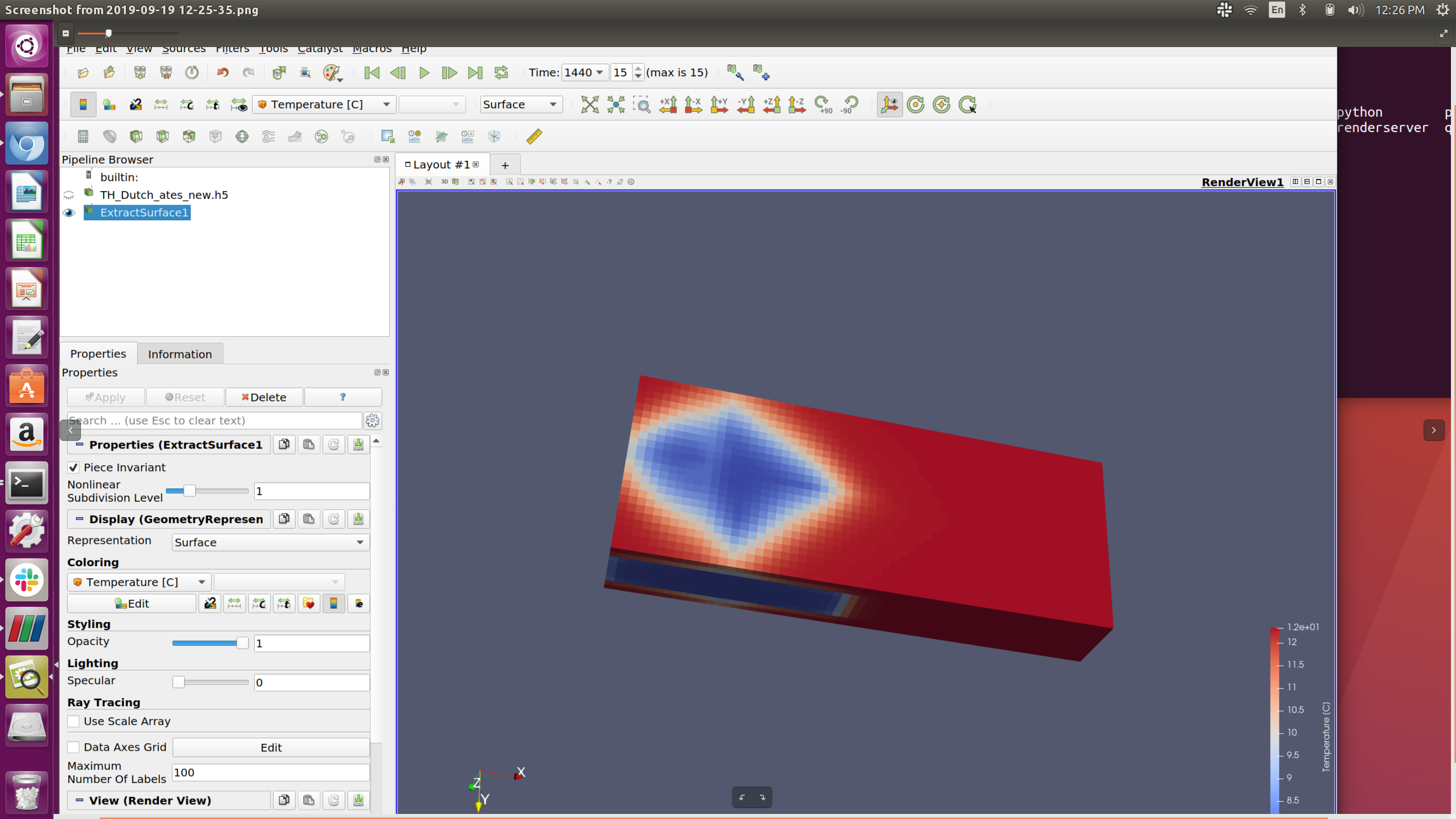
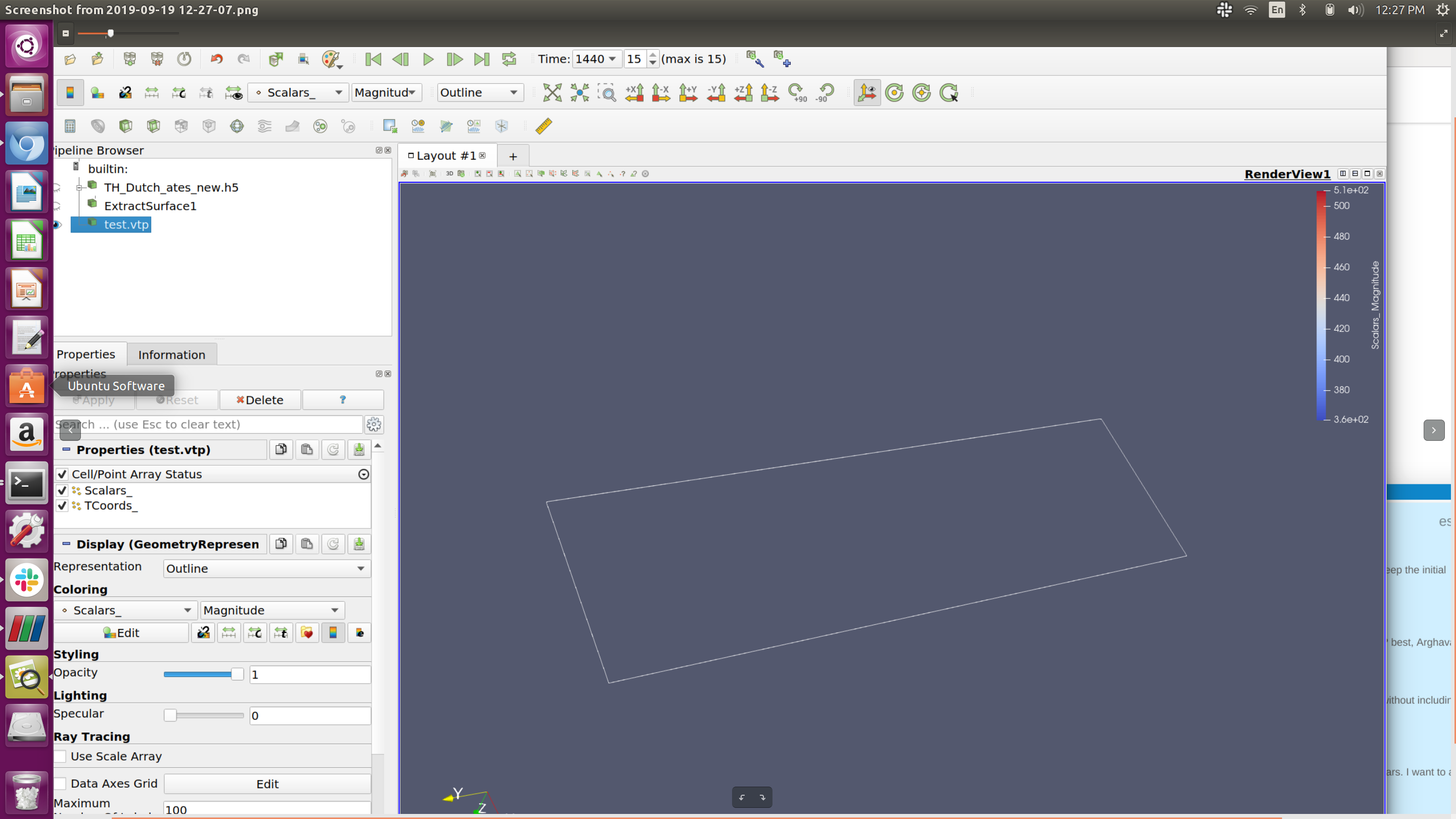
I tried to extract surface and save it to a vtp format. However, when I load the saved .vtp file, I lose the surface but only the outline. Please see below for the figures. The first figure shows the extractsurface based on the ‘TH\_Dutch\_ates\_new.h5’. It looks good. I export the scene and save it as ‘test.vtp’. Then I load the vtp file but it does not show properly (the second figure).
I am new to ParaView and would appreciate any help for this.
Best,
Haiyan
ps. I am using ParaView 5.7 on a Linux system.
---
### Author:  [@Kenneth\_Moreland](https://discourse.paraview.org/u/Kenneth_Moreland)
#### Post date: [September 19, 2019, 7:07pm UTC](https://discourse.paraview.org/t/save-an-extracted-surface-to-vtp-format/2595/2 "2019-09-19T19:07:11Z")
Try `Save Data` instead of `Export Scene`.
---
### Author:  [@Haiyan](https://discourse.paraview.org/u/Haiyan)
#### Post date: [September 19, 2019, 7:21pm UTC](https://discourse.paraview.org/t/save-an-extracted-surface-to-vtp-format/2595/3 "2019-09-19T19:21:58Z")
Hi Kenneth,
Thanks for your reply.
But I do need the format of \*.vtp which I do not find from the available types in ‘save data’.
Is there any other way to obtain a \*.vtp file?
Best,
Haiyan
---
### Author:  [@jourdain](https://discourse.paraview.org/u/jourdain)
#### Post date: [September 19, 2019, 8:13pm UTC](https://discourse.paraview.org/t/save-an-extracted-surface-to-vtp-format/2595/4 "2019-09-19T20:13:32Z")
If your dataset is a multi-block before running the extract surface, you will need to run `Merge bocks`.
The information tab will tell you the type of data you have and indeed the `Save Data` is the way to go. Just make sure the `Extract Surface` filter is selected when you trigger the `Save Data`.
---
### Author:  [@Haiyan](https://discourse.paraview.org/u/Haiyan)
#### Post date: [September 19, 2019, 8:21pm UTC](https://discourse.paraview.org/t/save-an-extracted-surface-to-vtp-format/2595/5 "2019-09-19T20:21:35Z")
Thank you so much, Sebastien. It works!
Haiyan