# Save Animation of two different views into one video output
**URL:** https://discourse.paraview.org/t/save-animation-of-two-different-views-into-one-video-output/371
**Category:** ParaView Support
**Created:** [July 29, 2018, 12:26pm UTC](https://discourse.paraview.org/t/save-animation-of-two-different-views-into-one-video-output/371 "2018-07-29T12:26:54Z")
**Posts on this page:** 9
**Page:** 1
### Author:  [@ovais](https://discourse.paraview.org/u/ovais)
#### Post date: [July 29, 2018, 12:26pm UTC](https://discourse.paraview.org/t/save-animation-of-two-different-views-into-one-video-output/371/1 "2018-07-29T12:26:55Z")
Hi there,
I am using paraview to create animation video of two different views of my mesh. I want show all the times steps side by side in two different views at the same time in a single video output.
This snap shot below will give an idea of what I want
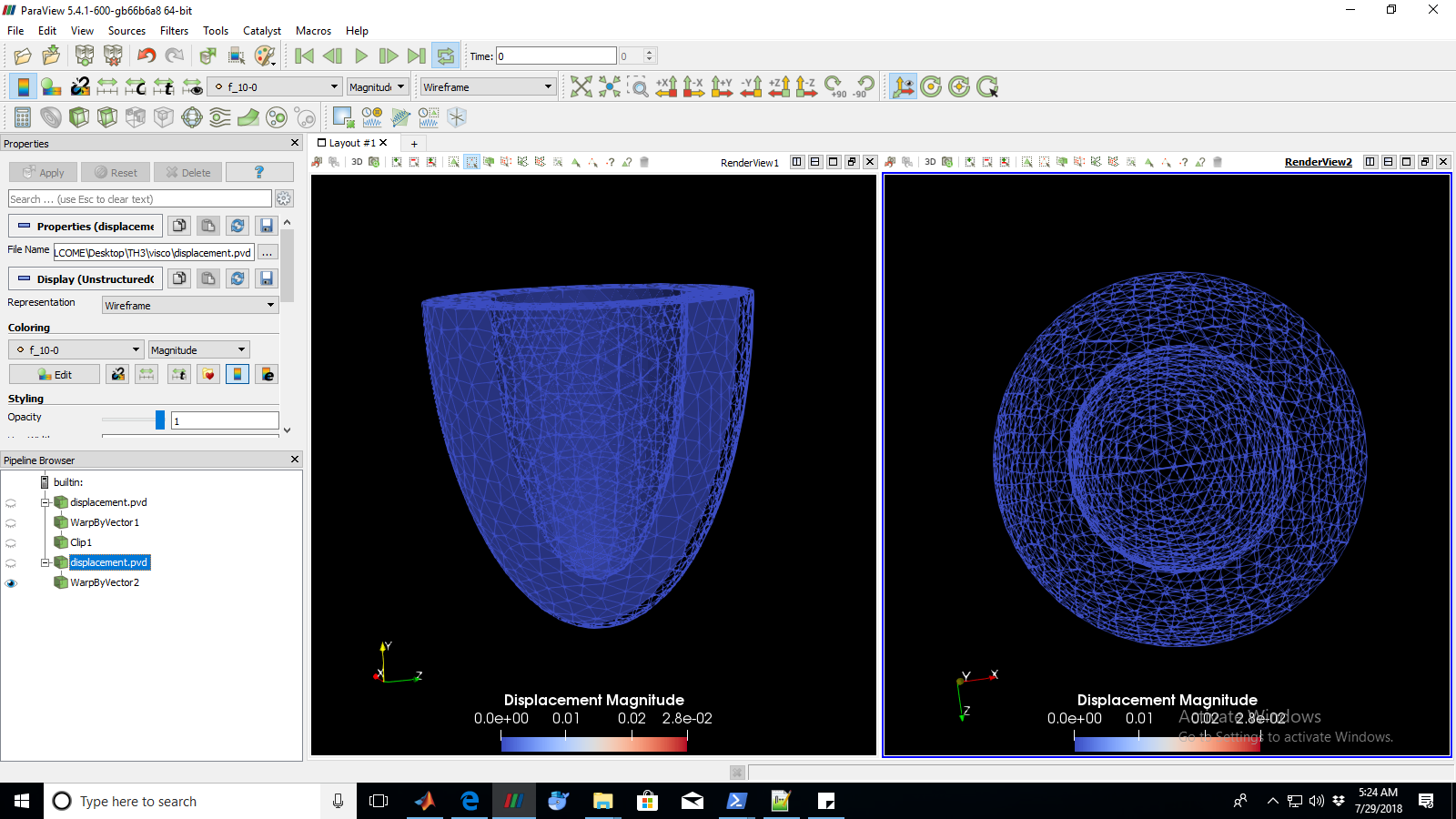
When I try to use Save animation. Paraview only allows me to select one window at a time. Can anyone very kindly suggest a possible way to save both views in one video ?
Regards,
Ovais
---
### Author:  [@Someone\_fromjapan](https://discourse.paraview.org/u/Someone_fromjapan)
#### Post date: [July 30, 2018, 6:07am UTC](https://discourse.paraview.org/t/save-animation-of-two-different-views-into-one-video-output/371/2 "2018-07-30T06:07:19Z")
non-overlapping videos can be combined almost in every video-mastering software, including cheapest, and free ez-tools like virtualdub. You can also use advanced scripting, and a “frameserver” for transforming, and combining any video, into virtual video-file, without actually modifying any source. See “AviSynth”. Of course, avisynth virtual video-file can be read by most tools for further encoding to “hard-file”.
Can not say for Linux, but you have Windows there, as I see.
---
### Author:  [@cory.quammen](https://discourse.paraview.org/u/cory.quammen)
#### Post date: [July 30, 2018, 1:40pm UTC](https://discourse.paraview.org/t/save-animation-of-two-different-views-into-one-video-output/371/3 "2018-07-30T13:40:46Z")
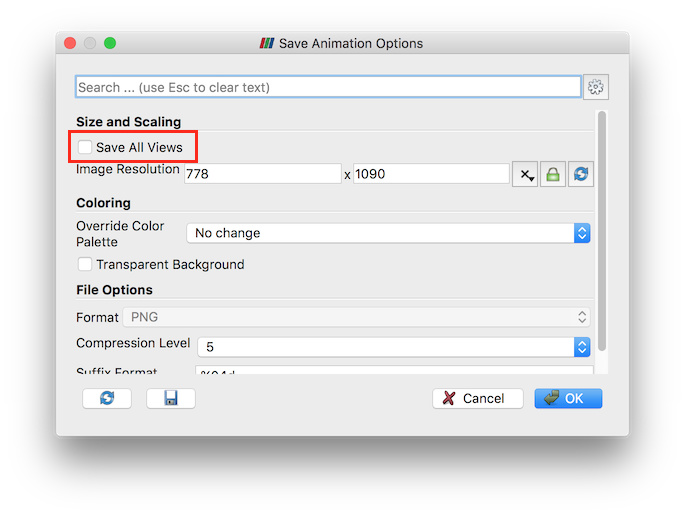
When saving an animation, click the **Save All Views** checkbox to save the two views side-by-side.
---
### Author:  [@cory.quammen](https://discourse.paraview.org/u/cory.quammen)
#### Post date: [July 30, 2018, 1:42pm UTC](https://discourse.paraview.org/t/save-animation-of-two-different-views-into-one-video-output/371/4 "2018-07-30T13:42:36Z")
By the way, please see this blog post for more information, including preview mode for saving multi-view screenshots and animations.
> **[Improvements for saving screenshots and animations in ParaView - Kitware Blog](https://blog.kitware.com/improvements-for-saving-screenshots-and-animations-in-paraview/)**
>
> If you have been using ParaView for a while, you have no doubt encountered at least one of these dialogs: While both configure how images were ... Read More
---
### Author:  [@ovais](https://discourse.paraview.org/u/ovais)
#### Post date: [July 30, 2018, 2:41pm UTC](https://discourse.paraview.org/t/save-animation-of-two-different-views-into-one-video-output/371/5 "2018-07-30T14:41:07Z")
Thank you so much. This seems to be a convinient solution. I have tried this with ParaView-5.5.2-Qt5-Windows-64bit that i am using but this check box doesnt appear on my save animation window. 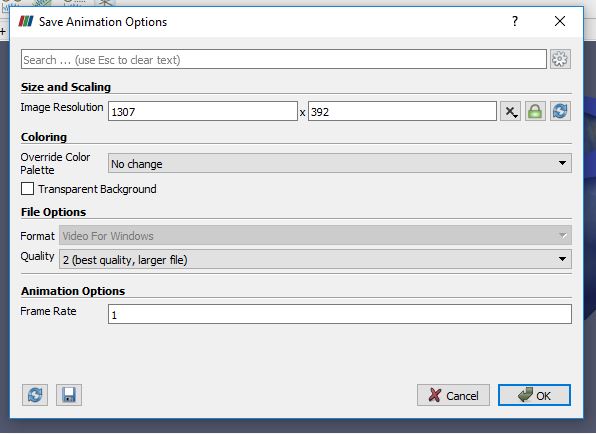
Can you kindly suggest which version of paraview should i download to get this option.
Best regards,
Ovais
---
### Author:  [@cory.quammen](https://discourse.paraview.org/u/cory.quammen)
#### Post date: [July 30, 2018, 3:32pm UTC](https://discourse.paraview.org/t/save-animation-of-two-different-views-into-one-video-output/371/6 "2018-07-30T15:32:23Z")
That version of ParaView is the latest and should be fine. The option only appears when there are two or more views open, so if you are looking for it when you are animating from a single view, it won’t be there. If that isn’t the case, please list the actions you performed prior to getting to the “Save Animation Options” dialog so that I can attempt to reproduce the issue locally.
---
### Author:  [@ovais](https://discourse.paraview.org/u/ovais)
#### Post date: [July 30, 2018, 4:02pm UTC](https://discourse.paraview.org/t/save-animation-of-two-different-views-into-one-video-output/371/7 "2018-07-30T16:02:30Z")
Perfect! It’s working … thanks for your support 🙂
---
### Author:  [@Abhinav\_Singh](https://discourse.paraview.org/u/Abhinav_Singh)
#### Post date: [October 26, 2021, 2:03pm UTC](https://discourse.paraview.org/t/save-animation-of-two-different-views-into-one-video-output/371/8 "2021-10-26T14:03:21Z")
Hi, is this possible with pvpython by any chance?
I am loading from a pvsm and would like to save animation of all views and not just active view.
I am unable to find the option for all views in pv python.
---
### Author:  [@mwestphal](https://discourse.paraview.org/u/mwestphal)
#### Post date: [November 6, 2023, 10:11am UTC](https://discourse.paraview.org/t/save-animation-of-two-different-views-into-one-video-output/371/9 "2023-11-06T10:11:36Z")
A post was split to a new topic: [Multi animation](https://discourse.paraview.org/t/multi-animation/13194)