# Save Animation with minimum overhead
**URL:** https://discourse.paraview.org/t/save-animation-with-minimum-overhead/15579
**Category:** ParaView Support
**Created:** [October 18, 2024, 5:36am UTC](https://discourse.paraview.org/t/save-animation-with-minimum-overhead/15579 "2024-10-18T05:36:36Z")
**Posts on this page:** 4
**Page:** 1
### Author:  [@Sandeep\_Jella](https://discourse.paraview.org/u/Sandeep_Jella)
#### Post date: [October 18, 2024, 5:36am UTC](https://discourse.paraview.org/t/save-animation-with-minimum-overhead/15579/1 "2024-10-18T05:36:36Z")
Dear Paraview Community,
I have opened a large dataset (CFD-direct numerical simulation) with several time-series. I have set up my visuals exactly as I like and would now like to save as MP4 using the ‘Save Animation’ feature.
However, this has issues with my client-server disconnecting frequently (not Paraview’s fault). Not to mention it might take upto 10 hours.
Is there a way I can use the command line or scripting to open my pvsm file and step through the data (they are saved in Ensight format) without rendering back to my screen? ideally this would only use the remote paraview version.
Hope am being clear, any help or example code would be deeply appreciated.
Sandeep.
---
### Author:  [@sherin.sugathan](https://discourse.paraview.org/u/sherin.sugathan)
#### Post date: [October 18, 2024, 9:33am UTC](https://discourse.paraview.org/t/save-animation-with-minimum-overhead/15579/2 "2024-10-18T09:33:30Z")
Yes, you can use scripts to render visuals to files.
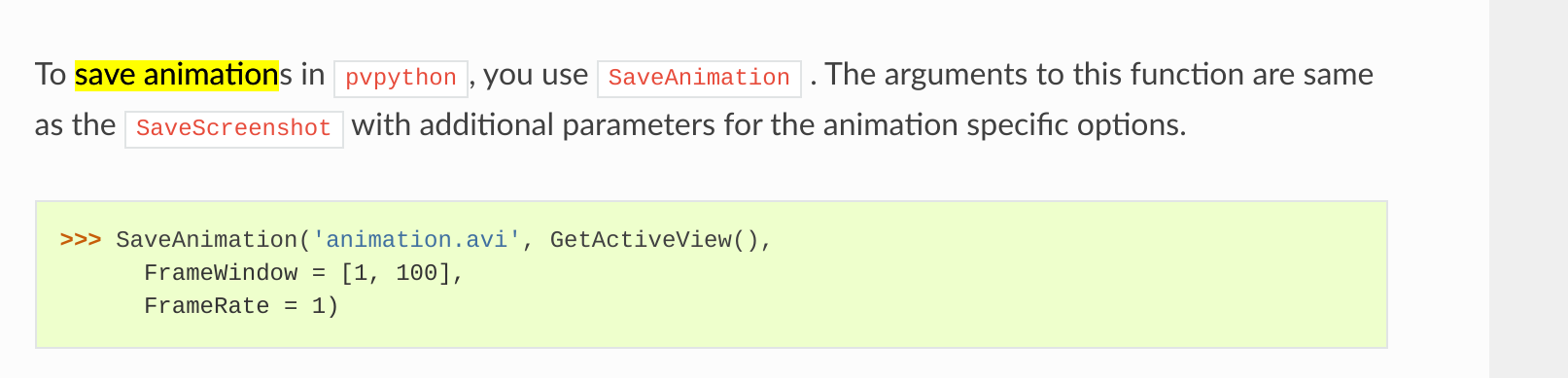
[https://docs.paraview.org/en/v5.8/UsersGuide/savingResults.html](https://docs.paraview.org/en/v5.8/UsersGuide/savingResults.html)
---
### Author:  [@cory.quammen](https://discourse.paraview.org/u/cory.quammen)
#### Post date: [October 18, 2024, 1:59pm UTC](https://discourse.paraview.org/t/save-animation-with-minimum-overhead/15579/3 "2024-10-18T13:59:08Z")
And, you may want to use `pvbatch` to run your Python script. It will run on the remote side and not require a connection to the client. If `pvbatch` is running on linux, however, I don’t believe you will be able to save to MP4 straight from `pvbatch` - that is supported in Windows only. `pvbatch` running on Windows should be able to save to an MP4.
By the way, I usually prefer to save still frames out to .png and use outside software to stitch them into videos. That is often a more robust approach in case of a crash.
---
### Author:  [@Sandeep\_Jella](https://discourse.paraview.org/u/Sandeep_Jella)
#### Post date: [December 23, 2024, 7:22pm UTC](https://discourse.paraview.org/t/save-animation-with-minimum-overhead/15579/4 "2024-12-23T19:22:30Z")
Many thanks, Cory!