# save selected surfaces from ExtractSurface
**URL:** https://discourse.paraview.org/t/save-selected-surfaces-from-extractsurface/9213
**Category:** ParaView Support
**Created:** [March 17, 2022, 10:15pm UTC](https://discourse.paraview.org/t/save-selected-surfaces-from-extractsurface/9213 "2022-03-17T22:15:55Z")
**Posts on this page:** 4
**Page:** 1
### Author:  [@S\_Otta](https://discourse.paraview.org/u/S_Otta)
#### Post date: [March 17, 2022, 10:15pm UTC](https://discourse.paraview.org/t/save-selected-surfaces-from-extractsurface/9213/1 "2022-03-17T22:15:55Z")
I have an Ensight case file which has several domains. After loading the complete file, I used the extract surface filter and then identified a subset of the all the surfaces to save to an STL file. Currently `save data` saves all the files and all surfaces from the same flow domain together rather than the selections in the ExtractSurface filter.
I want to save a selected number of surfaces to STL not all the surfaces. Is there a way to do this ?
---
### Author:  [@Christos\_Tsolakis](https://discourse.paraview.org/u/Christos_Tsolakis)
#### Post date: [March 17, 2022, 10:24pm UTC](https://discourse.paraview.org/t/save-selected-surfaces-from-extractsurface/9213/2 "2022-03-17T22:24:56Z")
After you have selected the surfaces of interest you may use `Extract Selection` filter and then save its result. See also [here](https://docs.paraview.org/en/latest/UsersGuide/selectingData.html#selecting-data) for examples of selecting and extracting data.
---
### Author:  [@S\_Otta](https://discourse.paraview.org/u/S_Otta)
#### Post date: [March 18, 2022, 12:18am UTC](https://discourse.paraview.org/t/save-selected-surfaces-from-extractsurface/9213/3 "2022-03-18T00:18:34Z")
Thanks Christos. I was able to create an ExtractSelection.
Now I was to save this set of surfaces as an STL file. Is there a suitable way to do this ? The sequence I followed to get to this set of surfaces is
- Load Ensight case
- Create ExtractSurface,
- Create ExtractSelection as above
Dummy names are still there as only a few of the names have surfaces associated with them. I want to save this files as stl or obj files. Are there any steps to do this ?
---
### Author:  [@Christos\_Tsolakis](https://discourse.paraview.org/u/Christos_Tsolakis)
#### Post date: [March 18, 2022, 12:51pm UTC](https://discourse.paraview.org/t/save-selected-surfaces-from-extractsurface/9213/4 "2022-03-18T12:51:32Z")
Here is your steps visualized:
A: Select the data based on your surface ids or any other variable that defines them.
B: Click Find Data to perform the selection
C: Click Extract to create a new object in the pipeline.
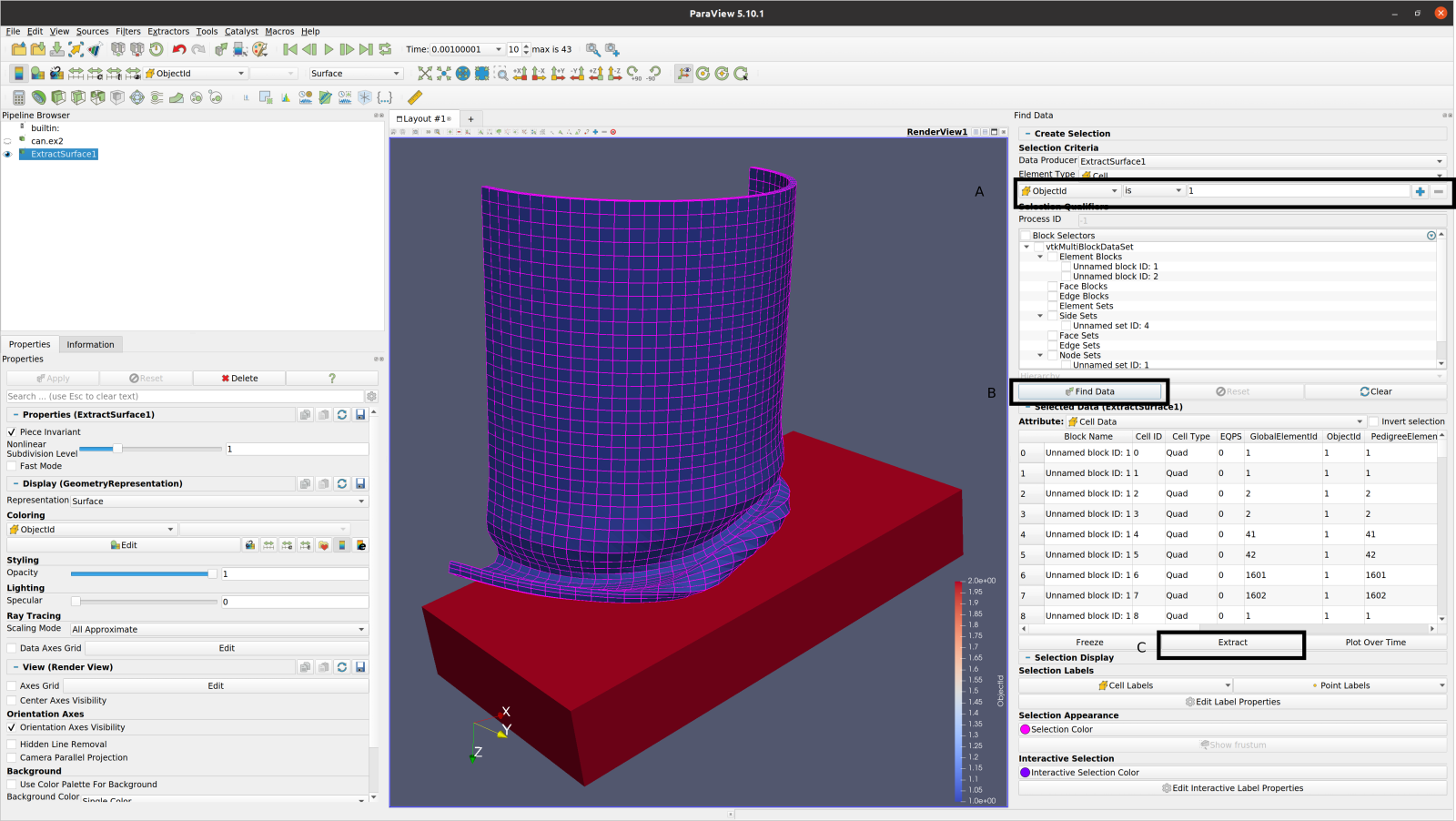
This will create a new object in the pipeline browser. Having the object selected, you may go to `File > Save Data` and save it to a new file.