# saving multiple vtp files to csv at once
**URL:** https://discourse.paraview.org/t/saving-multiple-vtp-files-to-csv-at-once/5793
**Category:** ParaView Support
**Created:** [November 13, 2020, 12:43pm UTC](https://discourse.paraview.org/t/saving-multiple-vtp-files-to-csv-at-once/5793 "2020-11-13T12:43:35Z")
**Posts on this page:** 14
**Page:** 1
### Author:  [@sgcgrif3](https://discourse.paraview.org/u/sgcgrif3)
#### Post date: [November 13, 2020, 12:43pm UTC](https://discourse.paraview.org/t/saving-multiple-vtp-files-to-csv-at-once/5793/1 "2020-11-13T12:43:35Z")
Hello,
I am very new to coding/paraview etc. I have run a DEM model in MFIX software, and to extract the data they suggest using paraview.
I have a model with 16,000 sand grains moving in a box over a series of time steps. I have 2000 .vtp files containing the particle ID, velocity and coordinates of all these particles.
I want to save all the particle data for each time step to a .csv file to use in microsoft excel. Is there a way I can save all the time step data in one go rather than each time time individually?
Thanks.
---
### Author:  [@mwestphal](https://discourse.paraview.org/u/mwestphal)
#### Post date: [November 13, 2020, 6:19pm UTC](https://discourse.paraview.org/t/saving-multiple-vtp-files-to-csv-at-once/5793/2 "2020-11-13T18:19:18Z")
PlotDataOvertTime and uncheck “Only Report Selection Statistics” should do the trick.
---
### Author:  [@sgcgrif3](https://discourse.paraview.org/u/sgcgrif3)
#### Post date: [November 17, 2020, 9:29am UTC](https://discourse.paraview.org/t/saving-multiple-vtp-files-to-csv-at-once/5793/3 "2020-11-17T09:29:07Z")
Thank you for your response.
Will PlotDataOverTime save the data? I have done the steps you suggested and paraview shows me a graph?
---
### Author:  [@mwestphal](https://discourse.paraview.org/u/mwestphal)
#### Post date: [November 17, 2020, 9:29am UTC](https://discourse.paraview.org/t/saving-multiple-vtp-files-to-csv-at-once/5793/4 "2020-11-17T09:29:54Z")
Yes ? You can save the data if you want.
---
### Author:  [@sgcgrif3](https://discourse.paraview.org/u/sgcgrif3)
#### Post date: [November 17, 2020, 9:41am UTC](https://discourse.paraview.org/t/saving-multiple-vtp-files-to-csv-at-once/5793/5 "2020-11-17T09:41:57Z")
Im sorry I don’t know if my original question was clear as I am slightly confused.
I have 2000 individual .vtp files where each one of them contains particle ID and coordinates for a single time step.
I can import all of these files into paraview and see the spreadsheet for each time step.
I can save each of these files individually into an excel file, but I have 2000 of these and dont want to have to do this individually. Can I bulk save all of these into excel in one go?
---
### Author:  [@mwestphal](https://discourse.paraview.org/u/mwestphal)
#### Post date: [November 17, 2020, 9:52am UTC](https://discourse.paraview.org/t/saving-multiple-vtp-files-to-csv-at-once/5793/6 "2020-11-17T09:52:18Z")
Yes, you can, open them as a file series and then save.
---
### Author:  [@sgcgrif3](https://discourse.paraview.org/u/sgcgrif3)
#### Post date: [November 17, 2020, 9:58am UTC](https://discourse.paraview.org/t/saving-multiple-vtp-files-to-csv-at-once/5793/7 "2020-11-17T09:58:51Z")
Thank you for your response. I am sorry this is my first time using paraview.
How do I open a file series? Do you just mean open all the files in one go?
---
### Author:  [@mwestphal](https://discourse.paraview.org/u/mwestphal)
#### Post date: [November 17, 2020, 10:11am UTC](https://discourse.paraview.org/t/saving-multiple-vtp-files-to-csv-at-once/5793/8 "2020-11-17T10:11:08Z")
A file series are files named like this:
file1.vtp
file2.vtp
…
You can open all the files together in ParaViez by chooosing file…vtp in the open dialog.
---
### Author:  [@sgcgrif3](https://discourse.paraview.org/u/sgcgrif3)
#### Post date: [November 17, 2020, 10:18am UTC](https://discourse.paraview.org/t/saving-multiple-vtp-files-to-csv-at-once/5793/9 "2020-11-17T10:18:13Z")
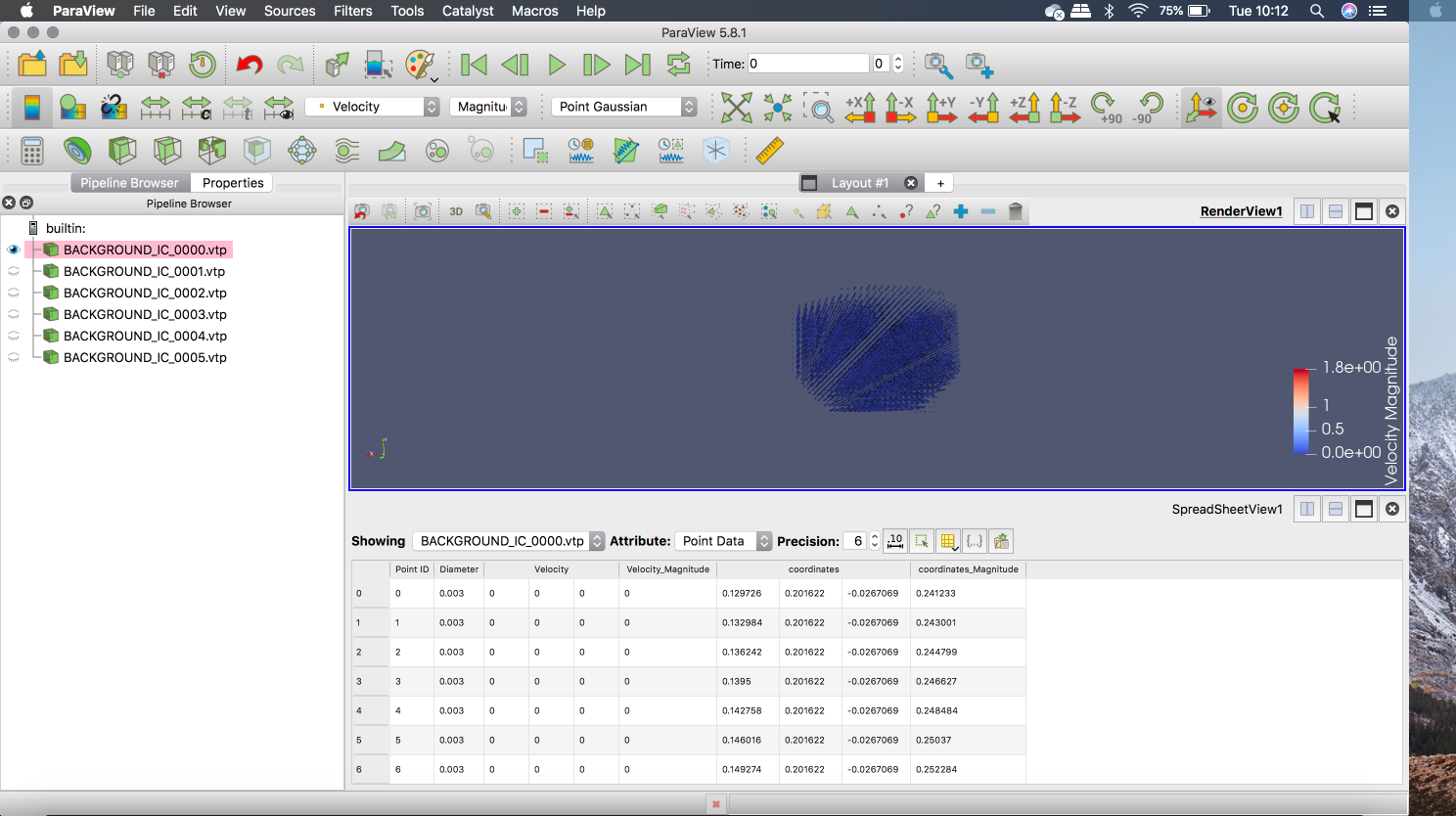
I can open multiple .vtp files in one go as seen in the screenshot i’ve attached.
I then highlight all the files and go to file\>save data. Is this correct?
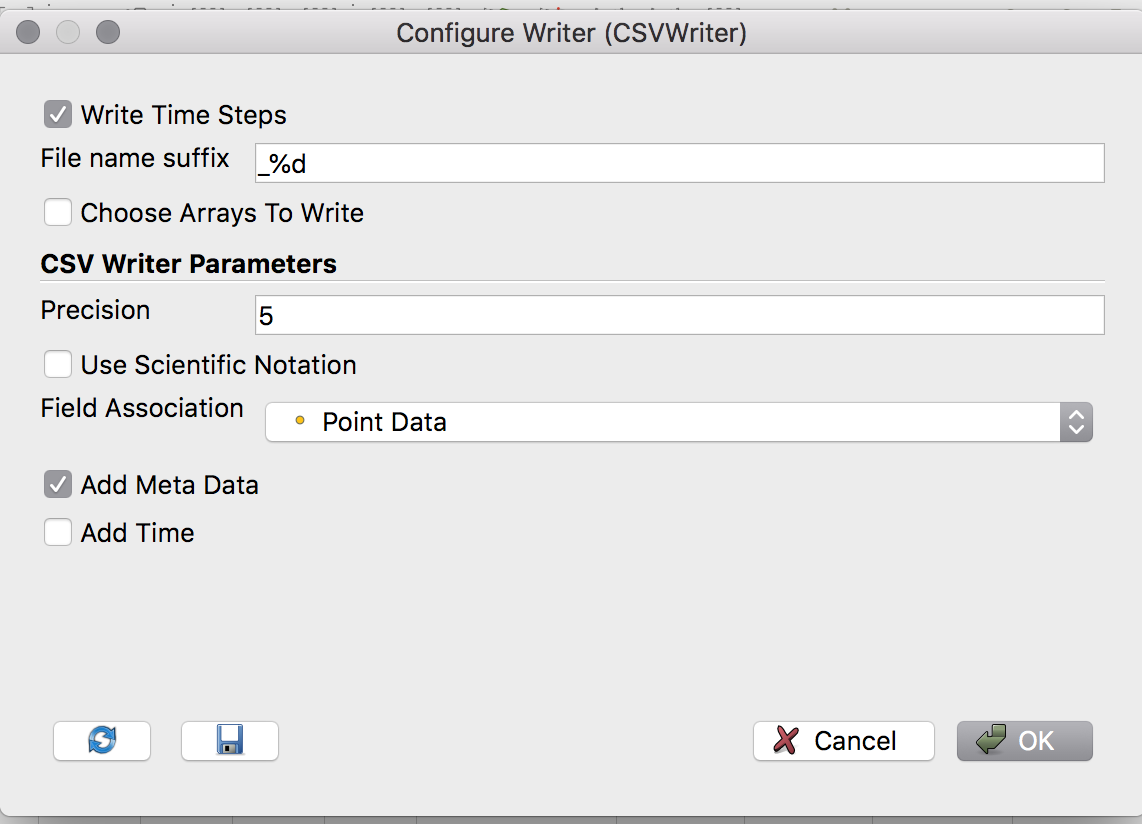
Then I get a ‘configure writer’ pop-up like this, which has the following options. If I check ‘write time steps’ will this write a .csv file for each one of those .vtp files?
---
### Author:  [@mwestphal](https://discourse.paraview.org/u/mwestphal)
#### Post date: [November 17, 2020, 10:19am UTC](https://discourse.paraview.org/t/saving-multiple-vtp-files-to-csv-at-once/5793/10 "2020-11-17T10:19:15Z")
Nope, open as a file series: [https://www.paraview.org/Wiki/Animating\_legacy\_VTK\_file\_series](https://www.paraview.org/Wiki/Animating_legacy_VTK_file_series)
---
### Author:  [@sgcgrif3](https://discourse.paraview.org/u/sgcgrif3)
#### Post date: [November 17, 2020, 11:48am UTC](https://discourse.paraview.org/t/saving-multiple-vtp-files-to-csv-at-once/5793/12 "2020-11-17T11:48:04Z")
Thank you, i understand now.
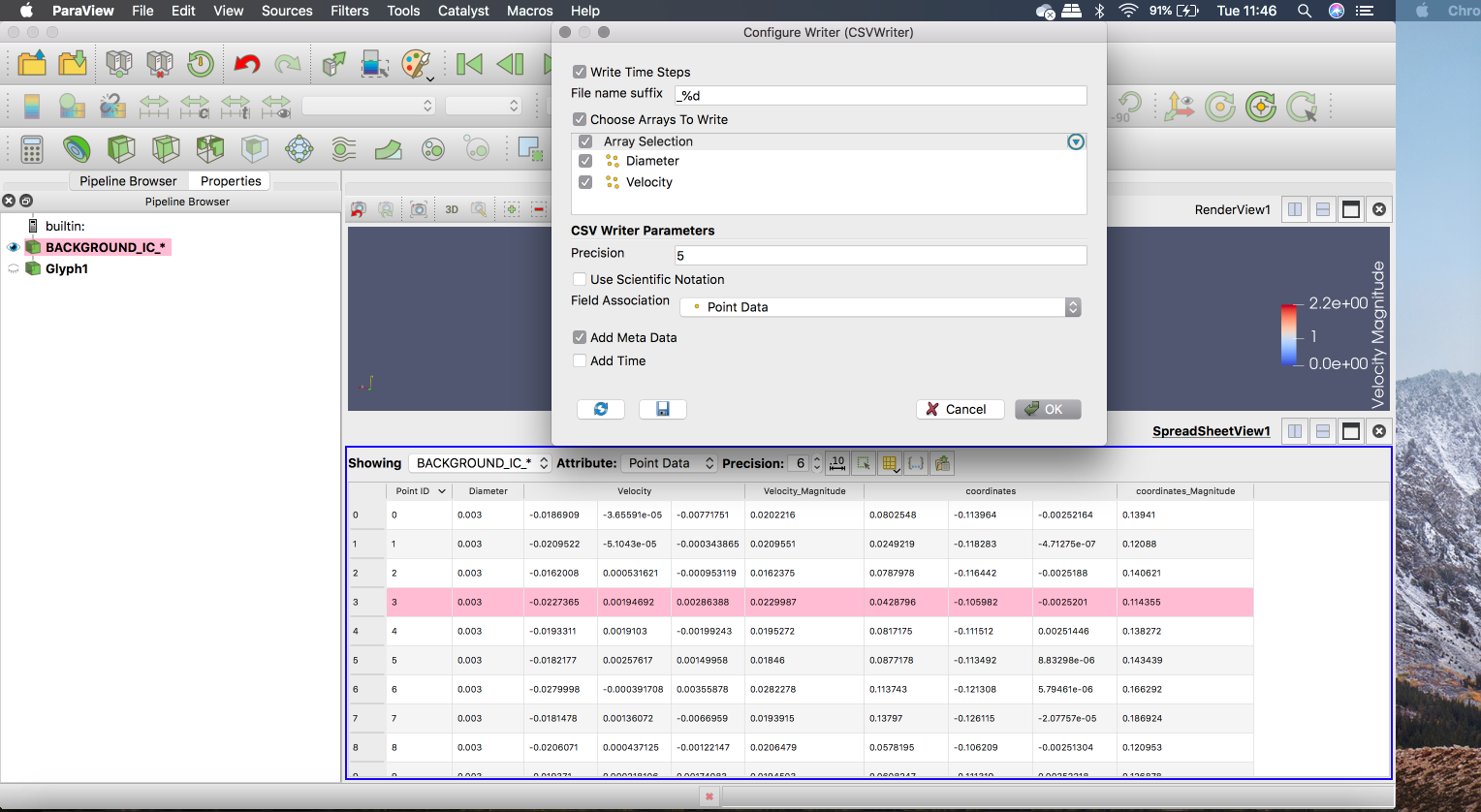
I have opened the file series, and can understand how to save the data.
I want to save the point Id, velocity and coordinates for each time step, but when I try and save the data it does not give me the option to save this, and i only get diameter and velocity. Could you suggest a way to get all the data?
---
### Author:  [@mwestphal](https://discourse.paraview.org/u/mwestphal)
#### Post date: [November 17, 2020, 12:10pm UTC](https://discourse.paraview.org/t/saving-multiple-vtp-files-to-csv-at-once/5793/13 "2020-11-17T12:10:32Z")
Add a calculator filter before saving, this would let you add the coordinates of the points as a data array.
For the pointId, you can use the GenerateIds filter.
---
### Author:  [@sgcgrif3](https://discourse.paraview.org/u/sgcgrif3)
#### Post date: [November 17, 2020, 12:24pm UTC](https://discourse.paraview.org/t/saving-multiple-vtp-files-to-csv-at-once/5793/14 "2020-11-17T12:24:10Z")
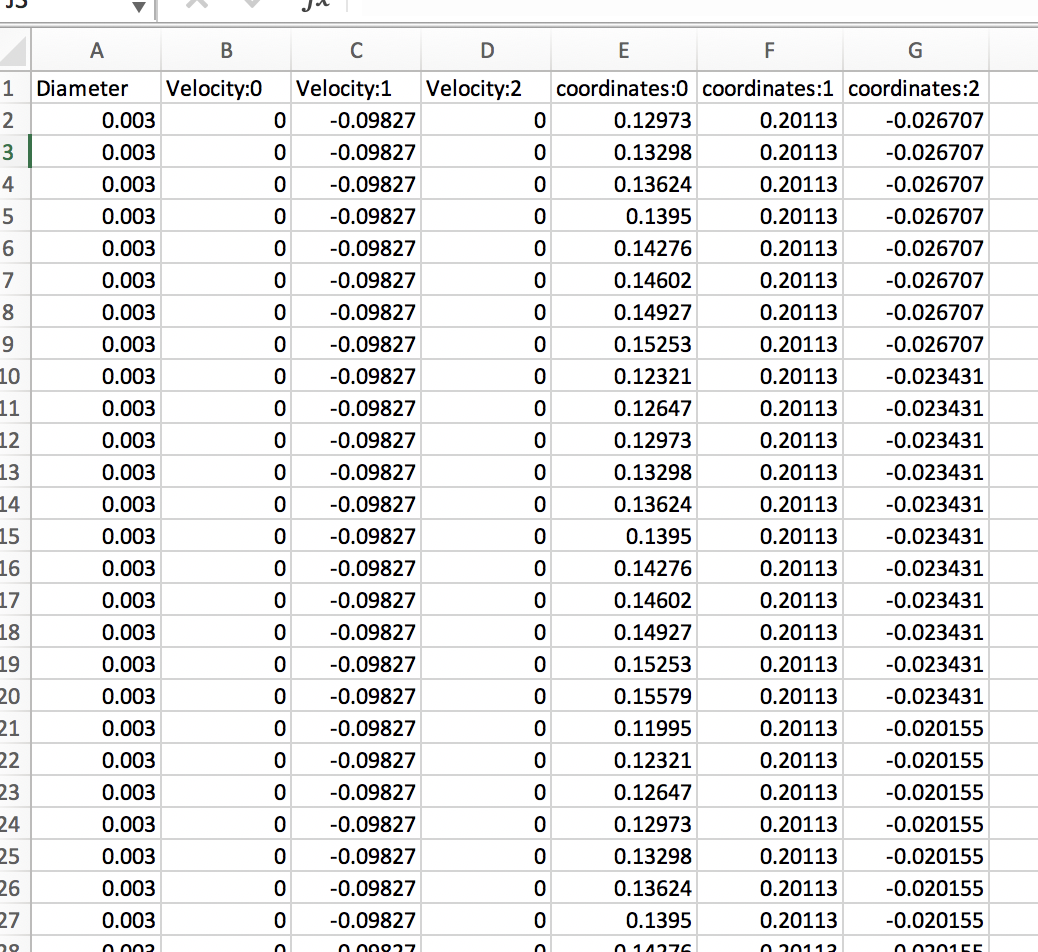
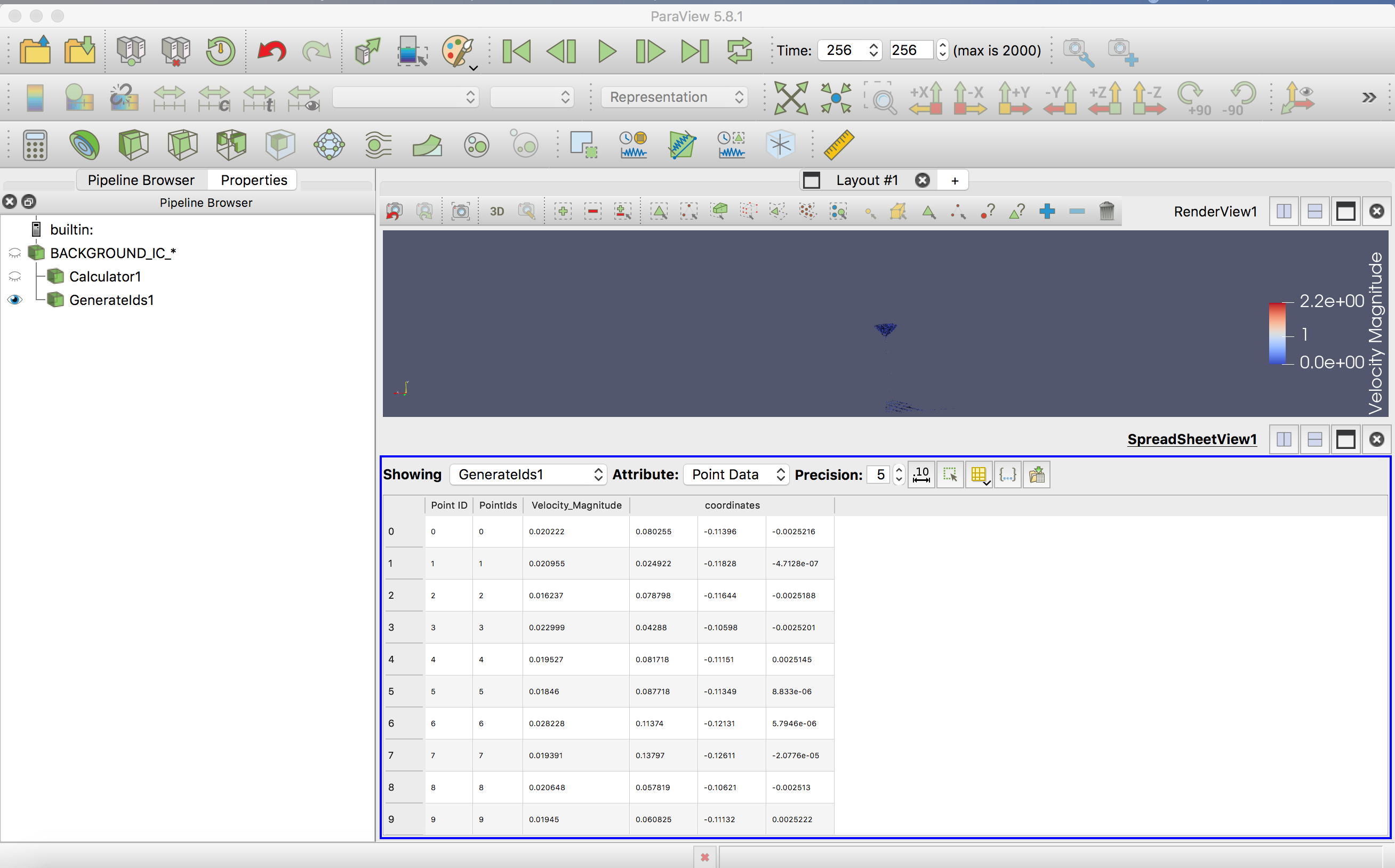
I have managed to get the coordinates to save, however I have used the generateid’s filter and this shows up in paraview, but not when I export the data, as seen in the screenshots.
When i apply this filter, is there anything I need to do to make it export with the other data?
---
### Author:  [@mwestphal](https://discourse.paraview.org/u/mwestphal)
#### Post date: [November 17, 2020, 12:29pm UTC](https://discourse.paraview.org/t/saving-multiple-vtp-files-to-csv-at-once/5793/15 "2020-11-17T12:29:20Z")
Add the generateId filter on the calculator instead of adding it to your file in the pipeline browser