# Scale bar for small numbers
**URL:** https://discourse.paraview.org/t/scale-bar-for-small-numbers/4741
**Category:** ParaView Support
**Created:** [July 2, 2020, 4:36pm UTC](https://discourse.paraview.org/t/scale-bar-for-small-numbers/4741 "2020-07-02T16:36:27Z")
**Posts on this page:** 2
**Page:** 1
### Author:  [@Hokon\_Kim](https://discourse.paraview.org/u/Hokon_Kim)
#### Post date: [July 2, 2020, 4:36pm UTC](https://discourse.paraview.org/t/scale-bar-for-small-numbers/4741/1 "2020-07-02T16:36:27Z")
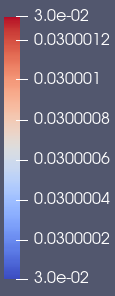
Numbers from my data are small.
I applied “Rescale to Data Range” and it showed as attached.
**What I want is "I do not want the rounded numbers for top and bottom values."**
I also applied “Rescale to Custom Data Range”, but it didn’t work.
Is there any tip for this?
Thanks!
---
### Author:  [@cory.quammen](https://discourse.paraview.org/u/cory.quammen)
#### Post date: [July 2, 2020, 6:15pm UTC](https://discourse.paraview.org/t/scale-bar-for-small-numbers/4741/2 "2020-07-02T18:15:35Z")
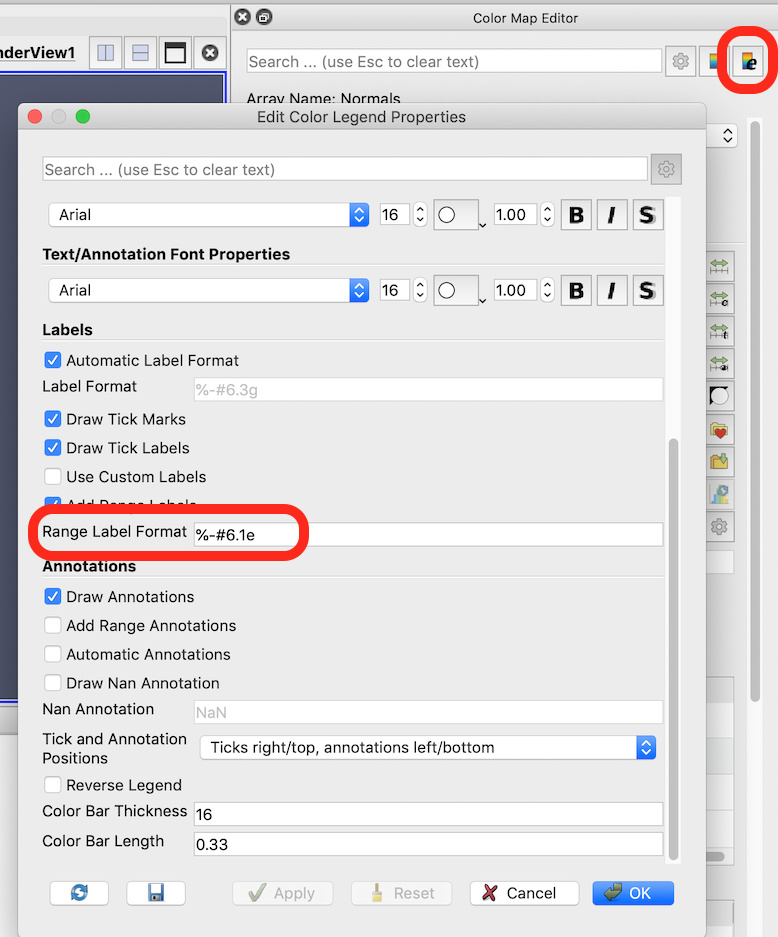
Welcome ParaView, @Hokon_Kim
You can change the formatting of the minimum and maximum numbers using the color legend properties. In the _Color Map Editor_, click the button in the upper right corner to open the _Edit Color Legend Properties_ dialog. Change the **Range Label Format** to your desired C-style format string.