# segmentation fault when visualizing vtk file in linux sever
**URL:** https://discourse.paraview.org/t/segmentation-fault-when-visualizing-vtk-file-in-linux-sever/12504
**Category:** ParaView Support
**Tags:** python, vtk
**Created:** [July 12, 2023, 7:39am UTC](https://discourse.paraview.org/t/segmentation-fault-when-visualizing-vtk-file-in-linux-sever/12504 "2023-07-12T07:39:53Z")
**Posts on this page:** 6
**Page:** 1
### Author:  [@dendrite](https://discourse.paraview.org/u/dendrite)
#### Post date: [July 12, 2023, 7:39am UTC](https://discourse.paraview.org/t/segmentation-fault-when-visualizing-vtk-file-in-linux-sever/12504/1 "2023-07-12T07:39:53Z")
Hello, I’m trying to visualizing vtk file in linux server for automation.
So, I got python script from paraview in window version ‘Tools - Start trace’.
I’m doing quite simple job. ‘Contour’, change ‘Coloring’ as a solid color and 'Save screenshot
The traced python script works at my window and mac computer (pvpython \*.py), but returns a segmentation fault at Linux server.
Paraview version information are:
Windows: ParaView 5.9.1-Windows-Python3.8-msvc2017-64bit
Mac: Paraview 5.9.1-MPI\_OSX10.13-Python3.8-64bit
Linux: ParaView 5.9.1-MPI-Linux-Python3.8-64bit
I attached python script (pv\_script\_from\_trace.py) and sample vtk file (sample.vtk).
[pv\_script\_from\_trace.py](https://discourse.paraview.org/uploads/short-url/qnPc4MyY40DXX38DxDcpufMYMLA.py) (6.0 KB)
[sample.vtk](https://discourse.paraview.org/uploads/short-url/A7qIAhb8WYPKfFaPgUG40fMuddx.vtk) (2.1 MB)
I used the following command,
$ pvpython pv\_script\_from\_trace.py
When I’m using this one in linux system, attatched segmentation fault occurs
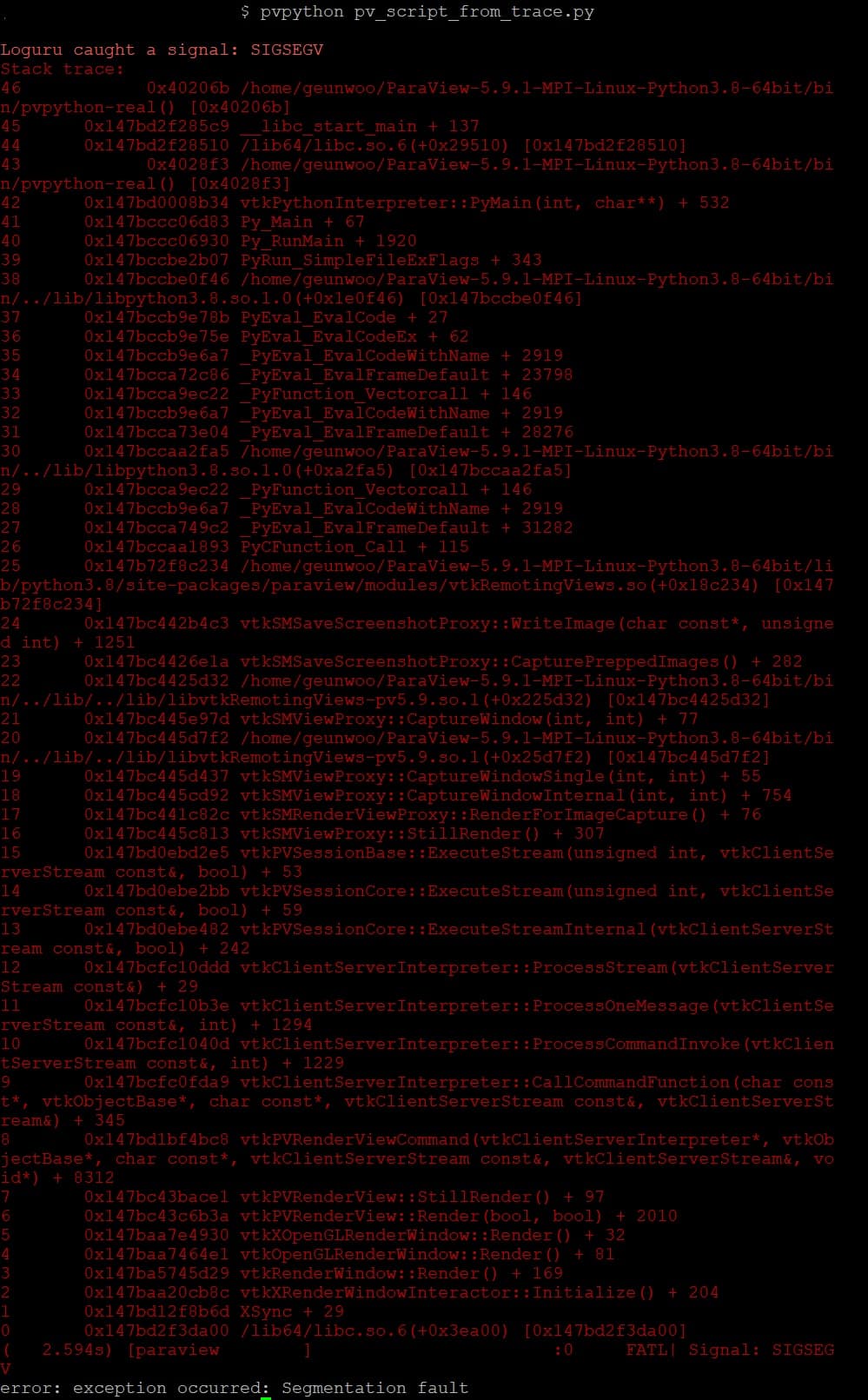
Probably, the error occurs at ‘SaveScreenshot’ part in line 139 of python code.
Why is it happen? Can anyone help me to solve this problem?
---
### Author:  [@jourdain](https://discourse.paraview.org/u/jourdain)
#### Post date: [July 13, 2023, 12:36am UTC](https://discourse.paraview.org/t/segmentation-fault-when-visualizing-vtk-file-in-linux-sever/12504/2 "2023-07-13T00:36:32Z")
Do you have X running or are you running it via ssh or via schedule job?
---
### Author:  [@dendrite](https://discourse.paraview.org/u/dendrite)
#### Post date: [July 13, 2023, 12:38am UTC](https://discourse.paraview.org/t/segmentation-fault-when-visualizing-vtk-file-in-linux-sever/12504/3 "2023-07-13T00:38:52Z")
Thank you for reply.
I’m running at terminal connected by ssh.
---
### Author:  [@jourdain](https://discourse.paraview.org/u/jourdain)
#### Post date: [July 13, 2023, 12:59am UTC](https://discourse.paraview.org/t/segmentation-fault-when-visualizing-vtk-file-in-linux-sever/12504/4 "2023-07-13T00:59:43Z")
Then that explain why.
Long story short, ParaView depend on OpenGL and we depend on X, EGL or OSMesa to provide us the graphic context.
The default paraview (Qt) assume X (for linux). But in your case, X is not started or at least you don’t have a DISPLAY defined in your SSH terminal. So at that point, when pvpython try to create the graphic window (offscreen) it fails since X is not around.
For doing headless operations (and when X is not running), you need to use a build of ParaView that is headless ([https://www.paraview.org/download/?version=v5.11&filter=Linux&tags=OFFSCREEN](https://www.paraview.org/download/?version=v5.11&filter=Linux&tags=OFFSCREEN)).
But the EGL require nvidia GPU while OSMesa is CPU only (slow but works everywhere).
HTH,
Seb
---
### Author:  [@dendrite](https://discourse.paraview.org/u/dendrite)
#### Post date: [July 13, 2023, 3:47am UTC](https://discourse.paraview.org/t/segmentation-fault-when-visualizing-vtk-file-in-linux-sever/12504/5 "2023-07-13T03:47:19Z")
Thank you for your claer explanation Jourdain!
It worked by headless version (osmesa) of Paraview.
Finally I can automate visualization process.
Thanks a lot!
---
### Author:  [@jourdain](https://discourse.paraview.org/u/jourdain)
#### Post date: [July 13, 2023, 2:48pm UTC](https://discourse.paraview.org/t/segmentation-fault-when-visualizing-vtk-file-in-linux-sever/12504/6 "2023-07-13T14:48:57Z")
I’m not 100% sure, but I think we bundle mesa in our graphic version. So you might be able use your default paraview by just adding `--mesa` as argument when running headless script.