# Show internal points in a structured grid
**URL:** https://discourse.paraview.org/t/show-internal-points-in-a-structured-grid/9935
**Category:** ParaView Support
**Created:** [June 28, 2022, 5:22pm UTC](https://discourse.paraview.org/t/show-internal-points-in-a-structured-grid/9935 "2022-06-28T17:22:16Z")
**Posts on this page:** 12
**Page:** 1
### Author:  [@AndreaGiorgio](https://discourse.paraview.org/u/AndreaGiorgio)
#### Post date: [June 28, 2022, 5:22pm UTC](https://discourse.paraview.org/t/show-internal-points-in-a-structured-grid/9935/1 "2022-06-28T17:22:16Z")
Hello!
I used Paraview in the past to visualize meshes and CFD results, now I start to use it to convert CSV data into structured grids by using the Table-to-structured-grid filter.
I’m able to obtain the grid without problem, but when I use the “Points” representation I cannot see the points inside the grids. Only the points on the external surfaces are shown,
The same for the “Wireframe” representation, the wires are shown only on the external surfaces, not inside the structured grid.
Is there a way to show internal points and wireframe?
Apologize if this topic is already present… I’ve not found the answer yet…
My paraview version is the 5.10.1 downloaded from the paraview download page
my sysop is Ubuntu 18.04.
Thanks in advance,
Andrea
---
### Author:  [@mwestphal](https://discourse.paraview.org/u/mwestphal)
#### Post date: [June 28, 2022, 7:06pm UTC](https://discourse.paraview.org/t/show-internal-points-in-a-structured-grid/9935/2 "2022-06-28T19:06:08Z")
Hi @AndreaGiorgio ,
> [@AndreaGiorgio](#):
>
> I’m able to obtain the grid without problem, but when I use the “Points” representation I cannot see the points inside the grids. Only the points on the external surfaces are shown,
>
> The same for the “Wireframe” representation, the wires are shown only on the external surfaces, not inside the structured grid.
This is expected.
> Is there a way to show internal points
Use `Convert To Point Cloud` filter
> wireframe
Use `Shrink` filter with a factor of 1.
Best,
---
### Author:  [@AndreaGiorgio](https://discourse.paraview.org/u/AndreaGiorgio)
#### Post date: [June 28, 2022, 7:33pm UTC](https://discourse.paraview.org/t/show-internal-points-in-a-structured-grid/9935/3 "2022-06-28T19:33:59Z")
I tried your suggestions, they are exactly what I need… thank a lot Mathieu.
Should I put [Solved] in the title of the topic?
All the best
---
### Author:  [@mwestphal](https://discourse.paraview.org/u/mwestphal)
#### Post date: [June 28, 2022, 7:40pm UTC](https://discourse.paraview.org/t/show-internal-points-in-a-structured-grid/9935/4 "2022-06-28T19:40:40Z")
You can “accept” my answer above.
---
### Author:  [@LiNan](https://discourse.paraview.org/u/LiNan)
#### Post date: [December 2, 2022, 1:29pm UTC](https://discourse.paraview.org/t/show-internal-points-in-a-structured-grid/9935/5 "2022-12-02T13:29:59Z")
hello everyone sorry to disturb you, but I can’t find the convert to point cloud filter in my paraview .My paraview version is 5.9.0 on windows 7.Can anyone help me?
---
### Author:  [@mwestphal](https://discourse.paraview.org/u/mwestphal)
#### Post date: [December 2, 2022, 1:31pm UTC](https://discourse.paraview.org/t/show-internal-points-in-a-structured-grid/9935/6 "2022-12-02T13:31:44Z")
Hi @LiNan
Update to 5.11 to get this new filter.
Best,
---
### Author:  [@LiNan](https://discourse.paraview.org/u/LiNan)
#### Post date: [December 2, 2022, 1:34pm UTC](https://discourse.paraview.org/t/show-internal-points-in-a-structured-grid/9935/7 "2022-12-02T13:34:42Z")
Well…that’s not a good news to me cause the computer in my company has to use win7.Is there any other ways to add this filter in 5.9.0?
---
### Author:  [@mwestphal](https://discourse.paraview.org/u/mwestphal)
#### Post date: [December 2, 2022, 1:35pm UTC](https://discourse.paraview.org/t/show-internal-points-in-a-structured-grid/9935/8 "2022-12-02T13:35:58Z")
You can simply download the 5.11 zipped archive here: [https://www.paraview.org/download/?version=v5.11&filter=Windows](https://www.paraview.org/download/?version=v5.11&filter=Windows)
If you cant do that, you can reimplement the filter using a ProgrammableFilter, but that will not be trivial for a beginner.
---
### Author:  [@Kenneth\_Moreland](https://discourse.paraview.org/u/Kenneth_Moreland)
#### Post date: [December 2, 2022, 1:41pm UTC](https://discourse.paraview.org/t/show-internal-points-in-a-structured-grid/9935/9 "2022-12-02T13:41:27Z")
If upgrading ParaView is not an option, there are a couple of things you can do in ParaView 5.9.
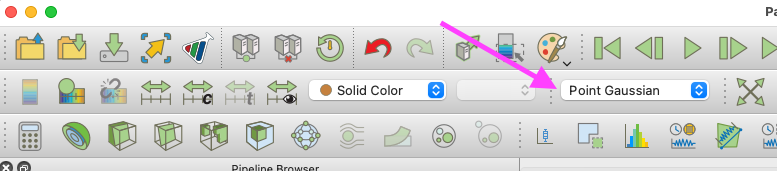
If all you want to do is see the points, you can change the representation to `Point Gaussian`. That will render all the points in your mesh regardless of any mesh.
If you really want vertex cells at all the points as the `Convert To Point Cloud` this filter does, it is possible with the `Glyph` filter, but the process is a bit weird. Add the `Glyph` filter, set the `Glyph Type` to `2D Glyph`. Turn on advanced properties and you will see a second `Glyph Type` parameter. Set the second `Glyph Type` parameter to `Vertex`. `Apply`.
---
### Author:  [@LiNan](https://discourse.paraview.org/u/LiNan)
#### Post date: [December 2, 2022, 1:44pm UTC](https://discourse.paraview.org/t/show-internal-points-in-a-structured-grid/9935/10 "2022-12-02T13:44:10Z")
Ok, maybe I can find something on github. Anyway, thanks for your help!
---
### Author:  [@LiNan](https://discourse.paraview.org/u/LiNan)
#### Post date: [December 2, 2022, 1:47pm UTC](https://discourse.paraview.org/t/show-internal-points-in-a-structured-grid/9935/11 "2022-12-02T13:47:07Z")
Thank you so much! I will try it when I go back to my work. If it works, I will tell you 😁
---
### Author:  [@Kenneth\_Moreland](https://discourse.paraview.org/u/Kenneth_Moreland)
#### Post date: [December 2, 2022, 2:05pm UTC](https://discourse.paraview.org/t/show-internal-points-in-a-structured-grid/9935/12 "2022-12-02T14:05:59Z")
Oh, one more step with the `Glyph` filter. Under `Masking` you should set `Glyph Mode` to `All Points`.