# Simultaneous interaction of two files
**URL:** https://discourse.paraview.org/t/simultaneous-interaction-of-two-files/3362
**Category:** ParaView Support
**Tags:** python, vtk
**Created:** [January 17, 2020, 11:09am UTC](https://discourse.paraview.org/t/simultaneous-interaction-of-two-files/3362 "2020-01-17T11:09:02Z")
**Posts on this page:** 10
**Page:** 1
### Author:  [@Samanvith\_A](https://discourse.paraview.org/u/Samanvith_A)
#### Post date: [January 17, 2020, 11:09am UTC](https://discourse.paraview.org/t/simultaneous-interaction-of-two-files/3362/1 "2020-01-17T11:09:02Z")
I have two files, one is- .VTK and another is .CSV. I want to have a simultaneous interaction with both these files.
Say, if I am zooming into the .VTK file in ParaView, then the zooming of .CSV file should also take place.
I have attached the file here.
[https://drive.google.com/drive/folders/1YOs8aSCQRQGgB-svjDfsVkW1wiHN0jhK?usp=sharing](https://drive.google.com/drive/folders/1YOs8aSCQRQGgB-svjDfsVkW1wiHN0jhK?usp=sharing)
---
### Author:  [@mwestphal](https://discourse.paraview.org/u/mwestphal)
#### Post date: [January 17, 2020, 12:31pm UTC](https://discourse.paraview.org/t/simultaneous-interaction-of-two-files/3362/2 "2020-01-17T12:31:28Z")
This does not require any specific action. Just try it and it should work.
---
### Author:  [@Samanvith\_A](https://discourse.paraview.org/u/Samanvith_A)
#### Post date: [January 18, 2020, 1:38pm UTC](https://discourse.paraview.org/t/simultaneous-interaction-of-two-files/3362/3 "2020-01-18T13:38:51Z")
Hey @mwestphal
I want to show these two files in two different render views.
So if I zoom into the first file in the first render view, is it possible to simultaneously zoom into the second file in the second render view ?.
---
### Author:  [@mwestphal](https://discourse.paraview.org/u/mwestphal)
#### Post date: [January 18, 2020, 1:39pm UTC](https://discourse.paraview.org/t/simultaneous-interaction-of-two-files/3362/4 "2020-01-18T13:39:51Z")
Right Click -\> Link Camera
---
### Author:  [@Samanvith\_A](https://discourse.paraview.org/u/Samanvith_A)
#### Post date: [January 18, 2020, 1:54pm UTC](https://discourse.paraview.org/t/simultaneous-interaction-of-two-files/3362/5 "2020-01-18T13:54:55Z")
@mwestphal
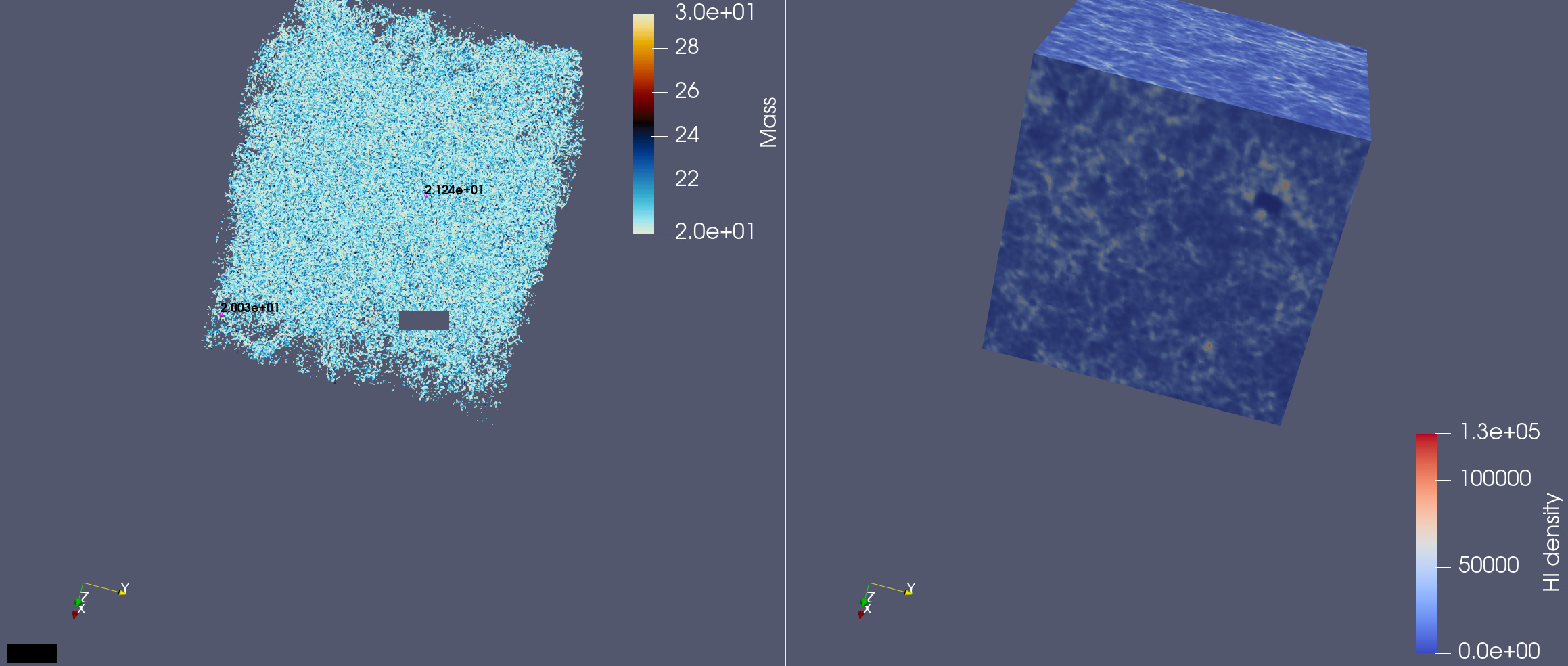
Is there any technique to display the values in the second render view, when I select a certain portion in the first render view?
I have attached the screenshot for reference
---
### Author:  [@mwestphal](https://discourse.paraview.org/u/mwestphal)
#### Post date: [January 18, 2020, 1:57pm UTC](https://discourse.paraview.org/t/simultaneous-interaction-of-two-files/3362/6 "2020-01-18T13:57:57Z")
Please explain what you mean in more details.
---
### Author:  [@Samanvith\_A](https://discourse.paraview.org/u/Samanvith_A)
#### Post date: [January 18, 2020, 2:05pm UTC](https://discourse.paraview.org/t/simultaneous-interaction-of-two-files/3362/7 "2020-01-18T14:05:04Z")
@mwestphal
Lets take the the attached file(above) as reference.
I have linked the camera as you suggested and was able to zoom in and out simultaneously.
Now, say I am zoom into a certain location in the first render view, (activated the interactive select points). So if I press at a particular location inside the box in the first render view, a value will be displayed ( as you can see in the attached file, displayed in black color).
So I want the values to be displayed in the second render view too as I do the above.
I hope its clear to you now the problem that I am facing
Thank you in advance 🙂
---
### Author:  [@Samanvith\_A](https://discourse.paraview.org/u/Samanvith_A)
#### Post date: [January 20, 2020, 11:16am UTC](https://discourse.paraview.org/t/simultaneous-interaction-of-two-files/3362/8 "2020-01-20T11:16:12Z")
@mwestphal
Can I get any help regarding my query ?
---
### Author:  [@mwestphal](https://discourse.paraview.org/u/mwestphal)
#### Post date: [January 21, 2020, 4:28am UTC](https://discourse.paraview.org/t/simultaneous-interaction-of-two-files/3362/9 "2020-01-21T04:28:10Z")
@Samanvith_A : not really possible. What you can do is the following :
- Use interactive view link when you create the camera link to show a view in another one
- Use the selection display inspector to show the values and then use Interactive Selection instead of hover.
Let me know if you need help with that.
---
### Author:  [@Samanvith\_A](https://discourse.paraview.org/u/Samanvith_A)
#### Post date: [January 21, 2020, 11:07am UTC](https://discourse.paraview.org/t/simultaneous-interaction-of-two-files/3362/10 "2020-01-21T11:07:36Z")
@mwestphal
Hey, your suggestion helps a bit. Thank you for your help.