# Slice along Polyline y axis
**URL:** https://discourse.paraview.org/t/slice-along-polyline-y-axis/9259
**Category:** ParaView Support
**Created:** [March 23, 2022, 2:10am UTC](https://discourse.paraview.org/t/slice-along-polyline-y-axis/9259 "2022-03-23T02:10:49Z")
**Posts on this page:** 9
**Page:** 1
### Author:  [@Qutadah\_Rababah](https://discourse.paraview.org/u/Qutadah_Rababah)
#### Post date: [March 23, 2022, 2:10am UTC](https://discourse.paraview.org/t/slice-along-polyline-y-axis/9259/1 "2022-03-23T02:10:49Z")
Hello,
I am trying to slice along a polyline, however it says it only slices along the z-direction. I would like to slice it in the y-direction. Here is my state file and the needed .foam file.

I would really like to plot along the polyline !
OR i **s there any way to change the mesh orientation that the polyline is in the XY plane?**
Here are the necessary files:
1- [polyline-passage-latest.pvsm](https://discourse.paraview.org/uploads/short-url/6omUAMTTUj9XTolo5AXjKWm0l05.pvsm) (518.7 KB)
2- vtk file : [https://1drv.ms/u/s!AogsRnDcMk-phK5IbvZK1XsaeX9jkQ?e=kiIdT6](https://1drv.ms/u/s!AogsRnDcMk-phK5IbvZK1XsaeX9jkQ?e=kiIdT6)
---
### Author:  [@Kenichiro-Yoshimi](https://discourse.paraview.org/u/Kenichiro-Yoshimi)
#### Post date: [March 23, 2022, 5:13am UTC](https://discourse.paraview.org/t/slice-along-polyline-y-axis/9259/2 "2022-03-23T05:13:35Z")
Hi,
Plotting along a created polyline is generally done after mapping the calculated values onto the polyline with the **Resample With Dataset** filter.
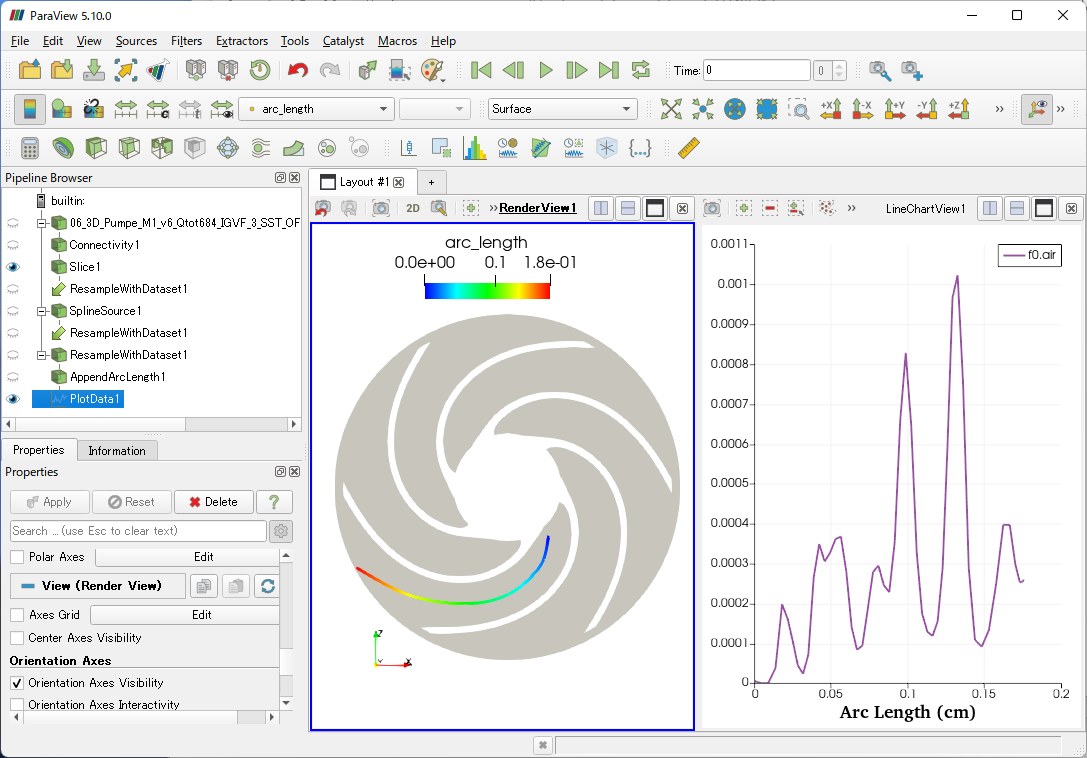
The following State file uses vtk as input because the above link is a vtk file.
[resample\_plot.pvsm](https://discourse.paraview.org/uploads/short-url/oTXYp7MTocl6HuNWXAlhH25mgwT.pvsm) (746.5 KB)
---
### Author:  [@Qutadah\_Rababah](https://discourse.paraview.org/u/Qutadah_Rababah)
#### Post date: [March 23, 2022, 3:18pm UTC](https://discourse.paraview.org/t/slice-along-polyline-y-axis/9259/3 "2022-03-23T15:18:33Z")
Hello,
Thanks ! That was of great help! I have a question, did you generate the polyline manually? How do I make sure the polyline is exactly in the middle?
I would also like to make polylines in all blade passages in the middle, can I somehow copy the polyline around the axis with angle “x” in between each of them ?
Also, what **Destination mesh** did you choose in the **ResampleWithDataset**? I am trying to add more polylines and using the same technique and it wont plot…
Thanks!
Regards,
Qutadah
---
### Author:  [@Kenichiro-Yoshimi](https://discourse.paraview.org/u/Kenichiro-Yoshimi)
#### Post date: [March 23, 2022, 11:34pm UTC](https://discourse.paraview.org/t/slice-along-polyline-y-axis/9259/4 "2022-03-23T23:34:11Z")
Hi,
Sorry, this polyline is created manually. There may be a way to create middle lines between blade passages, such as Transfinite interpolation, but I do not have an implementation of that.
For a rotated copy around the x-axis, you may want to apply the **Transform** filter to the polyline.
In the **Resample With Data** filter, the following settings were made.
- Source Data Arrays: Connectivity1 (or Slice1)
- Destination Mesh: SplineSource1
---
### Author:  [@Qutadah\_Rababah](https://discourse.paraview.org/u/Qutadah_Rababah)
#### Post date: [March 25, 2022, 12:50am UTC](https://discourse.paraview.org/t/slice-along-polyline-y-axis/9259/5 "2022-03-25T00:50:13Z")
Ok so I tried using Transform without luck, I could somehow manage to see the polyline or plot on it… However I did make manual polylines all over and used the same technique you used.
**Is there a way to smoothen out the manually created polylines so that they look nice?** I did try out **Smooth** filter on the **SplineSource** but it did not work.
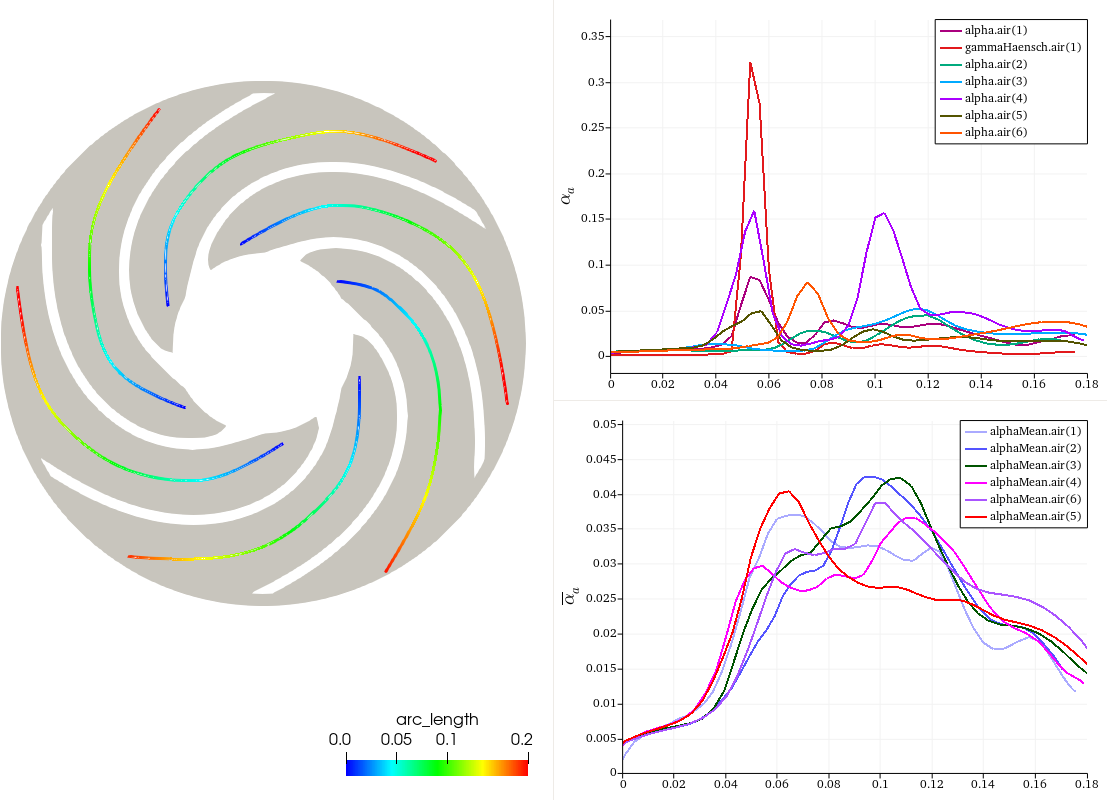
Here is the state file:
[blade-passage-midspan.pvsm](https://discourse.paraview.org/uploads/short-url/8vDsJxxnpiRmm2qTSc4cfOV2l0D.pvsm) (2.5 MB)
---
### Author:  [@Kenichiro-Yoshimi](https://discourse.paraview.org/u/Kenichiro-Yoshimi)
#### Post date: [March 25, 2022, 11:33am UTC](https://discourse.paraview.org/t/slice-along-polyline-y-axis/9259/6 "2022-03-25T11:33:41Z")
Hello,
The following Jupyter note will help you create a smooth midline between blade lines using transfinite interpolation.
>
Below is a simple tested script and results. I hope this will be helpful.
[tf\_interpolation.7z](https://discourse.paraview.org/uploads/short-url/zSzymfYgYZZkcVvxje7Gz1b9hKj.7z) (120.0 KB)

---
### Author:  [@Qutadah\_Rababah](https://discourse.paraview.org/u/Qutadah_Rababah)
#### Post date: [March 26, 2022, 6:51am UTC](https://discourse.paraview.org/t/slice-along-polyline-y-axis/9259/7 "2022-03-26T06:51:47Z")
@Kenichiro-Yoshimi
Thanks a lot for the code, that was a good read! I want to generate more polylines for other slices (arc lengths differ in length), how did you generate the two poly1.csv and poly2.csv for a specific slice?
Also assuming I want to take the same interpolated line for different slices if I try to change the translation in **Transform** filter, the polyline is visible, however no data whatsover is plotted in paraview, I also tried making a new transform and resample again, append arc length and plot.again. What am I doing wrong?
Thanks !
---
### Author:  [@Kenichiro-Yoshimi](https://discourse.paraview.org/u/Kenichiro-Yoshimi)
#### Post date: [March 26, 2022, 1:57pm UTC](https://discourse.paraview.org/t/slice-along-polyline-y-axis/9259/8 "2022-03-26T13:57:57Z")
I have created a video on how to create a poly1.csv file. Please refer to it.
> **[save\_poly1\_1.mp4](https://onedrive.live.com/redir?resid=63B2680685E64083%21123&authkey=%21ALxo0QydQ9SRQ3M&ithint=video%2cmp4&e=h6TmfX)**
>
> MP4 File
The **Source Data Arrays** in the **Resample With Data** filter settings should be set to something like Connectivity1 with a 3D volume, not Slice1 with 2D data.
---
### Author:  [@Qutadah\_Rababah](https://discourse.paraview.org/u/Qutadah_Rababah)
#### Post date: [March 26, 2022, 11:19pm UTC](https://discourse.paraview.org/t/slice-along-polyline-y-axis/9259/9 "2022-03-26T23:19:10Z")
Thank you that was great ! @Kenichiro-Yoshimi🙂