# SPHVolumeInterpolator not working
**URL:** https://discourse.paraview.org/t/sphvolumeinterpolator-not-working/10860
**Category:** ParaView Support
**Created:** [November 25, 2022, 12:49pm UTC](https://discourse.paraview.org/t/sphvolumeinterpolator-not-working/10860 "2022-11-25T12:49:25Z")
**Posts on this page:** 7
**Page:** 1
### Author:  [@30Kaz](https://discourse.paraview.org/u/30Kaz)
#### Post date: [November 25, 2022, 12:49pm UTC](https://discourse.paraview.org/t/sphvolumeinterpolator-not-working/10860/1 "2022-11-25T12:49:25Z")
I am trying to use SPHVolumeInterpolator, but nothing shows up so far, even though the points are clearly there as can be seen in TableToPoints1. What could I do?
The input data has 5 columns. The zeroth is id, first to third are coordinates, and fourth is density.
I set kernel spatial step to 0.00075, which is the point separation distance.
My ParaView version is 5.11.0-RC1.
[output3\_0.txt](https://discourse.paraview.org/uploads/short-url/lCLXYhn6dIKbXW7a10ttCyBrmC6.txt) (265.2 KB)
[output3\_1.txt](https://discourse.paraview.org/uploads/short-url/4dWycxNOFgk6ni1DsD9mIuNgw9Q.txt) (388.2 KB)
[SPHtest.pvsm](https://discourse.paraview.org/uploads/short-url/7xQ5QrYuUuYthguNq37SlDtNsqb.pvsm) (339.9 KB)
---
### Author:  [@jfavre](https://discourse.paraview.org/u/jfavre)
#### Post date: [November 25, 2022, 1:00pm UTC](https://discourse.paraview.org/t/sphvolumeinterpolator-not-working/10860/2 "2022-11-25T13:00:03Z")
change the representation mode of the interpolator from “Outline” to “Surface” and you will see the data volume.
---
### Author:  [@30Kaz](https://discourse.paraview.org/u/30Kaz)
#### Post date: [November 25, 2022, 2:56pm UTC](https://discourse.paraview.org/t/sphvolumeinterpolator-not-working/10860/3 "2022-11-25T14:56:59Z")
@jfavre Thank you for the info. Representation mode “volume” was more of what I expecred.
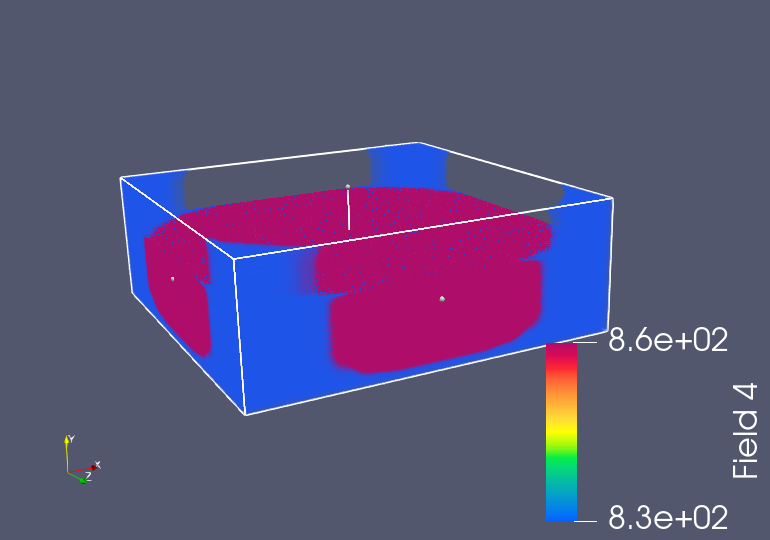
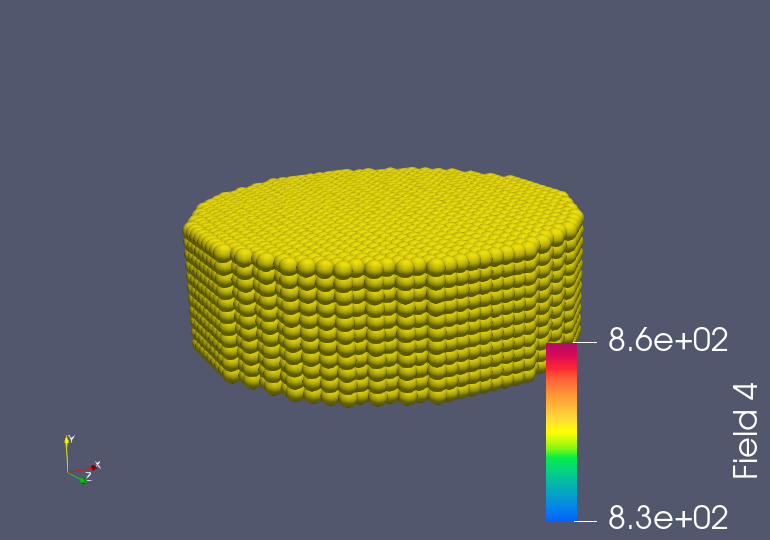
However, when I select volume, at the zeroth time step, I see something like pillars at the corners, but those shouldn’t be there considering the points’ coordinations. This is gone at the first time step. Why does this happen, and is there any way to remove those?
---
### Author:  [@jfavre](https://discourse.paraview.org/u/jfavre)
#### Post date: [November 25, 2022, 3:14pm UTC](https://discourse.paraview.org/t/sphvolumeinterpolator-not-working/10860/4 "2022-11-25T15:14:12Z")
to remove the blue pillars, set the opacity to 0 for a very small range on the lower side of your scalar field range. in other words, make a piece-wise linear opacity transfer function with a short and small segment set to 0, and then a ramp from 0 to 1. This should be all user-defined and will depend on your data range.
---
### Author:  [@30Kaz](https://discourse.paraview.org/u/30Kaz)
#### Post date: [November 25, 2022, 4:24pm UTC](https://discourse.paraview.org/t/sphvolumeinterpolator-not-working/10860/5 "2022-11-25T16:24:14Z")
@jfavre Could you kindly tell me how to change opacity in SPHVolumeInterpolator in the first place?
---
### Author:  [@jfavre](https://discourse.paraview.org/u/jfavre)
#### Post date: [November 28, 2022, 7:44am UTC](https://discourse.paraview.org/t/sphvolumeinterpolator-not-working/10860/6 "2022-11-28T07:44:32Z")
I would kindly invite you to follow the excellent on-line tutorial: [2. Basic Usage — ParaView Documentation 5.11.0 documentation](https://docs.paraview.org/en/latest/Tutorials/SelfDirectedTutorial/basicUsage.html?highlight=volume#volume-rendering)
---
### Author:  [@30Kaz](https://discourse.paraview.org/u/30Kaz)
#### Post date: [November 28, 2022, 11:42am UTC](https://discourse.paraview.org/t/sphvolumeinterpolator-not-working/10860/7 "2022-11-28T11:42:27Z")
@jfavre Thank you.