# Stat Paraview from Python script
**URL:** https://discourse.paraview.org/t/stat-paraview-from-python-script/14207
**Category:** ParaView Support
**Created:** [March 19, 2024, 4:02pm UTC](https://discourse.paraview.org/t/stat-paraview-from-python-script/14207 "2024-03-19T16:02:52Z")
**Posts on this page:** 10
**Page:** 1
### Author:  [@Marvin](https://discourse.paraview.org/u/Marvin)
#### Post date: [March 19, 2024, 4:02pm UTC](https://discourse.paraview.org/t/stat-paraview-from-python-script/14207/1 "2024-03-19T16:02:52Z")
Hi !
I am trying to launch Paraview from a Python script (Windows) but I got this message :
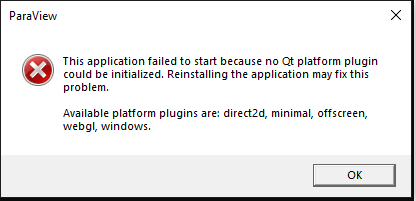
I have not problem to start the program from a .bat file but I don’t find any solution from python.
Do you have any solution ?
Thank you.
Best regards,
---
### Author:  [@mwestphal](https://discourse.paraview.org/u/mwestphal)
#### Post date: [March 19, 2024, 4:15pm UTC](https://discourse.paraview.org/t/stat-paraview-from-python-script/14207/2 "2024-03-19T16:15:47Z")
Hi @Marvin
How did you install ParaView ?
Best,
---
### Author:  [@Marvin](https://discourse.paraview.org/u/Marvin)
#### Post date: [March 19, 2024, 4:23pm UTC](https://discourse.paraview.org/t/stat-paraview-from-python-script/14207/3 "2024-03-19T16:23:16Z")
From zip file so no install.
---
### Author:  [@mwestphal](https://discourse.paraview.org/u/mwestphal)
#### Post date: [March 19, 2024, 4:25pm UTC](https://discourse.paraview.org/t/stat-paraview-from-python-script/14207/4 "2024-03-19T16:25:01Z")
Please try again with the last released version of ParaView from: [https://www.paraview.org/download/](https://www.paraview.org/download/)
---
### Author:  [@mwestphal](https://discourse.paraview.org/u/mwestphal)
#### Post date: [March 19, 2024, 4:25pm UTC](https://discourse.paraview.org/t/stat-paraview-from-python-script/14207/5 "2024-03-19T16:25:32Z")
> [@Marvin](#):
>
> I am trying to launch Paraview from a Python script (Windows)
And share your script and how you run it.
---
### Author:  [@Marvin](https://discourse.paraview.org/u/Marvin)
#### Post date: [March 19, 2024, 5:17pm UTC](https://discourse.paraview.org/t/stat-paraview-from-python-script/14207/6 "2024-03-19T17:17:53Z")
I tried 2 ways :
- Directly with Python
```auto
program='C:/Users/XXXXXXX/Desktop/Paraview/ParaView-5.11.0-MPI-Windows-Python3.9-msvc2017-AMD64/bin/paraview.exe'
subprocess.call([program])
```
- By calling a shell script from python :
```auto
os.system('"run_postpro_mod.bat"')
```
```auto
START /wait C:\Users\XXXXXX\Desktop\Paraview\ParaView-5.11.0-MPI-Windows-Python3.9-msvc2017-AMD64\bin\paraview.exe --state C:\Users\XXXXXX\Desktop\SALOME-9.7.0\programme\FEA\mod.pvsm
```
Thanks for your help !
---
### Author:  [@mwestphal](https://discourse.paraview.org/u/mwestphal)
#### Post date: [March 20, 2024, 8:20am UTC](https://discourse.paraview.org/t/stat-paraview-from-python-script/14207/7 "2024-03-20T08:20:53Z")
Can you try with 5.12.0 ?
---
### Author:  [@Marvin](https://discourse.paraview.org/u/Marvin)
#### Post date: [March 20, 2024, 1:01pm UTC](https://discourse.paraview.org/t/stat-paraview-from-python-script/14207/8 "2024-03-20T13:01:04Z")
Hi Mathieu,
I tried with 5.12.0 but no luck.
---
### Author:  [@mwestphal](https://discourse.paraview.org/u/mwestphal)
#### Post date: [March 21, 2024, 4:15pm UTC](https://discourse.paraview.org/t/stat-paraview-from-python-script/14207/9 "2024-03-21T16:15:18Z")
I just tried that and it worked perfectly:
```auto
>>> import subprocess
>>> program=r"C:\Users\glow\Desktop\paraview\ParaView-5.12.0-MPI-Windows-Python3.10-msvc2017-AMD64\bin\paraview.exe"
>>> subprocess.call(program)
0
>>>
```
Are you able to start paraview normally ?
---
### Author:  [@Marvin](https://discourse.paraview.org/u/Marvin)
#### Post date: [March 22, 2024, 6:00am UTC](https://discourse.paraview.org/t/stat-paraview-from-python-script/14207/10 "2024-03-22T06:00:03Z")
Hi Mathieu,
I finally got the point. I tried to start paraview from a salome shell but even if it’s a python shell, it seems that some module like Qt are not loaded (or something like this).
Thank you for your help.