# stl file tied to motions time series
**URL:** https://discourse.paraview.org/t/stl-file-tied-to-motions-time-series/10295
**Category:** ParaView Support
**Tags:** vtk
**Created:** [September 12, 2022, 7:47pm UTC](https://discourse.paraview.org/t/stl-file-tied-to-motions-time-series/10295 "2022-09-12T19:47:39Z")
**Posts on this page:** 20
**Page:** 1
### Author:  [@irenerar](https://discourse.paraview.org/u/irenerar)
#### Post date: [September 12, 2022, 7:47pm UTC](https://discourse.paraview.org/t/stl-file-tied-to-motions-time-series/10295/1 "2022-09-12T19:47:39Z")
I would like to have a stl file (which represents a solid rigid) which follows the motions of another rigid object attached to it, for which I have time history of the displacement. Is there a simple way to do it?
---
### Author:  [@mwestphal](https://discourse.paraview.org/u/mwestphal)
#### Post date: [September 13, 2022, 3:36am UTC](https://discourse.paraview.org/t/stl-file-tied-to-motions-time-series/10295/2 "2022-09-13T03:36:35Z")
Not simple but may be doable with the animation view, especially the “python” mode of it.
Another way to look at it is to use a glyph instead, you can show you stl as a “glyph” on a point which is attached to your rigid.
---
### Author:  [@irenerar](https://discourse.paraview.org/u/irenerar)
#### Post date: [September 13, 2022, 6:25am UTC](https://discourse.paraview.org/t/stl-file-tied-to-motions-time-series/10295/3 "2022-09-13T06:25:01Z")
Thanks a lot for your answer. I am quite new to paraview. How would you impose a motion to a glyph?
---
### Author:  [@mwestphal](https://discourse.paraview.org/u/mwestphal)
#### Post date: [September 13, 2022, 11:00am UTC](https://discourse.paraview.org/t/stl-file-tied-to-motions-time-series/10295/4 "2022-09-13T11:00:38Z")
Could you share your data so I can give you an example ?
---
### Author:  [@irenerar](https://discourse.paraview.org/u/irenerar)
#### Post date: [September 13, 2022, 2:31pm UTC](https://discourse.paraview.org/t/stl-file-tied-to-motions-time-series/10295/5 "2022-09-13T14:31:56Z")
I attach the stl file; I would like the (0,0,0) of the stl file to follow a time series in six DOF. How would it be better to send you the time series of the six degrees of freedom?
(Attachment WINDMOOR\_vis.stl is missing)
---
### Author:  [@mwestphal](https://discourse.paraview.org/u/mwestphal)
#### Post date: [September 14, 2022, 2:42am UTC](https://discourse.paraview.org/t/stl-file-tied-to-motions-time-series/10295/6 "2022-09-14T02:42:30Z")
Nothing got attached.
Here is an example:
data:
[https://data.kitware.com/api/v1/file/5afd93688d777f15ebe1b48a/download](https://data.kitware.com/api/v1/file/5afd93688d777f15ebe1b48a/download)
[cow.vtp](https://discourse.paraview.org/uploads/short-url/19MetCqTb9CSwlAW4MQaDhipAH0.vtp) (59.0 KB)
state file:
[state.pvsm](https://discourse.paraview.org/uploads/short-url/2xarDlofIUif1oiw1w3rQTj238V.pvsm) (416.3 KB)
Result:
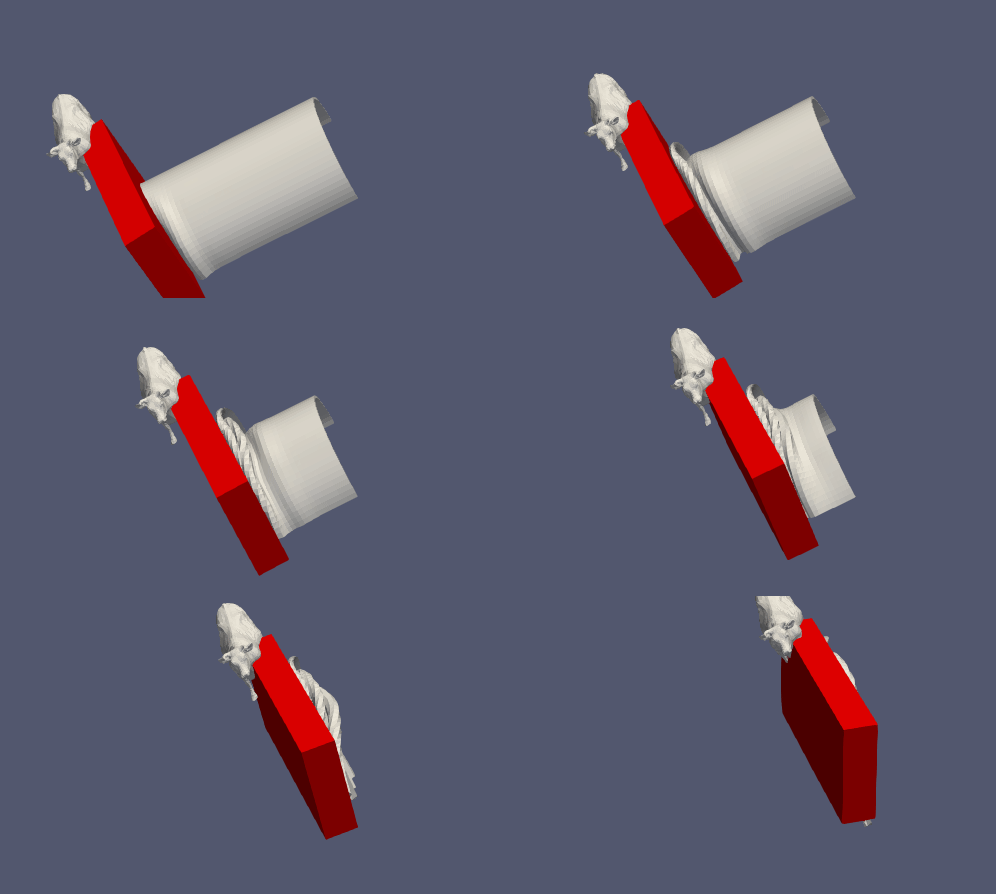
---
### Author:  [@irenerar](https://discourse.paraview.org/u/irenerar)
#### Post date: [September 14, 2022, 7:15am UTC](https://discourse.paraview.org/t/stl-file-tied-to-motions-time-series/10295/7 "2022-09-14T07:15:12Z")
Hi,
That is exactly what I want, but I am not able to load the state… what were the steps you followed?
Thanks again,
Irene
---
### Author:  [@mwestphal](https://discourse.paraview.org/u/mwestphal)
#### Post date: [September 14, 2022, 8:34am UTC](https://discourse.paraview.org/t/stl-file-tied-to-motions-time-series/10295/8 "2022-09-14T08:34:47Z")
Which version of ParaView are you using ?
---
### Author:  [@irenerar](https://discourse.paraview.org/u/irenerar)
#### Post date: [September 14, 2022, 8:40am UTC](https://discourse.paraview.org/t/stl-file-tied-to-motions-time-series/10295/9 "2022-09-14T08:40:51Z")
I tried with both 5.9.1 and 5.10.1
---
### Author:  [@mwestphal](https://discourse.paraview.org/u/mwestphal)
#### Post date: [September 14, 2022, 8:48am UTC](https://discourse.paraview.org/t/stl-file-tied-to-motions-time-series/10295/10 "2022-09-14T08:48:21Z")
Steps for 5.10.1
- run ParaView
- open can.ex2, Apply
- open cow.vtp, Apply, hide the cow
- Using selection tools, select a single point on the red part of the can
- Extract Selection, Apply
- Change the representation of the ExtractSelection to “3D Glyphs”
- Instead of Arrow, Choose pipeline connection as the glyph type (in display properties)
- Choose the cow as the actual glyph
- Press play to play the animation
hth
---
### Author:  [@irenerar](https://discourse.paraview.org/u/irenerar)
#### Post date: [September 14, 2022, 7:50pm UTC](https://discourse.paraview.org/t/stl-file-tied-to-motions-time-series/10295/11 "2022-09-14T19:50:31Z")
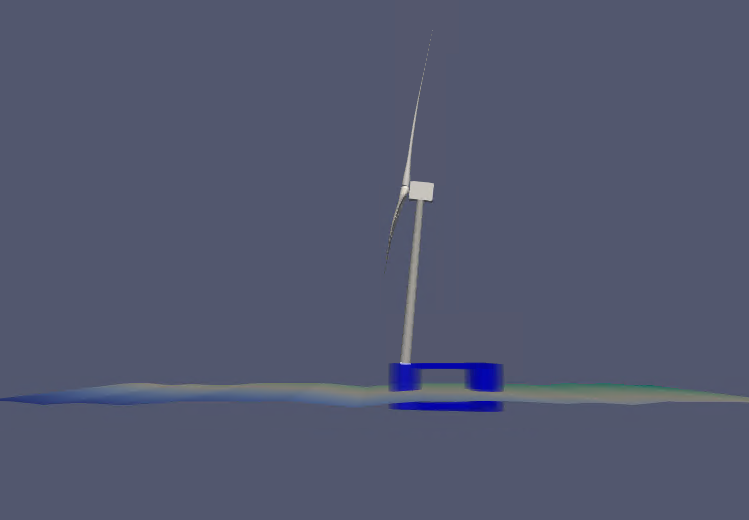
Great, thanks a lot! I almost managed! The only thing is that this way my ‘glyph’ (the blue object) translated with the white line, but it does not rotate… do you know a way?

---
### Author:  [@mwestphal](https://discourse.paraview.org/u/mwestphal)
#### Post date: [September 15, 2022, 2:09am UTC](https://discourse.paraview.org/t/stl-file-tied-to-motions-time-series/10295/12 "2022-09-15T02:09:57Z")
There is an orient property on the glyph that you can use, but you need a vector in the right direction on the point you selected.
---
### Author:  [@irenerar](https://discourse.paraview.org/u/irenerar)
#### Post date: [September 15, 2022, 6:55am UTC](https://discourse.paraview.org/t/stl-file-tied-to-motions-time-series/10295/13 "2022-09-15T06:55:05Z")
Thanks again, but I do not understand what you mean by ‘a vector in the right direction on the point you selected’. Also, I did not select a point, but a polygon: could that be an issue?
---
### Author:  [@mwestphal](https://discourse.paraview.org/u/mwestphal)
#### Post date: [September 15, 2022, 9:04am UTC](https://discourse.paraview.org/t/stl-file-tied-to-motions-time-series/10295/14 "2022-09-15T09:04:27Z")
Hi,
Please share your data, it is hard to explain without it.
---
### Author:  [@irenerar](https://discourse.paraview.org/u/irenerar)
#### Post date: [September 15, 2022, 9:40am UTC](https://discourse.paraview.org/t/stl-file-tied-to-motions-time-series/10295/15 "2022-09-15T09:40:57Z")
It was too heavy, so I share it here: [WINDMOOR\_vis.stl](https://studntnu-my.sharepoint.com/:u:/g/personal/irenerar_ntnu_no/EXm0-jJhn2pOuLwoR2kr-SABCf-ejSG6Z6hB7YGKqRrNlg?e=vlvZgm)
And the tower (the stl should follow the base of this tower): [paraview](https://studntnu-my.sharepoint.com/:f:/g/personal/irenerar_ntnu_no/EqJXTFFej3JMhjOEF3SQMOwBI0up13jjJLUpzCcv-Q9G8A?e=fB3YsC)
Please let me know if something else is needed
Thanks again!
Irene
---
### Author:  [@mwestphal](https://discourse.paraview.org/u/mwestphal)
#### Post date: [September 15, 2022, 11:10am UTC](https://discourse.paraview.org/t/stl-file-tied-to-motions-time-series/10295/16 "2022-09-15T11:10:07Z")
I managed to do something, not sure this is what you want:
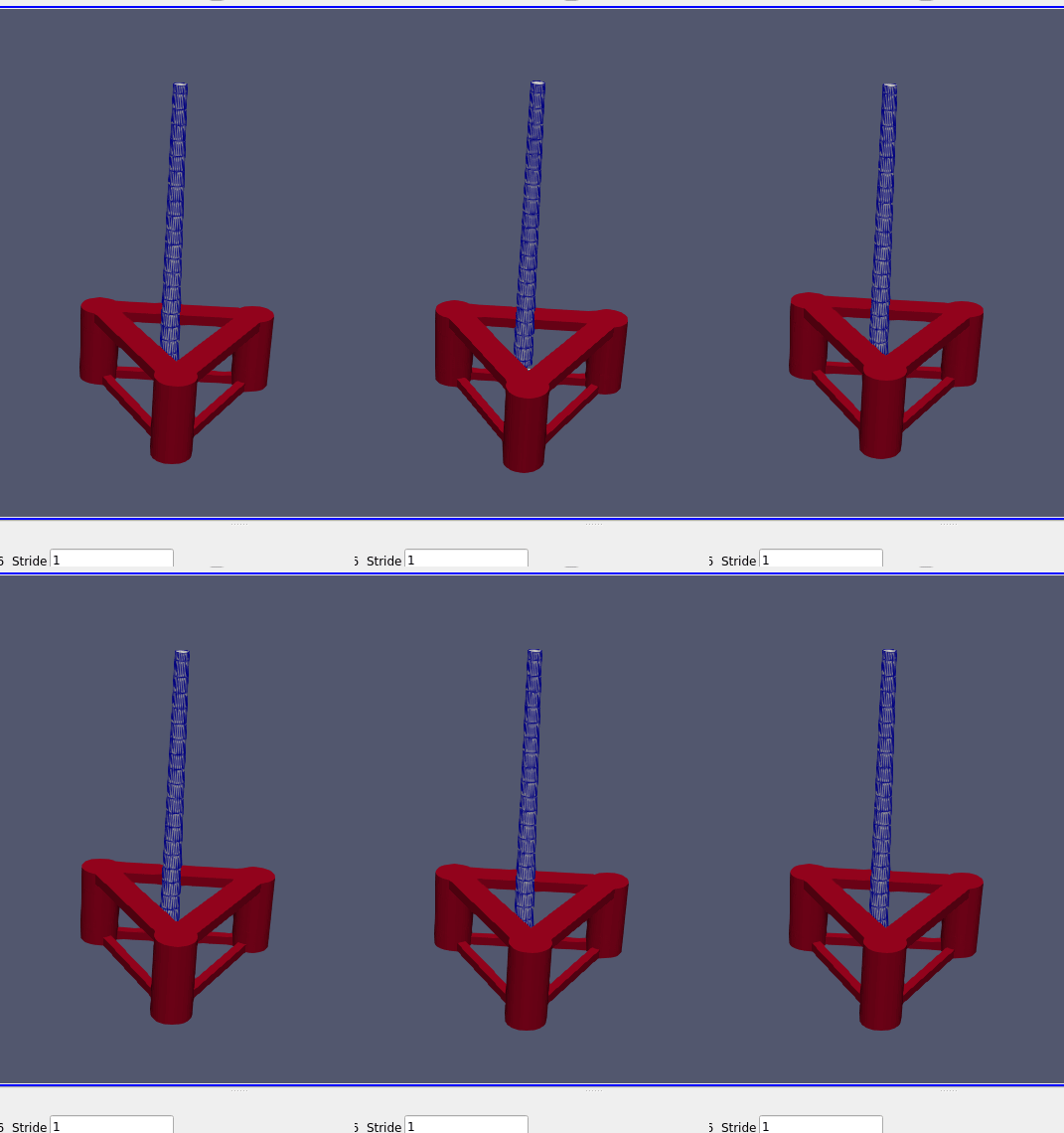
Extracting a cell is actually a good thing, because you need it to do that. Here is more or less what you need:
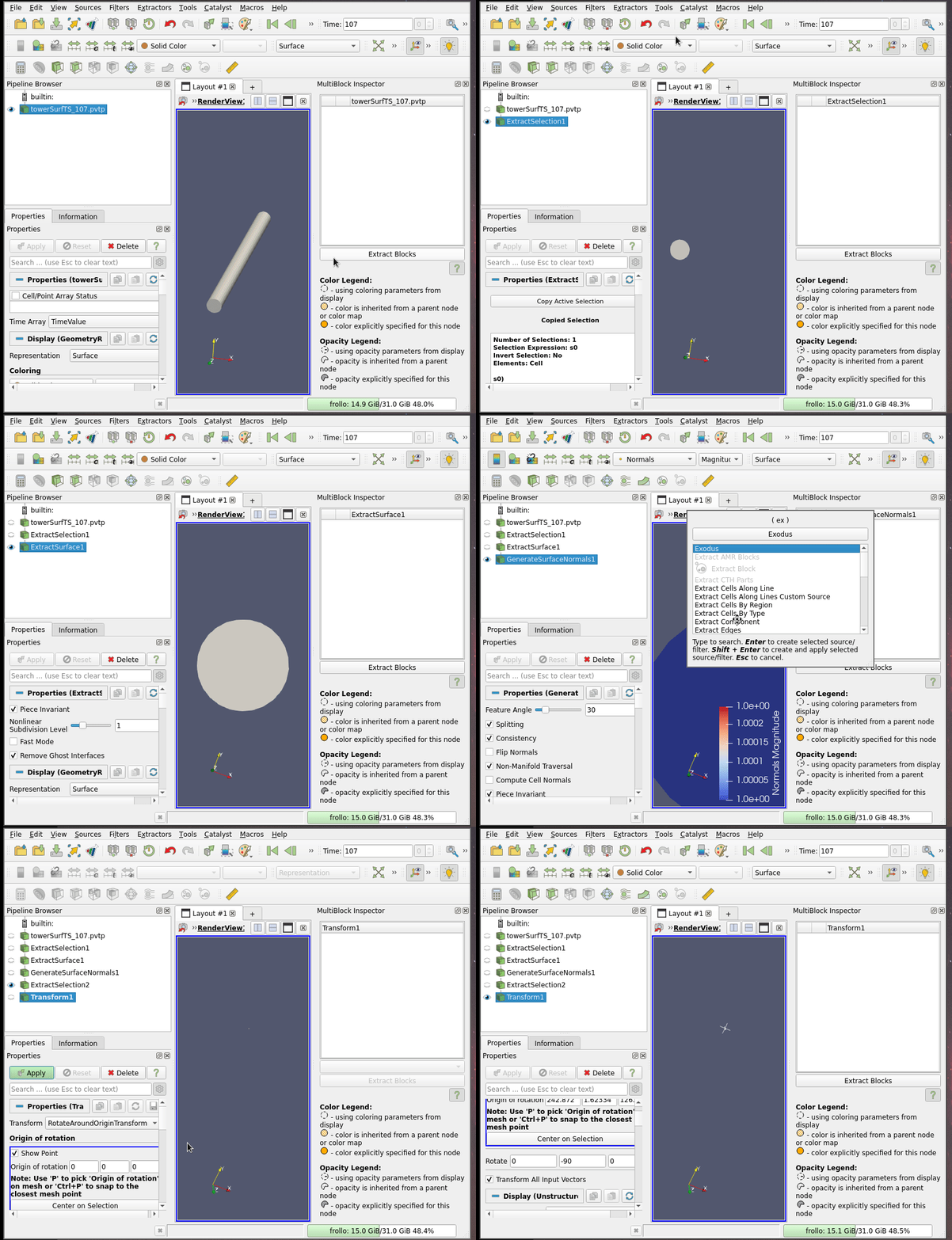
- On your extracted cells, add a “Extract Surface” filter
- Add a GenerateSurfaceNormals, Apply
- Select a single point, ExtractSelection, Apply
- Add a Transform, change the Transfrom type to “Rotate around origin”
- Pick the origin on the middle of the cell and rotate by -90 deg in Y
- Use 3D glyphs representation as before, but enabled “orient” and choose your “rotated” normals
Its a complex pipeline, but I hope it helps you achieve your goal.
---
### Author:  [@irenerar](https://discourse.paraview.org/u/irenerar)
#### Post date: [September 15, 2022, 2:11pm UTC](https://discourse.paraview.org/t/stl-file-tied-to-motions-time-series/10295/17 "2022-09-15T14:11:55Z")
Hi,
Yes, this is what I want; actually, the blue tower should be at the upfront column (so -35.218m translated in x), and at z = 15.5m. But other than that it is what I want. I did not manage to do it; I get lost on the ‘Select a point’ and then on the ‘Transform’ point. Where should I select the point from?
I think I am almost there, but that a small detail is escaping…
Thanks again!
Irene
---
### Author:  [@mwestphal](https://discourse.paraview.org/u/mwestphal)
#### Post date: [September 15, 2022, 2:26pm UTC](https://discourse.paraview.org/t/stl-file-tied-to-motions-time-series/10295/18 "2022-09-15T14:26:13Z")
Here is how to select a cell, compute the normals and select a point, then apply a transform
---
### Author:  [@irenerar](https://discourse.paraview.org/u/irenerar)
#### Post date: [September 16, 2022, 6:23am UTC](https://discourse.paraview.org/t/stl-file-tied-to-motions-time-series/10295/19 "2022-09-16T06:23:19Z")
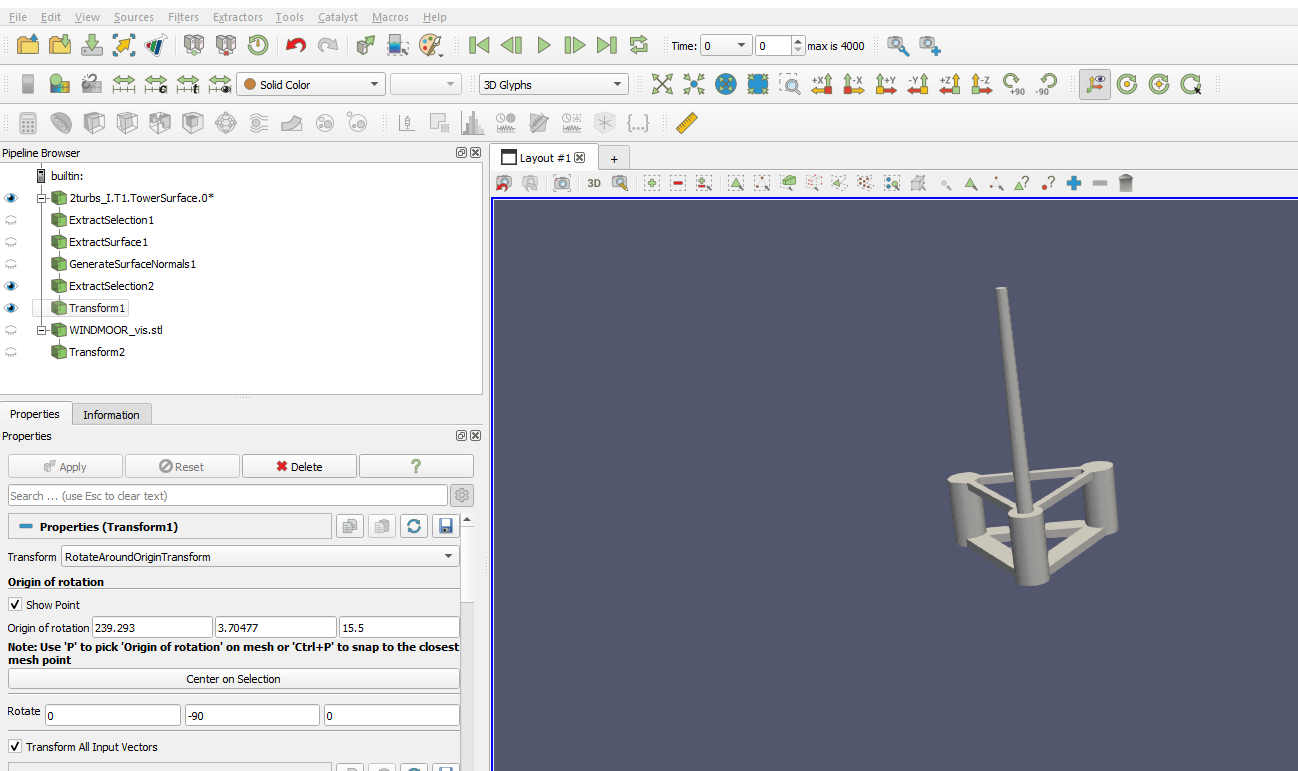
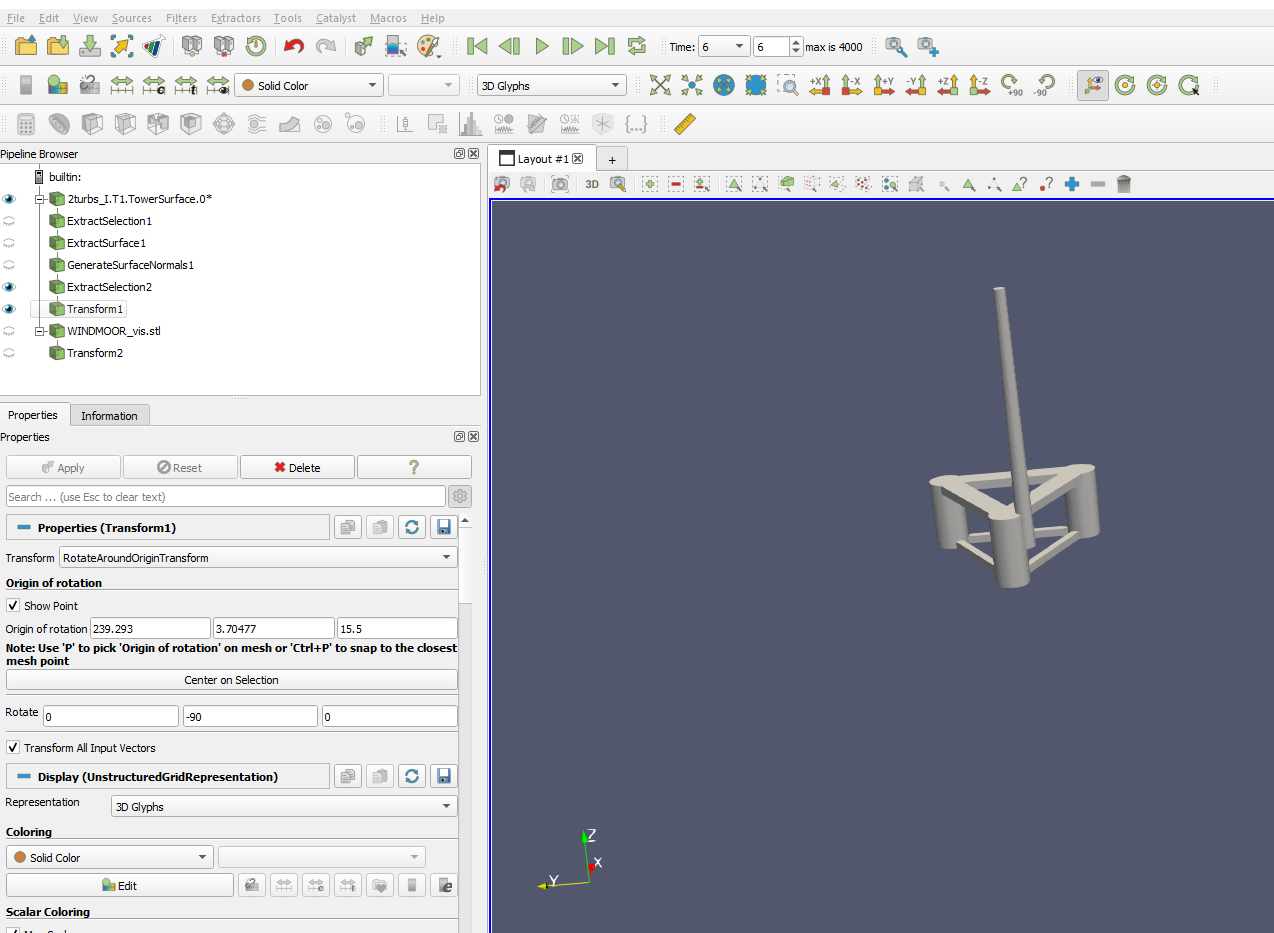
Great, perfect, I am doing the same as you, but then my stl, when I include it as glyph, rotates, but does not translate anymore. In the gif you sent I could not appreciate if it was moving or not with it…
This is what I get following the steps you mention (and trying to align the stl with the tower)
---
### Author:  [@mwestphal](https://discourse.paraview.org/u/mwestphal)
#### Post date: [September 16, 2022, 6:31am UTC](https://discourse.paraview.org/t/stl-file-tied-to-motions-time-series/10295/20 "2022-09-16T06:31:20Z")
Please share your statefile. Which version of ParaView are you using ?
[Next page](https://discourse.paraview.org/t/stl-file-tied-to-motions-time-series/10295.md?page=2)