# Stream tracer from input to output
**URL:** https://discourse.paraview.org/t/stream-tracer-from-input-to-output/437
**Category:** ParaView Support
**Created:** [August 16, 2018, 8:50am UTC](https://discourse.paraview.org/t/stream-tracer-from-input-to-output/437 "2018-08-16T08:50:30Z")
**Posts on this page:** 5
**Page:** 1
### Author:  [@aniruddha](https://discourse.paraview.org/u/aniruddha)
#### Post date: [August 16, 2018, 8:50am UTC](https://discourse.paraview.org/t/stream-tracer-from-input-to-output/437/1 "2018-08-16T08:50:30Z")
I have a simulation result from multiphase simulations where I would like to have stream tracers defined from the input plane to the output plane. I tried to create a stream tracer with custome data source i.e. the input plane but i am not able to get the proper intended results. Ideally i would like to have the liquid recirculation zones behind the bubbles and flow structures being distorted due to passage of bubbles. Please find attached the screenshots.
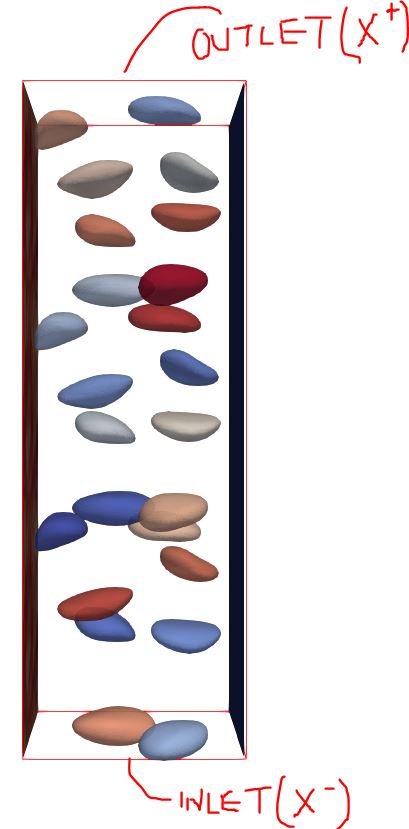
Link to the data : ( **Open both of them simultaneously** )
Point VTK : [https://my.pcloud.com/publink/show?code=XZvSYs7ZbOoC4DFEV8jgDaBKcTm2LLMYXP1y](https://my.pcloud.com/publink/show?code=XZvSYs7ZbOoC4DFEV8jgDaBKcTm2LLMYXP1y)
Buble VTU: [https://my.pcloud.com/publink/show?code=XZzjYs7ZPQxDnJke0VLax5xvhEn0Rj0uurjV](https://my.pcloud.com/publink/show?code=XZzjYs7ZPQxDnJke0VLax5xvhEn0Rj0uurjV)
With thanks and regards
Aniruddha
---
### Author:  [@nicolas.vuaille](https://discourse.paraview.org/u/nicolas.vuaille)
#### Post date: [August 17, 2018, 9:11am UTC](https://discourse.paraview.org/t/stream-tracer-from-input-to-output/437/2 "2018-08-17T09:11:34Z")
Hi,
If I understand correctly, you want to see streamlines in the whole volume of your dataset. The stream filter will display only streamlines that pass through the source.
So you can try with the ‘common’ stream filter and use a line as source (default source), and modify the line as needed (e.g. click on ‘X’ to have a line along X axis)
Second possibility, you can try with a subset of your Point data as custom source of the stream filter. See this state file as example: [streamlines.pvsm](https://discourse.paraview.org/uploads/default/original/1X/9cb632dc56a6b49677dcf3bd8ad896783e4b36a6.pvsm) (464.3 KB)
(Note that I have an error reported when executing this state file, but I don’t know why as computation ends correclty)
---
### Author:  [@aniruddha](https://discourse.paraview.org/u/aniruddha)
#### Post date: [August 18, 2018, 5:13pm UTC](https://discourse.paraview.org/t/stream-tracer-from-input-to-output/437/3 "2018-08-18T17:13:51Z")
Hi Nicolas,
Thanks for the info. Thats exactly what I needed. I tried loading your state file and I do see the streamlines all across the domain. Is there a way to control the density of these streamlines. Normally in the case of point source or Line source we can control the seed points but here I don’t find that option.
Also, regarding extracting the subset of surface should all of the domain needs to be selected as a subset ? And which dataset needs to be taken as the source of custom filter ? I tried it from the scratch and then paraview hangs. If i load your statefile it works perfectly fine.
---
### Author:  [@nicolas.vuaille](https://discourse.paraview.org/u/nicolas.vuaille)
#### Post date: [August 20, 2018, 7:43am UTC](https://discourse.paraview.org/t/stream-tracer-from-input-to-output/437/4 "2018-08-20T07:43:39Z")
Hi,
The main logic here is in the `extract` filter. It creates a subgrid by extracting 1 point over X. This `X` is the `sample rate` you can set in the advanced properties.
The output of this extract filter is the `seed source` of the streamlines: each point of this subset will be used as start point of a streamline.
So, density of streamline will increase with number of points. But too many points will lead ParaView to hang, because of the computation size.
Hope it will help,
---
### Author:  [@aniruddha](https://discourse.paraview.org/u/aniruddha)
#### Post date: [August 20, 2018, 8:28am UTC](https://discourse.paraview.org/t/stream-tracer-from-input-to-output/437/5 "2018-08-20T08:28:51Z")
Hi Nicolas,
I was missing the point on `sample rate` and hence I was facing the issue. Thanks for pointing that. From my side the issue is resolved. 🙂
Cheers, Aniruddha