# Stream Tracer grayed out
**URL:** https://discourse.paraview.org/t/stream-tracer-grayed-out/4338
**Category:** ParaView Support
**Created:** [May 15, 2020, 7:06am UTC](https://discourse.paraview.org/t/stream-tracer-grayed-out/4338 "2020-05-15T07:06:29Z")
**Posts on this page:** 13
**Page:** 1
### Author:  [@M\_P](https://discourse.paraview.org/u/M_P)
#### Post date: [May 15, 2020, 7:06am UTC](https://discourse.paraview.org/t/stream-tracer-grayed-out/4338/1 "2020-05-15T07:06:30Z")
Hello,
I am a novice at Paraview. I have a data file in Tecplot format at which I am struggling to plot streamlines. The Stream Tracer is actually grayed out.
Any help is appreciated!
Thanks[extrafine\_res\_501.dat](https://discourse.paraview.org/uploads/short-url/9RSP2HLzLjaS8F8SE6YUdIlkTJa.dat) (139.4 KB)
---
### Author:  [@cory.quammen](https://discourse.paraview.org/u/cory.quammen)
#### Post date: [May 15, 2020, 1:43pm UTC](https://discourse.paraview.org/t/stream-tracer-grayed-out/4338/2 "2020-05-15T13:43:44Z")
Welcome to the ParaView Discourse forum, M P.
Without looking at your dataset, my guess is your data has only cell data, and **Stream Tracer** works only with point data. Please apply a **Cell Data to Point Data** filter first. Then the **Stream Tracer** should be available.
---
### Author:  [@M\_P](https://discourse.paraview.org/u/M_P)
#### Post date: [May 15, 2020, 3:00pm UTC](https://discourse.paraview.org/t/stream-tracer-grayed-out/4338/3 "2020-05-15T15:00:15Z")
Thank you Cory for the response. I just checked out and found that the Cell Data to Point Data filter is grayed out too! I guess I am doing some basic mistakes?!
---
### Author:  [@cory.quammen](https://discourse.paraview.org/u/cory.quammen)
#### Post date: [May 15, 2020, 3:27pm UTC](https://discourse.paraview.org/t/stream-tracer-grayed-out/4338/4 "2020-05-15T15:27:07Z")
Okay. I looked at your data file, and you have point-centered data, so I was wrong about **Cell Data to Point Data** being needed (and also explains why that filter is grayed out). The problem is that you don’t have any vector fields, which the **Stream Tracer** needs. To create a vector field, add a **Python Calculator** filter, and set the **Expression** to `make_vector(U, V)`. You can change the **Array Name** property as well to whatever makes sense to you. Once that is done, you can apply a **Stream Tracer**.
---
### Author:  [@M\_P](https://discourse.paraview.org/u/M_P)
#### Post date: [May 15, 2020, 6:09pm UTC](https://discourse.paraview.org/t/stream-tracer-grayed-out/4338/5 "2020-05-15T18:09:59Z")
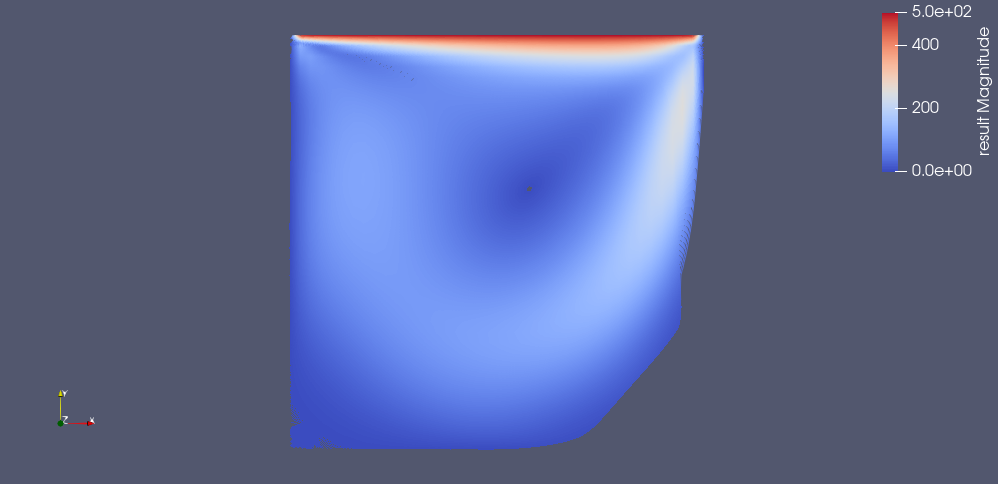
I followed your instruction. The Stream Tracer is no longer grayed out but the result is not exactly what I expected. I got the following:
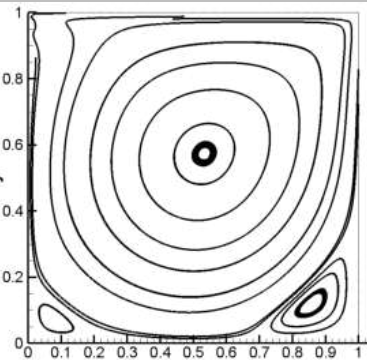
While I expect something like this:
---
### Author:  [@cory.quammen](https://discourse.paraview.org/u/cory.quammen)
#### Post date: [May 15, 2020, 6:58pm UTC](https://discourse.paraview.org/t/stream-tracer-grayed-out/4338/6 "2020-05-15T18:58:41Z")
Reduce the number of streamlines by reducing the **Resolution** from 1000 to 10 or so. That should give you what you are looking for.
---
### Author:  [@M\_P](https://discourse.paraview.org/u/M_P)
#### Post date: [May 16, 2020, 8:03am UTC](https://discourse.paraview.org/t/stream-tracer-grayed-out/4338/7 "2020-05-16T08:03:37Z")
Thanks for the instruction. I reduced the resolution but the streamlines are not continuous and so I never could get something similar to the picture I sent (also the vortex on down right are not appearing).
---
### Author:  [@danlipsa](https://discourse.paraview.org/u/danlipsa)
#### Post date: [May 18, 2020, 2:08pm UTC](https://discourse.paraview.org/t/stream-tracer-grayed-out/4338/8 "2020-05-18T14:08:35Z")
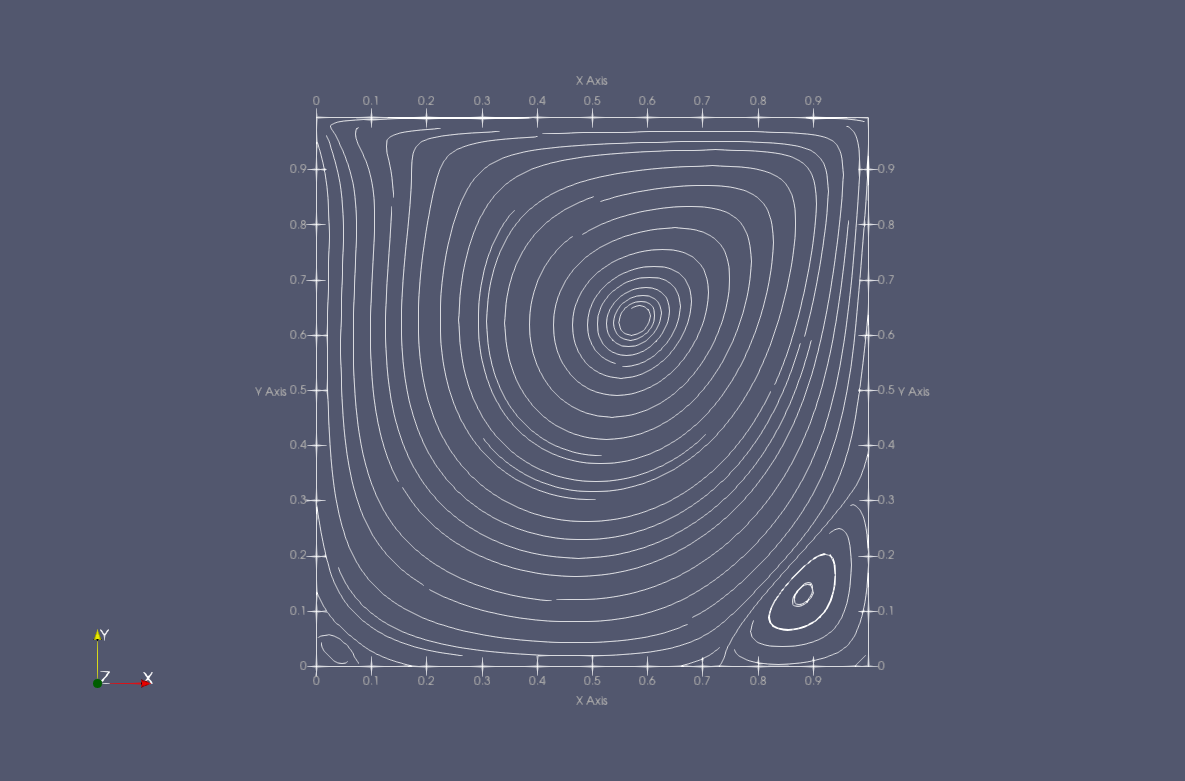
For 2D data you can also use EvenlySpacedStreamlines2D. Attached is the state file and the image I got with that filter.
[streamlines.pvsm](https://discourse.paraview.org/uploads/short-url/1PNHNBZQPgE87BKSAlkWPN8LlYx.pvsm) (350 KB)
---
### Author:  [@M\_P](https://discourse.paraview.org/u/M_P)
#### Post date: [May 18, 2020, 3:18pm UTC](https://discourse.paraview.org/t/stream-tracer-grayed-out/4338/9 "2020-05-18T15:18:19Z")
Thank you Dan, great instruction!
---
### Author:  [@Zeineldin\_Elserfy](https://discourse.paraview.org/u/Zeineldin_Elserfy)
#### Post date: [October 25, 2021, 11:59am UTC](https://discourse.paraview.org/t/stream-tracer-grayed-out/4338/10 "2021-10-25T11:59:29Z")
Hi Cory
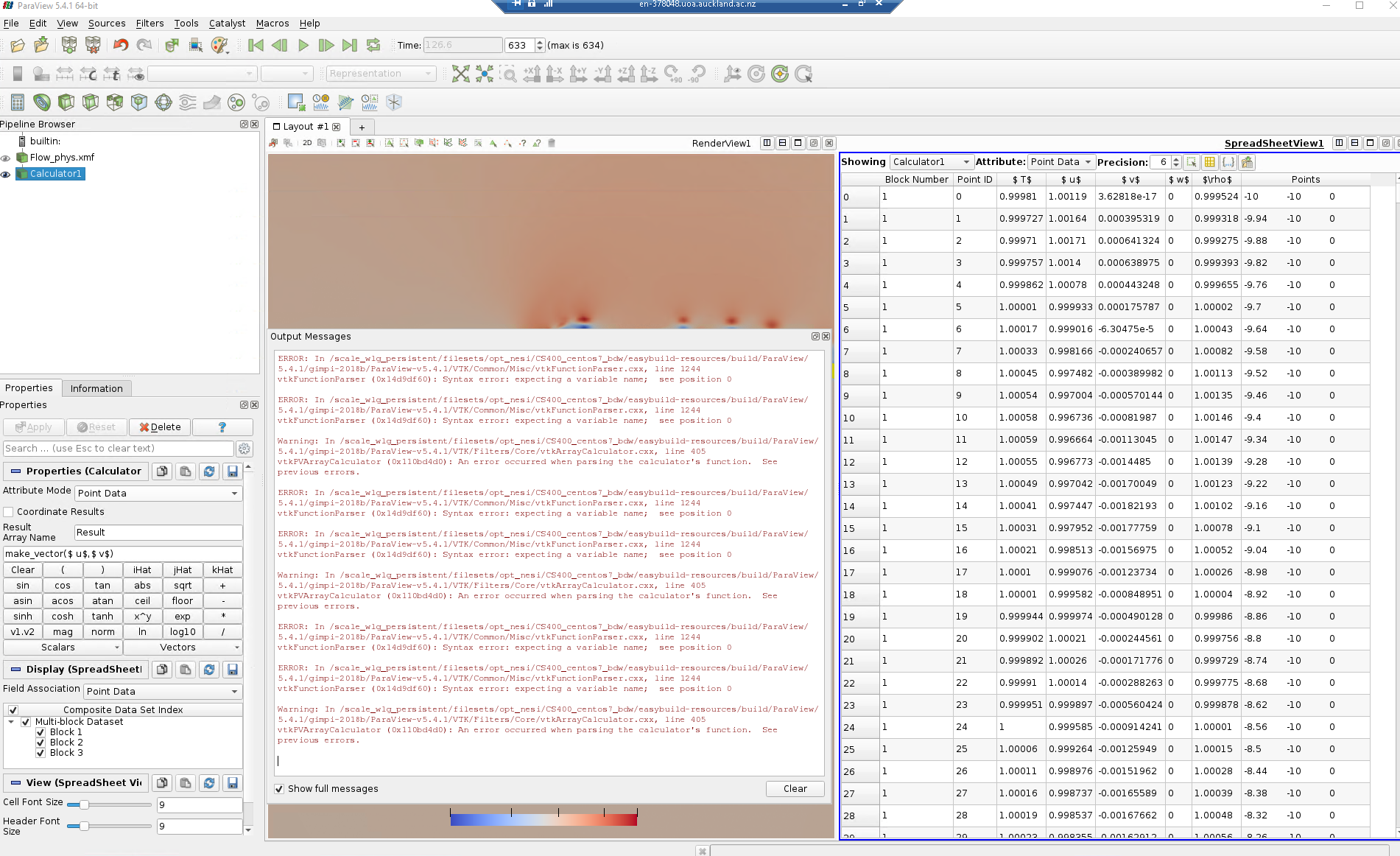
I have the same problem and my data are saved as point data without cell data. I have tried to use the calculator expression make\_vector(u,v), but an error was generated. How the expression is written in the calculator? I have also the velocity magnitude component in x,y,z
I have attached image for the error generated

---
### Author:  [@pcrepier](https://discourse.paraview.org/u/pcrepier)
#### Post date: [October 26, 2021, 2:43pm UTC](https://discourse.paraview.org/t/stream-tracer-grayed-out/4338/11 "2021-10-26T14:43:16Z")
I think the “make\_vector” function is only available in the latest version (5.10 ?)
for 5.4, you should use u_iHat+v_jHat
---
### Author:  [@wascott](https://discourse.paraview.org/u/wascott)
#### Post date: [October 26, 2021, 2:51pm UTC](https://discourse.paraview.org/t/stream-tracer-grayed-out/4338/12 "2021-10-26T14:51:06Z")
As stated, the Merge Vector Component filter is new to 5.10.0-RC1. The functionality is in the calculator. This is explained in the Users Guide. The formula is xComponent_iHat+yComponent_jHat+zComponent\*kHat.
---
### Author:  [@cory.quammen](https://discourse.paraview.org/u/cory.quammen)
#### Post date: [October 26, 2021, 3:53pm UTC](https://discourse.paraview.org/t/stream-tracer-grayed-out/4338/13 "2021-10-26T15:53:27Z")
> [@wascott](#):
>
> As stated, the Merge Vector Component filter is new to 5.10.0-RC1
To clarify, **Merge Vector Components** is an independent filter (not related to any Calculator filter) that enables creation of vector arrays from individual arrays.
`make_vector` is a Python function available in the **Python Calculator** that can be used to do the same. See [5. Filtering Data — ParaView Documentation 5.11.0 documentation](https://docs.paraview.org/en/latest/UsersGuide/filteringData.html?highlight=make_vector#basic-operations) for details. It has been around for a while (I’m not sure how many versions ago).
As Alan alluded to, you can also use the **Calculator** filter with the expression `xComponent*iHat+yComponent*jHat+zComponent*kHat` where xComponent, yComponent, and zComponent are the names of your component arrays.