# Stream Tracer movie
**URL:** https://discourse.paraview.org/t/stream-tracer-movie/2115
**Category:** ParaView Support
**Created:** [June 26, 2019, 9:09am UTC](https://discourse.paraview.org/t/stream-tracer-movie/2115 "2019-06-26T09:09:20Z")
**Posts on this page:** 20
**Page:** 1
### Author:  [@vanis](https://discourse.paraview.org/u/vanis)
#### Post date: [June 26, 2019, 9:09am UTC](https://discourse.paraview.org/t/stream-tracer-movie/2115/1 "2019-06-26T09:09:20Z")
Hi, guys!
I’ve got a problem. I have to do movie of several fixed stream lines evolution.
I have 100 3D arrays with velocity vector field, what correspond to 100 time steps in modilling the fluid. So, I used stream tracer on the whole bunch of them, but it establish line start points randomly somewhere in the middle of the sphere for each array and I can’t watch the evolution of a fixed line.
How can I fix line start points?
Thanks in advance!
---
### Author:  [@mwestphal](https://discourse.paraview.org/u/mwestphal)
#### Post date: [June 26, 2019, 1:46pm UTC](https://discourse.paraview.org/t/stream-tracer-movie/2115/2 "2019-06-26T13:46:16Z")
With an unsteady solution, you should not use the StreamTracer, but the ParticleTracer instead.
---
### Author:  [@wascott](https://discourse.paraview.org/u/wascott)
#### Post date: [June 26, 2019, 6:46pm UTC](https://discourse.paraview.org/t/stream-tracer-movie/2115/3 "2019-06-26T18:46:29Z")
Mathieu, I have never seen the Particle Tracer used. Could you give us an example of it’s use? Is there an open dataset or source that would do this?
---
### Author:  [@vanis](https://discourse.paraview.org/u/vanis)
#### Post date: [June 27, 2019, 5:48am UTC](https://discourse.paraview.org/t/stream-tracer-movie/2115/4 "2019-06-27T05:48:10Z")
Same problem:)
---
### Author:  [@mwestphal](https://discourse.paraview.org/u/mwestphal)
#### Post date: [June 27, 2019, 1:18pm UTC](https://discourse.paraview.org/t/stream-tracer-movie/2115/5 "2019-06-27T13:18:43Z")
Here you go.
First you need to have an unsteady volume data, here is one :
> **[canExEx.e](https://drive.google.com/file/d/14p8noWVdlS2ixSRwc0rcOUJ-2F9xijBn/view?usp=sharing)**
>
> Google Drive file.
Then just use the folowing state file and point it to the canExEx.e you downloaded.
[animCanEx.pvsm](https://discourse.paraview.org/uploads/default/original/2X/2/25c9d3546615d8c61fb3096276fecf1deea52cdf.pvsm) (575.2 KB)

---
### Author:  [@jfavre](https://discourse.paraview.org/u/jfavre)
#### Post date: [June 28, 2019, 1:07pm UTC](https://discourse.paraview.org/t/stream-tracer-movie/2115/6 "2019-06-28T13:07:35Z")
thanks for the nice example. I am using v5.6.1. A couple of things to note:
I am getting quite a bit of errors like this: Unexpected time value in MPISendList - expected (19-20) got 20.2237
if I try to reproduce the same by starting from a blank page and adding the sources/filers via the GUI, I am getting also quite a bit of zero-length pathlines. (I have the same with other datasets as well).
Are there some special tricks I have missed?
---
### Author:  [@mwestphal](https://discourse.paraview.org/u/mwestphal)
#### Post date: [June 28, 2019, 1:10pm UTC](https://discourse.paraview.org/t/stream-tracer-movie/2115/7 "2019-06-28T13:10:56Z")
I do have the errors as well. They are not a problem (but should be corrected anyway)
Zero length pathlines can happen indeed, you will need to tune to your data.
---
### Author:  [@Krys\_Bangert](https://discourse.paraview.org/u/Krys_Bangert)
#### Post date: [October 22, 2020, 2:43pm UTC](https://discourse.paraview.org/t/stream-tracer-movie/2115/8 "2020-10-22T14:43:09Z")
Dear Mathieu,
Would it be possible to get a copy of your example again please?
It appears to be not on the system any more.
I’m trying to solve a very similar problem.
Best wishes,
Krys
---
### Author:  [@mwestphal](https://discourse.paraview.org/u/mwestphal)
#### Post date: [October 22, 2020, 2:51pm UTC](https://discourse.paraview.org/t/stream-tracer-movie/2115/9 "2020-10-22T14:51:13Z")
I’ve restored the file.
---
### Author:  [@Krys\_Bangert](https://discourse.paraview.org/u/Krys_Bangert)
#### Post date: [October 22, 2020, 3:06pm UTC](https://discourse.paraview.org/t/stream-tracer-movie/2115/10 "2020-10-22T15:06:51Z")
Wonderful, thank you.
---
### Author:  [@Krys\_Bangert](https://discourse.paraview.org/u/Krys_Bangert)
#### Post date: [October 22, 2020, 4:23pm UTC](https://discourse.paraview.org/t/stream-tracer-movie/2115/11 "2020-10-22T16:23:40Z")
I’ve tried applying the same technique to my data set, but unfortunately I can’t get it work.
Is there a limitation on the type of file format used? I’m using an ensight gold export from Fluent.
Any guidance would be really appreciated.
---
### Author:  [@mwestphal](https://discourse.paraview.org/u/mwestphal)
#### Post date: [October 23, 2020, 8:02am UTC](https://discourse.paraview.org/t/stream-tracer-movie/2115/12 "2020-10-23T08:02:54Z")
Yes, the dataset need to be temporal and contains vectors.
---
### Author:  [@Krys\_Bangert](https://discourse.paraview.org/u/Krys_Bangert)
#### Post date: [October 23, 2020, 8:14am UTC](https://discourse.paraview.org/t/stream-tracer-movie/2115/13 "2020-10-23T08:14:31Z")
Ok, I think my data has those parts. It’s time stepped at 0.5 secs for 10 data points, velocity vectors are included. I exported every setting possible in the format for testing purposes, so there should be plenty to go off.
---
### Author:  [@mwestphal](https://discourse.paraview.org/u/mwestphal)
#### Post date: [October 23, 2020, 8:17am UTC](https://discourse.paraview.org/t/stream-tracer-movie/2115/14 "2020-10-23T08:17:03Z")
Then share your dataset 🙂
---
### Author:  [@Krys\_Bangert](https://discourse.paraview.org/u/Krys_Bangert)
#### Post date: [October 23, 2020, 8:43am UTC](https://discourse.paraview.org/t/stream-tracer-movie/2115/15 "2020-10-23T08:43:21Z")
Ok, here goes. I hope I’ve got everything in here! Let me know if it’s not working.
See the link here:
[https://drive.google.com/file/d/11DFW2CEeCZwYe5IybpIRWRX3pam68XRL/view?usp=sharing](https://drive.google.com/file/d/11DFW2CEeCZwYe5IybpIRWRX3pam68XRL/view?usp=sharing)
---
### Author:  [@mwestphal](https://discourse.paraview.org/u/mwestphal)
#### Post date: [November 16, 2020, 7:03pm UTC](https://discourse.paraview.org/t/stream-tracer-movie/2115/16 "2020-11-16T19:03:56Z")
Please share a more clean dataset or explain which part I should extract and open.
---
### Author:  [@Krys\_Bangert](https://discourse.paraview.org/u/Krys_Bangert)
#### Post date: [November 17, 2020, 2:14pm UTC](https://discourse.paraview.org/t/stream-tracer-movie/2115/17 "2020-11-17T14:14:41Z")
Hi Mathieu,
Apologies, I should have explained that. If you open the “FFF-13-5.000000.encas” file, you’ll have to change the file type to see it I think and use the “EnSight Reader” option. The data sets has got every type output that fluent would give me, I can’t get any combination to work with the Stream tracing feature either nothing is displayed or the program abruptly closes.
Any assistance would be appreciated.
Krys
---
### Author:  [@Kenichiro-Yoshimi](https://discourse.paraview.org/u/Kenichiro-Yoshimi)
#### Post date: [November 18, 2020, 3:46am UTC](https://discourse.paraview.org/t/stream-tracer-movie/2115/18 "2020-11-18T03:46:45Z")
Hello,
Excuse me for cutting in. The flow seems to be too fast to be tracked in the second step. Therefore, a “velocity” variable needs to be slowed down by scaling it with an appropriate value in the Calculator filter as follows.
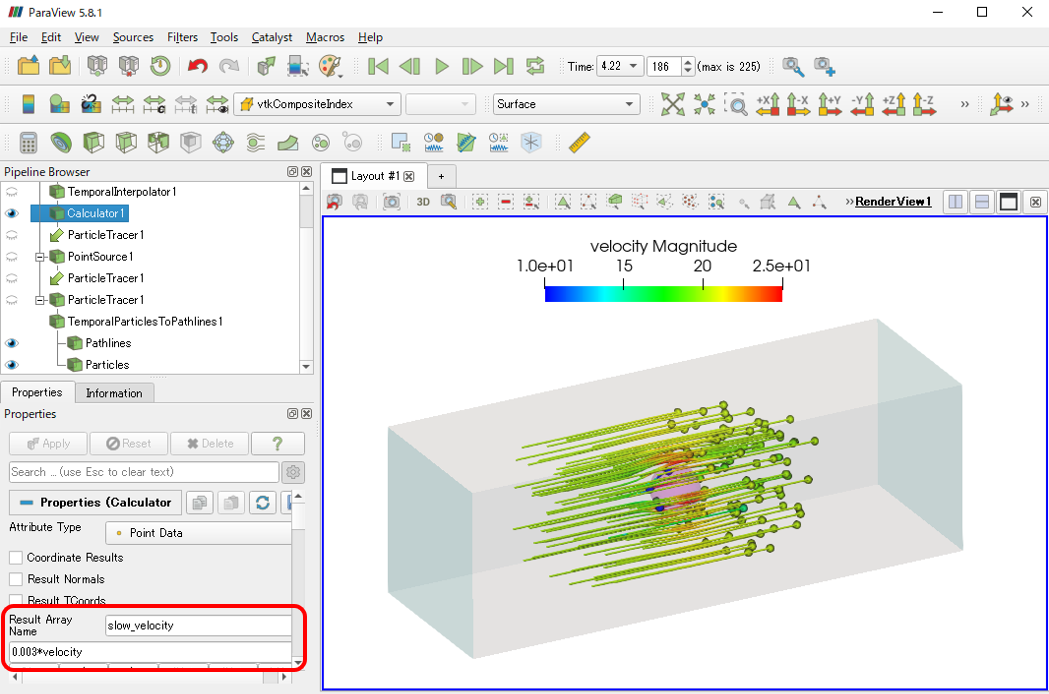
[slow\_down.pvsm](https://discourse.paraview.org/uploads/short-url/iEu0tFuX0ww5hDqYtQ7PpC84JMT.pvsm) (947.3 KB)
Hope that helps.
---
### Author:  [@Krys\_Bangert](https://discourse.paraview.org/u/Krys_Bangert)
#### Post date: [November 19, 2020, 7:34pm UTC](https://discourse.paraview.org/t/stream-tracer-movie/2115/19 "2020-11-19T19:34:18Z")
Dear Kyoshimi,
Thank you very much for this, I can now do repeated tracer injections which is what I was after.
I just need to figure out how to get the seed points to spawn in a uniform grid and do the same for non-transient data now. 🙂
Krys
---
### Author:  [@CathyX](https://discourse.paraview.org/u/CathyX)
#### Post date: [March 29, 2025, 7:23am UTC](https://discourse.paraview.org/t/stream-tracer-movie/2115/20 "2025-03-29T07:23:22Z")
Hi, Mathieu,
This is exactly what I am searching for a long time. Rendering the particle tracer over time with fix start point.
But could you resurrect the google drive canExEx.e file again?
And how do you generate such file?
I got some sample dataset, which is temporal, contains both density and velocity.
[https://drive.google.com/drive/folders/19I-wl52BhlYHGmT6OnvPGvhwaH-0KFdE?usp=share\_link](https://drive.google.com/drive/folders/19I-wl52BhlYHGmT6OnvPGvhwaH-0KFdE?usp=share_link)
will my dataset be rendered as exactly your above video shows?
I tried to mimic your state file steps but always hit crash at certain steps. Is my dataset in the expected format? I am able to do normal renderings such as volume, glyph, and stream tracer but those are not what I am looking for though.
Now I don’t hit crash however it’s a blank view, I cannot set the particles point to velocity?
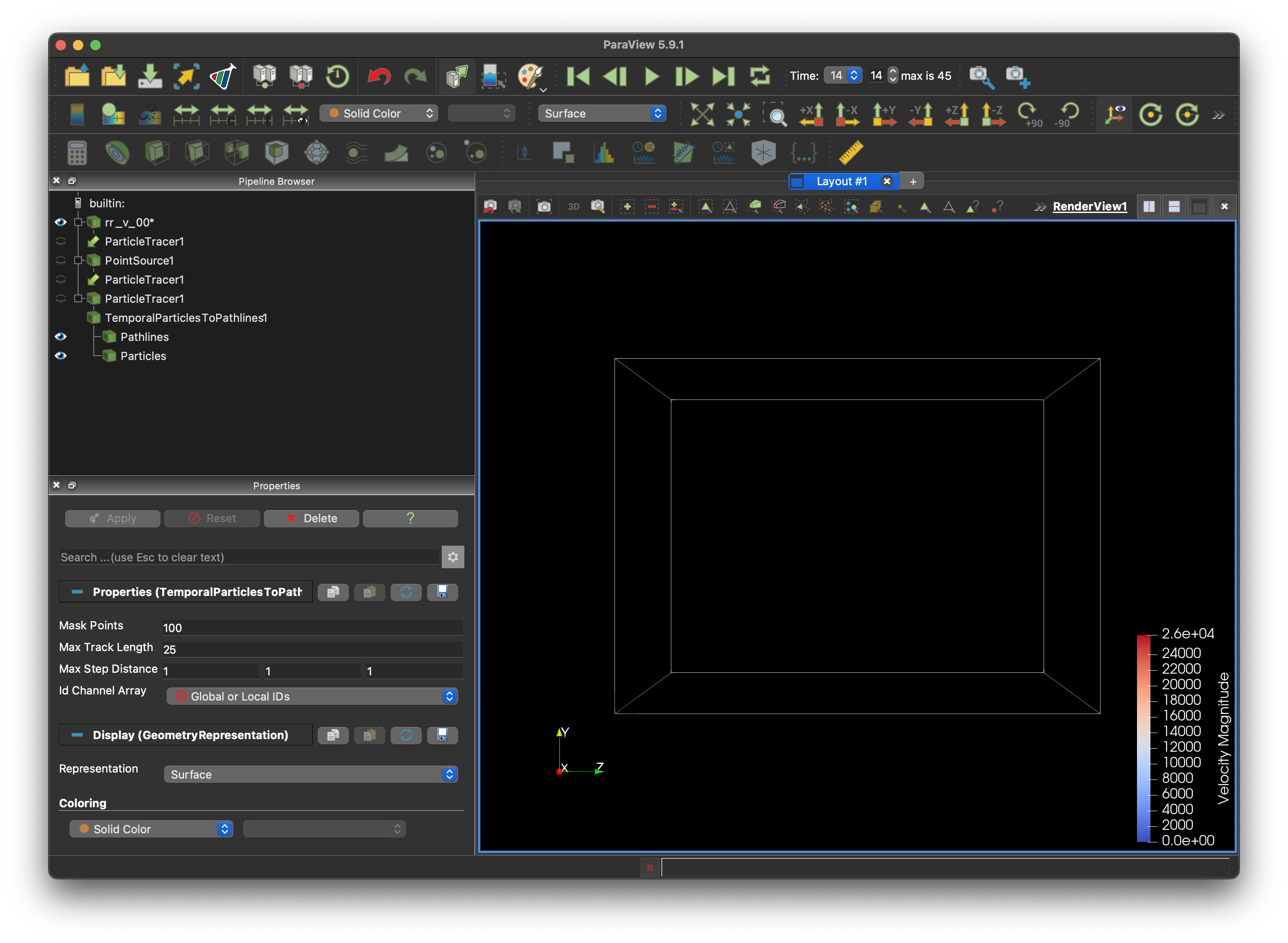
Tons of Thanks.
[Next page](https://discourse.paraview.org/t/stream-tracer-movie/2115.md?page=2)