# Streamline with Glyph in 3D animation
**URL:** https://discourse.paraview.org/t/streamline-with-glyph-in-3d-animation/2565
**Category:** In Situ Support
**Created:** [September 16, 2019, 7:55am UTC](https://discourse.paraview.org/t/streamline-with-glyph-in-3d-animation/2565 "2019-09-16T07:55:00Z")
**Posts on this page:** 10
**Page:** 1
### Author:  [@Alexlee](https://discourse.paraview.org/u/Alexlee)
#### Post date: [September 16, 2019, 7:55am UTC](https://discourse.paraview.org/t/streamline-with-glyph-in-3d-animation/2565/1 "2019-09-16T07:55:00Z")
Any one know how to create streamline with Gluyph animation in 3D from steady state OpenFoam run.
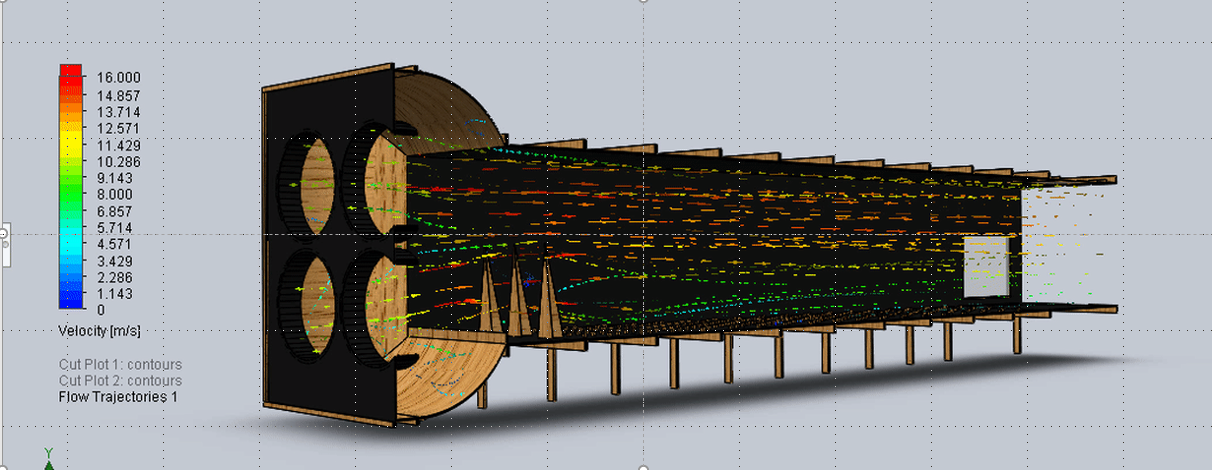
Regards
Alex Lee
---
### Author:  [@mwestphal](https://discourse.paraview.org/u/mwestphal)
#### Post date: [September 16, 2019, 7:56am UTC](https://discourse.paraview.org/t/streamline-with-glyph-in-3d-animation/2565/2 "2019-09-16T07:56:58Z")
1. Create the streamlines as you normally would.
2. Add a Contour filter to the streamline (third toolbar, second button from the left).
2.a. Change the Contour By property to IntegrationTime.
2.b. Press Apply.
This little trick will create a point on each streamline at a particular time in the particle advection simulation that created the streamlines.
3. Open the Animation View (View -\> Animation View)
3.a. On the bottom row, select the contour filter in the first chooser box and Isosurfaces in the second chooser box. Then hit the blue plus button at the left.
3.b. Make sure Mode is set to Sequence and change No. Frames to 100.
3.c. Hit the play button in the VCR controls (green triangle in the top toolbar). You will see the dots animate over the streamlines.
3.d. You can adjust the speed of the animation by changing the No. Frames.
4. If you want to see glyphs instead of dots, just add the glyph filter to the output of the contour filter.
from : [https://public.kitware.com/pipermail/paraview/2014-June/031333.html](https://public.kitware.com/pipermail/paraview/2014-June/031333.html)
---
### Author:  [@Krys\_Bangert](https://discourse.paraview.org/u/Krys_Bangert)
#### Post date: [October 22, 2020, 6:51pm UTC](https://discourse.paraview.org/t/streamline-with-glyph-in-3d-animation/2565/3 "2020-10-22T18:51:25Z")
Hello,
Is it possible using this method to export the 3D glyphs for each timestep? I’m trying to do this using the .PLY format, but I can only seem to get the first timestep repeated for each of all the timesteps (using the “Write Time Steps” option). Yet, if I export individual frames by manually moving to the correct frame in the “Animation View” it seems to work. This work around is rather cumbersome for doing larger studies though.
Any ideas?
---
### Author:  [@mwestphal](https://discourse.paraview.org/u/mwestphal)
#### Post date: [October 23, 2020, 7:45am UTC](https://discourse.paraview.org/t/streamline-with-glyph-in-3d-animation/2565/4 "2020-10-23T07:45:51Z")
How are you saving the data ? Which button ?
---
### Author:  [@Alexlee](https://discourse.paraview.org/u/Alexlee)
#### Post date: [October 23, 2020, 8:03am UTC](https://discourse.paraview.org/t/streamline-with-glyph-in-3d-animation/2565/5 "2020-10-23T08:03:21Z")
Thanks alot Mathieu!
---
### Author:  [@Krys\_Bangert](https://discourse.paraview.org/u/Krys_Bangert)
#### Post date: [October 23, 2020, 8:30am UTC](https://discourse.paraview.org/t/streamline-with-glyph-in-3d-animation/2565/6 "2020-10-23T08:30:54Z")
Whilst the “Glyph” is selected in the Pipeline Browser, I am going to “File” \> “Save Data” then using the PLY file format. In the “Configure Writer (PPLYWriter)” window, I have got “Write Time Steps” selected, “\_%.3d” as the suffix and “Enable Coloring” selected.
This just outputs the same PLY file for each timestep, different sequential names, but the same file size and content.
I hope that makes sense.
---
### Author:  [@mwestphal](https://discourse.paraview.org/u/mwestphal)
#### Post date: [October 23, 2020, 8:42am UTC](https://discourse.paraview.org/t/streamline-with-glyph-in-3d-animation/2565/7 "2020-10-23T08:42:33Z")
Which version of ParaView are you using ?
---
### Author:  [@Krys\_Bangert](https://discourse.paraview.org/u/Krys_Bangert)
#### Post date: [October 23, 2020, 8:45am UTC](https://discourse.paraview.org/t/streamline-with-glyph-in-3d-animation/2565/8 "2020-10-23T08:45:44Z")
5.8.1
---
### Author:  [@mwestphal](https://discourse.paraview.org/u/mwestphal)
#### Post date: [October 23, 2020, 8:57am UTC](https://discourse.paraview.org/t/streamline-with-glyph-in-3d-animation/2565/9 "2020-10-23T08:57:25Z")
Unable to reproduce.
Steps:
- unzip [can.zip](https://discourse.paraview.org/uploads/short-url/2rviMD9LcSkQahueB5s704hXqLc.zip) (3.9 MB)
- Open can\_\*.ply as a file series, Apply
- Check animation is working
- File -\> Save Data, Check Write time steps, Save
- close ParaView, open ParaView
- Open the new file\_\* as a file series, Apply
- Check animation is working
---
### Author:  [@Krys\_Bangert](https://discourse.paraview.org/u/Krys_Bangert)
#### Post date: [October 23, 2020, 9:16am UTC](https://discourse.paraview.org/t/streamline-with-glyph-in-3d-animation/2565/10 "2020-10-23T09:16:15Z")
I can confirm that your steps work correctly on my machine.
I am trying this method on the same dataset that I shared in this thread:
> [@Stream Tracer movie](https://discourse.paraview.org/t/strem-tracer-movie/2115/14):
>
> Then share your dataset slight_smile
Would you mind trying this method on that too?