# Streamlines or velocity field in particle simulation
**URL:** https://discourse.paraview.org/t/streamlines-or-velocity-field-in-particle-simulation/7435
**Category:** Development
**Created:** [June 17, 2021, 3:44pm UTC](https://discourse.paraview.org/t/streamlines-or-velocity-field-in-particle-simulation/7435 "2021-06-17T15:44:54Z")
**Posts on this page:** 14
**Page:** 1
### Author:  [@Carlos](https://discourse.paraview.org/u/Carlos)
#### Post date: [June 17, 2021, 3:44pm UTC](https://discourse.paraview.org/t/streamlines-or-velocity-field-in-particle-simulation/7435/1 "2021-06-17T15:44:54Z")
Dear users,
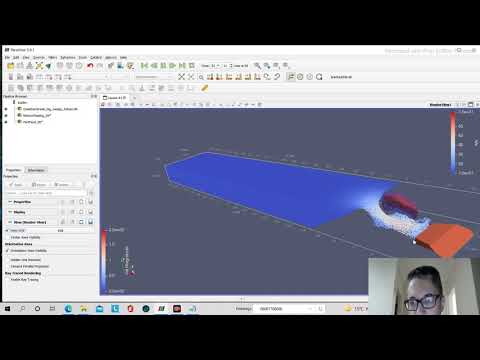
I’m trying to plot streamlines (or vector velocity fields) to detect vortices formation using results for particle simulation (from DualSPHysics software). I’m not having success using “stream tracer” in paraview. The “stream tracer” was located in the workspace but nothing is showing (the streamlines expected) along with the evolution of the particles. Could someone help me with the streamlines?
Regards
---
### Author:  [@mwestphal](https://discourse.paraview.org/u/mwestphal)
#### Post date: [June 17, 2021, 4:02pm UTC](https://discourse.paraview.org/t/streamlines-or-velocity-field-in-particle-simulation/7435/2 "2021-06-17T16:02:24Z")
Please share your data.
---
### Author:  [@Carlos](https://discourse.paraview.org/u/Carlos)
#### Post date: [June 17, 2021, 10:19pm UTC](https://discourse.paraview.org/t/streamlines-or-velocity-field-in-particle-simulation/7435/3 "2021-06-17T22:19:40Z")
Dear Westphal,
Following the file data
> **[File folder on MEGA](https://mega.nz/folder/0pUSXbAC#VB55bFWK5RM4If45mJh7mg)**
and the video to help you (you can build the 3 archives, as showed in the video; others archives only for your simulation understanding):
[ ](https://www.youtube.com/watch?v=vP7zoZV8vps)
Thanks in advance.
---
### Author:  [@mwestphal](https://discourse.paraview.org/u/mwestphal)
#### Post date: [June 18, 2021, 7:00am UTC](https://discourse.paraview.org/t/streamlines-or-velocity-field-in-particle-simulation/7435/4 "2021-06-18T07:00:06Z")
Use the “Temporal Particles to pathlines” filters.
---
### Author:  [@berkgeveci](https://discourse.paraview.org/u/berkgeveci)
#### Post date: [June 18, 2021, 2:15pm UTC](https://discourse.paraview.org/t/streamlines-or-velocity-field-in-particle-simulation/7435/5 "2021-06-18T14:15:56Z")
Please take a look at this blog for processing SPH data in ParaView:
> **[Point and Smoothed-Particle Hydrodynamics (SPH) Interpolation in ParaView -...](https://blog.kitware.com/point-and-smoothed-particle-hydrodynamics-sph-interpolation-in-paraview/)**
>
> (This is the second article in a two part series. It shows how to perform point interpolation using ParaView. The first article describes how to ... Read More
It is likely that you need to interpolate to a volume to do certain things like streamlines. Temporal Particle to Pathlines filter is aimed at connecting positions of particles/tracers over time (pathlines) and will not give you instantaneous streamlines.
---
### Author:  [@Shadman\_144](https://discourse.paraview.org/u/Shadman_144)
#### Post date: [September 17, 2021, 11:18pm UTC](https://discourse.paraview.org/t/streamlines-or-velocity-field-in-particle-simulation/7435/6 "2021-09-17T23:18:06Z")
Hi there,
I have also been facing the exact problem.
Was there any solution ultimately?
---
### Author:  [@Ondrej\_Kincl](https://discourse.paraview.org/u/Ondrej_Kincl)
#### Post date: [January 22, 2023, 1:13pm UTC](https://discourse.paraview.org/t/streamlines-or-velocity-field-in-particle-simulation/7435/7 "2023-01-22T13:13:55Z")
Disappointingly, it seems that streamline filter still does not work on SPH volume interpolator object. However, in Paraview 5.11, it is possible to use [SPH Volume Interpolation](https://www.kitware.com/point-and-smoothed-particle-hydrodynamics-sph-interpolation-in-paraview/) and then choose Surface LIC representation.
---
### Author:  [@berkgeveci](https://discourse.paraview.org/u/berkgeveci)
#### Post date: [January 30, 2023, 5:35pm UTC](https://discourse.paraview.org/t/streamlines-or-velocity-field-in-particle-simulation/7435/8 "2023-01-30T17:35:36Z")
Have you tried the SPH Volume Interpolator?
---
### Author:  [@Ondrej\_Kincl](https://discourse.paraview.org/u/Ondrej_Kincl)
#### Post date: [February 1, 2023, 9:07am UTC](https://discourse.paraview.org/t/streamlines-or-velocity-field-in-particle-simulation/7435/9 "2023-02-01T09:07:53Z")
I always use SPH Volume Interpolator. But the streamline filter on interpolator object yields empty or nonsensical results (see for example the file [ldcRe100 - Google Drive](https://drive.google.com/drive/folders/1q7277p41sfsbXWOrsGMxDC1o1gcsi9uL?usp=share_link)). Now, I found out it works for me in 3d. So perhaps it is a 2d specific issue.
---
### Author:  [@berkgeveci](https://discourse.paraview.org/u/berkgeveci)
#### Post date: [February 1, 2023, 4:22pm UTC](https://discourse.paraview.org/t/streamlines-or-velocity-field-in-particle-simulation/7435/10 "2023-02-01T16:22:06Z")
Ah I understand. This seems to be an issue with SPH Volume Interpolator. The vector field it generates does not match the original vector field. Maybe it was designed to work in 3D only. @Will_Schroeder may be able to shed some light on it.
---
### Author:  [@Will\_Schroeder](https://discourse.paraview.org/u/Will_Schroeder)
#### Post date: [February 1, 2023, 4:40pm UTC](https://discourse.paraview.org/t/streamlines-or-velocity-field-in-particle-simulation/7435/11 "2023-02-01T16:40:04Z")
As shown in the blog, the sph interpolator interpolates from an input 3D point cloud onto a line, plane, volume (or other dataset type). However, I suspect that if the input point cloud is 2D, the SPH interpolation process must be modified. There may also be issues with determining in/out of points in the underlying spatial locators. But given it’s been a while since I looked at this code, this is just a guess on my part.
---
### Author:  [@jfavre](https://discourse.paraview.org/u/jfavre)
#### Post date: [February 2, 2023, 8:16am UTC](https://discourse.paraview.org/t/streamlines-or-velocity-field-in-particle-simulation/7435/12 "2023-02-02T08:16:31Z")
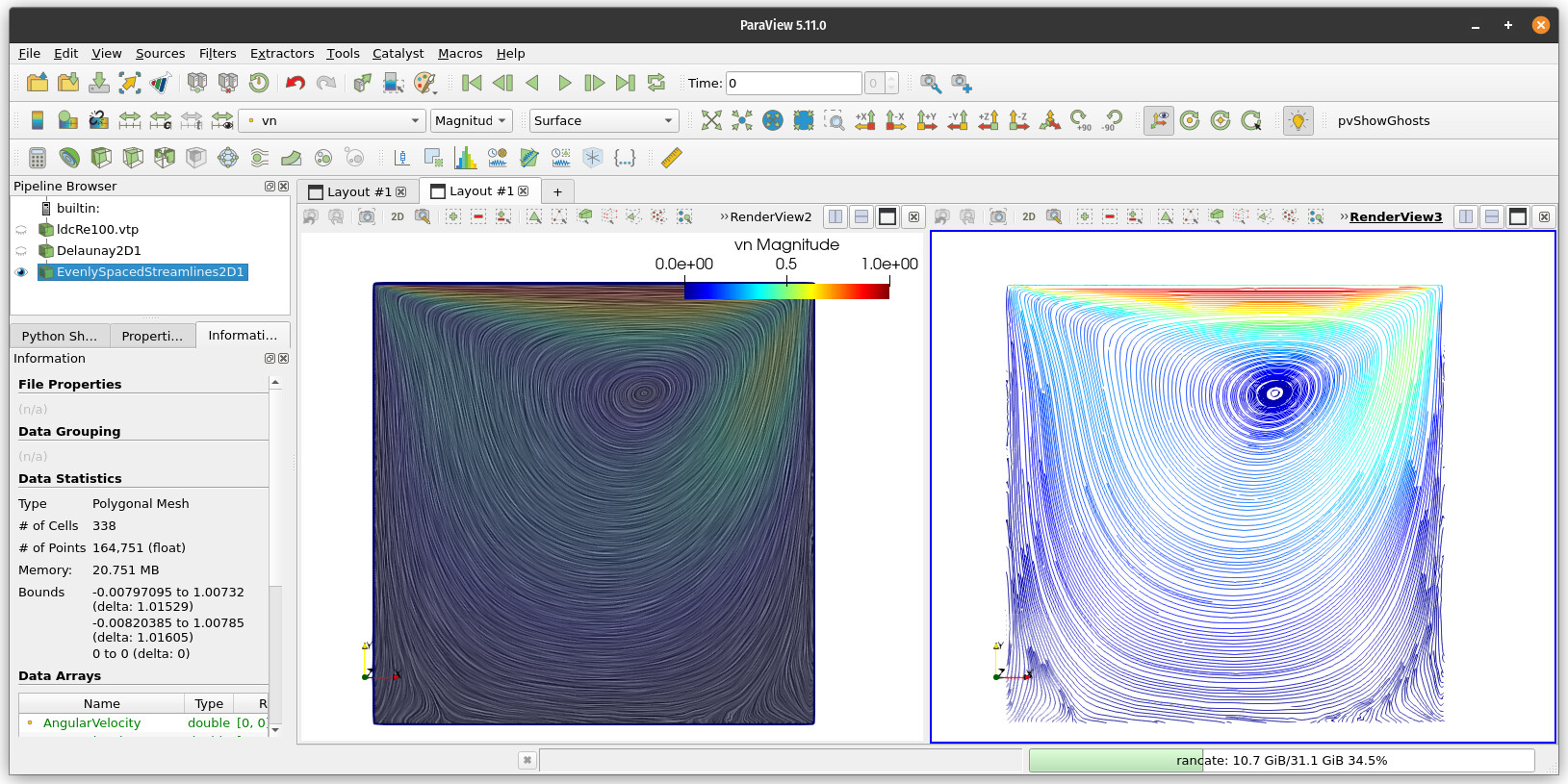
There is a nice solution to this 2D problem. Apply the Delaunay2D triangulation and a EvenlySpacedStreamlines2D filter to fill up the space with streamlines. Here is a screenshot and a Python script.
[cavityRe100.py](https://discourse.paraview.org/uploads/short-url/y2EucwDeE4Ir2N5hzqubwu5JiiT.py) (4.6 KB)
---
### Author:  [@Ondrej\_Kincl](https://discourse.paraview.org/u/Ondrej_Kincl)
#### Post date: [February 2, 2023, 9:35am UTC](https://discourse.paraview.org/t/streamlines-or-velocity-field-in-particle-simulation/7435/13 "2023-02-02T09:35:32Z")
Yes, using Delaunay2D instead of SPH Volume Interpolator is a good solution here. Thank you for finding this. I still hope that the interpolator issue gets corrected in future.
---
### Author:  [@berkgeveci](https://discourse.paraview.org/u/berkgeveci)
#### Post date: [February 2, 2023, 2:10pm UTC](https://discourse.paraview.org/t/streamlines-or-velocity-field-in-particle-simulation/7435/14 "2023-02-02T14:10:16Z")
Thanks Jean! You beat me to it 🙂 In terms of supporting 2D, I honestly don’t think that it will happen soon. I am not aware of this being a priority for anyone currently doing development. If there is anyone in the SPH community interested in revising the filter, we would be happy to assist.