# Summary and custom panels?
**URL:** https://discourse.paraview.org/t/summary-and-custom-panels/4420
**Category:** Development
**Created:** [May 26, 2020, 7:12pm UTC](https://discourse.paraview.org/t/summary-and-custom-panels/4420 "2020-05-26T19:12:34Z")
**Posts on this page:** 9
**Page:** 1
### Author:  [@kevins](https://discourse.paraview.org/u/kevins)
#### Post date: [May 26, 2020, 7:12pm UTC](https://discourse.paraview.org/t/summary-and-custom-panels/4420/1 "2020-05-26T19:12:34Z")
I am working on a customized version of paraview that simplifies the user experience. One of the things I found in the paraview wiki that looked interesting was the Summary Panel page, which was marked as obsolete.
Were Summary Panels abandoned or replaced with a better way of accomplishing the same thing?
Can entirely custom panels be written to interface with object properties? If so, are there any examples of that?
Thank you,
Kevin
---
### Author:  [@mwestphal](https://discourse.paraview.org/u/mwestphal)
#### Post date: [May 27, 2020, 1:30am UTC](https://discourse.paraview.org/t/summary-and-custom-panels/4420/2 "2020-05-27T01:30:36Z")
It depends on what you are trying to do. In a customized version of ParaView you have a complete liberty on how to present information to your users, you can develop your own custom dock widgets.
Can you give a little bit more details ?
---
### Author:  [@cory.quammen](https://discourse.paraview.org/u/cory.quammen)
#### Post date: [May 27, 2020, 1:50am UTC](https://discourse.paraview.org/t/summary-and-custom-panels/4420/3 "2020-05-27T01:50:09Z")
I believe Summary Panels have been replaced by splitting properties into default and “advanced” visibility. The default properties are a reduced number of properties that show only the most-often-used properties.
As Mathieu mentioned, it depends what you want to do. If you want to keep the convenience of ParaView setting up the widget/proxy links, then you can use the [`pqProxyWidget`](https://kitware.github.io/paraview-docs/nightly/cxx/classpqProxyWidget.html). It has a constructor that lets you pass in a list of names of properties you want to show. If you want more flexibility in presenting the property controls, you can explicitly instantiate a [`pqPropertyWidget`](https://kitware.github.io/paraview-docs/nightly/cxx/classpqPropertyWidget.html) subclass as needed and add it to the layout of a Qt widget. You can even create custom Qt widgets if you’d like for custom UI for manipulating proxies.
---
### Author:  [@kevins](https://discourse.paraview.org/u/kevins)
#### Post date: [May 27, 2020, 1:24pm UTC](https://discourse.paraview.org/t/summary-and-custom-panels/4420/4 "2020-05-27T13:24:09Z")
Thank you for the quick guidance.
I want to cull the buttons/inputs from the screen that are barely or never touched by our users. For example, on the property panel I want to hide inputs/buttons our users do not touch very often like the Copy, Paste, Restore, Save buttons on each of the main groups (Properties, Display, View). There are other things I would like to hide such as OSPRay Use Scale Array and maybe even hide the View section altogether. I believe I can do some of this just using the xml files by pushing properties into the “advanced” section. I like the style/layout of the obsoleted summary panels and it sounds like I could do that by instantiating the property widgets myself.
Kevin
---
### Author:  [@cory.quammen](https://discourse.paraview.org/u/cory.quammen)
#### Post date: [May 27, 2020, 4:39pm UTC](https://discourse.paraview.org/t/summary-and-custom-panels/4420/5 "2020-05-27T16:39:46Z")
Yep, creating custom proxies via XML would let you pick and choose which properties to show, but you’ll have to maintain a parallel set of readers/filters/representations/views, which isn’t impossible, but perhaps not as easy as feeding a list of properties you want to show to the `pqProxyWidget`.
You might be able to reuse the properties panel and them implement a behavior that removes the copy/paste/etc buttons you don’t want to show.
---
### Author:  [@Yoshino](https://discourse.paraview.org/u/Yoshino)
#### Post date: [May 28, 2020, 2:58am UTC](https://discourse.paraview.org/t/summary-and-custom-panels/4420/6 "2020-05-28T02:58:58Z")
> [@kevins](#):
>
> Copy, Paste, Restore, Save buttons on each of the main groups (Properties, Display, View)
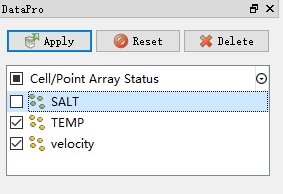
I did this by deleting these buttons from UI file, and then reprogrammed the ApplyBehavior, which isn’t an elegant way but it truly got clearer. It’s like:
---
### Author:  [@kevins](https://discourse.paraview.org/u/kevins)
#### Post date: [May 28, 2020, 9:53am UTC](https://discourse.paraview.org/t/summary-and-custom-panels/4420/7 "2020-05-28T09:53:53Z")
Oh, thanks for the tip! There are a few other places I’d like to eliminate buttons such as on the view layout. I wonder if this same general approach could be applied there as well.
---
### Author:  [@Yoshino](https://discourse.paraview.org/u/Yoshino)
#### Post date: [May 28, 2020, 10:09am UTC](https://discourse.paraview.org/t/summary-and-custom-panels/4420/8 "2020-05-28T10:09:14Z")
The three panels(properties, display, view) are actually **identical** except for the names(just take a look at paraview’s UI file), they’re less complicated when you set them separately. So all the buttons will be eliminated after you cull the buttons from _propertiesPanel_.
As for other proerpties such as Scale Array, Ray tracing, since they depends on the proxy, I think we have to control that by _pqProxyWidget_ or _pqPropertyWidget_ as @cory.quammen mentioned.
---
### Author:  [@Yoshino](https://discourse.paraview.org/u/Yoshino)
#### Post date: [May 31, 2020, 2:55am UTC](https://discourse.paraview.org/t/summary-and-custom-panels/4420/9 "2020-05-31T02:55:33Z")
Hi, I’d like to let you know that there is an general approach to simplify the UI components.
``
`
> **Summary**
>
> ovSimplifyUiBehavior::ovSimplifyUiBehavior(QMainWindow _w) : QObject(w)
> {
> pqPropertiesPanel_ ppanel = w-\>findChild\(“propertiesPanel”);
> ppanel-\>findChild\(“Help”)-\>hide();
> ppanel-\>findChild\(“PropertiesCopy”)-\>hide();
> ppanel-\>findChild\(“PropertiesPaste”)-\>hide();
> ppanel-\>findChild\(“PropertiesRestoreDefaults”)-\>hide();
> ppanel-\>findChild\(“PropertiesSaveAsDefaults”)-\>hide();
> }
` I implement my own \*Behavior\* and managed that by calling `hide()` functions, which, IMO, could easily be applied to any other paraview UI