# Surface aliasing (W/ and w/o filter FXAA on)
**URL:** https://discourse.paraview.org/t/surface-aliasing-w-and-w-o-filter-fxaa-on/10414
**Category:** ParaView Support
**Created:** [September 26, 2022, 1:06pm UTC](https://discourse.paraview.org/t/surface-aliasing-w-and-w-o-filter-fxaa-on/10414 "2022-09-26T13:06:10Z")
**Posts on this page:** 2
**Page:** 1
### Author:  [@gamma210](https://discourse.paraview.org/u/gamma210)
#### Post date: [September 26, 2022, 1:06pm UTC](https://discourse.paraview.org/t/surface-aliasing-w-and-w-o-filter-fxaa-on/10414/1 "2022-09-26T13:06:10Z")
Dear paraview user,
I have a problem when rendering my file as a surface. It seems that I have an aliasing problem even if the filter FXAA is on in the rendering option.
I can’t give the full file here but here an example of my problem it seems to happen on all faces except one. I am sorry if it isn’t detailed enough. I’ll try to add a dummy example later if the problem is not an obvious thing.
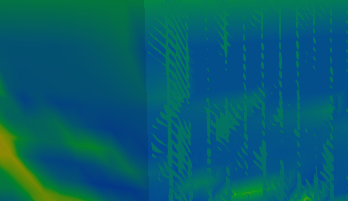
Any idea what could be the problem ?
could it be A graphic card problem ?
thanks,
Julien
---
### Author:  [@gamma210](https://discourse.paraview.org/u/gamma210)
#### Post date: [September 29, 2022, 6:25am UTC](https://discourse.paraview.org/t/surface-aliasing-w-and-w-o-filter-fxaa-on/10414/2 "2022-09-29T06:25:48Z")
Solved:
My data were badly sorted in my vtk file.
The increasing coordinates order of column 1 (x), then 2 (y), then 3 (z), was not respected causing trouble for reading to paraview.