# TableToStructureGrid works for 2D csv file but not for the 3D version
**URL:** https://discourse.paraview.org/t/tabletostructuregrid-works-for-2d-csv-file-but-not-for-the-3d-version/8751
**Category:** ParaView Support
**Created:** [January 10, 2022, 8:04am UTC](https://discourse.paraview.org/t/tabletostructuregrid-works-for-2d-csv-file-but-not-for-the-3d-version/8751 "2022-01-10T08:04:32Z")
**Posts on this page:** 2
**Page:** 1
### Author:  [@Akash](https://discourse.paraview.org/u/Akash)
#### Post date: [January 10, 2022, 8:04am UTC](https://discourse.paraview.org/t/tabletostructuregrid-works-for-2d-csv-file-but-not-for-the-3d-version/8751/1 "2022-01-10T08:04:33Z")
Hi all,
I have two csv files. One contains data for only one z plane and the other contains data for 41 z planes. I am using TableToStructureGrid Filter to get the domain from CSV file.
I also checked the number of rows. The first CSV file has 67312 rows while the other has 67312 \* 41 = 2759792 rows. I have also arranged the rows by ‘y’ and then ‘z’ for the 3D CSV file. Still, I am getting the following results:( Pics attached)
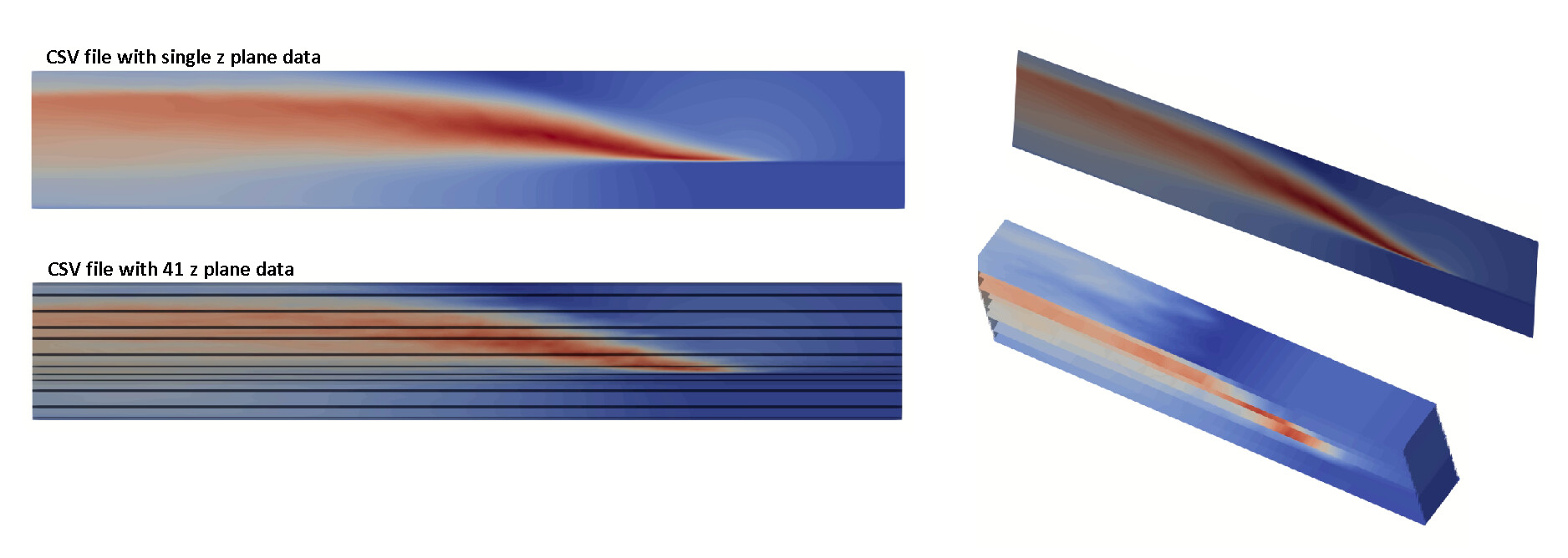
Could you please help me in figuring out why those horizontal black lines occur for the 3D csv files?
Thank you
---
### Author:  [@cory.quammen](https://discourse.paraview.org/u/cory.quammen)
#### Post date: [January 11, 2022, 3:34pm UTC](https://discourse.paraview.org/t/tabletostructuregrid-works-for-2d-csv-file-but-not-for-the-3d-version/8751/2 "2022-01-11T15:34:17Z")
What are the dimensions of your volume, and what is the Whole Extent you have set?